
Cooler Master TD500V2-WGNN-S00
Cooler Master MasterBox TD500 Mesh V2 User Manual
Model: TD500V2-WGNN-S00 | Brand: Cooler Master
Introduction
The Cooler Master MasterBox TD500 Mesh V2 is an E-ATX Mid-Tower PC Case designed for optimal airflow and versatile system building. It features a tessellated mesh front panel, three pre-installed 120mm ARGB fans, a removable top panel, a tempered glass side panel, and enhanced connectivity including USB Type-C 10Gbps. This manual provides essential information for setting up, operating, and maintaining your PC case.
Key Features
- 3 x 120MM ARGB FANS: Pre-installed fan lighting can be assigned via onboard controller or directly connected to an ARGB supported motherboard (ASUS, Gigabyte, MSI & ASRock); The front and top panel features Fine Mesh technology for optimal airflow.
- TEMPERED GLASS SIDE PANEL: A removable top panel and tempered-glass side panel provide easy access and showcase system build (tool-free design); The PSU shroud comes with a removable cover to showcase or hide the PSU.
- MULTIPLE COOLING OPTIONS: Comes with 3 x CF120 ARGB frontal fans; The front & top panels each support up to 3 x 120mm fans/2 x 140mm fans, or a 360mm radiator, the rear panel supports 1 x 120mm fan/radiator.
- MAXIMIZE THE POSSIBILITIES: The TD500 Mesh V2 interior accommodates E-ATX (up to 12” x 10.7”), ATX, micro-ATX and mini-ITX motherboards; CPU coolers up to 165mm in height; Graphics cards (GFX/GPU) up to 410mm in length; PSU up to 200mm in length.
- RICH CONNECTIVITY I/O PANEL: The I/O panel features 2 x USB 3.2 Gen 1 Type-A ports, 1 x USB 3.2 Gen 2 Type-C port, 1 x audio jack and 1 x Reset/ARGB button for fast data transmission and excellent connectivity.
What's in the Box
- Cooler Master MasterBox TD500 Mesh V2 PC Case
- Accessory Box (containing screws, zip ties, and other small parts)
- User Manual (this document)
Note: Additional components like power supply, motherboard, CPU, GPU, and storage drives are sold separately.
Setup Guide
1. Preparing the Case
Before installing components, ensure you have a clean, static-free workspace. The MasterBox TD500 Mesh V2 features a tool-free tempered glass side panel for easy access to the interior.

Image: Front-right view of the Cooler Master MasterBox TD500 Mesh V2, highlighting the tempered glass side panel.
To remove the tempered glass side panel, locate the screw at the top rear of the panel. After removing the screw, the panel can be lifted off easily. This design allows for convenient installation and maintenance of internal components.
2. Component Installation
The spacious interior of the TD500 Mesh V2 supports various motherboard sizes, including E-ATX, ATX, Micro-ATX, and Mini-ITX. Cable management is simplified with strategically placed grommets and ample space behind the motherboard tray.

Image: Interior view of the PC case, showcasing the cable routing grommets and mounting points for SSDs.
- Motherboard: Install your motherboard onto the standoffs.
- CPU Cooler: The case supports CPU coolers up to 165mm in height. For liquid cooling, radiators up to 360mm can be mounted at the front or top.
- Graphics Card (GPU): Graphics cards up to 410mm in length are supported.
- Power Supply (PSU): Install your PSU in the dedicated shroud at the bottom. The shroud has a removable cover for visibility or concealment.
- Storage Drives: Utilize the multiple mounting points for SSDs and the dedicated hard drive cage at the bottom.

Image: Rear interior view of the PC case, illustrating the PSU shroud and available drive bays.
3. Cable Management and ARGB Control
The case includes an ARGB controller for the pre-installed fans. This controller can be connected to your motherboard's ARGB header for software control, or you can use the dedicated button on the I/O panel for manual light effects.

Image: Backside view of the PC case, revealing the cable management area and the integrated ARGB controller.
Operating the Case
Once all components are installed and cables are connected, you can power on your system using the power button on the top I/O panel.
Front I/O Panel
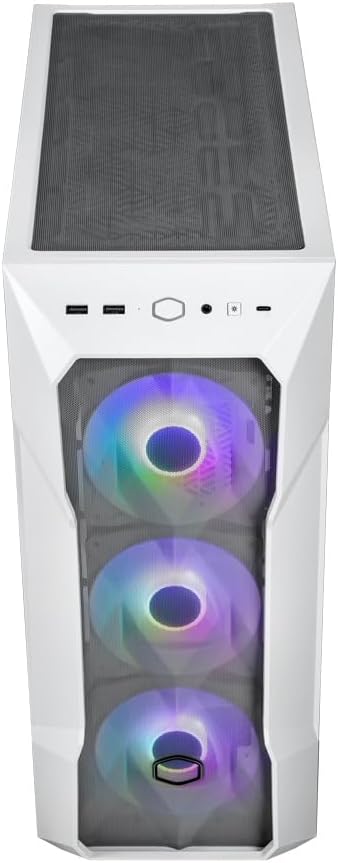
Image: Top-down view of the PC case, highlighting the front I/O panel with its various ports and buttons.
- Power Button: To turn the system on or off.
- Reset/ARGB Button: Functions as a reset button or to cycle through ARGB lighting modes if not connected to a motherboard header.
- USB 3.2 Gen 1 Type-A Ports (x2): For connecting USB devices.
- USB 3.2 Gen 2 Type-C Port (x1): For high-speed data transfer with compatible devices.
- Audio Jack (x1): For connecting headphones or a headset.
Maintenance
Regular maintenance ensures optimal performance and longevity of your PC components.
- Dust Filters: The MasterBox TD500 Mesh V2 includes removable dust filters on the top and bottom (for the PSU intake). Regularly clean these filters to maintain optimal airflow and prevent dust buildup inside the case.
- Interior Cleaning: Periodically open the side panel and use compressed air to remove dust from fans, heatsinks, and other components.
- Exterior Cleaning: Wipe the exterior surfaces with a soft, damp cloth. Avoid abrasive cleaners.
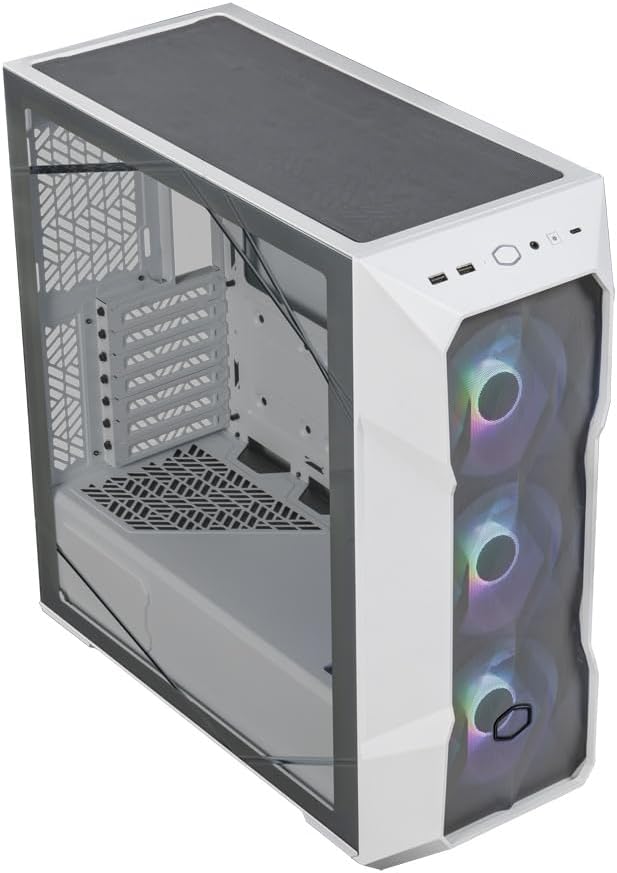
Image: Top-down perspective view of the PC case, showing the removable top dust filter.
Troubleshooting
If you encounter issues with your PC case, consider the following general troubleshooting steps:
- No Power: Ensure all power cables (PSU to wall, PSU to components) are securely connected. Check the power button connection to the motherboard.
- Fans Not Spinning/ARGB Not Working: Verify fan and ARGB connections to the motherboard or the included ARGB controller. Ensure the ARGB controller is powered.
- Poor Airflow/High Temperatures: Clean all dust filters and ensure fans are oriented correctly for optimal intake and exhaust. Check for any obstructions.
- USB/Audio Ports Not Working: Confirm that the front panel I/O cables are correctly connected to the motherboard headers.
For more detailed troubleshooting or specific component issues, refer to the manuals of your individual PC components or contact Cooler Master support.
Specifications
| Feature | Detail |
|---|---|
| Model Name | TD500 MESH V2 |
| Item Model Number | TD500V2-WGNN-S00 |
| Case Type | Mid Tower |
| Motherboard Compatibility | E-ATX (up to 12” x 10.7”), ATX, Micro-ATX, Mini-ITX |
| Color | TD500 Mesh V2 White |
| Material | Glass (Tempered Glass Side Panel) |
| Item Weight | 16.94 pounds |
| Product Dimensions (LxWxH) | 21.65 x 22.83 x 11.42 inches |
| Pre-installed Fans | 3 x 120mm ARGB Fans (Front) |
| Radiator Support (Front) | 120mm, 140mm, 240mm, 280mm, 360mm |
| Radiator Support (Top) | 120mm, 140mm, 240mm, 280mm, 360mm |
| Radiator Support (Rear) | 120mm |
| Max CPU Cooler Height | 165mm |
| Max GPU Length | 410mm |
| Max PSU Length | 200mm |
| Front I/O Ports | 2x USB 3.2 Gen 1 Type-A, 1x USB 3.2 Gen 2 Type-C, 1x Audio Jack, 1x Reset/ARGB Button |
Warranty and Support
For warranty information, technical support, or service inquiries, please visit the official Cooler Master website or contact their customer support directly. Keep your proof of purchase for warranty claims.
Official Cooler Master Website: www.coolermaster.com
Related documentsTD500V2-WGNN-S00


Ask a question about this manual
Ask about setup, troubleshooting, compatibility, parts, safety, or missing instructions. Manuals+ will review the question and use this page’s manual context to help answer it.