
1. Introduction
Thank you for choosing the OUILA Rechargeable LED Cabinet Light. This product is designed to provide convenient and efficient lighting for various indoor spaces such as cabinets, closets, kitchens, and hallways. Featuring a motion sensor, dimmable brightness, and easy installation, it enhances visibility and comfort.
Please read this manual thoroughly before installation and operation to ensure proper use and to maintain the product's longevity.

Image 1.1: OUILA LED Cabinet Light providing illumination in a kitchen setting.
2. Product Overview
Key Features:
- Motion Sensor: Automatically detects movement within 3 meters (10 feet) in dark conditions.
- 3 Operating Modes: Night Sensing Mode, Always ON Mode, Always OFF Mode.
- Stepless Dimming: Adjustable brightness from 10% to 100%.
- Rechargeable Battery: Built-in 2500 mAh lithium polymer battery with Type-C charging.
- Easy Installation: Integrated magnets for metal surfaces or included double-sided adhesive tape for other surfaces.
- Eye Protection: Provides stable, comfortable, and flicker-free illumination.
- Durable Design: High-quality aluminum alloy construction, anti-corrosion and anti-rust.
Package Contents:
- OUILA LED Cabinet Light (Model GLS-C018)
- USB Type-C Charging Cable
- Double-sided Adhesive Tape
- Metal Plates (for magnetic mounting on non-metallic surfaces)
- User Manual
3. Specifications
| Parameter | Value |
|---|---|
| Model Number | GLS-C018 |
| Dimensions (L x W x H) | 41 x 4 x 0.9 cm (16.1 x 1.6 x 0.35 inches) |
| Weight | 250 g (0.55 lbs) |
| Material | Aluminum |
| Color Temperature | 6000K (Cool White) |
| Luminous Flux | 300 Lumens |
| Power | 5 Watts |
| Battery Capacity | 2500 mAh Lithium Metal |
| Charging Port | USB Type-C |
| Charging Input | DC 5V-1A |
| Charging Time | 3-4 hours |
| Usage Time (Full Charge) | 4-80 hours (depending on mode and brightness) |
| LED Lifespan | Up to 80,000 hours |
| Motion Sensor Range | Up to 3 meters (10 feet) |
| Motion Sensor Angle | 100 degrees |
4. Safety Instructions
- Do not disassemble, repair, or modify the product. This may cause damage, electric shock, or fire.
- Keep the product away from water and high humidity environments to prevent damage to electronic components.
- Avoid exposing the product to direct sunlight or high temperatures for extended periods.
- Use only the provided USB Type-C cable and a compatible 5V-1A adapter for charging.
- Do not look directly into the LED light for prolonged periods, as it may cause eye strain.
- Keep out of reach of children.
5. Setup and Installation
The OUILA LED Cabinet Light offers two primary installation methods:
Method 1: Magnetic Adsorption (for metallic surfaces)
- Ensure the metallic surface is clean and dry.
- Simply place the back of the LED light directly onto the metallic surface. The built-in magnets will securely hold it in place.
Method 2: Adhesive Tape (for non-metallic surfaces)
- Clean and dry the desired installation surface thoroughly.
- Peel off the protective film from one side of the provided double-sided adhesive tape.
- Attach the adhesive tape to the metal plates (if using on non-metallic surfaces) or directly to the back of the light if the surface is suitable.
- Peel off the protective film from the other side of the adhesive tape.
- Press the light firmly onto the desired surface for a few seconds to ensure a strong bond.
The light can be easily removed from its mounted position for charging or use as a portable light source.

Image 5.1: Illustration of the two installation methods: built-in magnet and double-sided tape.
6. Operating Instructions
6.1 Charging the Light
Before first use, fully charge the light. Connect the provided USB Type-C cable to the charging port on the light and the other end to a 5V-1A USB power source (e.g., USB charger, power bank, computer USB port).
- Charging Indicator: A red light indicates charging; a green light indicates a full charge.
- Charging Time: Approximately 3-4 hours for a full charge.
- Battery Life: A full charge provides 4 to 80 hours of use, depending on the selected mode and brightness level.
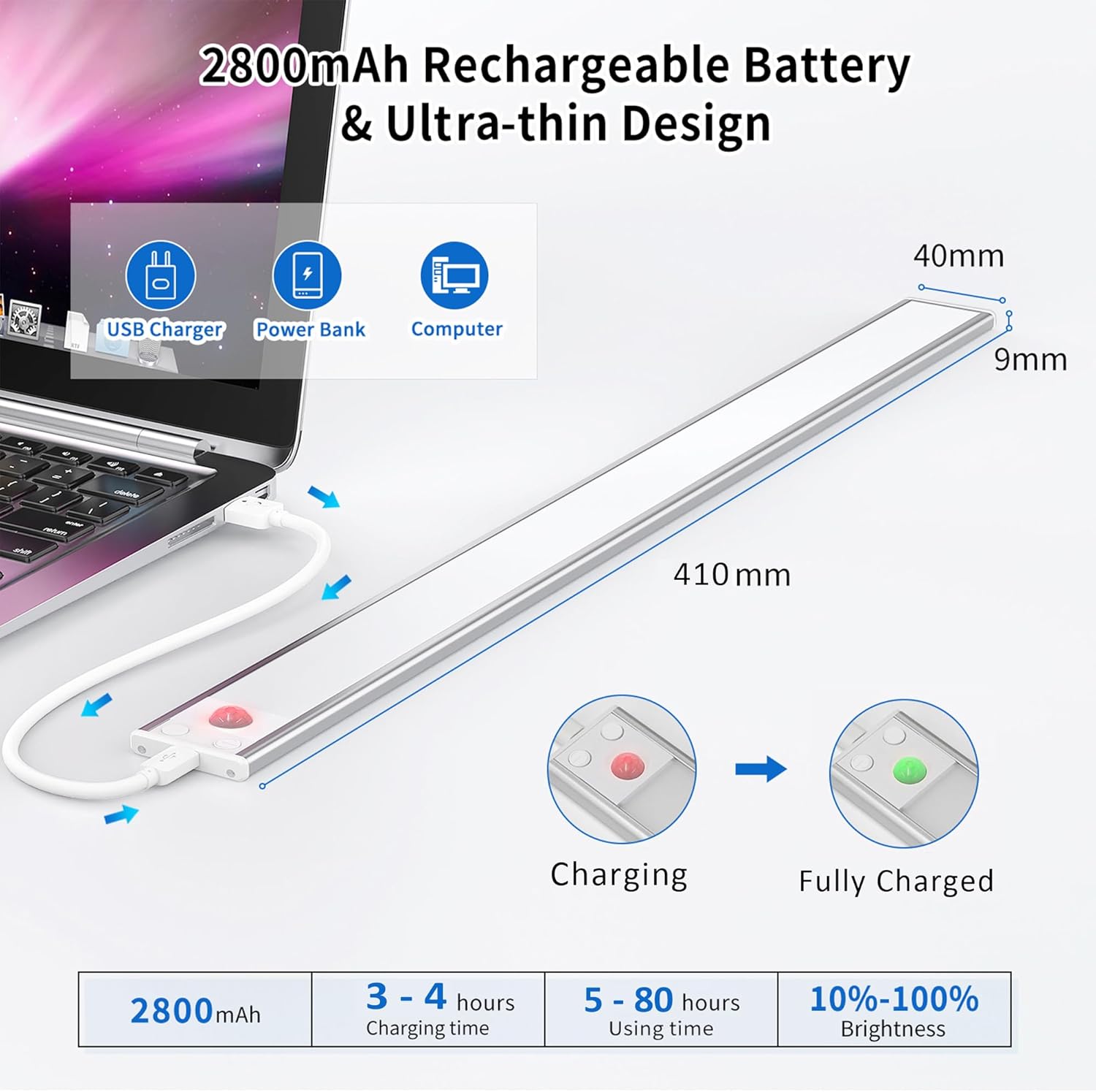
Image 6.1: Charging the OUILA LED Cabinet Light and battery indicators.
6.2 Operating Modes
The light features a control button to cycle through three modes:
- Always ON Mode: Press the button once. The light will remain continuously on, functioning as a standard light.
- Night Sensing Mode (Motion Sensor): Press the button a second time. The light will only activate when motion is detected in sufficiently dark conditions (ambient light below a certain threshold). It will turn off automatically after approximately 20 seconds if no further motion is detected, conserving energy.
- Always OFF Mode: Press the button a third time. The light will remain off.

Image 6.2: Overview of the three operating modes.
6.3 Brightness Adjustment (Stepless Dimming)
When the light is on (in either Always ON or Night Sensing Mode), press and hold the control button to adjust the brightness. The brightness will cycle smoothly between 10% and 100%. Release the button when the desired brightness level is reached.

Image 6.3: Mode selection and stepless brightness adjustment.
7. Maintenance
- Cleaning: Wipe the light gently with a soft, dry cloth. Do not use abrasive cleaners or solvents.
- Battery Care: To prolong battery life, avoid completely draining the battery frequently. Recharge the light when the brightness noticeably diminishes. If storing for a long period, charge the battery to about 50% every 3-6 months.
- Storage: Store the light in a cool, dry place away from direct sunlight and extreme temperatures.
8. Troubleshooting
| Problem | Possible Cause | Solution |
|---|---|---|
| Light does not turn on. | Battery is depleted. Incorrect mode selected. | Charge the light. Cycle through modes to ensure it's not in 'Always OFF' mode. |
| Motion sensor not working. | Not in Night Sensing Mode. Ambient light is too bright. Obstruction in sensor path. | Ensure the light is in Night Sensing Mode. Test in a darker environment. Clear any objects blocking the sensor. |
| Light flickers or is dim. | Low battery. | Recharge the light fully. |
| Light falls off surface. | Improper installation. Surface not clean. | Re-install, ensuring surface is clean and dry. Apply firm pressure for adhesive tape. |
9. Warranty and Support
OUILA products are manufactured with high-quality standards. For warranty information or technical support, please refer to the contact details provided with your purchase or visit the official OUILA website. Please retain your proof of purchase for warranty claims.
10. Additional Information
Eye Protection Feature:
The OUILA LED Cabinet Light is designed to provide a soft, flicker-free light source, reducing eye strain compared to traditional cabinet lights. This ensures a more comfortable visual experience.

Image 10.1: Comparison highlighting the eye protection features of the OUILA light.
Versatile Applications:
This light is suitable for a wide range of indoor applications, including but not limited to:
- Kitchen cabinets and under-counter lighting
- Closets and wardrobes
- Stairwells and hallways
- Workshops and garages
- Bookcases and display shelves
- Bedside lighting

Image 10.2: Examples of the OUILA LED light in various application scenarios.