1. Introduction
Thank you for choosing the Votatu M9L-G 1600 Lumens Light Laser Combo. This device integrates a high-performance LED flashlight with a powerful green laser sight, designed for enhanced visibility and aiming. This manual provides essential information for the safe and effective use, installation, and maintenance of your M9L-G unit.

Image 1.1: Votatu M9L-G Light Laser Combo mounted on a rifle rail, showcasing its compact design and integrated light and laser.
2. Safety Information
Please read and understand all safety warnings before operating this product. Failure to follow these instructions may result in serious injury or property damage.
- Laser Radiation: This product emits Class IIIA laser radiation. Avoid direct eye exposure. Do not stare into the beam or view directly with optical instruments.
- Eye Protection: Always wear appropriate eye protection when operating or adjusting the laser.
- Children: Keep this device out of reach of children.
- Proper Use: Use this product only as intended. Do not attempt to modify or disassemble the unit.
- Heat: The LED light can generate heat during prolonged use. Avoid touching the light head immediately after operation.
3. Package Contents
Verify that all items are present in your package:
- Votatu M9L-G Light Laser Combo Unit
- Magnetic USB Charging Cable
- M-Lok Mounting Screws (2)
- M-Lok T-Nuts (2)
- Hex Keys (2)
- User Manual

Image 3.1: The Votatu M9L-G package contents, showing the main unit, magnetic charging cable, mounting screws, T-nuts, hex keys, and user manual.
4. Product Overview and Features
The Votatu M9L-G is a robust and versatile accessory designed for M-Lok rail systems. It combines a powerful LED light and a precise green laser sight.

Image 4.1: Labeled diagram illustrating the key components of the M9L-G unit.
Key Features:
- High Performance: Combines a 1600 lumens LED light and a powerful Class IIIA green laser sight (Laser Power Output ≤5mw).
- M-Lok Mounting System: Ergonomic design compatible with M-Lok rail surfaces, requiring no additional rail adapters.
- Durable Construction: Precision machined from lightweight, high-strength aircraft aluminum with a Mil-Spec hard-anodized finish. Water-resistant and shockproof.
- Magnetic Charging: Built-in magnetic USB rechargeable feature for easy and safe charging without removal.
- Ambidextrous Control: Features an ambidextrous momentary- and constant-on switch.
- Strobe Function: Includes a strobe feature for the 1600 Lumen LED Light and 520nm Wavelength Green Laser.
5. Setup and Installation
The M9L-G is designed for direct attachment to M-Lok rail systems.
M-Lok Rail Installation:
- Align the M-Lok T-nuts with the desired M-Lok slots on your rail. The M9L-G typically occupies 3 slots.
- Insert the mounting screws through the M9L-G unit and into the T-nuts.
- Using the provided hex key, tighten the screws. Ensure the T-nuts rotate and lock securely against the inside of the M-Lok rail. Do not overtighten.
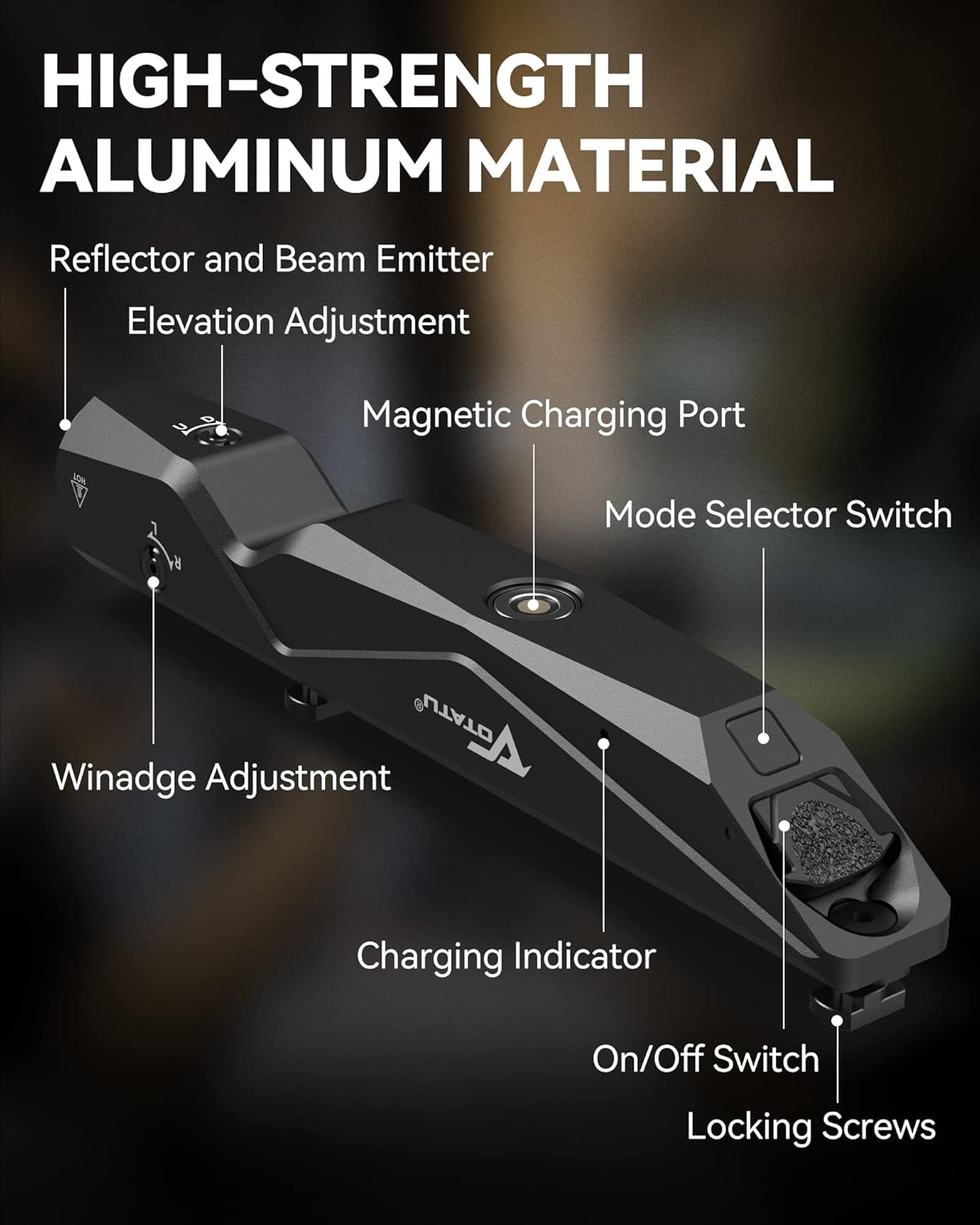
Image 5.1: Step-by-step guide for installing the M9L-G on an M-Lok rail.

Image 5.2: The M9L-G is compatible with all M-Lok rail surfaces.
6. Operating Instructions
Power On/Off and Mode Selection:
- On/Off Switch: Located at the rear of the unit. Press to activate.
- Mode Selector Switch: Use the ambidextrous switch to cycle through different modes: Light only, Laser only, Light + Laser, and Strobe.
- Momentary-On: Lightly press and hold the switch for momentary activation. Release to turn off.
- Constant-On: Fully press and click the switch for constant activation. Press again to turn off.
- Strobe Function: Activate the strobe mode via the mode selector switch.

Image 6.1: The tactical textured switch allows for ambidextrous momentary-on and constant-on operation.
Laser Adjustment (Zeroing):
The M9L-G features adjustable windage and elevation for precise laser zeroing.
- Windage Adjustment: Use a small hex key (or appropriate tool) to turn the windage adjustment screw (labeled 'L' and 'R' for Left and Right) to move the laser horizontally.
- Elevation Adjustment: Use a small hex key (or appropriate tool) to turn the elevation adjustment screw (labeled 'U' and 'D' for Up and Down) to move the laser vertically.
- Perform adjustments incrementally and test the laser's point of impact at your desired range until it aligns with your point of aim.
7. Charging
The M9L-G features a convenient magnetic USB charging system.
- Connect Charger: Attach the magnetic end of the supplied USB charging cable to the magnetic charging port on the M9L-G unit.
- Power Source: Connect the USB-A end of the cable to any standard USB power source (e.g., wall adapter, power bank, car charger, laptop).
- Charging Indicator: The charging indicator light will illuminate during charging and change color or turn off when fully charged.
- Charging Time: Approximately 2 hours for a full charge.
- Battery Life: Provides approximately 1 hour of continuous operation on a full charge.

Image 7.1: Easy magnetic charging without removing the unit, compatible with various USB power sources.
8. Maintenance
Regular maintenance ensures optimal performance and longevity of your M9L-G unit.
- Cleaning: Use a soft, dry cloth to wipe down the exterior of the unit. For lenses, use a lens cleaning cloth and solution designed for optics. Do not use abrasive cleaners or solvents.
- Storage: Store the unit in a cool, dry place away from direct sunlight and extreme temperatures. Ensure the unit is turned off before storage.
- Battery Care: For long-term storage, it is recommended to charge the battery to approximately 50% every few months to maintain battery health.
- Inspection: Periodically check mounting screws for tightness and ensure all components are secure.
9. Troubleshooting
If you encounter issues with your M9L-G, refer to the following common problems and solutions:
| Problem | Possible Cause | Solution |
|---|---|---|
| Unit does not turn on. | Battery is depleted. | Charge the unit using the magnetic USB cable. |
| Light or laser is dim. | Low battery. | Recharge the unit. |
| Laser does not hold zero. | Mounting screws are loose. | Check and tighten the M-Lok mounting screws. |
| Magnetic charging not working. | Cable not properly connected or damaged. | Ensure the magnetic connector is clean and fully seated. Try a different USB power source or cable. |
10. Specifications
| Feature | Detail |
|---|---|
| Model Number | M9L-G |
| Light Output | 1600 Lumens |
| Laser Type | Class IIIA Green Laser (520nm Wavelength) |
| Laser Power Output | ≤5mw |
| Laser Max Reach | 200 meters (day), up to 2000 meters (night) |
| Mounting System | M-Lok Rail Surface |
| Material | High-strength Aircraft Aluminum |
| Finish | Mil-Spec Hard-Anodized |
| Charging | Magnetic USB Rechargeable |
| Charging Time | Approx. 2 hours |
| Max Run Time | Approx. 1 hour |
| Dimensions | 15.24 x 2.18 x 2.18 cm (6 x 0.86 x 0.86 inches) |
| Weight | 231 g |
| Water Resistance | Yes |
| Shockproof | Yes |
11. Warranty and Support
Specific warranty details are not provided within the product information. For warranty inquiries, technical support, or further assistance, please contact VOTATU customer service directly or visit the official VOTATU brand store.
VOTATU Brand Store: https://www.amazon.ca/stores/VOTATU/page/FFD71CF9-F8A2-4BC3-A441-09CFD946B828


