
Fanmusic Space
Fanmusic TANCHJIM Space Portable DAC Headphone Amplifier User Manual
Model: TANCHJIM Space
Introduction
The Fanmusic TANCHJIM Space is a portable Digital-to-Analog Converter (DAC) and headphone amplifier designed to enhance audio quality from various devices. It features dual CS43131 decoding chips, supports high-resolution audio up to DSD256 and 32Bit/768kHz, and offers both 3.5mm single-ended and 4.4mm balanced outputs. This manual provides essential information for setting up, operating, and maintaining your TANCHJIM Space.

Image: The TANCHJIM Space portable DAC/AMP, showcasing its compact design.
Key Features
- Exquisite Design: Features an aviation-grade aluminum alloy CNC housing with a transparent window, allowing visibility of internal components. Volume control is managed via a dedicated button.
- Versatile Compatibility: Equipped with both 3.5mm single-ended and 4.4mm balanced outputs for powerful performance. High/low gain settings accommodate various portable headphones.
- Interchangeable Type-C Cable: Supports mainstream devices with a Type-C interchangeable design. High-performance decoding is possible across Android, iOS, and PC platforms by using appropriate OTG cables.
- Dual-Path Decoding Architecture: Utilizes dual CS43131 decoding chips, operating independently for left and right channels, supporting fully balanced four-channel decoding. This design minimizes channel interference for purer sound.
- High-Quality OTG Cable: The standard OTG cable features two strands of single crystal copper silver-plated material. Digital signal and power supply cables are independently shielded, enhancing anti-interference capabilities for accurate and efficient transmission.
- Large Dynamic Range: Offers a dynamic range of 127dB for single-ended output and 132dB for balanced output, ensuring excellent audio performance.
- Low Distortion, High SINAD: Achieves a Total Harmonic Distortion (THD) as low as 0.00017% and a Signal-to-Noise and Distortion (SINAD) of 117dB*, providing benchmark-level measurements and superior restored performance.

Image: Exploded view illustrating the internal components and transparent window design.

Image: The TANCHJIM Space DAC connected to its high-quality Type-C OTG cable.

Image: Detailed view of the dual CS43131 decoding chips, central to the device's audio processing.

Image: Chart illustrating the dynamic range performance for both channels.

Image: Graphs displaying the SINAD and FFT Spectrum measurements, indicating low distortion.
Setup
1. Connecting to Your Device
- Identify the Type-C input port on your TANCHJIM Space.
- Connect the provided Type-C OTG cable to the TANCHJIM Space.
- Connect the other end of the OTG cable to your source device (Android phone, iOS device with appropriate adapter, or PC). Ensure the connection is secure.
- Your device should automatically recognize the TANCHJIM Space as an audio output device. If not, check your device's audio settings.
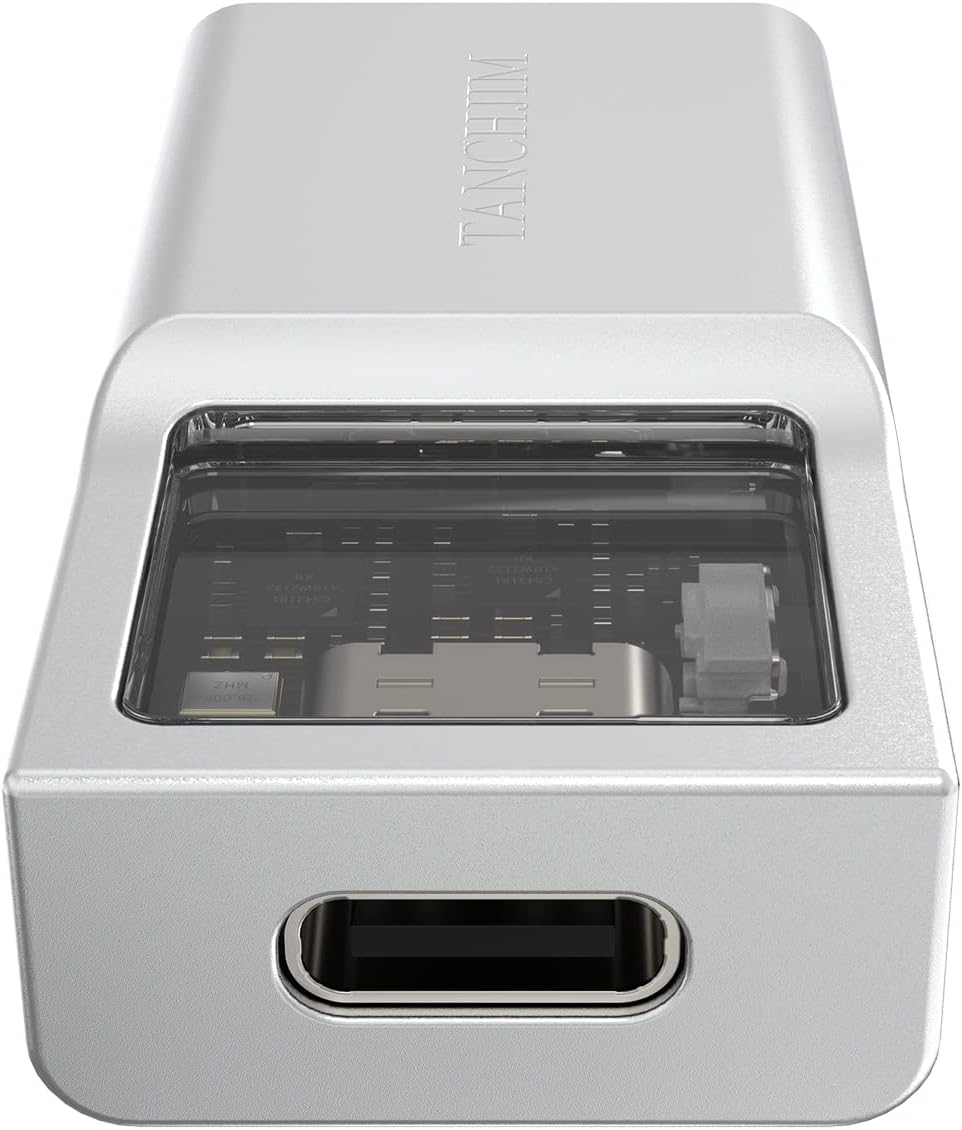
Image: Close-up of the USB Type-C input port on the TANCHJIM Space.
2. Connecting Headphones
- Locate the 3.5mm single-ended and 4.4mm balanced output ports on the TANCHJIM Space.
- Plug your headphones into the appropriate output port. For optimal performance with compatible headphones, use the 4.4mm balanced output.
- Ensure your headphones are fully inserted into the port.

Image: The 3.5mm single-ended and 4.4mm balanced output ports.
Operating Instructions
Volume Control
The TANCHJIM Space features a dedicated button for volume control. Press the button to adjust the audio output level. The device is designed with a non-linear volume control to optimize the experience for mainstream earphones, providing a more accurate volume level across its range.

Image: RMS Level graph demonstrating the non-linear volume control curve.
Gain Settings
The TANCHJIM Space includes high and low gain settings to effectively drive various types of portable headphones. Refer to the product's specifications or packaging for details on how to switch between gain modes, if applicable, or if it's automatically adjusted based on impedance.
Maintenance
- Cleaning: Use a soft, dry cloth to clean the exterior of the device. Avoid using harsh chemicals or abrasive materials.
- Storage: Store the TANCHJIM Space in a cool, dry place away from direct sunlight and extreme temperatures.
- Cable Care: Handle the Type-C cable with care. Avoid excessive bending or pulling, especially near the connectors, to prevent damage.
Troubleshooting
- No Sound Output:
- Ensure the TANCHJIM Space is securely connected to both the source device and headphones.
- Verify that the source device's volume is not muted or set too low.
- Check if the TANCHJIM Space is selected as the default audio output device in your operating system settings.
- Test with a different pair of headphones or a different source device to isolate the issue.
- Distorted Sound:
- Reduce the volume level on both the TANCHJIM Space and the source device.
- Ensure the audio file or streaming quality is not inherently low.
- Check for any loose connections.
- Device Not Recognized:
- Try disconnecting and reconnecting the Type-C cable.
- Restart your source device (phone, tablet, PC).
- Ensure your source device's operating system is up to date.
- Test with a different Type-C cable if available.
- Intermittent Connection:
- Ensure the Type-C cable is fully inserted and not loose.
- Avoid putting strain on the cable or the device's ports during use.
- If the issue persists, the cable or port may be damaged. Consider replacing the cable.
Technical Specifications
| Feature | Specification |
|---|---|
| Brand | Fanmusic |
| Model | Space |
| DAC Chip | Dual CS43131 |
| Maximum Supply Voltage | 4 Volts (AC) |
| Number of Pins | 32 |
| Interface Type | USB Type-C Input |
| Output Ports | 3.5mm Single-ended, 4.4mm Balanced |
| Number of Channels | 2 |
| Material | Aluminum, Copper |
| Product Dimensions | 0.47 x 1.61 x 0.83 inches |
| Item Weight | 3.84 ounces |
| DSD Support | DSD256 |
| PCM Support | Up to 32Bit/768kHz |
| Dynamic Range (Balanced) | 132dB |
| Dynamic Range (Single-ended) | 127dB |
| THD | 0.00017% |
| SINAD | 117dB |
Note: Specifications are subject to change without prior notice.
Warranty and Support
For warranty information, technical support, or service inquiries, please refer to the documentation included with your purchase or contact the authorized Fanmusic retailer or distributor. Keep your proof of purchase for warranty claims.
Related Documents - Space
 |
Fosi Audio DS1 Hi-Res USB-C DAC Headphone Amplifier User Manual Comprehensive user manual for the Fosi Audio DS1, a Hi-Res USB-C DAC headphone amplifier featuring dual ESS ES9038Q2M DAC chips, 32bit/768kHz PCM, DSD512 support, and 4.4mm/3.5mm outputs. Includes specifications, operation guides, and FAQs. |
 |
Topping E30 II DAC User Manual and Specifications Comprehensive user manual and technical specifications for the Topping E30 II HiFi DAC, detailing its features, operation, and performance for USB, Coaxial, and Optical inputs. |
 |
Fosi Audio DS2 User Manual: High-Resolution Headphone Amplifier Comprehensive user manual for the Fosi Audio DS2, a high-resolution headphone amplifier supporting 32bit/768kHz and DSD512. Learn about its features, specifications, operation, and troubleshooting. |
 |
TOPPING DX3 Pro+ Desktop DAC & Headphone Amplifier User Manual Comprehensive user manual for the TOPPING DX3 Pro+ desktop DAC and headphone amplifier. This guide details its features, specifications, operation, and settings, including USB, Optical, Coaxial, and Bluetooth inputs, supporting high-resolution audio up to 768kHz/32bit and DSD512. Learn how to use its various functions for an optimal audio experience. |
 |
S.M.S.L C100 MQA USB DAC - User Manual & Specifications Comprehensive user manual for the S.M.S.L C100 MQA USB DAC, detailing features, specifications, operation, safety, and warranty information. |
 |
Onkyo C-30 CD Player - ICON SERIES High-Fidelity Audio Discover the Onkyo C-30 CD Player from the ICON SERIES. Featuring VLSC, a high-precision clock, premium DAC, and a vibration-resistant aluminum chassis for pure, distortion-free sound. |
Ask a question about this manual
Ask about setup, troubleshooting, compatibility, parts, safety, or missing instructions. Manuals+ will review the question and use this page’s manual context to help answer it.