
1. Introduction
This manual provides instructions for the installation, operation, and maintenance of your TAFFIO 12.3" Touchscreen Android GPS Navigation and Carplay System. Please read this manual thoroughly before installation and use to ensure proper function and to prevent damage. Keep this manual for future reference.
Safety Information: Always ensure the vehicle is parked safely before operating the system. Do not attempt to install or service the unit if you are not qualified. Disconnect the vehicle's battery before installation to prevent electrical damage.
2. Compatibility
This system is designed for specific BMW models equipped with the Original NBT System and Audio AUX IN. Verify your vehicle's original system interface matches the compatible type shown below.
- Compatible with: BMW 3 Series F30/F31/F34/F35 with Original NBT System and Audio AUX IN
- Compatible with: BMW 4 Series F32/F33/F36 with Original NBT System and Audio AUX IN
- Compatible with: BMW M3 / M4 F80 F82 F83 F84 with Original NBT System and Audio AUX IN

Image: This image illustrates the compatibility check. The top image shows the NBT EVO ID 4 interface, which is compatible (indicated by a green checkmark). The bottom images show EVO ID 5/6 interfaces, which are not compatible (indicated by red crosses). Ensure your vehicle's original menu structure matches the compatible NBT EVO ID 4.
3. Product Features
The TAFFIO Android Multimedia System offers a range of advanced features to enhance your driving experience:
- Operating System: Android 12 with Qualcomm Snapdragon 662 Kryo 260 8-core CPU (4x ARM Cortex-A73 up to 2 GHz and 4x ARM Cortex-A53 up to 1.8 GHz).
- Memory: 4 GB RAM (LDDR4) & 64 GB Flash storage.
- Display: 12.3-inch capacitive multi-touch screen with FULL HD resolution.
- Connectivity: Integrated Wi-Fi, Bluetooth, 3G/4G LTE SIM card slot, USB ports.
- Smartphone Integration: Integrated Wireless CarPlay and Android Auto functionality without additional adapters.
- Navigation: 3D GPS navigation with worldwide map support and free lifetime updates.
- Audio: FM/AM tuner with RDS, Bluetooth A2DP for music streaming, custom EQ settings, 4x audio outputs, 1x AUX A/V input, 1x subwoofer output.
- Vehicle Integration: Supports original radio functions, i-Drive controller, steering wheel controls, and all vehicle displays/settings. Easy switching between original and Android systems.
- Additional Functions: Back-Zone Function (navigate in front, watch video in back), Auto-Memory, Day and night display function, Play Stores for Android apps, Rear camera connection with automatic switching.

Image: This image displays the Wireless CarPlay interface on the 12.3-inch screen, showing various iOS applications like Phone, Maps, Messages, and Music.
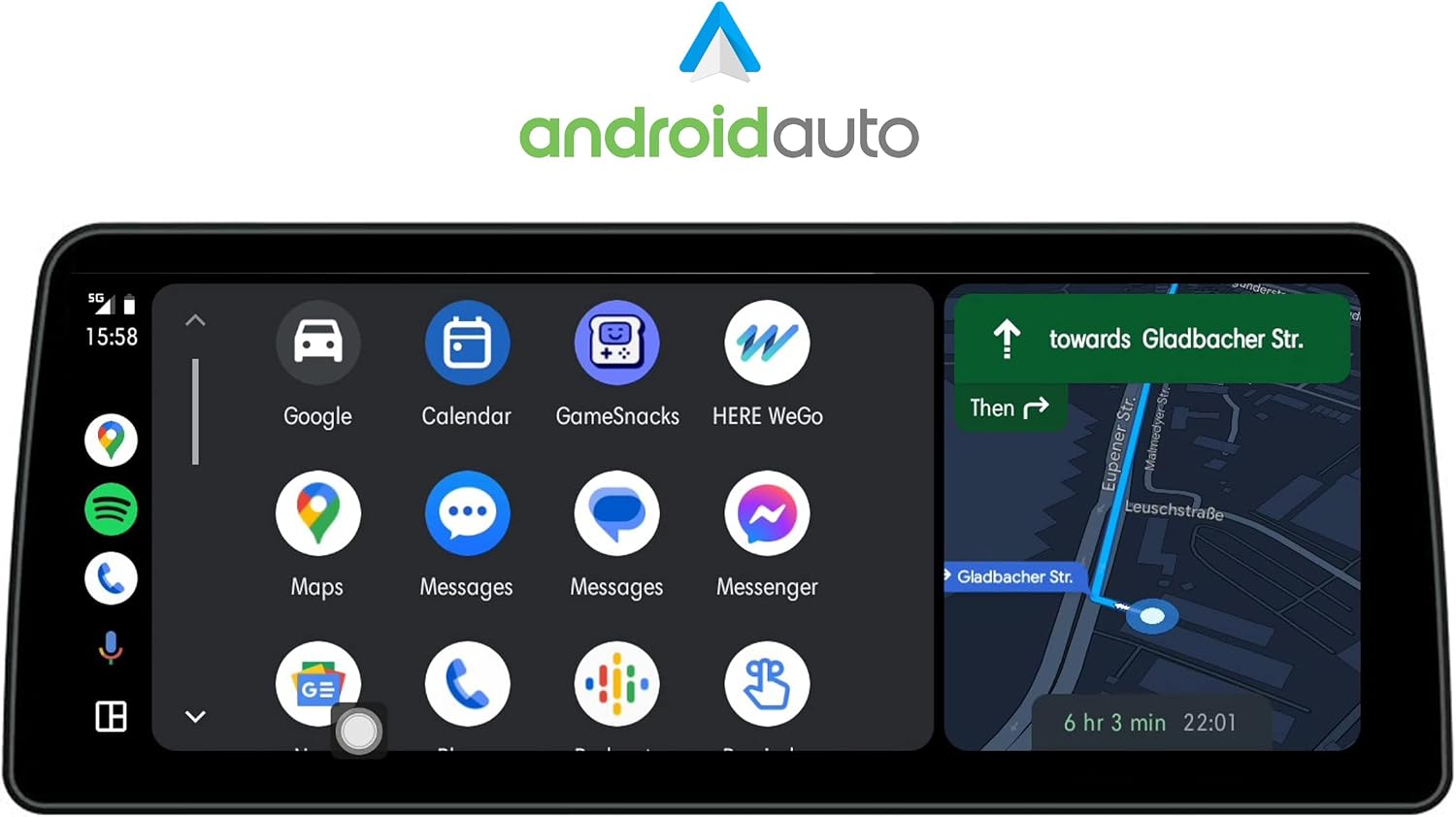
Image: This image shows the Android Auto interface, featuring Google Maps navigation, Google Assistant, and other Android applications.

Image: This image illustrates the main Android interface with widgets for navigation, weather updates, music playback, and car information, providing a comprehensive overview.

Image: This image shows the music playback interface, displaying track information and playback controls.
4. What's in the Box (Delivery Content)
Please check the contents of your package against the list below:
- 1x Android Multimedia System (Display + Frame)
- 1x Power Cable
- 1x RCA cable
- 1x USB cable (with 2x USB ports)
- 1x GPS Antenna
- 1x 4G Antenna
- 1x AUX cable
- 1x PDF installation manual
- 1x User Manual in English
- 1x Invoice with VAT

Image: This image displays the complete delivery content, including the main display unit, power cable, RCA plugs, USB cable, 4G antenna, AUX cable, and GPS antenna.
5. Setup and Installation
The TAFFIO system is designed for plug-and-play installation without requiring modifications, restrictions, or coding of the original vehicle system. A detailed PDF installation manual is included for comprehensive guidance.
Basic Connection Overview:
- Connect the original display plug (LVDS) to the designated port on the new unit.
- Connect the main power cable harness to the vehicle's wiring and the new unit.
- Connect the RCA cable for audio/video input/output.
- Connect the USB cable for external USB devices.
- Connect the 4G antenna for cellular data connectivity.
- Connect the GPS antenna for navigation functionality.
- Connect the AUX cable for audio output to the vehicle's AUX input.

Image: This image provides a visual guide to the connection points on the back of the multimedia system, indicating where each cable (Original Display Plug, Power Cable, RCA, USB, 4G Antenna, GPS Antenna) should be connected.
For detailed step-by-step instructions, refer to the included PDF installation manual.
6. Operating Instructions
System Navigation:
- User Interface: The system features an intuitive user interface with 3D graphics. Navigate using the capacitive multi-touch screen or the vehicle's original i-Drive controller.
- Switching Systems: Easily switch between the original BMW system and the Android system by pressing and holding a specific button (refer to the PDF manual for exact button mapping).
- Day/Night Mode: The display automatically adjusts brightness or can be manually set for day and night viewing.
Connectivity and Media:
- Bluetooth Handsfree: Pair your mobile phone via Bluetooth for hands-free calling. The system supports phonebook synchronization.
- Bluetooth A2DP: Stream music wirelessly from your smartphone (Android or iPhone) to the system.
- USB/SD Playback: Insert USB drives or SD cards into the designated slots to play music, view pictures, or watch videos.
- Radio: Use the integrated FM/AM tuner with RDS for radio reception.
- Wi-Fi: Connect to WLAN hotspots or your smartphone's hotspot for internet access and app downloads from the Play Store.
- CarPlay & Android Auto: Connect your iPhone or Android phone to activate Wireless CarPlay or Android Auto for seamless integration of smartphone apps.
Navigation:
- Access the pre-installed 3D GPS navigation system.
- Input destinations using the touchscreen or voice commands (if supported by the navigation app).
- The system supports worldwide maps and offers free lifetime updates.
Rear Camera Function:
- If a compatible rear camera is connected, the display will automatically switch to the camera view when the vehicle is put into reverse gear.
7. Maintenance
Screen Cleaning:
- Use a soft, lint-free cloth to gently wipe the screen.
- For stubborn smudges, slightly dampen the cloth with water or a screen-safe cleaning solution. Avoid harsh chemicals or abrasive materials.
Software Updates:
- Periodically check for system software updates through the Android settings menu or the manufacturer's website.
- Follow the provided instructions carefully when performing updates to avoid system corruption.
8. Troubleshooting
If you encounter issues, refer to the following common troubleshooting steps:
- No Power: Check all power cable connections. Ensure the vehicle's ignition is on. Verify the vehicle's fuse box for any blown fuses related to the multimedia system.
- No Sound: Check the AUX cable connection to the vehicle's AUX input. Ensure the vehicle's audio source is set to AUX. Verify volume levels on both the TAFFIO system and the vehicle's audio system.
- GPS Signal Loss: Ensure the GPS antenna is properly installed and has a clear view of the sky (e.g., mounted on the dashboard). Check antenna cable connections.
- Touchscreen Unresponsive: Restart the system. If the issue persists, perform a factory reset (note: this will erase all user data and settings).
- CarPlay/Android Auto Not Connecting: Ensure Bluetooth and Wi-Fi are enabled on both the system and your smartphone. Check for any software updates for your phone or the TAFFIO system.
- System Freezes/Slow Performance: Close unnecessary background applications. Clear system cache. If the issue persists, consider a factory reset.
For persistent issues not resolved by these steps, contact customer support.
9. Technical Specifications
| Feature | Specification |
|---|---|
| Brand | TAFFIO |
| Model Name | TAL6400-F30 |
| Operating System | Android 12 |
| Processor | Qualcomm Snapdragon 662 Kryo 260 8-core CPU |
| RAM | 4 GB (LDDR4) |
| Storage Capacity | 64 GB Flash |
| Screen Size | 12.3 Inches |
| Display Type | Capacitive Touchscreen |
| Connectivity Technology | Bluetooth, USB, Wi-Fi, 3G/4G LTE |
| Special Features | Touchscreen, Integrated CarPlay & Android Auto |
| Map Type | Worldwide (Central America, North America, South America) |
| Audio Output Mode | AUX |
| Mounting Type | Dashboard Mount |
| Compatible Devices | Android, iPhone |
| Manufacturer | Real Media GmbH & Co. KG - Germany |
10. Warranty and Support
Warranty: This product comes with a 2-year manufacturer's warranty. Please retain your invoice with VAT as proof of purchase for warranty claims.
Support: For technical assistance, troubleshooting beyond this manual, or warranty inquiries, please contact the manufacturer, Real Media GmbH & Co. KG - Germany, or your point of purchase. Refer to the contact information provided with your purchase documentation.