
T-SUNUS TS-S4205-4H-30-V2
T-SUNUS Solar Spot Lights Outdoor User Manual
Model: TS-S4205-4H-30-V2
Introduction
The T-SUNUS Solar Spot Lights are designed to provide efficient and eco-friendly outdoor illumination. These solar-powered landscape spotlights feature warm white light, IP65 waterproof rating, and automatic dusk-to-dawn operation. They are suitable for various outdoor applications such as gardens, yards, driveways, porches, and walkways.
This manual provides detailed instructions for the setup, operation, maintenance, and troubleshooting of your T-SUNUS Solar Spot Lights to ensure optimal performance and longevity.
Package Contents
Before beginning installation, please verify that all components are present in the package:
- 1 x Solar Panel with integrated stake
- 4 x LED Spotlights with ground stakes
- Connecting cables for spotlights
- Mounting screws and wall anchors (for wall installation)
- User Manual (this document)
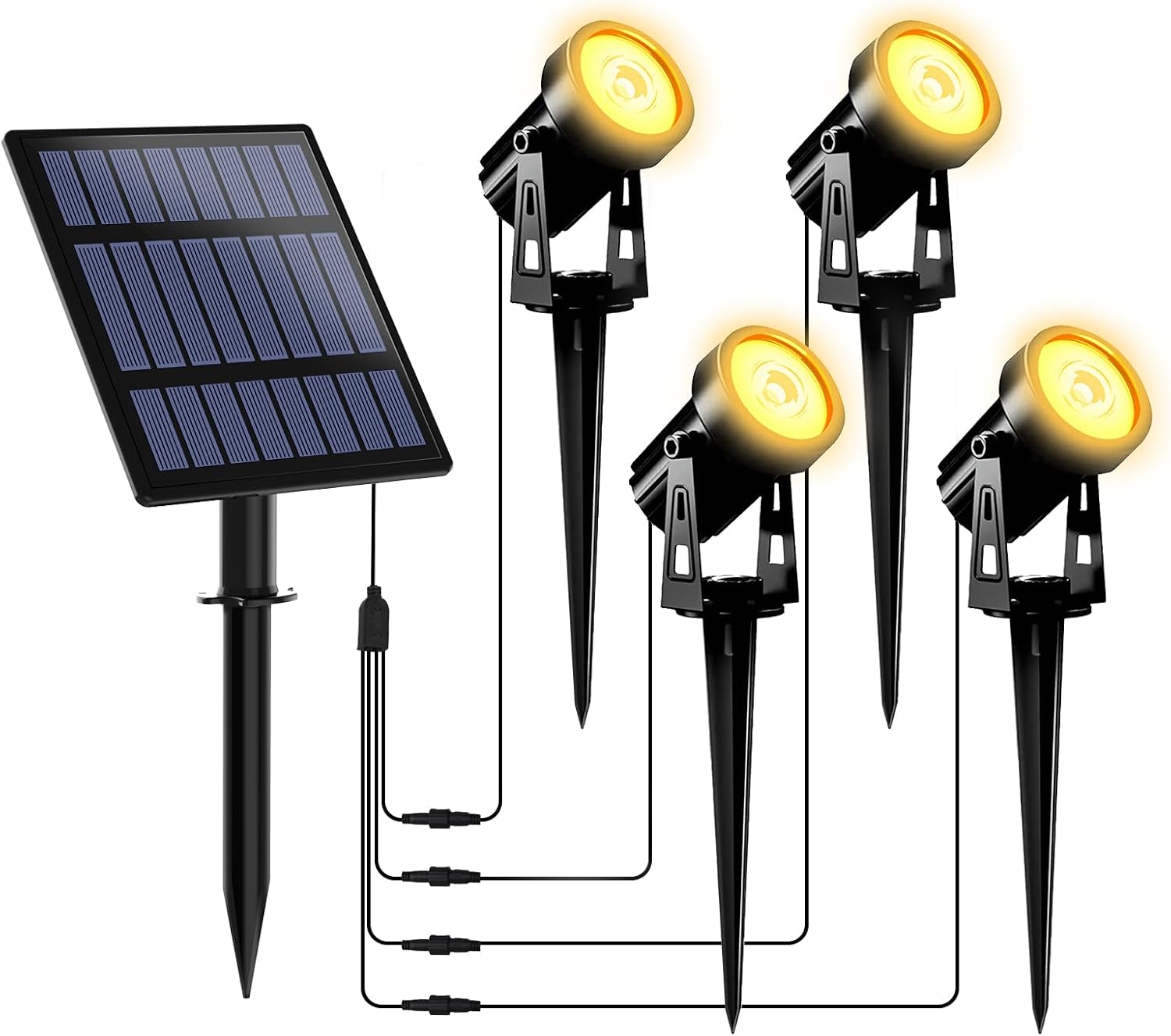
Image: Overview of the T-SUNUS Solar Spot Lights system, including the solar panel and four individual spotlights connected by cables.
Setup and Installation
Proper placement and initial charging are crucial for the performance of your solar lights.
1. Initial Charge
Before the first use, ensure the solar panel is exposed to direct sunlight for 6-8 hours to fully charge the internal battery. Locate the power button on the back of the solar panel and press it to turn the unit ON. The lights will not operate during the day while charging.

Image: Rear view of the solar panel, highlighting the power/mode button. Press this button to select the desired brightness mode before initial use.
2. Choose Installation Method
Your T-SUNUS Solar Spot Lights offer two primary installation methods:
- Ground Installation: Attach the ground stake to the bottom of each spotlight and the solar panel. Insert the stakes firmly into soft ground in your desired location. Ensure the solar panel is positioned where it receives maximum direct sunlight throughout the day.
- Wall Mounting: Use the provided screws and wall anchors to mount the spotlights and the solar panel onto a wall or fence. Mark the desired drilling spots, drill pilot holes, insert anchors (if needed), and secure the fixtures with screws. Ensure the solar panel is mounted in a location with ample direct sunlight.

Image: Illustration demonstrating both wall-mount and ground-stake installation options for the solar spotlights.
3. Connect Spotlights
Connect the cables from each spotlight to the corresponding ports on the solar panel's main cable. Ensure connections are secure and waterproof. The cables are designed to provide sufficient length for flexible placement of the spotlights.

Image: The solar lighting system in an outdoor setting, depicting the solar panel absorbing sunlight for charging during the day and the spotlights automatically illuminating at night.
Operating Instructions
The T-SUNUS Solar Spot Lights are designed for simple, automatic operation.
1. Automatic Dusk-to-Dawn Operation
The lights are equipped with a light sensor that automatically detects ambient light levels. They will turn on automatically at dusk and turn off at dawn, conserving energy during daylight hours.
2. Brightness Modes
The solar panel features a button to cycle through two brightness modes:
- High Brightness Mode: Provides maximum illumination, typically lasting up to 6 hours on a full charge.
- Low Brightness Mode: Offers a softer light, extending operation time up to 12 hours on a full charge.
Press the button on the back of the solar panel once for High Brightness, twice for Low Brightness, and three times to turn the lights off. Select your preferred mode based on your lighting needs and desired operating duration.
Image: Visual guide to the two brightness modes (High and Low) and the off state, controlled by pressing the button on the solar panel.
Maintenance
Regular maintenance ensures the longevity and optimal performance of your T-SUNUS Solar Spot Lights.
- Clean Solar Panel: Periodically wipe the solar panel with a soft, damp cloth to remove dust, dirt, leaves, or snow. A clean panel ensures maximum sunlight absorption and efficient charging.
- Clear Obstructions: Ensure no trees, bushes, or structures block direct sunlight from reaching the solar panel throughout the day.
- Check Connections: Occasionally inspect all cable connections to ensure they remain secure and free from corrosion or damage.
- Battery Replacement: The product contains a built-in Lithium-Ion battery. While designed for long life, if the lights' performance significantly degrades over time, the battery may need replacement. Consult the manufacturer for guidance on battery replacement. Do not dispose of batteries in fire or trash; recycle properly.

Image: The solar lighting system shown enduring rain, heat, and snow, illustrating its IP65 waterproof, heat-resistant, and frost-resistant design for all-weather durability.
Troubleshooting
If your T-SUNUS Solar Spot Lights are not functioning as expected, consider the following common issues and solutions:
| Problem | Possible Cause | Solution |
|---|---|---|
| Lights do not turn on at night. |
|
|
| Lights are dim or only stay on for a short period. |
|
|
| One or more spotlights are not working. |
|
|
Specifications
| Feature | Detail |
|---|---|
| Brand | T-SUNUS |
| Model Name | TS-S4205-4H-30-V2 |
| Color | Warm White (3000K) |
| Material | Acrylonitrile Butadiene Styrene (ABS) |
| Power Source | Solar Powered |
| Voltage | 3 Volts (DC) |
| Wattage | 3 watts |
| Number of Light Sources | 4 |
| Special Feature | IP65 Waterproof |
| Indoor/Outdoor Usage | Outdoor |
| Battery | 1 Lithium Ion battery (included) |
| Product Dimensions | 0.04"L x 0.04"W x 0.04"H (approximate, refer to diagram for detailed measurements) |
| Item Weight | 2.25 pounds |

Image: Dimensional diagram showing the measurements of the solar panel, spotlights, and cable lengths.
Warranty and Support
For product support, warranty information, or inquiries, please contact the manufacturer directly:
- Brand: T-SUNUS
- Manufacturer: T-SUN Tech Corporation
- US Address: 201 137th ST, Unit 31021, Gardena, CA 90248
- US Email: amazon.us@tsun.tech
- EU Representative: Q&E Compliance E. Commerce(DE) GmbH
- EU Address: Zum Sonnenberg 10, 65527 Niedernhausen, Germany
- EU Email: info@qe-connection.de
Please retain your purchase receipt for warranty claims. Information regarding protection plans may be available from your retailer at the time of purchase.
Important Safety Information
Battery Warning: This product has a built-in Lithium-Ion battery that must be recycled or disposed of properly. Do not dispose of batteries in fire or trash.
For proper disposal, consult your local waste management authority.

Image: Packaging detail showing a multi-language warning regarding proper disposal and recycling of the built-in lithium battery.

Image: Packaging detail displaying various recycling symbols and contact information for the manufacturer and EU representative.
Official Product Videos
No official product videos from the seller were available for inclusion in this manual.
Ask a question about this manual
Ask about setup, troubleshooting, compatibility, parts, safety, or missing instructions. Manuals+ will review the question and use this page’s manual context to help answer it.