
Proster PST242-PST
Proster Digital Clamp Meter Instruction Manual
Model: PST242-PST
Introduction
The Proster Digital Clamp Meter is a versatile and essential tool for electrical measurements. Designed for accuracy and ease of use, it features True RMS measurement capabilities for AC/DC voltage, current, resistance, capacitance, frequency, temperature, diode, and continuity. Its intelligent mode automatically identifies measurement signals, simplifying operation. The large HD color screen provides clear readings, even in challenging lighting conditions. This manual provides detailed instructions for setup, operation, maintenance, and troubleshooting to ensure safe and effective use of your device.
What's in the Box
Your Proster Digital Clamp Meter package includes the following items:
- Digital Clamp Meter x1
- Storage Bag x1
- Pair of Test Lead x1
- K-type Thermocouple x1
- Pair of Alligator Clip x1
- 1.5V AAA Battery x3
- Slotted Screwdriver x1
- User Manual x1

Figure 1: All components included in the Proster Digital Clamp Meter package.
Setup
Battery Installation
- Locate the battery compartment on the back of the clamp meter.
- Use the provided slotted screwdriver to unscrew the battery compartment cover.
- Insert the three 1.5V AAA batteries, ensuring correct polarity as indicated inside the compartment.
- Replace the cover and secure it with the screw. The meter will emit a short beep upon successful power-up.

Figure 2: Battery compartment on the back of the meter.
Connecting Test Leads
For measurements requiring test leads (e.g., voltage, resistance, continuity), connect them as follows:
- Insert the red test lead into the positive (+) input jack (typically labeled 'VΩHzLive').
- Insert the black test lead into the common (COM) input jack.
- Ensure the connections are secure before taking any measurements.

Figure 3: Test leads properly connected to the meter.
Operating Instructions
The Proster Digital Clamp Meter features an intelligent mode that automatically identifies measurement signals for common functions. For specific measurements, you can manually select the desired mode.
Intelligent Mode (Auto)
When the meter is powered on, it defaults to Intelligent Mode ('Auto'). In this mode, the meter automatically detects and measures AC/DC voltage, DC/AC current, resistance, and continuity without requiring manual selection. This simplifies operation for quick checks.
AC/DC Voltage Measurement
To measure voltage, ensure the test leads are correctly connected. The meter will automatically detect AC or DC voltage in Intelligent Mode. For specific voltage types, you can use the 'SEL' button to cycle through modes if needed.

Figure 4: Measuring DC and AC voltage with the test leads.
Video 1: Demonstration of AC/DC voltage measurement using the Proster Digital Clamp Meter. This video shows the meter automatically detecting and displaying voltage readings from various sources.
AC/DC Current Measurement (Clamp Function)
The clamp function allows for non-contact measurement of AC/DC current. Simply open the clamp jaws using the trigger and enclose a single conductor (wire) within the jaws. The meter will display the current flowing through the conductor.

Figure 5: Using the clamp function to measure current.
Video 2: Official product video demonstrating the clamp meter's current measurement capabilities. It highlights the ease of use for measuring current without direct contact.
NCV / Live Test
The Non-Contact Voltage (NCV) function allows you to detect the presence of AC voltage without physical contact. Hold the NCV sensor near a live wire or outlet. The meter will indicate voltage presence with an audible alarm and visual indicator. The Live test function helps identify live wires.

Figure 6: Performing a Non-Contact Voltage (NCV) test.
Resistance, Capacitance, Frequency, Diode, Continuity
Use the 'SEL' button to cycle through these measurement modes. Connect the test leads to the component or circuit you wish to test. The meter will display the corresponding reading.
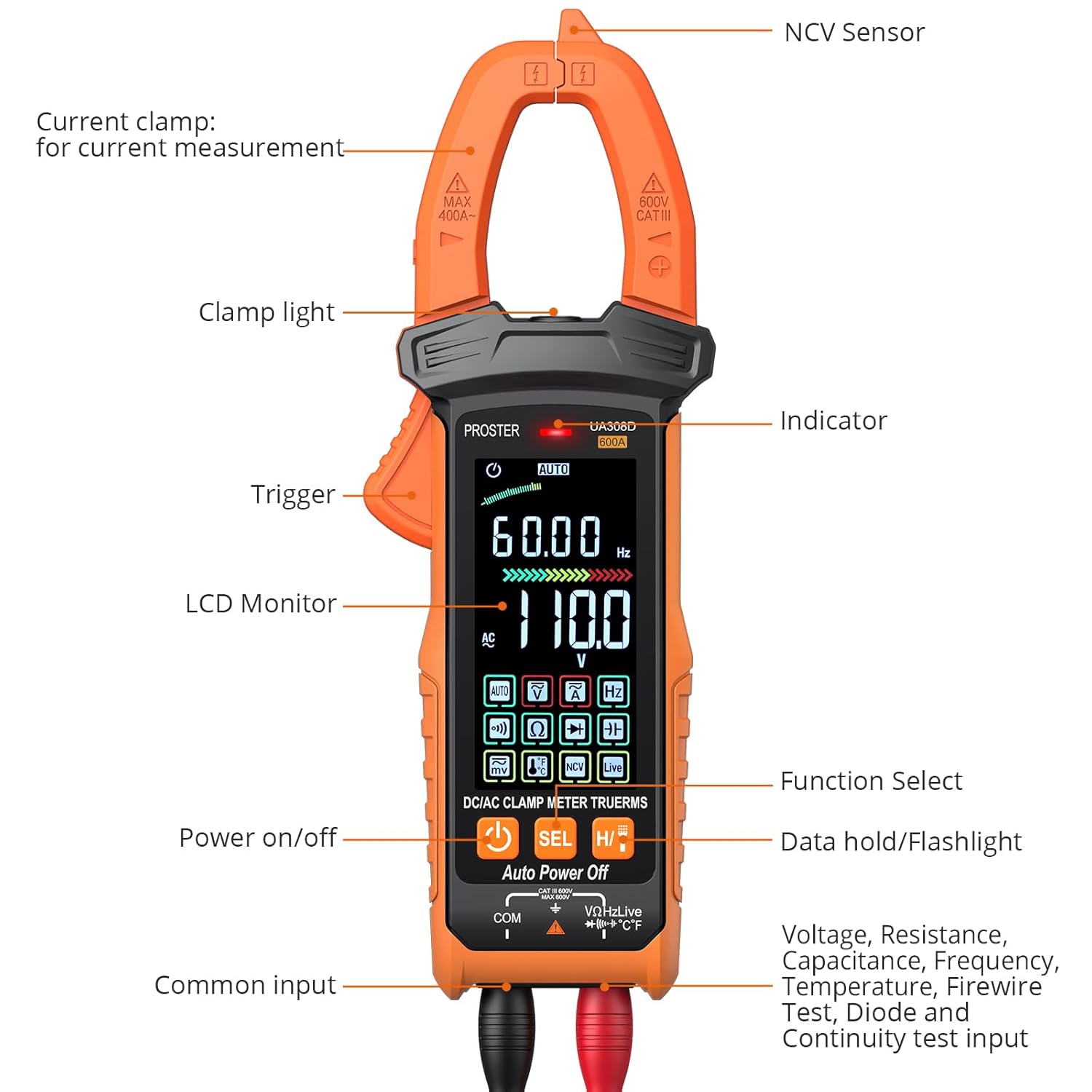
Figure 7: The meter's display showing various measurement functions.
Temperature Measurement
Connect the K-type thermocouple to the meter's input jacks. Place the thermocouple tip on or near the object whose temperature you wish to measure. The meter will display the temperature reading.

Figure 8: Measuring temperature with the K-type thermocouple.
Data Hold & Flashlight
Press the 'H/T' button to activate the Data Hold function, which freezes the current reading on the display. Press it again to release. A long press of the 'H/T' button will turn the built-in flashlight on or off, useful for working in dimly lit areas.

Figure 9: The meter's built-in flashlight in operation.
Specifications
| Specification | Value |
|---|---|
| Package Dimensions | 8.86 x 4.49 x 2.8 inches |
| Item model number | PST242-PST |
| Batteries | 3 AAA batteries required. (included) |
| Date First Available | October 16, 2023 |
| Manufacturer | PROSTER |
| ASIN | B0CL3XQ4V7 |
| Brand | Proster |
| Power Source | Battery Powered |
| Style | 6000counts Color Screen |
| Color | BLACK |
| Item Weight | 22 Grams |
Maintenance
Proper maintenance ensures the longevity and accuracy of your Proster Digital Clamp Meter.
- Cleaning: Use a soft, dry cloth to clean the meter's surface. Avoid abrasive cleaners or solvents.
- Battery Care: The meter features an auto-off function after 15 minutes of inactivity to conserve battery life. If the meter will not be used for an extended period, remove the batteries to prevent leakage and damage.
- Storage: Store the meter in its provided carrying case in a cool, dry place, away from direct sunlight and extreme temperatures.
- Probe Inspection: Regularly inspect test leads and probes for any signs of wear, damage, or frayed insulation. Replace them if necessary to ensure safety and accurate readings.
Troubleshooting
If you encounter issues with your Proster Digital Clamp Meter, refer to the following common problems and solutions:
- Display Backlight Turns Off Quickly: The backlight is designed to conserve battery power. This is normal operation. If you require continuous illumination, ensure you are in a well-lit environment or use an external light source.
- Inaccurate Frequency Readings: Ensure the test leads are properly connected and the signal source is stable. For precise frequency measurements, refer to the detailed instructions in the user manual for specific range and input requirements.
- Inaccurate NCV (Non-Contact Voltage) Readings: NCV sensitivity can be affected by environmental factors and proximity to other electrical fields. Ensure you are testing a single, isolated conductor. If readings are inconsistent, verify with direct contact voltage measurement using test leads if safe to do so.
- Inconsistent Clamp Current Measurements: Ensure the conductor is placed centrally within the clamp jaws and that only one conductor is being measured at a time. External magnetic fields or nearby current-carrying wires can affect accuracy.
- Alligator Clips Do Not Fit Probes Easily: Ensure the probe tips are fully inserted into the alligator clip receptacles. Some clips may have protective boots that require slight adjustment for a secure fit.
- Meter Does Not Power On: Check that the batteries are correctly installed and have sufficient charge. Replace batteries if necessary.
Warranty & Support
For warranty information, technical support, or service inquiries regarding your Proster Digital Clamp Meter, please refer to the contact information provided in the user manual included with your product. You can also visit the official Proster website for additional resources and support.
Ask a question about this manual
Ask about setup, troubleshooting, compatibility, parts, safety, or missing instructions. Manuals+ will review the question and use this page’s manual context to help answer it.