
1. Introduction
This manual provides instructions for the safe and effective operation, maintenance, and troubleshooting of your CREWORKS 10L Digital Ultrasonic Cleaning Machine. This device utilizes ultrasonic waves to clean various items by creating cavitation bubbles in a liquid solution, offering a thorough cleaning process for intricate objects.

Figure 1: CREWORKS 10L Digital Ultrasonic Cleaning Machine
2. Safety Instructions
WARNING: Failure to follow these safety instructions may result in electric shock, fire, or serious injury.
- Always ensure the unit is unplugged before filling, draining, or performing any maintenance.
- Do not operate the unit without sufficient liquid in the tank. The liquid level must be above the minimum fill line.
- Do not immerse the main unit in water or any other liquid.
- Keep the unit away from children and pets.
- Use only non-flammable cleaning solutions. Flammable solutions can ignite due to heat or cavitation.
- Do not use corrosive or abrasive cleaning agents that could damage the tank or items.
- Ensure proper ventilation when operating, especially if using cleaning solutions that produce fumes.
- Do not operate the unit unattended.
- Avoid touching the tank or solution during operation, as it may become hot.
- If the unit shows signs of damage or malfunction, discontinue use immediately and contact customer support.
3. Product Features
- Powerful Ultrasonic Cleaning: 240W ultrasonic power with 40 kHz frequency for effective cavitation.
- Integrated Heater: 600W heating power to accelerate the cleaning process and improve results.
- Digital Control Panel: Intuitive interface for setting time and temperature.
- Degas Mode: Quickly removes gas bubbles from the solution and porous objects, enhancing cavitation efficiency.
- Gentle Mode: Reduces ultrasonic intensity by half to protect delicate items such as circuit boards, rings, and necklaces.
- Durable Construction: Made with 304 stainless steel tank and basket, meeting food-grade safety standards.
- User-Friendly Design: Features inset handles, a widened top cover, two protective fuses, and multiple dissipation holes for reliable performance.

Figure 2: Control Panel and Key Features
4. Components
- Main Ultrasonic Cleaner Unit
- Stainless Steel Cleaning Tank (10L capacity)
- Stainless Steel Mesh Cleaning Basket
- Stainless Steel Lid
- Power Cord
- Drain Valve

Figure 3: Stainless Steel Cleaning Basket
5. Setup
- Placement: Place the ultrasonic cleaner on a stable, flat, and dry surface. Ensure there is adequate ventilation around the unit.
- Power Connection: Connect the power cord to the unit and then to a grounded electrical outlet.
- Fill Tank: Open the lid and fill the stainless steel tank with the appropriate cleaning solution. Ensure the liquid level is between the MIN and MAX marks. Do not overfill or underfill.
- Insert Basket: Place the cleaning basket into the tank.
- Place Items: Carefully place the items to be cleaned into the basket. Ensure items are fully submerged but not touching the bottom of the tank directly. Avoid overcrowding the basket.

Figure 4: Wide Application of the Cleaner
6. Operating Instructions
The control panel features digital displays for set and actual temperature, and set and actual time, along with buttons for various functions.

Figure 5: Digital Control Panel
- Power On: Press the POWER button to turn on the unit.
- Set Temperature: Press the TEMP button. Use the UP and DOWN arrows to set the desired temperature between 68°F and 176°F (20°C and 80°C). The heater will begin warming the solution.
- Set Timer: Press the TIME button. Use the UP and DOWN arrows to set the cleaning duration from 1 to 99 minutes.
- Degas Mode: For enhanced cleaning, especially with new solutions or porous items, press the DEGAS button. This mode removes trapped air, improving cavitation. The indicator light will illuminate.
- Gentle Mode: For delicate items, press the GENTLE button. This mode reduces the ultrasonic power by half to prevent damage. The indicator light will illuminate.
- Start Cleaning: Once temperature and time are set, the unit will automatically start the ultrasonic cleaning process.
- Stop Cleaning: The unit will automatically stop when the timer reaches zero. You can manually stop the process at any time by pressing the POWER button.
- After Cleaning: Carefully remove the basket with the cleaned items. Rinse the items with clean water if necessary and dry them thoroughly.

Figure 6: Degas and Gentle Mode Explanation
Video 1: Demonstration of CREWORKS Ultrasonic Cleaner with Dual Mode. This video illustrates the setup, operation, and effectiveness of the degas and gentle modes.
Video 2: CREWORKS Ultrasonic Cleaner for Various Items. This video showcases the cleaner's ability to clean different types of items, highlighting its versatility.
7. Maintenance
- Draining the Tank: After each use, especially if the solution is dirty, unplug the unit. Use the drain valve located on the side of the unit to empty the tank into an appropriate container.
- Cleaning the Tank: Rinse the stainless steel tank with clean water. Wipe the interior and exterior with a soft, damp cloth. Do not use abrasive cleaners or scourers.
- Lid and Basket: Clean the lid and basket with mild soap and water, then rinse and dry thoroughly.
- Storage: Ensure the unit is completely dry before storing. Store in a cool, dry place away from direct sunlight and moisture.

Figure 7: Drain Valve
8. Troubleshooting
| Problem | Possible Cause | Solution |
|---|---|---|
| Unit does not power on. | No power supply; power cord not connected; fuse blown. | Check power outlet and cord connection. Replace fuse if necessary. |
| No ultrasonic action (no buzzing sound or visible cavitation). | Insufficient liquid; unit not started; transducer malfunction. | Ensure liquid level is correct. Press the power button to start. If problem persists, contact support. |
| Solution not heating. | Heater not activated; heater malfunction. | Ensure temperature is set and heater is on. Contact support if no heat. |
| Poor cleaning results. | Incorrect cleaning solution; items overcrowded; insufficient cleaning time/temperature; degas mode not used. | Use appropriate solution. Clean fewer items at a time. Adjust time/temperature. Use degas mode. |
| Excessive noise during operation. | Items touching tank bottom; unit not on a stable surface. | Ensure items are in the basket and not touching the tank. Place unit on a stable, level surface. |
9. Specifications
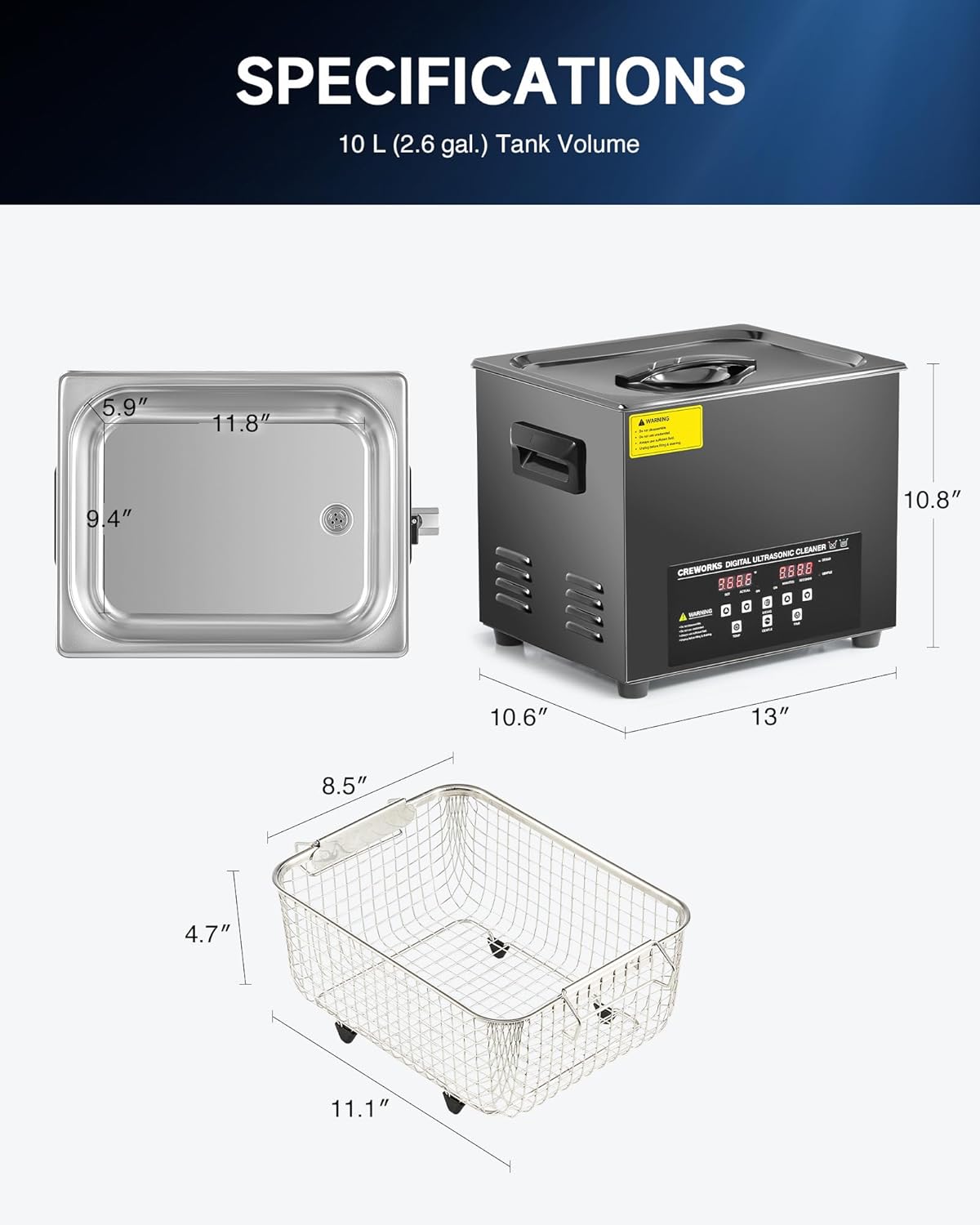
Figure 8: Product Dimensions and Specifications
| Feature | Specification |
|---|---|
| Model Number | SX-DUCBK10US |
| Tank Volume | 10 Liters (2.6 Gallons) |
| Ultrasonic Power | 240W |
| Heating Power | 600W |
| Ultrasonic Frequency | 40 kHz |
| Temperature Range | 68-176°F (20-80°C) |
| Timer Range | 1-99 Minutes |
| Tank Material | 304 Stainless Steel |
| Overall Dimensions (L x W x H) | 13 x 10.6 x 10.6 inches |
| Tank Dimensions (L x W x H) | 11.8 x 9.4 x 5.9 inches |
10. Warranty and Support
For warranty information, technical support, or any questions regarding your CREWORKS 10L Digital Ultrasonic Cleaning Machine, please refer to the product packaging or contact CREWORKS customer service directly. Keep your purchase receipt as proof of purchase.
