
Introduction
Thank you for choosing the Cubicfun L531h Tower Bridge 3D Puzzle with LED Series. This kit allows you to construct a detailed replica of the iconic Tower Bridge using durable papercraft pieces, enhanced with an integrated LED lighting system. This manual provides essential instructions for assembly, operation, and maintenance to ensure a rewarding building experience.
Safety Information
- Small Parts Warning: This kit contains small parts and is not suitable for children under 3 years old due to choking hazards.
- Adult Supervision: Adult supervision is recommended for younger builders.
- Handle with Care: Papercraft pieces can be delicate. Handle them gently to avoid tearing or bending.
- LED Components: Ensure LED wires are not pinched or damaged during assembly. Do not attempt to modify the LED circuit.
Package Contents
Before beginning assembly, please verify that all components are present in your kit. Refer to the image below for a visual guide to the package contents.
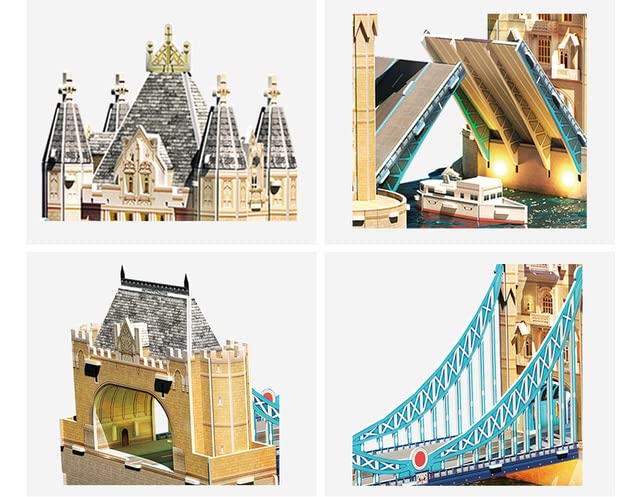
Image: All components of the Cubicfun L531h Tower Bridge 3D Puzzle kit, including puzzle sheets, instruction booklet, and LED light string.
- Pre-cut EPS foam and paper puzzle pieces
- LED light string with battery box (batteries not included)
- Detailed graphic instruction manual
Setup and Assembly
This 3D puzzle requires no glue or tools for assembly. Follow the numbered steps in the included graphic manual and the general guidelines below.
General Assembly Steps:
- Unpack and Organize: Carefully remove all puzzle sheets from the box. Identify the different sheets by their labels (e.g., A, B, C).
- Identify Pieces: Each piece is numbered. Locate the corresponding numbers in the instruction manual.
- Punch Out Pieces: Gently punch out the required pieces from the sheets. Use caution to avoid tearing.
- Connect Pieces: Follow the step-by-step illustrations in the manual. Insert tabs into corresponding slots. Ensure a snug fit.
- Build Sections: Assemble smaller sections first, then connect them to form larger structures of the Tower Bridge.

Image: Close-up views illustrating the intricate details and connection points of the Tower Bridge puzzle pieces during assembly.
LED Light Installation:
The LED light string is designed to be integrated during the final stages of assembly. Refer to the specific instructions in your manual for exact placement.
- Prepare Battery Box: Insert 2x AA batteries (not included) into the battery box. Ensure correct polarity.
- Route Wires: Carefully route the LED wires through the designated channels or openings in the puzzle structure as indicated in the manual.
- Secure LEDs: Place the LED bulbs into their specific slots or positions to illuminate the model.
- Connect Battery Box: Secure the battery box in its designated hidden compartment, ensuring the switch is accessible.

Image: A father and son collaboratively assembling the Cubicfun Tower Bridge 3D puzzle, demonstrating the hands-on building process.
Operating the LED Lights
Once the LED light string is fully installed and batteries are inserted, operating the lights is simple.
- Power On/Off: Locate the switch on the battery box. Flip the switch to the 'ON' position to illuminate the Tower Bridge model. Flip it to 'OFF' to turn off the lights.
- Battery Replacement: When the lights dim or stop working, replace the AA batteries in the battery box. Ensure the model is turned off before replacing batteries.

Image: The fully assembled Cubicfun Tower Bridge 3D puzzle, showcasing its illuminated LED lights against a twilight backdrop.
Maintenance
Proper care will help preserve the appearance and functionality of your Cubicfun Tower Bridge model.
- Cleaning: Dust the model gently with a soft, dry cloth or a soft brush. Avoid using water or cleaning solutions, as they may damage the papercraft material.
- Storage: Store the assembled model in a dry place away from direct sunlight and excessive humidity to prevent warping or fading.
- Battery Care: Remove batteries if the model will not be used for an extended period to prevent leakage.
Troubleshooting
If you encounter any issues with your Cubicfun Tower Bridge 3D Puzzle, refer to the following common solutions:
| Problem | Possible Cause | Solution |
|---|---|---|
| Pieces do not fit together | Incorrect piece orientation or force applied | Ensure pieces are oriented correctly as per the manual. Do not force pieces; gently align tabs and slots. |
| LED lights do not turn on | Dead batteries, incorrect battery polarity, loose connection, or switch is off | Check if batteries are inserted correctly and are not depleted. Ensure the battery box switch is 'ON'. Verify all LED connections are secure. |
| Model appears unstable | Pieces not fully engaged or assembled out of sequence | Review the assembly steps to ensure all pieces are firmly connected. Re-check the stability of base sections. |
Specifications
Image: The fully assembled Cubicfun Tower Bridge 3D puzzle, showcasing its illuminated LED lights against a twilight backdrop.
- Model Number: L531h
- Product Name: Tower Bridge 3D Puzzle with LED Series
- Brand: Cubicfun
- Material: EPS Foam Board and Paper
- Number of Pieces: Varies by specific edition, refer to packaging (typically around 222 pieces for this model)
- Assembled Dimensions (Approximate): 89.3 cm (L) x 20.3 cm (W) x 24.4 cm (H)
- Estimated Assembly Time: 4+ Hours
- Lighting: Integrated LED light string (requires 2x AA batteries, not included)
- Recommended Age: 10+ Years
Image: Close-up views illustrating the intricate details and connection points of the Tower Bridge puzzle pieces during assembly.
Warranty and Support
Cubicfun products are designed for quality and enjoyment. While specific warranty details are not provided in this manual, please retain your proof of purchase. For any missing parts or assembly assistance, please contact Cubicfun customer support through their official website or the retailer where the product was purchased. Provide your model number (L531h) and a clear description of the issue for efficient support.