
Viper ProScore Digital Dart Scorer, Laser Throw/Toe Line Marker
Viper ProScore Digital Dart Scorer and Laser Throw Line Marker Instruction Manual
Brand: Viper | Models: ProScore Digital Dart Scorer, Laser Throw/Toe Line Marker
Introduction
This manual provides comprehensive instructions for the setup, operation, and maintenance of your Viper ProScore Digital Dart Scorer and Viper Laser Throw/Toe Line Marker. Please read this manual thoroughly before use to ensure proper functionality and to maximize your enjoyment of these products.

Image: The Viper ProScore Digital Dart Scorer (left) and the Viper Laser Throw/Toe Line Marker (right) are shown together. The scorer is a black rectangular device with a red digital display and a keypad. The laser marker is a black rectangular unit emitting a red laser beam in a triangular shape downwards.
Safety Information
- Laser Safety: Avoid direct eye exposure to the laser beam. Do not stare into the beam or view directly with optical instruments. This product uses a Class 2 laser.
- Battery Handling: Use only the specified battery type. Do not mix old and new batteries, or different types of batteries. Dispose of batteries according to local regulations.
- Placement: Ensure the dart scorer and laser marker are securely mounted to prevent accidental falls.
- Cleaning: Disconnect power before cleaning. Use a soft, dry cloth. Do not use abrasive cleaners or liquids.
- Children: Keep out of reach of small children. This product is not a toy.
Package Contents
Please verify that all components are present before proceeding with installation:
- Viper ProScore Digital Dart Scorer
- Viper Laser Throw/Toe Line Marker
- Mounting Hardware (screws, anchors)
- Instruction Manual (this document)
- Batteries (may be included or sold separately, check packaging)
Setup
Viper ProScore Digital Dart Scorer Setup
- Battery Installation: Locate the battery compartment on the back of the scorer. Insert the required batteries (typically AA or AAA, refer to the compartment label) ensuring correct polarity (+/-). Close the battery compartment securely.
- Mounting: The scorer can be placed on a flat surface or mounted on a wall. If wall-mounting, use the provided mounting hardware. Mark the desired location, drill pilot holes if necessary, and secure the scorer using screws. Ensure it is at a comfortable viewing height from the throw line.

Image: A Viper ProScore Digital Dart Scorer is shown mounted on a wall to the right of a dartboard. A hand is pressing a button on the scorer's keypad, indicating interaction during play.
Viper Laser Throw/Toe Line Marker Setup
- Battery Installation: Open the battery compartment on the laser marker. Insert the specified batteries, observing polarity. Close the compartment.
- Mounting Location: The laser marker should be mounted on a wall or cabinet above the dartboard, centered with the dartboard. Ensure it is positioned so the laser beam can project clearly onto the floor at the standard throw line distance (7 feet 9 1/4 inches from the face of the dartboard).
- Mounting: Use the provided mounting hardware to securely attach the laser marker to the wall or cabinet.
- Adjusting the Laser: Once mounted, power on the laser. Adjust the angle of the laser unit to project a clear, straight line on the floor at the correct throw line distance. Tighten any adjustment screws to secure the angle.
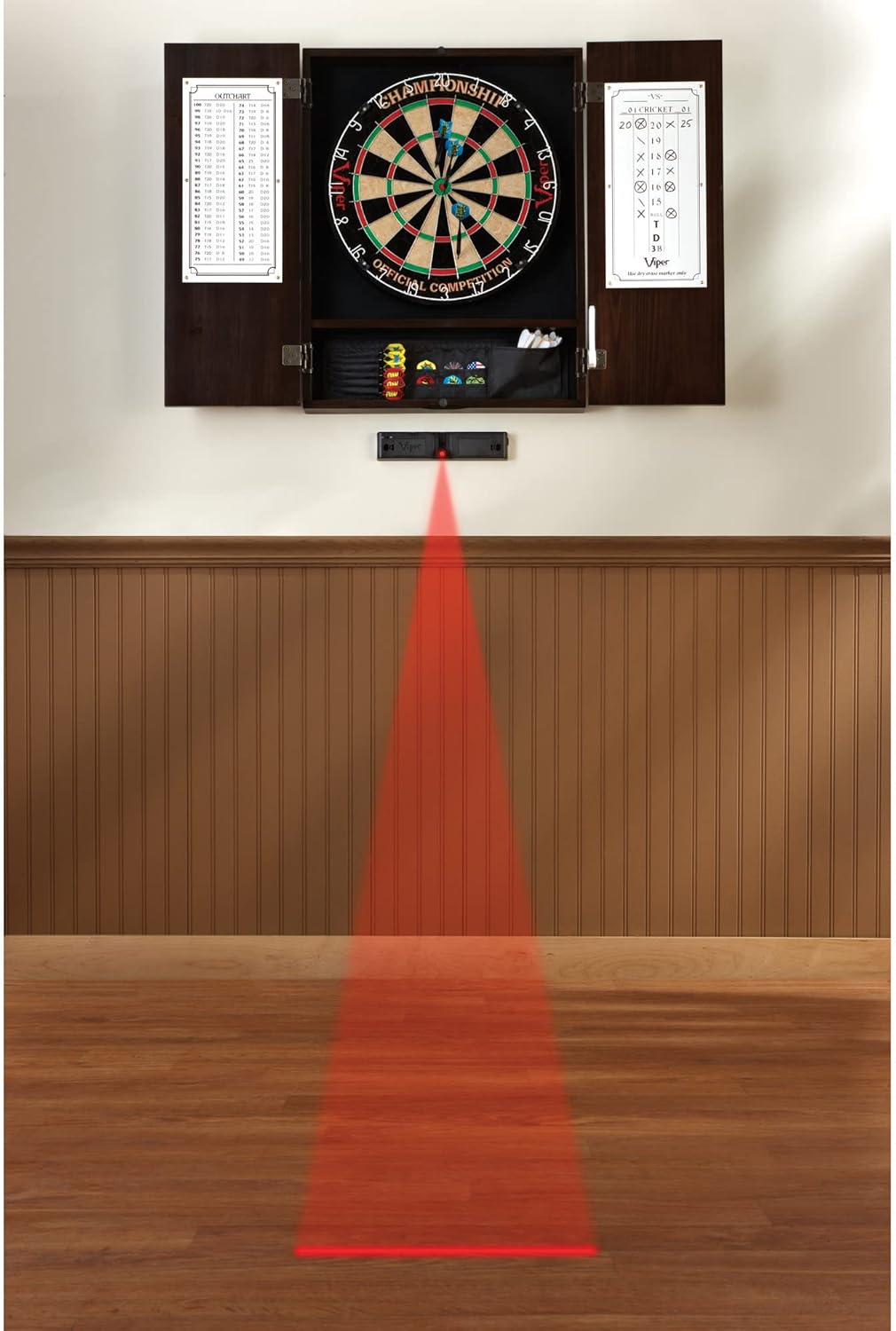
Image: A full dart setup is displayed, featuring a dartboard cabinet mounted on a wall. Below the dartboard, a Viper Laser Throw/Toe Line Marker is mounted, projecting a bright red laser line onto the wooden floor, indicating the precise throw line for dart players.
Operating Instructions
Viper ProScore Digital Dart Scorer Operation

Image: A close-up view of the Viper ProScore Digital Dart Scorer. The red digital display shows scores and player information, while the keypad below features numerical buttons (1-20), function buttons like X2, X3, 25, 50, On/Off, Miss, Reset, Correct, Volume, Up, Down, Enter, and Next Player.
- Power On/Off: Press the On/Off button to turn the scorer on or off. The unit features an auto-off mode and sleep mode to conserve battery power.
- Game Selection: Upon powering on, the display will show game options. Use the Up and Down buttons to scroll through the 40 available games. Press Enter to select a game.
- Number of Players: After selecting a game, choose the number of players (up to 8) using the numerical keypad or Up/Down buttons, then press Enter.
- Scoring: After each player's turn, enter their score using the numerical keypad. For doubles (X2) or triples (X3), press the respective button before entering the number. For example, for a triple 20, press X3 then 20.
- Miss: If a dart misses the board or does not score, press the Miss button.
- Correcting Scores: If an incorrect score is entered, press the Correct button to go back and adjust the last entry.
- Next Player: After entering a player's score, press Next Player to advance to the next player's turn.
- Volume Control: Use the Volume button to adjust the sound level of the scorer's effects.
- Handicap: Some games allow for handicapping. Refer to the specific game rules and use the Handicap button to set handicaps if desired.
- Quick 0: This button may be used for quickly entering a score of zero in certain game modes.
Viper Laser Throw/Toe Line Marker Operation
- Power On/Off: Locate the power switch on the laser marker unit. Toggle it to the "On" position to activate the laser beam. Toggle to "Off" when not in use to conserve battery life.
- Beam Projection: The laser will project a bright red line onto the floor, indicating the precise throw line. Ensure the line is clear and visible.
- Maintenance of Position: Once the desired angle and position are set during setup, the laser marker should maintain its alignment. If the line appears misaligned, re-check the mounting and adjustment screws.

Image: A Viper Laser Throw/Toe Line Marker is shown from the front, emitting a distinct red laser beam downwards. The unit is black with the Viper logo visible.
Game List (40 Games)
The Viper ProScore Digital Dart Scorer includes 40 distinct games. Below is a partial list of common dart games and their typical numbering on the device. Refer to the scorer's display for the full list and specific game numbers.
| Game No. | Game Name |
|---|---|
| G01 | Cricket |
| G02 | Score Cricket |
| G03 | Cut Throat Cricket |
| G04 | Killer Cricket |
| G05 | Random Cricket |
| G06 | Low Pitch Cricket |
| G07 | Shanghai Cricket |
| G08 | Single Only Cricket |
| G09 | Double Only Cricket |
| G10 | Triple Only Cricket |
| G11 | Football |
| G12 | Bowling |
| G13 | Golf |
| G14 | Baseball |
| G15 | 301 |
| G16 | 501 |
| G17 | 701 |
| G18 | 901 |
| G19 | 901 League |
| G20 | 1001 League |
| G21 | 1501 League |
| G22 | 2001 League |
| G23 | 3001 League |
| G24 | 4001 League |
| G25 | 5001 League |
| G26 | Count Up |
| G27 | Round the Clock |
| G28 | Shanghai |
| G29 | Killer |
| G30 | Shoot-Out |
| G31 | Nine Lives |
| G32 | Overs |
| G33 | Unders |
| G34 | Half-It |
| G35 | Big-6 |
| G36 | Forty-One |
| G37 | Bingo |
| G38 | Double Down |
| G39 | 21 Points |
| G40 | Custom Game |
Maintenance
- Cleaning: Regularly wipe down the surfaces of both the dart scorer and laser marker with a soft, dry, lint-free cloth. Do not use liquid cleaners, sprays, or abrasive materials, as these can damage the electronics or finish.
- Battery Replacement: When the display on the dart scorer dims or the laser beam weakens, it is time to replace the batteries. Always replace all batteries at the same time with new ones of the same type.
- Storage: If storing the products for an extended period, remove the batteries to prevent leakage and potential damage. Store in a cool, dry place away from direct sunlight.
Troubleshooting
| Problem | Possible Cause | Solution |
|---|---|---|
| Scorer does not power on. | Dead or incorrectly installed batteries. | Check battery polarity. Replace with fresh batteries. |
| Display is dim or flickering. | Low battery power. | Replace batteries. |
| Laser beam is faint or not visible. | Low battery power in laser marker. | Replace batteries in the laser marker. |
| Laser line is crooked or misaligned. | Laser unit is not securely mounted or adjusted. | Ensure mounting screws are tight. Re-adjust the laser angle and secure it. |
| Scorer buttons are unresponsive. | Temporary electronic glitch or very low battery. | Turn the unit off and on again. Replace batteries. |
Specifications
| Feature | Detail |
|---|---|
| Brand | Viper |
| Material | Either Metal or Plastic (for components) |
| Color | Black |
| Included Components | Digital Dart Scorer, Laser Throw Line Marker, Mounting Hardware |
| Scorer Display | Large, backlit LCD monitor |
| Player Capacity | Up to 8 players |
| Game Options | 40 games, 655 game options (including custom handicaps) |
| Power Source | Battery Operated (specific battery type not provided, check device) |
| Laser Type | Class 2 Laser |
| Laser Compatibility | Steel and soft tip darts |
Warranty and Support
Viper products are manufactured with quality and durability in mind. For specific warranty information, please refer to the warranty card included with your purchase or visit the official Viper website. For technical support or inquiries, please contact Viper customer service through their official channels.
Online Resources: For additional information, FAQs, and product registration, please visit the Viper Brand Store on Amazon.
Related documentsProScore Digital Dart Scorer, Laser Throw/Toe Line Marker


Ask a question about this manual
Ask about setup, troubleshooting, compatibility, parts, safety, or missing instructions. Manuals+ will review the question and use this page’s manual context to help answer it.