
1. Product Overview
The Airdog X8 is an advanced home air purifier designed to provide superior air quality in large spaces. Utilizing patented TPA (Two-Pole Active) filtration technology, it effectively removes harmful airborne particles, allergens, and odors. Unlike traditional HEPA filters, the TPA filter is washable and reusable, offering a sustainable and cost-effective solution for clean air.
Key Features:
- TPA Filtration Technology: Captures 99.9% of particles as small as 0.0146 microns, including dust, pollen, pet dander, mold spores, and odors.
- Washable & Reusable Filter: Eliminates the need for costly filter replacements, reducing waste and long-term expenses.
- Large Room Coverage: Purifies up to 1500 sq ft (140m²) twice per hour, or 500 sq ft (46m²) six times per hour (CADR: 500 CFM / 850m³/h).
- Integrated Air Quality Detector: Detachable sensor monitors HCHO (Formaldehyde), AQI (Air Quality Index), temperature, and humidity.
- Quiet Operation: Operates at a noise level as low as 39dB in sleep mode.
- Smart Control: Features 5 purification speeds, 2 modes (Auto, Sleep), and APP control for remote management.
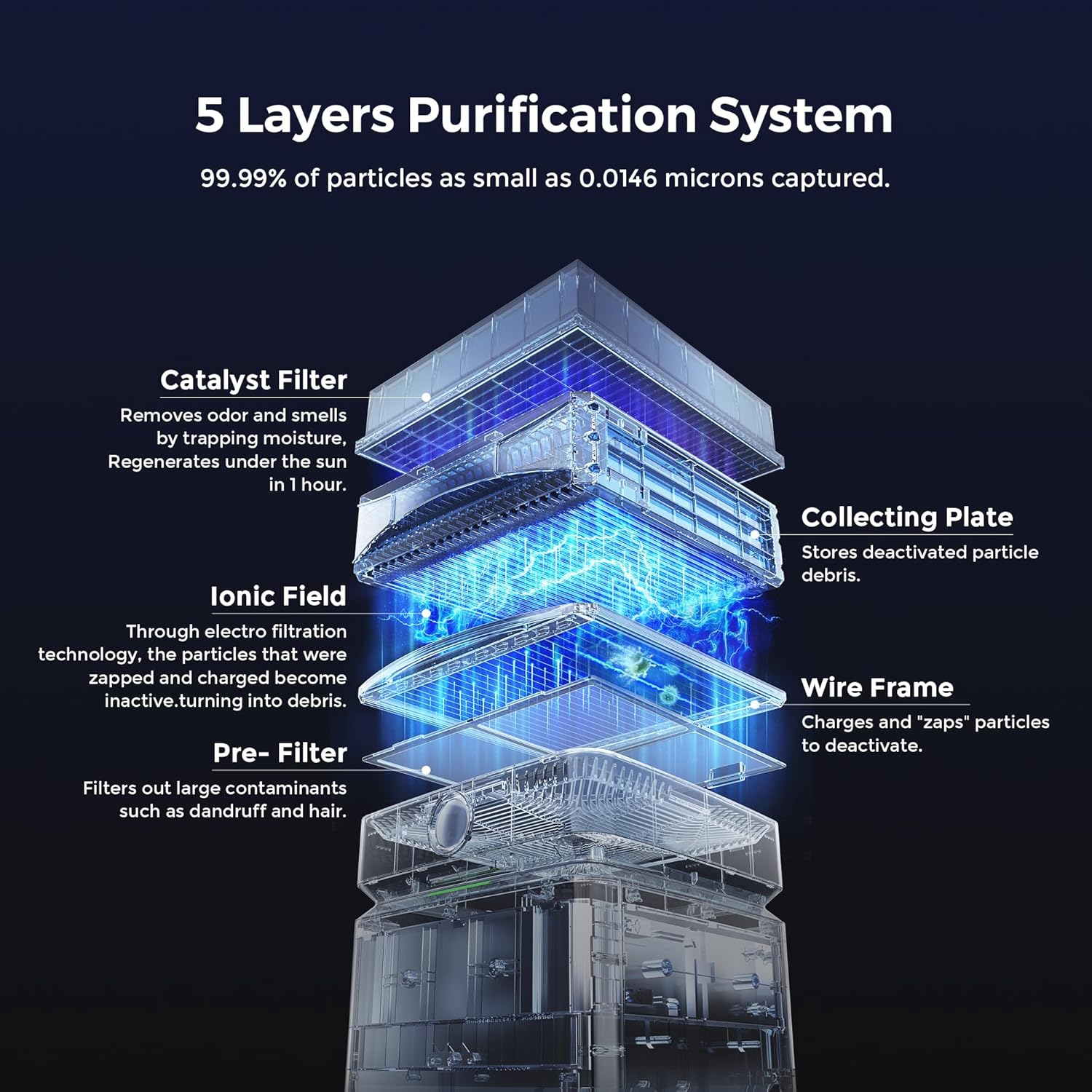
Figure 1: The Airdog X8 features a 5-layer purification system, including a pre-filter, wire frame, ionic field, collecting plate, and catalyst filter, to capture particles as small as 0.0146 microns.

Figure 2: The Airdog X8 provides total home coverage, purifying large spaces efficiently.
2. Safety Information
- Always unplug the unit before cleaning or performing maintenance.
- Do not operate the unit with a damaged cord or plug.
- Keep the unit away from water or moist environments.
- Ensure proper ventilation around the unit; do not block air inlets or outlets.
- Keep out of reach of children and pets.
- Do not insert foreign objects into the unit.
3. Setup and Installation
Package Contents:
- Airdog X8 Air Purifier Unit
- Collecting Plate
- Wire Frame
- Catalytic Filter
- Primary Filters (2)
- Power Cord
- User Manual
Installation Steps:
- Carefully remove the unit from its packaging.
- Open the back cover of the unit.
- Remove the foam packaging from inside the unit.
- Insert the Collecting Plate into the machine with the arrow pointing upwards.
- Install the Wire Frame into the designated card slot.
- Close the back cover securely.
- Plug the power cord into a suitable electrical outlet.
- Press the power button to turn on the unit.
Video 1: Airdog X8 Installation Steps. This video demonstrates the unboxing and initial setup of the Airdog X8 air purifier, including inserting the collecting plate and wire frame.
4. Operating Instructions
The Airdog X8 offers intuitive controls and smart features for effortless air purification.
Control Panel:
The top panel features a digital display for AQI and control buttons for various settings.

Figure 3: The control panel allows one-touch purification, cycling through Auto, Sleep, and various fan speeds.
Modes and Fan Speeds:
- Power On/Off: Short press the right power button to turn on. Long press to turn off.
- Automatic Mode: The unit automatically adjusts fan speed based on detected air quality. An 'A' indicator light will turn on.
- Manual Fan Speed: Short press the power button to cycle through fan speeds (300, 500, 600, 700, 800 CFM).
- Sleep Mode: Continue short pressing the power button to activate sleep mode. The moonlight indicator light will turn on, and the unit will operate at its quietest setting (39dB).
- Display Control: Short press the left control button to manage screen display and brightness.
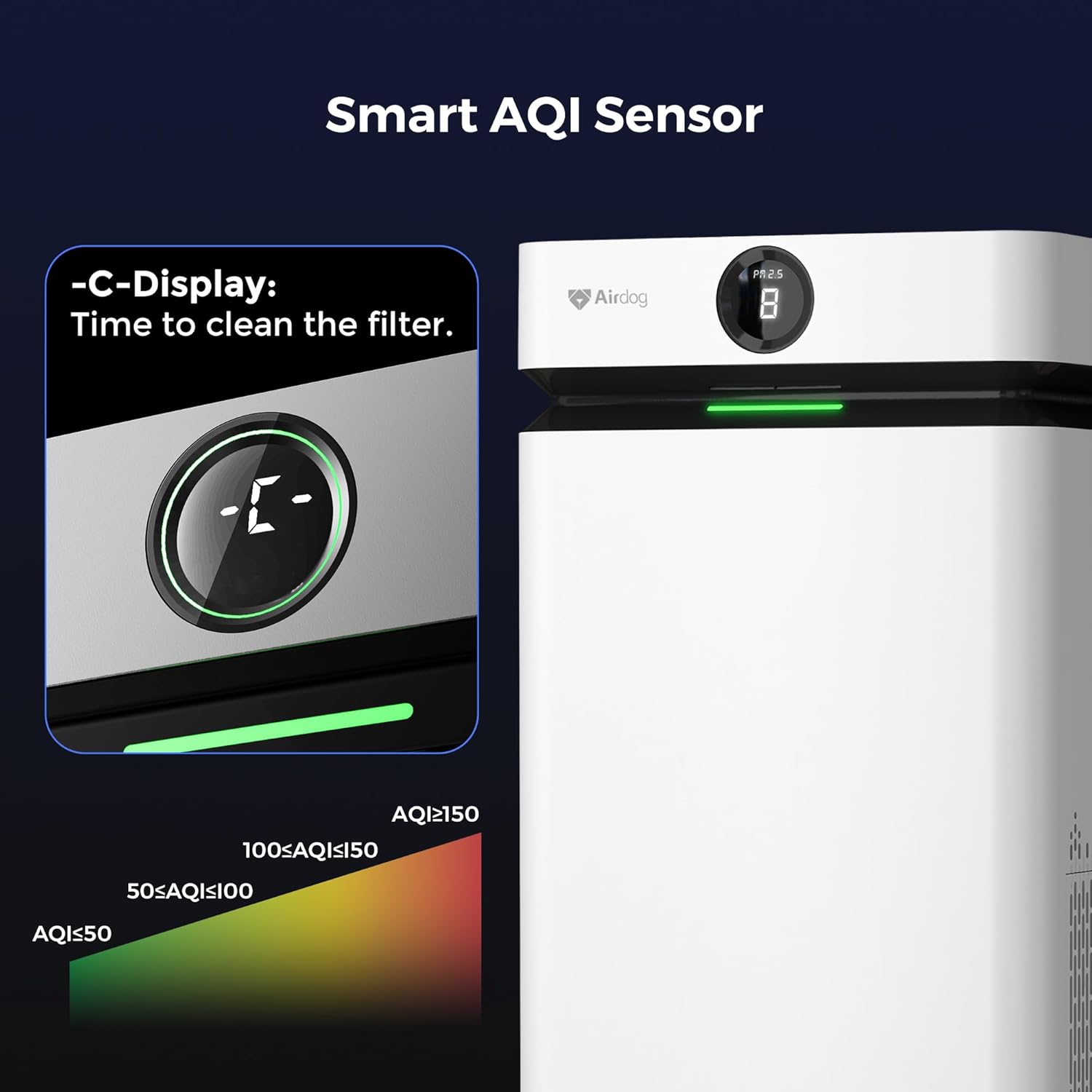
Figure 4: The Smart AQI Sensor provides real-time air quality readings, including PM2.5 levels, formaldehyde, temperature, and humidity.
APP Control:
Download the Airdog app to control your purifier remotely, monitor air quality, and set schedules from your smartphone.

Figure 5: Manage your Airdog X8 settings and monitor air quality from anywhere using the dedicated smartphone application.
5. Maintenance and Cleaning
Regular cleaning of the Airdog X8's washable filters is crucial for maintaining optimal performance and ensuring long-term efficiency. The unit features a cleaning reminder that displays "CLEAN" on the digital screen when maintenance is due.
Cleaning Procedure:
- Power Off & Unplug: Always turn off and unplug the air purifier before cleaning.
- Remove Filters:
- Open the back cover and carefully pull out the Collecting Plate and Wire Frame.
- Open the top cover and remove the Catalytic Filter.
- Open the air inlet panels on both sides and remove the Primary Filters.
- Remove the Ionic Rubber Housing from inside the unit.
- Clean Collecting Plate & Primary Filters: Rinse with clean water or a neutral detergent. Ensure they are fully dry (over 24 hours) before reinstallation.
- Clean Wire Frame: Wipe the wires with a dry cloth or paper towel. Do not use wet items.
- Clean Ionic Rubber Housing: Rinse with water and dry completely.
- Clean Catalytic Filter: This filter should NOT be washed with water. Expose it to direct sunlight for 4-5 hours to regenerate its odor-removing properties.
- Clean Unit Interior/Exterior: Use a wet towel to wipe the back cover, air inlet panels, and the inner part of the machine if needed.
- Reassemble: Once all components are clean and completely dry, reassemble them in reverse order of removal. Ensure the Collecting Plate is inserted with the arrow pointing up.

Figure 6: The washable filter design allows for easy cleaning, as shown in this before and after comparison.
Video 2: Airdog X8 Machine Cleaning Tutorial. This video provides a step-by-step guide on how to properly clean the various components of your Airdog X8 air purifier.
Video 3: Airdog Fast Drying Collecting Plates Intro. This video highlights the design of the collecting plates, which allows for quick drying after cleaning.
6. Troubleshooting
If you encounter any issues with your Airdog X8, please refer to the following common troubleshooting steps:
- Unit Not Turning On: Ensure the power cord is securely plugged into both the unit and the wall outlet. Check if the power button is pressed correctly.
- Reduced Airflow/Purification: Check if filters are dirty and require cleaning. Ensure no obstructions are blocking the air inlets or outlets.
- Unusual Noises (e.g., crackling, sizzling): This can sometimes occur due to dust accumulation on the wire frame or collecting plates. Clean these components thoroughly as per the maintenance instructions. If the noise persists after cleaning, contact customer support.
- Unpleasant Odor: The catalytic filter may need regeneration. Expose it to direct sunlight for 4-5 hours. Ensure all washable components are completely dry before reassembly.
- AQI Readings Seem Incorrect: Ensure the detachable air quality detector is clean and properly inserted. Allow the unit some time to stabilize readings after initial power-on or relocation.
- App Connectivity Issues: Ensure your Wi-Fi network is stable and the unit is within range. Follow the app's instructions for re-pairing if necessary.
For further assistance, please contact Airdog customer support.
7. Specifications
| Specification | Value |
|---|---|
| Brand | Airdog |
| Model Number | X8 |
| Color | White |
| Product Dimensions | 15"D x 15"W x 29.9"H |
| Item Weight | 43.4 pounds |
| Floor Area Coverage | Up to 4035 Square Feet (CADR: 500 CFM / 850m³/h) |
| Noise Level | 39 Decibels (Sleep Mode) |
| Particle Retention Size | 0.01 Micron |
| Controller Type | APP Control, Button Control |
| Wattage | 60 watts |
| Contaminant Filtration Capability | 99.9% |
| Special Feature | Washable Filter |
| Filter Class | Washable Filter with TPA Technology |
| Certifications | FCC Certified |

Figure 7: Physical dimensions of the Airdog X8 air purifier.
8. Warranty and Support
Warranty Information:
The Airdog X8 comes with a 1-year manufacturer's warranty covering defects in materials and workmanship. For specific terms and conditions, please refer to the warranty card included with your product or contact Airdog customer support.
Customer Support:
For any questions, technical assistance, or warranty claims, please contact Airdog customer support. Support is available to assist you with product inquiries and troubleshooting.
- Online Support: Visit the official Airdog website for FAQs and support resources.
- Email Support: Refer to your product packaging or the Airdog website for contact email.
- Phone Support: Refer to your product packaging or the Airdog website for contact phone number.


