1. Introduction
Thank you for choosing the YISSVIC Electric Fly Swatter. This device is designed to effectively eliminate flying insects such as mosquitoes, flies, gnats, and moths, providing a more comfortable environment indoors and outdoors. Please read this manual carefully before use to ensure proper operation and safety.

The YISSVIC Electric Fly Swatter utilizes 4000V high voltage to efficiently eliminate various flying insects.
2. Product Features
- 4000V High Voltage: Powerful electric grid for instant insect elimination.
- Dual Modes: Operates in both manual swatter mode and automatic bug zapper mode.
- Purple Attractant Light: 365nm wavelength UV light attracts insects for effective zapping.
- Rechargeable Battery: Equipped with a 1500mAh battery for extended use.
- Type-C Charging Port: Convenient and fast charging.
- Three-Layer Protective Nets: Ensures safety by preventing accidental contact with the high-voltage grid.
- Detachable Base: Allows for upright placement in auto mode.
- Non-slip Handle: Provides a secure grip during manual use.
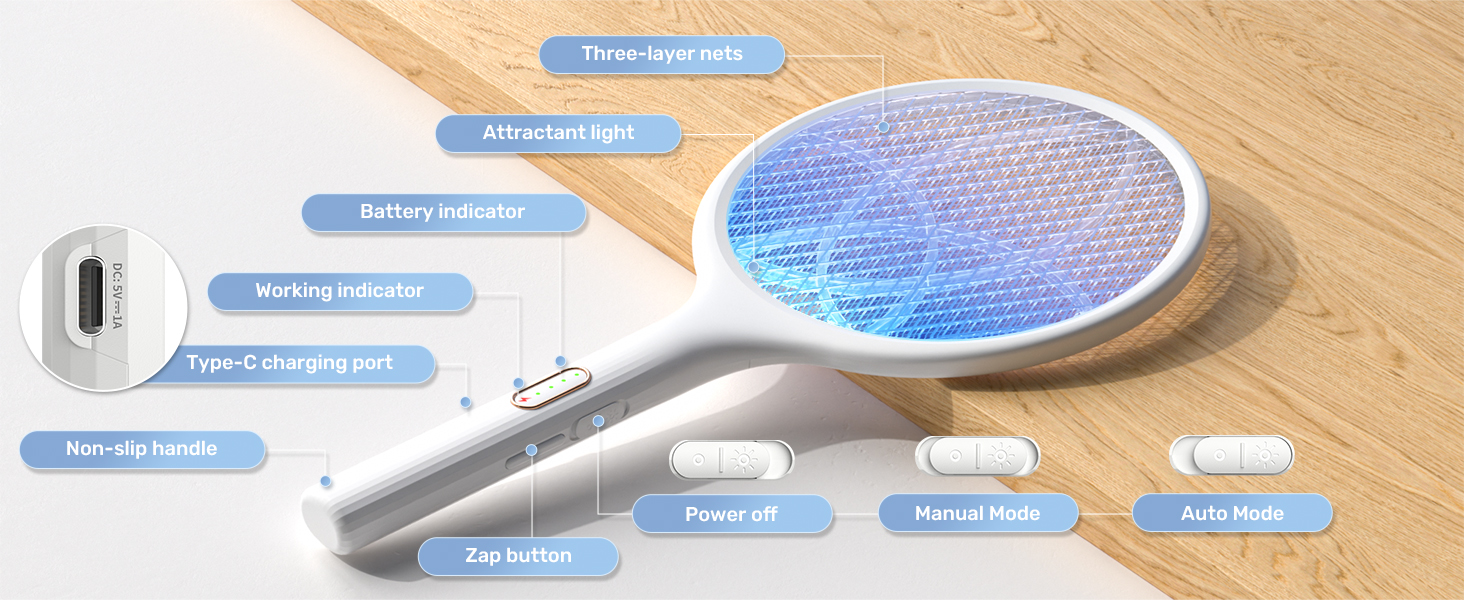
Overview of the YISSVIC Electric Fly Swatter's key features and design elements.
3. Setup
3.1 Charging the Device
- Locate the Type-C charging port on the side of the handle.
- Connect the provided USB Type-C cable to the swatter and a compatible USB power adapter (not included).
- Ensure the device is in the 'Power OFF' position before charging.
- The battery indicator lights will illuminate to show the charging status. A full charge is indicated when all lights are solid green.
- For first use, charge the device for approximately 4 hours.

Connect the Type-C cable to charge the device. Ensure it is powered off for initial charging.
3.2 Attaching the Detachable Base
The detachable base allows the fly swatter to stand upright for automatic mode. Simply align the bottom of the swatter's handle with the opening in the base and gently push down until it is securely seated.
4. Operating Instructions
4.1 Power On/Off and Mode Selection
The device features a three-position slider switch on the handle:
- Bottom Position: Power OFF.
- Middle Position: Manual Mode.
- Top Position: Auto Mode.

Detailed view of the YISSVIC Electric Fly Swatter's controls and features.
4.2 Manual Mode
- Slide the power switch to the middle position (Manual Mode).
- Press and hold the Zap Button located on the handle. The red working indicator light will illuminate, indicating the grid is active.
- Swing the racket towards flying insects to make contact with the electrified grid. A distinct 'zap' sound confirms successful elimination.
- Release the Zap Button when not actively zapping.
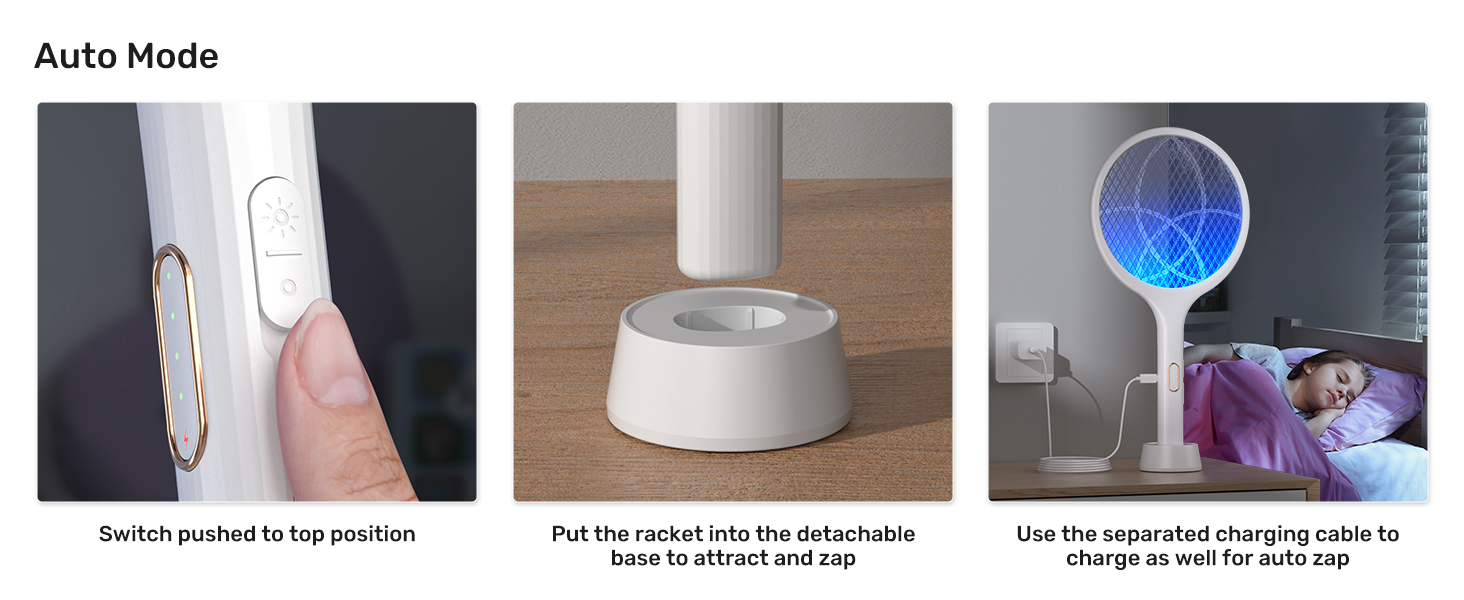
Steps for operating the YISSVIC Electric Fly Swatter in manual mode.
4.3 Auto Mode (with Attractant Light)
- Slide the power switch to the top position (Auto Mode).
- Place the swatter into its detachable base on a flat surface.
- The purple attractant light will activate, drawing insects towards the electrified grid.
- For optimal performance at night, it is recommended to make the swatter the unique light source in the area.
- The device can be charged while in auto mode for continuous operation.

Steps for operating the YISSVIC Electric Fly Swatter in automatic mode.
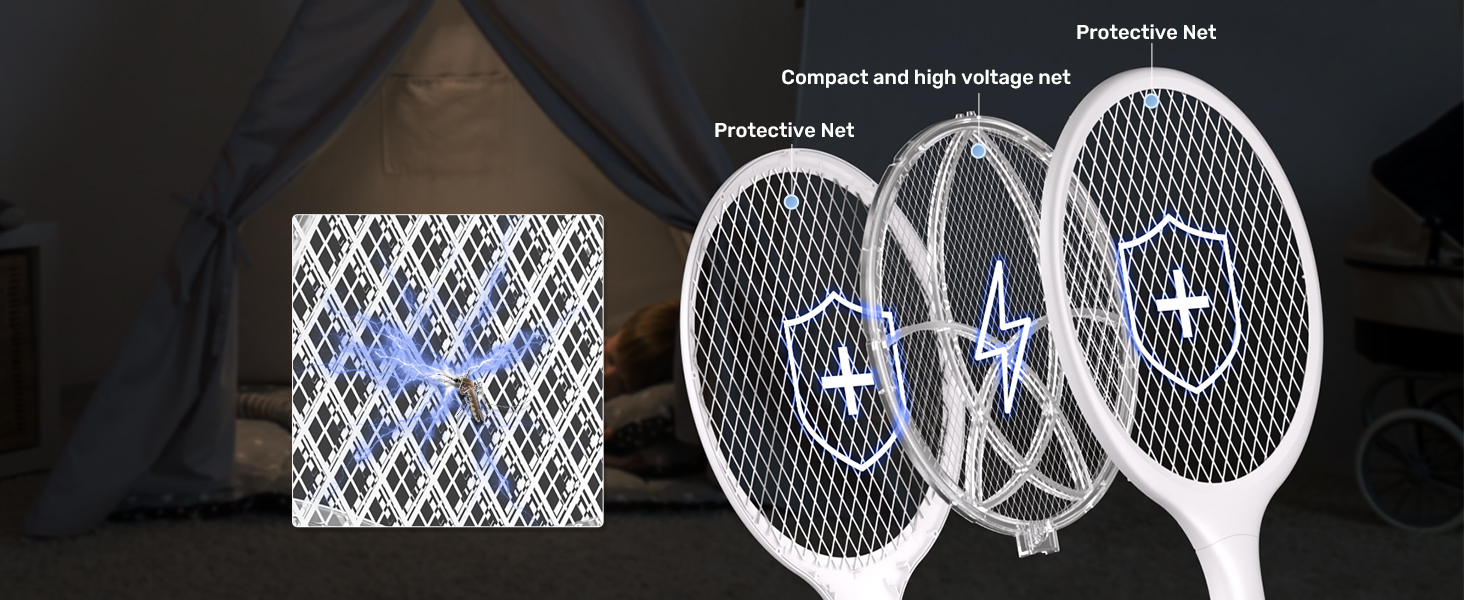
The 365nm wavelength attractant light provides 360° surround light for automatic zapping throughout the night.
5. Maintenance
5.1 Cleaning
To clean the fly swatter, ensure the device is powered OFF and unplugged from any charging source. Gently brush off any insect debris from the grid using a soft, dry brush. Do not use water or wet cloths to clean the electrified grid, as this can damage the device or cause electric shock.
5.2 Storage
When not in use, store the YISSVIC Electric Fly Swatter in a cool, dry place away from direct sunlight and moisture. Ensure the device is fully charged before long-term storage to maintain battery health.
6. Troubleshooting
- Device not zapping: Ensure the device is charged and the power switch is in either Manual or Auto mode. In Manual mode, confirm the Zap Button is pressed and the red indicator light is on.
- Attractant light not working: Verify the device is in Auto mode and has sufficient battery charge.
- Short battery life: Ensure the device is fully charged before use. Battery performance may decrease over time with repeated charging cycles.
- Insects not being attracted: In Auto mode, ensure the area is dark enough for the purple light to be effective. Reduce competing light sources.
7. Specifications
| Feature | Specification |
|---|---|
| Brand | YISSVIC |
| Model Number | WD-981 |
| Voltage | 4000V |
| Battery Capacity | 1500mAh |
| Charging Port | Type-C |
| Product Dimensions | 11.02"L x 1.57"W x 17.32"H |
| Item Weight | 0.59 Pounds (9.4 ounces) |
| Material | Stainless Steel |
| Color | White |
8. Safety Warnings
- Keep out of reach of children and pets.
- Do not touch the internal grid while the device is active or charging.
- Do not use near flammable gases or liquids.
- Do not use in wet environments or expose to rain.
- Do not insert metal objects into the grid.
- This device is not a toy.
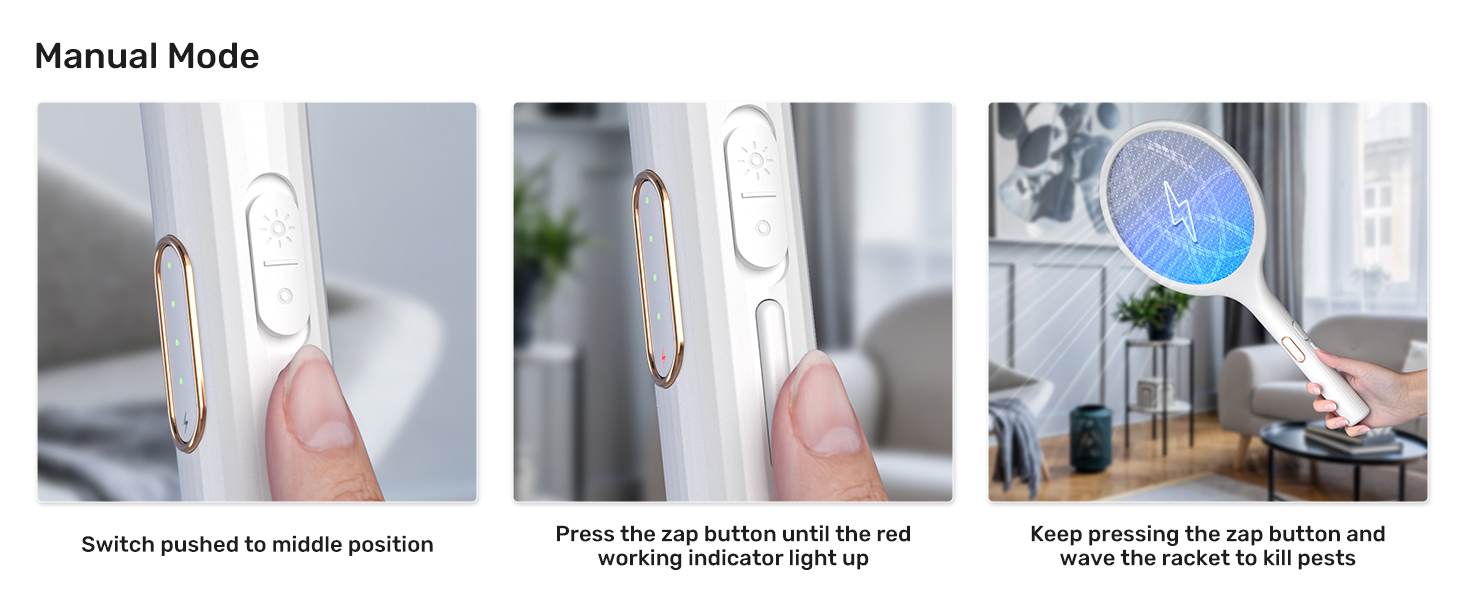
The three-layer protective nets are designed for user safety, preventing direct contact with the high-voltage inner grid.
9. Support
YISSVIC is committed to providing the best service and stands behind its products. For any questions, concerns, or support needs regarding your Electric Fly Swatter, please contact YISSVIC customer service. We are dedicated to ensuring your satisfaction.


