
1. Introduction
The UGREEN USB C 4-in-1 SD Card Reader (Model 50443) is a versatile external memory card adapter designed for high-speed data transfer. It supports various memory card formats and is compatible with a wide range of USB-C enabled devices, including smartphones, tablets, and computers. This manual provides essential information for the proper setup, operation, and maintenance of your card reader.
2. Key Features
- 4-in-1 Card Slots: Supports SD, Micro SD (TF), CF (Compact Flash), and MS (Memory Stick) card formats.
- Universal USB-C Compatibility: Designed for use with iPhone 15 series, MacBook, iPad, Android phones (e.g., Samsung Galaxy S23/S20/S10, Note 20/Note 10, Google Pixel 4 XL, Moto G8/G7), trail cameras, and other USB-C devices.
- High-Speed Data Transfer: Achieves data transfer speeds of up to 5Gbps, allowing quick transfer of large files.
- Simultaneous Card Access: Supports reading and writing to all connected cards concurrently.
- Plug and Play: Driver-free operation across multiple operating systems including Windows, Mac OS, Linux, and Chrome OS.
- Extended Cable Design: Features a 19.5-inch cable to prevent port blocking and provide flexibility for desktop usage.
- Compact and Portable: Mini size for easy transport.
3. Setup Guide
Setting up your UGREEN USB C 4-in-1 SD Card Reader is straightforward. No additional drivers are required for most operating systems.
3.1 Connecting the Card Reader
- Locate an available USB-C port on your device (laptop, tablet, smartphone).
- Insert the USB-C connector of the UGREEN card reader firmly into the USB-C port.
- The device should automatically recognize the card reader. A small LED indicator on the reader may illuminate to show it is powered.

Image: The UGREEN USB C 4-in-1 SD Card Reader connected to a MacBook Pro, illustrating its compact design and multiple card slots.
3.2 Supported Card Types
The card reader supports the following memory card types:
- TF (Micro SD): Micro SD, Micro SDHC, Micro SDXC
- SD: SD, SDHC, SDXC, RS-MMC, MMC Micro
- MS: MS Duo, MS Pro, MS Pro Duo
- CF: Compact Flash

Image: A visual representation of the four card types (TF, SD, MS, CF) supported by the UGREEN 4-in-1 USB C Card Reader.
4. Operation
4.1 Inserting Memory Cards
- Identify the correct slot for your memory card (SD, Micro SD, CF, or MS).
- Gently insert the memory card into its corresponding slot until it clicks into place or is fully seated. Do not force the card.
- Your device's operating system should detect the card and display its contents.
Video: An official UGREEN video demonstrating the plug-and-play functionality and simultaneous card reading/writing of the 4-in-1 USB C SD Card Reader.
4.2 Data Transfer
Once a memory card is inserted and recognized, you can transfer files to and from it just like any other external storage device.
- Open your device's file explorer (e.g., File Explorer on Windows, Finder on Mac).
- Locate the drive letter or name assigned to your memory card.
- Drag and drop files, or use copy/paste functions to move data.
- The card reader supports up to 5Gbps transfer speeds, ensuring fast data movement.

Image: A visual representation highlighting the 5Gbps high-speed data transfer capability of the UGREEN USB C card reader.
4.3 Simultaneous Read & Write
The UGREEN 4-in-1 card reader allows simultaneous access to all inserted cards. This means you can transfer data between different card types or between a card and your device at the same time.
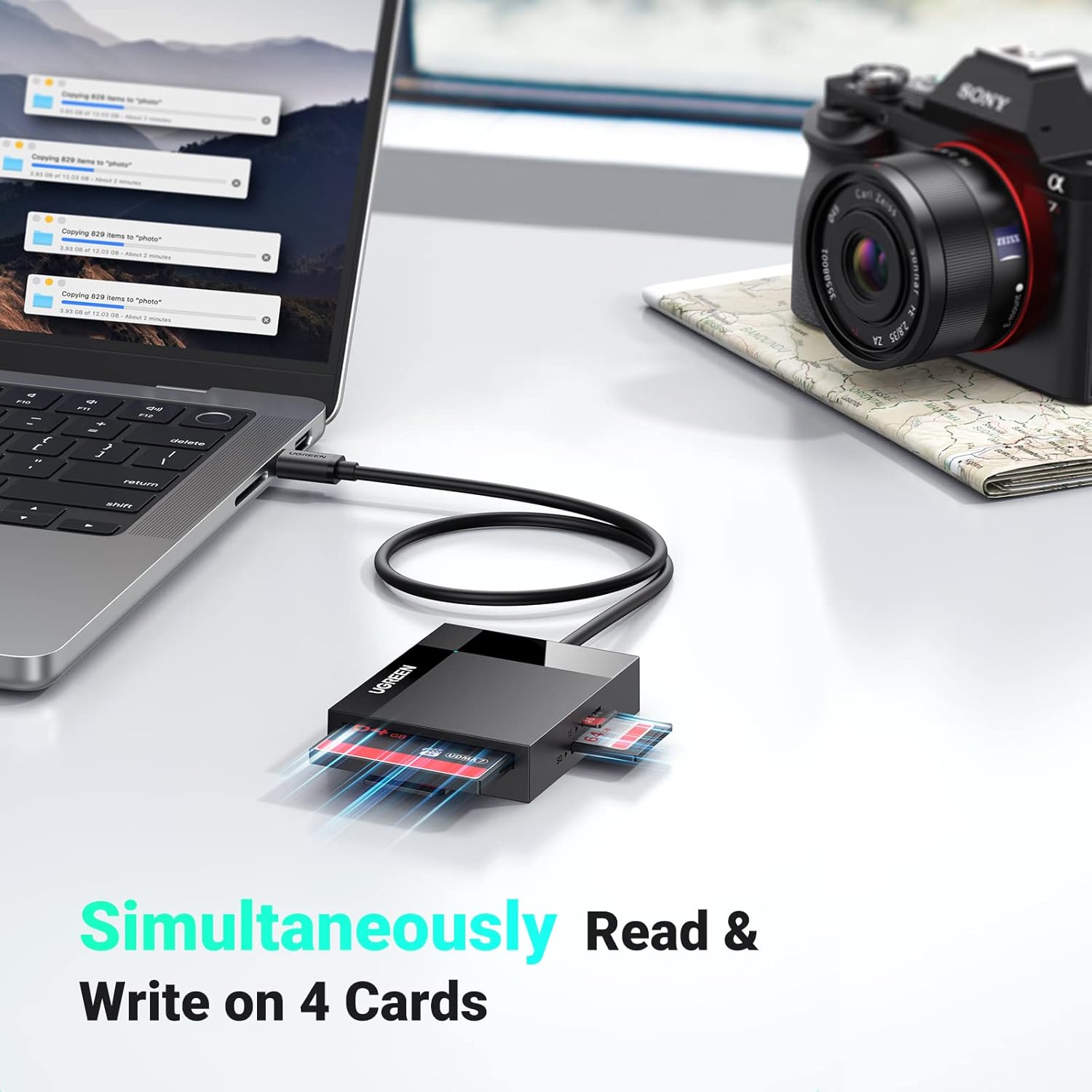
Image: The UGREEN card reader connected to a laptop, demonstrating its ability to read and write to four different memory cards simultaneously.
5. Maintenance
To ensure the longevity and optimal performance of your UGREEN USB C 4-in-1 SD Card Reader, follow these maintenance guidelines:
- Keep Clean: Regularly wipe the exterior of the card reader with a soft, dry cloth. Avoid using liquid cleaners or solvents.
- Protect Ports: Keep the card slots and USB-C connector free from dust and debris. Use compressed air if necessary, but avoid inserting sharp objects.
- Handle with Care: Avoid dropping the device or subjecting it to strong impacts.
- Proper Storage: When not in use, store the card reader in a cool, dry place away from direct sunlight and extreme temperatures.
- Cable Care: Do not bend the cable excessively or sharply. The cable is designed for durability but improper handling can cause damage.

Image: A close-up view of the UGREEN USB-C cable, illustrating its robust design and flexibility, capable of withstanding over 10,000 bends.
6. Troubleshooting
If you encounter issues with your UGREEN USB C 4-in-1 SD Card Reader, refer to the following common problems and solutions:
| Problem | Possible Solution |
|---|---|
| Card reader not detected by device. |
|
| Memory card not recognized. |
|
| Slow data transfer speeds. |
|
| Cannot access multiple cards simultaneously. |
|
7. Specifications
| Feature | Detail |
|---|---|
| Brand | UGREEN |
| Model Number | 50443 |
| Connectivity Technology | USB Type C |
| Media Types Supported | CompactFlash, Memory Stick, SD Card, microSD |
| Data Transfer Rate | Up to 5 Gigabits Per Second (5Gbps) |
| Slot Count | 4 (SD, Micro SD, CF, MS) |
| Compatible Devices | USB C Laptops, PCs, Phones (e.g., iPhone 15), iPads, Trail Cameras, Game Cameras |
| Operating System Compatibility | Windows, Mac OS, Linux, Android, Chrome OS |
| Color | Black |
| Cable Length | Approximately 19.5 inches (Extended Cable Design) |
| Maximum Card Capacity | Supports up to 2TB memory cards |
8. Warranty Information
This UGREEN USB C 4-in-1 SD Card Reader is covered by a 24 Months Warranty Service provided by UGREEN. Please retain your proof of purchase for warranty claims. For detailed warranty terms and conditions, refer to the official UGREEN website or contact customer support.
9. Customer Support
For further assistance, technical support, or inquiries regarding your UGREEN USB C 4-in-1 SD Card Reader, please visit the official UGREEN website or contact their customer service department. Contact information can typically be found on the product packaging or the UGREEN official website.


