
Mahle 3051022075
Contents
Mahle Smartbike Systems Pulsar ONE Wireless Display Mount - Extended (Sport) User Manual
Model: 3051022075
Introduction
This manual provides comprehensive instructions for the installation, operation, and maintenance of your Mahle Smartbike Systems Pulsar ONE Wireless Display Mount - Extended (Sport). Please read this manual thoroughly before use to ensure proper functionality and safety.
Product Overview
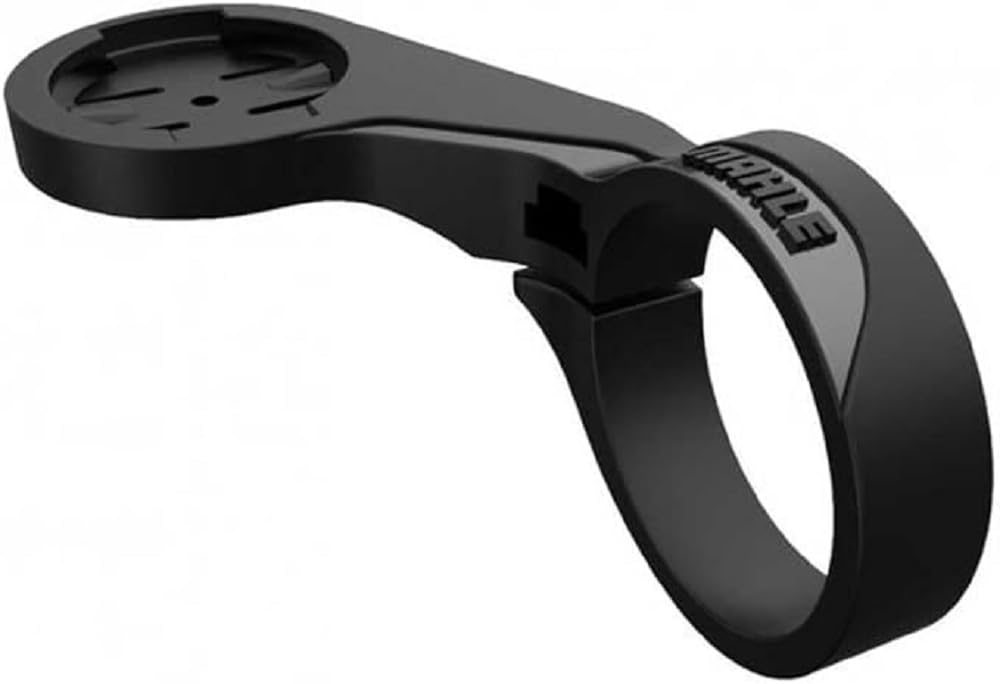
Figure 1: The Mahle Smartbike Systems Pulsar ONE Wireless Display Mount, shown in black, designed for extended reach and sport applications. It features a circular clamp for handlebar attachment and a flat top platform with a four-slot interface for securing the Pulsar ONE display.
The Mahle Pulsar ONE Wireless Display Mount is designed to securely attach your Pulsar ONE display to your bicycle's handlebars. This extended sport version provides optimal positioning for clear visibility during rides.
Setup and Installation
Tools Required:
- Hex key (size may vary, typically 3mm or 4mm)
- Torque wrench (recommended for precise tightening)
Installation Steps:
- Identify Mounting Location: Choose a suitable location on your bicycle's handlebars that allows for clear visibility of the Pulsar ONE display and does not obstruct other controls.
- Open the Clamp: Loosen the screw on the clamp of the display mount using the appropriate hex key until the clamp can be opened sufficiently to fit around the handlebar.
- Position the Mount: Place the open clamp around the handlebar at your desired location. Ensure the display platform is oriented correctly for optimal viewing.
- Secure the Clamp: Tighten the clamp screw. Gradually tighten the screw, ensuring the mount is secure but not overtightened. Refer to your bicycle's handlebar specifications or the mount's packaging for recommended torque settings if available. Overtightening can damage handlebars or the mount.
- Attach Pulsar ONE Display: Align the back of your Mahle Pulsar ONE display with the four-slot interface on the mount. Gently push and twist the display clockwise until it clicks securely into place.
- Verify Stability: Gently tug on the installed mount and display to ensure it is firmly attached and does not rotate or slide on the handlebar.
Operating Instructions
Once the display mount is securely installed and the Pulsar ONE display is attached, the mount requires no further operation. Its function is to provide a stable platform for the display.
Removing the Pulsar ONE Display:
- To remove the Pulsar ONE display from the mount, gently press down on the release tab (if present on your display model) or twist the display counter-clockwise until it disengages from the mount.
- Always remove the display by twisting, not by pulling directly, to prevent damage to the locking mechanism.
Maintenance
The Mahle Pulsar ONE Wireless Display Mount is designed for durability and requires minimal maintenance.
- Cleaning: Wipe the mount with a damp cloth to remove dirt and grime. Avoid using harsh chemicals or abrasive cleaners, as these can damage the material.
- Inspection: Periodically inspect the mount for any signs of wear, cracks, or damage, especially around the clamp and the display interface.
- Tightness Check: Regularly check the tightness of the clamp screw to ensure the mount remains securely fastened to the handlebar. Retighten if necessary, adhering to recommended torque specifications.
Troubleshooting
This section addresses common issues you might encounter with the display mount.
| Problem | Possible Cause | Solution |
|---|---|---|
| Mount slides on handlebar | Clamp screw is loose. | Tighten the clamp screw. Ensure it is snug but do not overtighten. |
| Display does not attach securely | Incorrect alignment or debris in interface. | Ensure the display is correctly aligned with the four slots. Check for any debris in the interface and clean if necessary. |
| Mount appears damaged | Physical impact or material fatigue. | Discontinue use immediately. Contact Mahle support for replacement options. |
Specifications
| Feature | Detail |
|---|---|
| Model Number | 3051022075 |
| Product Name | Pulsar ONE Wireless Display Mount - Extended (Sport) |
| Brand | Mahle |
| Package Dimensions | 7.64 x 4.57 x 1.3 inches |
| Item Weight | 0.704 ounces |
| Manufacturer | Mahle |
| Date First Available | January 9, 2025 |
Warranty and Support
For information regarding product warranty, returns, or technical support, please refer to the official Mahle Smartbike Systems website or contact their customer service directly. Keep your proof of purchase for warranty claims.
Mahle Official Website: www.mahle-smartbike.com
Ask a question about this manual
Ask about setup, troubleshooting, compatibility, parts, safety, or missing instructions. Manuals+ will review the question and use this page’s manual context to help answer it.