
Introduction
This manual provides essential instructions for the safe and efficient operation, setup, and maintenance of your Canglan Technology Plastic Shredder/Bottle Crusher/Granulator. Please read this manual thoroughly before operating the machine to ensure proper usage and to prevent injury or damage.
Important Safety Instructions
Always prioritize safety when operating machinery. Failure to follow these instructions may result in serious injury or equipment damage.
- Read the Entire Manual: Understand all operating procedures and safety warnings before use.
- Personal Protective Equipment (PPE): Always wear appropriate safety glasses, gloves, and hearing protection. Avoid loose clothing or jewelry that could get caught in moving parts.
- Power Disconnection: Disconnect the machine from the power source before performing any maintenance, cleaning, or when the machine is not in use.
- Stable Surface: Operate the machine on a stable, level surface to prevent tipping.
- Clear Work Area: Keep the work area clean and well-lit. Remove any obstructions or debris.
- Authorized Personnel Only: Only trained and authorized individuals should operate this equipment.
- Emergency Stop: Familiarize yourself with the location and operation of the emergency stop button.
- Material Compatibility: Only process materials specified for this machine. Do not attempt to shred metal, glass, or other non-plastic items.
- Keep Hands Clear: Never place hands or any body parts near the shredding mechanism while the machine is operating or connected to power.
Product Specifications
The following are the technical specifications for the Canglan Technology Plastic Shredder/Bottle Crusher/Granulator:
| Specification | Value |
|---|---|
| Voltage | 220V, 50HZ or 380V, 50HZ |
| Capacity | 50-100 kg/h |
| Power | 2.2 kW |
| Rotating Blade Quantity | 9 |
| Fixed Blade Quantity | 2 |
| Mesh Size | 6 mm |
| Rotated Rate | 52 r/min |
| Feed Port Dimension | 110 mm x 180 mm |
| Dimension (L x W x H) | 630 mm x 520 mm x 950 mm |
| Weight | 160 KG |
Setup Instructions
Follow these steps to properly set up your plastic shredder:
- Unpacking: Carefully remove the machine from its packaging. Inspect for any shipping damage. Report any damage to the carrier immediately.
- Placement: Position the machine on a firm, level, and stable surface capable of supporting its weight (160 KG). Ensure adequate clearance around the machine for operation and maintenance.
- Power Connection: Verify that the power supply matches the machine's voltage requirements (220V or 380V, 50HZ). Connect the power cord to a grounded electrical outlet. Ensure the emergency stop button is engaged before connecting power.
- Initial Inspection: Before first use, check all bolts and fasteners for tightness. Ensure all safety guards are in place and functioning correctly.

Image 1: Front view of the Canglan Technology Plastic Shredder. This image shows the main body of the machine, including the feed hopper, motor housing, and the base with wheels.
Operating Instructions
Follow these steps for safe and effective operation:
- Pre-Operation Check: Ensure the machine is properly set up, all safety guards are in place, and the work area is clear. Confirm that the collection bin for shredded material is correctly positioned.
- Power On: Disengage the emergency stop button. Turn on the main power switch. The machine should start. Listen for any unusual noises. If any abnormal sounds are heard, immediately press the emergency stop button and investigate.
- Feeding Material: Carefully feed plastic materials (e.g., plastic bottles) into the feed port. Do not overload the machine. Feed materials gradually to maintain consistent operation. Never push material with your hands. Use a non-metallic pusher if necessary.
- Monitoring: Continuously monitor the machine's operation. If the machine jams or shows signs of strain, immediately press the emergency stop button.
- Power Off: Once shredding is complete, turn off the main power switch. Engage the emergency stop button.
- Clear Output: Wait for all moving parts to come to a complete stop before clearing the output area or collection bin.
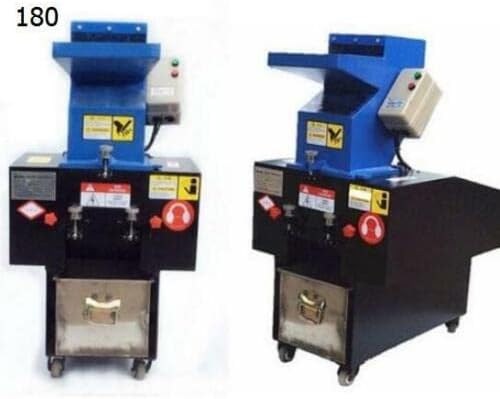
Image 2: Two views of the Canglan Technology Plastic Shredder, one showing the machine with an integrated collection bin below the shredding mechanism, and another view from a slightly different angle. This illustrates the machine's compact design and how shredded material is collected.
Maintenance
Regular maintenance ensures the longevity and optimal performance of your machine. Always disconnect power before performing any maintenance.
- Cleaning: After each use, clean the feed port, shredding chamber, and output area to remove any plastic residue. Use a brush or compressed air. Do not use water directly on electrical components.
- Blade Inspection: Periodically inspect the rotating and fixed blades for wear, damage, or dullness. Sharp blades are crucial for efficient shredding. Refer to the manufacturer for blade replacement or sharpening services.
- Lubrication: Check and lubricate moving parts as recommended by the manufacturer.
- Fastener Check: Regularly check all nuts, bolts, and screws for tightness. Tighten any loose fasteners.
- Electrical System: Inspect the power cord and electrical connections for any signs of wear or damage. Replace damaged components immediately.
Troubleshooting
This section addresses common issues you might encounter. For problems not listed here, contact customer support.
| Problem | Possible Cause | Solution |
|---|---|---|
| Machine does not start | No power; Emergency stop engaged; Loose connection | Check power supply; Disengage emergency stop; Inspect and secure connections |
| Machine jams during operation | Overloading; Incorrect material; Dull blades | Reduce material quantity; Ensure correct material type; Inspect and sharpen/replace blades |
| Poor shredding performance | Dull blades; Incorrect mesh size; Motor strain | Inspect and sharpen/replace blades; Verify mesh size is appropriate; Do not overload |
| Unusual noise or vibration | Loose components; Foreign object; Worn bearings | Tighten fasteners; Disconnect power and inspect for foreign objects; Contact support for bearing issues |
Warranty and Customer Support
For warranty information, technical assistance, or to order replacement parts, please contact Canglan Technology customer support. Refer to your purchase documentation for specific warranty terms and contact details.
You can visit the official Canglan Technology store on Amazon for more information: Canglan Technology Store