
1. Product Overview
The Garmin vívomove Trend is a stylish 40 mm hybrid smartwatch that combines a classic analog watch design with essential smart features. It offers a long-lasting battery life, dynamic watch hands, and a hidden touchscreen display. This device helps you stay connected and monitor your health and fitness throughout the day.

Figure 1: Front view of the Garmin vívomove Trend Smartwatch.
Key Features:
- Stylish 40 mm hybrid smartwatch with a stainless steel bezel and smart features.
- Battery life: up to 5 days in smart mode and up to one additional day in watch mode (hands tell time only).
- Hidden full-dial touchscreen display that reacts to your movements and is visible only when needed.
- Smart notifications for incoming calls, text messages, and calendar view when paired with your Apple or Android smartphone.
- Comprehensive health monitoring: continuous heart rate sampling, Body Battery energy levels, Pulse Ox, sleep score, stress tracking, and women’s health tracking.
- Garmin Pay contactless payment solution for convenient transactions.
- Everyday fitness tracking: steps, floors climbed, calories, and intensity minutes.
- Connected GPS for outdoor activities (walk, run, bike) and preloaded activity profiles (yoga, strength, cardio, pool swim).
- Safety and tracking features: incident detection and Assistance (sends live location to emergency contacts).
2. What's in the Box
- vívomove Trend Smartwatch
- Charging/Data Cable
- Documentation (Quick Start Manual)
3. Setup
3.1 Charging the Device
Before using your vívomove Trend for the first time, it is recommended to fully charge it. Use the provided charging/data cable.
- Plug the small end of the charging cable into the charging port on your watch.
- Plug the large end of the charging cable into a USB charging port.
- The watch display will show the current battery charge level.
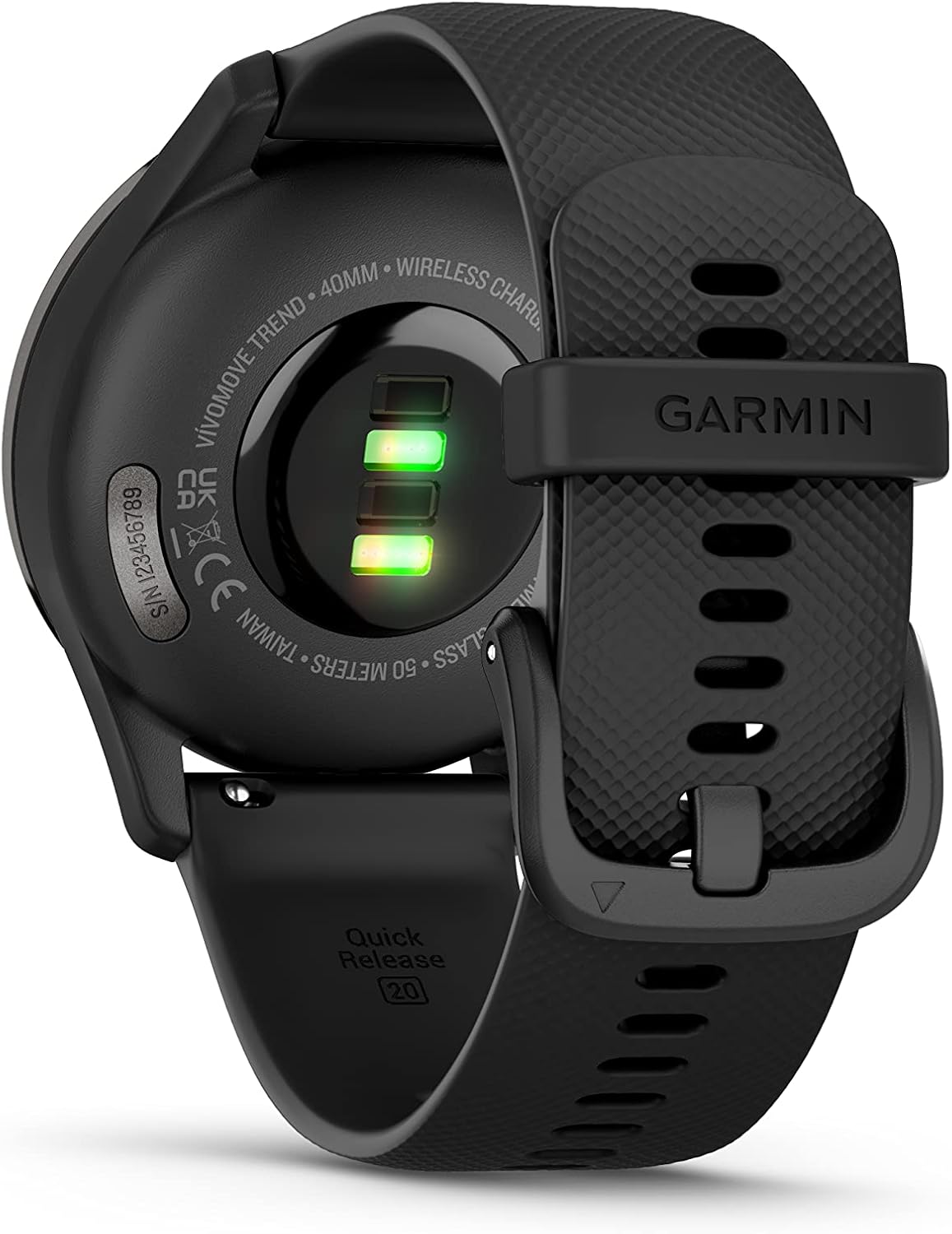
Figure 2: Rear view of the watch with charging contacts.
3.2 Pairing with Your Smartphone
To access all smart features, you must pair your vívomove Trend with a compatible smartphone using the Garmin Connect app.
- Download the Garmin Connect app from your smartphone's app store.
- Enable Bluetooth on your smartphone.
- Open the Garmin Connect app and follow the on-screen instructions to create an account or sign in.
- Follow the app's instructions to pair your vívomove Trend.

Figure 3: The Garmin Connect App for managing your device and data.
4. Operating Instructions
4.1 Touchscreen Display
The vívomove Trend features a hidden touchscreen display that becomes visible when you interact with the watch. The analog watch hands dynamically move out of the way to reveal the digital information.
- Tap: Tap the screen to wake the device or select an option.
- Swipe: Swipe up or down to scroll through widgets, features, and menus.
- Hold: Hold the touchscreen to view the menu.

Figure 4: The hidden touchscreen display showing time and date.
4.2 Smart Notifications
Receive smart notifications directly on your watch when paired with your smartphone. The watch will vibrate and display the notification content.
- Swipe up or down to view notification details.
- Tap to dismiss a notification.

Figure 5: Smart notifications appearing on the watch face.
4.3 Garmin Pay™ Contactless Payments
Make secure payments directly from your wrist using Garmin Pay. Set up your virtual wallet in the Garmin Connect app.
- Hold the touchscreen to view the menu.
- Select the Garmin Pay icon.
- Enter your passcode (if set up).
- Hold your wrist near the contactless reader.
5. Health and Wellness Features
The vívomove Trend provides a suite of tools to help you understand your body better.
- Heart Rate Monitoring: Continuous heart rate sampling throughout the day and during activities.
- Body Battery™ Energy Monitoring: Tracks your body's energy levels to help you identify optimal times for activity and rest.
- Pulse Ox Sensor: Spot-check your blood oxygen saturation at any point during the day or night.
- Sleep Score and Monitoring: Understand your sleep quality with detailed insights into sleep stages and respiration.
- Stress Tracking: Monitors your stress levels and provides relaxation reminders.
- Women's Health Tracking: Use the Garmin Connect app to track menstrual cycle or pregnancy.

Figure 6: Health monitoring features displayed on the watch.
6. Activity Tracking
Track your daily activities and workouts with precision.
- Daily Fitness Tracking: Monitors steps, floors climbed, calories burned, and intensity minutes.
- Connected GPS: Connects with your smartphone’s GPS to track outdoor walk, run, or bike activities.
- Preloaded Sports Apps: Includes activity profiles for yoga, strength, cardio, pool swim, and more.

Figure 7: Activity tracking interface on the vívomove Trend.
7. Safety and Tracking Features
When paired with a compatible smartphone, the vívomove Trend offers safety and tracking features.
- Incident Detection: Automatically sends a message with your live location to emergency contacts during select outdoor activities.
- Assistance: Manually sends a message with your live location to emergency contacts.
8. Maintenance
8.1 Device Care
- Clean the device regularly with a soft, damp cloth.
- Avoid harsh chemicals, solvents, and abrasive cleaners.
- Rinse the device thoroughly with fresh water after exposure to chlorine, salt water, sunscreen, cosmetics, alcohol, or other harsh chemicals.
8.2 Water Resistance
The vívomove Trend has a water resistance rating of 5 ATM, making it suitable for splashes, rain or snow, showering, swimming, diving into water, and snorkeling. It is not suitable for scuba diving.
9. Troubleshooting
9.1 Connectivity Issues
If your watch is not connecting to your smartphone:
- Ensure Bluetooth is enabled on your smartphone and the watch.
- Make sure your smartphone is within range of the watch.
- Restart both your smartphone and the watch.
- Try unpairing and re-pairing the device through the Garmin Connect app.
9.2 Display Not Responding
If the touchscreen is unresponsive, try restarting the device by holding the button until the watch powers off, then press it again to power on.
10. Specifications
| Feature | Specification |
|---|---|
| Model Name | vívomove Trend |
| Model Number | 010-02665-00 |
| Brand | Garmin |
| Physical Size | 40.4 x 40.4 x 11.9 mm |
| Fits Wrists With Circumference | 125-190 mm |
| Battery Life (Smart Mode) | Up to 5 days |
| Battery Life (Watch Mode) | Up to 1 additional day |
| Water Resistance Rating | 5 ATM (Swim-friendly) |
| Connectivity Technology | Bluetooth, USB |
| Display Type | Hidden touchscreen OLED |
| Display Resolution | 240 x 240 pixels |
| Case Material | Stainless Steel |
| Band Material | Stainless Steel (Quick Release 20mm) |
| Memory Storage Capacity | 14 MB |
| GPS | Connected GPS (via smartphone) |
11. Official Product Video
Video 1: Official product overview of the Garmin vívomove Trend, highlighting its design and key smart features.
12. Warranty and Support
The Garmin vívomove Trend comes with a 1-year limited warranty. For detailed warranty information, product support, or to register your device, please visit the official Garmin website or refer to the documentation included in your product box.