1. Product Overview
The JOYO Dr.J Series D53 Bass Pedal is a compact overdrive and amp simulator designed for bass guitars. It features controls for Drive, High and Low Frequency, HF Harmonics, and Mix, along with analog cabinet emulation. This pedal includes an XLR output for direct injection (DI) into mixing consoles for live performances or professional recording, and a parallel 1/4" output for connecting to a stage amplifier.

Figure 1: Top view of the JOYO Dr.J Series D53 Bass Pedal, illustrating the control knobs and footswitch.
Key Features:
- Compact design with robust construction.
- Captures the sound of a mic'd classic tube bass amp.
- Analog cabinet emulation circuitry.
- Integrated XLR output for DI (Direct Injection) applications.
- Parallel 1/4" output for connection to a stage amplifier.
2. Safety Information
- Ensure the pedal is powered by a DC 9V, 800mA power supply with a central negative polarity. Using an incorrect power supply may damage the unit and void the warranty.
- Do not expose the unit to water or excessive moisture.
- Avoid extreme temperatures or direct sunlight.
- Do not attempt to disassemble or modify the unit. Refer all servicing to qualified personnel.
- Keep out of reach of children.
3. Setup
3.1 Power Connection
Connect a DC 9V, 800mA power supply (center negative) to the DC 9V input jack on the pedal. The power supply is not included with the pedal.

Figure 2: Close-up view of the DC 9V power input jack, indicating central negative polarity. A compatible power supply is required and sold separately.
3.2 Audio Connections
- Connect your bass guitar to the 1/4" input jack on the right side of the pedal.
- For direct connection to a mixing console or audio interface, use an XLR cable from the XLR OUTPUT on the left side of the pedal.
- For connection to a bass amplifier, use a 1/4" instrument cable from the parallel 1/4" output jack on the right side of the pedal.
4. Operating Instructions
The Dr.J Series D53 Bass Pedal features six control knobs and a footswitch for engaging the effect. The pedal is designed to capture the sound of a mic'd classic tube bass amp, offering versatile tone shaping.

Figure 3: Labeled diagram of the JOYO Dr.J Series D53 Bass Pedal controls and outputs.
4.1 Controls:
- LOW: Adjusts the low frequency response of the tone.
- HIGH: Adjusts the high frequency response of the tone.
- DRIVE: Controls the amount of overdrive/gain. Turn clockwise for more distortion.
- HARMONICS: Adjusts the level of high-frequency harmonics, adding clarity and presence.
- VOLUME: Controls the overall output volume of the pedal.
- MIX: Blends the dry (original) signal with the wet (effected) signal. Turn clockwise to increase the proportion of the effected signal.
- GND LIFT (Switch): Engages or disengages the ground lift for the XLR output, useful for eliminating hum or ground loop noise.
- Footswitch: Toggles the effect on/off. The blue LED indicates when the effect is active.
5. Maintenance
- Clean the pedal regularly with a soft, dry cloth. Do not use abrasive cleaners or solvents.
- Store the pedal in a cool, dry place away from direct sunlight and extreme temperatures.
- Disconnect the power supply when the pedal is not in use for extended periods.
- Periodically check all cable connections for secure fit.
6. Troubleshooting
| Problem | Possible Cause | Solution |
|---|---|---|
| No sound or weak signal | Incorrect power supply; loose cables; pedal not engaged; volume knob too low. | Verify power supply (DC 9V, center negative); check all cable connections; press footswitch to engage effect (blue LED on); increase VOLUME knob. |
| Humming or buzzing noise | Ground loop; faulty cables; interference from other electronics. | Engage the GND LIFT switch; try different cables; move pedal away from power sources or other electronic devices. |
| Unexpected 'pop' sound when engaging/disengaging | Normal characteristic of some analog pedals; high gain settings. | This can be a characteristic of the pedal's design. Try reducing the DRIVE or HARMONICS settings before engaging/disengaging the effect. |
| Effect is not noticeable | MIX knob setting; DRIVE knob too low. | Adjust the MIX knob towards the wet signal; increase the DRIVE knob. |
7. Specifications
| Attribute | Value |
|---|---|
| Model Number | Manufacturer-JYPS-00D53 |
| Dimensions (L x W x H) | 4.02" x 3.15" x 2.28" (102mm x 80mm x 58mm) |
| Weight | 9.5 ounces (270 Grams) |
| Power Requirement | DC 9V, 800mA (Center Negative) |
| Compatible Devices | Bass Guitar |
| Connector Type | 1/4-Inch Straight, XLR |
| Signal Format | Analog |
| Material Type | Alloy, Aluminum, Carbon Fiber, Plastic, Steel |
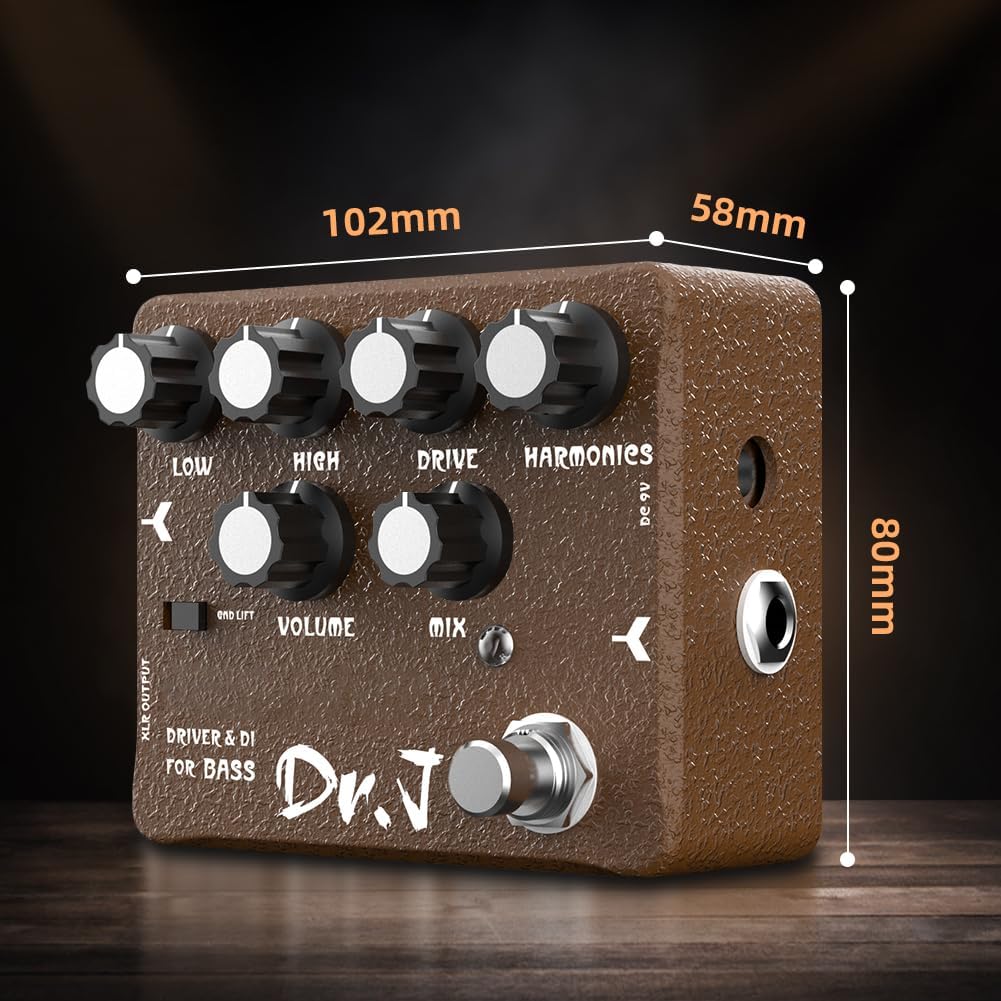
Figure 4: Dimensions of the JOYO Dr.J Series D53 Bass Pedal.
8. Warranty and Support
JOYO is committed to providing excellent service. If you encounter any problems with the use of this product, please contact our customer support. We aim to provide prompt service within 24 hours to address your concerns.
For further assistance, please visit the official JOYO website or contact your local distributor.