
1. Introduction
This manual provides essential information for the safe installation, operation, and maintenance of your V-Guard Exado Pro AS Ceiling Fan. Please read these instructions carefully before installation and retain them for future reference.
The V-Guard Exado Pro AS is a 1200 mm ceiling fan designed for efficient air circulation in various indoor spaces. It features a high-speed motor, anti-dust repellent coating, and durable aluminum blades for enhanced performance and longevity.
2. Safety Instructions
Important: Always follow basic safety precautions when installing, operating, and maintaining electrical appliances to reduce the risk of fire, electric shock, and personal injury.
- Ensure the power supply is disconnected before installation, cleaning, or maintenance.
- Installation must be performed by a qualified electrician in accordance with local wiring regulations.
- The mounting structure must be capable of supporting the fan's weight (approximately 4.2 kg) and the dynamic load during operation.
- Ensure all electrical connections are secure and properly insulated.
- Do not operate the fan if any part is damaged or missing.
- Keep hands, hair, and clothing away from moving blades.
- This fan is designed for indoor use only.
- Do not use the fan in areas with high humidity or where it may be exposed to water.
3. Package Contents
Verify that all components are present and undamaged before proceeding with installation. The package should contain:
- 1 x Fan Motor
- 1 x Top Canopy
- 1 x Bottom Canopy
- 1 x Down Rod
- 1 x Shackle Set
- 3 x Precisely Balanced Blades (Aluminium)
- 1 x Operating Manual and Warranty Guide

Image: V-Guard Exado Pro AS Ceiling Fan with its main components.
4. Installation
Installation should only be carried out by a qualified electrician. Refer to the included Operating Manual for detailed wiring diagrams and step-by-step instructions.
- Prepare the Mounting Location: Ensure the ceiling joist or support structure is strong enough to hold the fan's weight and is properly grounded.
- Install the Mounting Bracket: Securely attach the mounting bracket to the ceiling outlet box or support structure using appropriate hardware.
- Assemble the Down Rod and Canopy: Thread the electrical wires from the fan motor through the down rod. Attach the top and bottom canopies to the down rod.
- Hang the Fan Motor: Carefully lift the fan motor assembly and hang it onto the mounting bracket.
- Make Electrical Connections: Connect the fan's electrical wires to the household wiring according to the wiring diagram provided in the manual. Ensure all connections are tight and covered with wire nuts.
- Secure the Canopies: Slide the canopies up to cover the wiring and mounting bracket, then secure them in place.
- Attach the Blades: Securely attach the three aluminum blades to the fan motor using the provided screws. Ensure all blades are balanced.

Image: A technician installing a ceiling fan, demonstrating the installation process.
5. Operating Instructions
The V-Guard Exado Pro AS Ceiling Fan is operated via button control or remote control (if included with your specific model). Ensure the fan is properly installed and connected to a power source before operation.
- Power On/Off: Use the designated switch or remote button to turn the fan on or off.
- Speed Control: Adjust the fan speed using the speed control buttons on the wall switch or remote. The fan operates at a speed of up to 400 RPM, delivering approximately 240 m³/min of air.
- Directional Control (if applicable): Some ceiling fans include a switch on the motor housing to reverse blade direction for seasonal use (downward airflow for cooling, upward airflow for circulating warm air). Consult your specific model's manual for this feature.

Image: The V-Guard Exado Pro AS fan in operation, illustrating its strong airflow and rapid cooling capabilities.
6. Maintenance
Regular maintenance ensures optimal performance and extends the lifespan of your V-Guard Exado Pro AS Ceiling Fan.
- Cleaning: The fan features an anti-dust repellent coating. To clean, ensure the power is off. Wipe the blades and motor housing with a soft, damp cloth. Do not use abrasive cleaners or solvents.
- Blade Tightness: Periodically check that all blade screws are tight. Loose blades can cause wobbling and noise.
- Lubrication: The fan is equipped with double-shielded ball bearings, which are typically sealed and do not require lubrication. Do not attempt to lubricate the motor.
- General Inspection: Annually inspect the fan for any signs of wear, damage, or loose connections. If any issues are found, contact customer support.
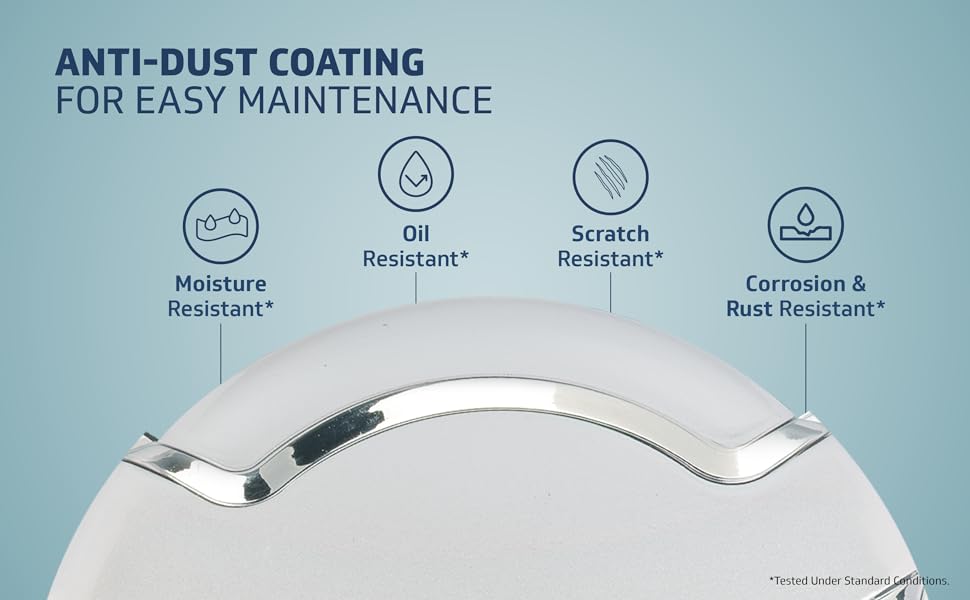
Image: Diagram illustrating the anti-dust coating technology on the fan blades, highlighting its easy maintenance benefit.
7. Troubleshooting
If you encounter issues with your V-Guard Exado Pro AS Ceiling Fan, refer to the following table for common problems and solutions. If the problem persists, contact customer support.
| Problem | Possible Cause | Solution |
|---|---|---|
| Fan does not start | No power supply; Loose wiring; Faulty switch. | Check circuit breaker/fuse; Ensure all connections are secure; Test the switch. |
| Fan wobbles | Loose blades; Unevenly tightened screws; Unbalanced blades; Loose mounting. | Tighten all blade screws; Ensure mounting bracket is secure; Check blade balance. |
| Excessive noise | Loose screws; Motor issues; Obstruction. | Check and tighten all screws; Ensure no objects are interfering with blades; Contact service if motor noise persists. |
| Low airflow | Incorrect speed setting; Dust accumulation on blades. | Increase fan speed; Clean fan blades. |
8. Specifications
| Feature | Detail |
|---|---|
| Brand | V-Guard |
| Model Name | Exado Pro AS |
| Electric Fan Design | Ceiling Fan |
| Colour | Pearl White Silver |
| Product Dimensions (D x W x H) | 56D x 33.5W x 27H Centimeters |
| Item Weight | 4.2 Kilograms |
| Power Source | Electricity |
| Wattage | 60 Watts |
| Number of Blades | 3 |
| Blade Material | Aluminium |
| Blade Length | 1.2 Metres (1200 mm) |
| Air Flow Capacity | 240 Cubic Meters Per Minute |
| Speed | 400 RPM |
| Motor Type | High-speed induction motor with double-shielded ball bearings |
| Special Features | Anti-Dust Repellent Coating, High Velocity |
| Control Method | Button Control, Remote (if applicable) |
| Installation Type | Ceiling Mount (Downrod Mount) |
| Indoor Outdoor Usage | Indoor |
| Finish Type | Matte |
| Specification Met | CE |

Image: Power Savings Guide for the V-Guard Exado Pro AS Ceiling Fan, indicating energy efficiency.
9. Warranty and Support
Your V-Guard Exado Pro AS Ceiling Fan comes with a 30 Months Domestic Warranty from the date of purchase.
For any consumer complaints, service requests, or technical assistance, please contact V-Guard Customer Service:
- Phone: 012 0485 0100, 1860 180 3000
- Email: customercare@vguard.in
- Address: Senior Engineer - Customer Service, V-Guard Industries Ltd. 42/962, Vennala High School Road, Vennala, Kochi- 682028, Kerala, India.
V-Guard offers a Pan India Service network with quick installation support and comprehensive coverage.

Image: Map illustrating V-Guard's Pan India Service network, highlighting widespread support.