Introduction
This manual provides comprehensive instructions for the Lexibook Unicorn Bilingual Educational Computer, model JC598UNIi1. Designed for children aged 3 and up, this device offers a variety of educational activities in both French and English, covering languages, mathematics, logic, and music. Please read this manual carefully to ensure proper use and maintenance of the product.
Package Contents
- Lexibook Unicorn Bilingual Educational Computer
- Wired Mouse
- Instruction Manual (this document)

Image: The Lexibook Unicorn Bilingual Educational Computer shown in its retail packaging, highlighting its bilingual features and 124 activities.
Setup
Battery Installation
The Lexibook Unicorn Bilingual Educational Computer requires 2 AA batteries (not included). Follow these steps to install the batteries:
- Locate the battery compartment on the underside of the computer.
- Using a screwdriver, open the battery compartment cover.
- Insert 2 AA batteries, ensuring correct polarity (+/-) as indicated inside the compartment.
- Replace the battery compartment cover and secure it with the screw.
Connecting the Mouse
The computer comes with a wired mouse for enhanced interaction.
- Locate the mouse port on the side of the computer.
- Plug the mouse connector firmly into the port.
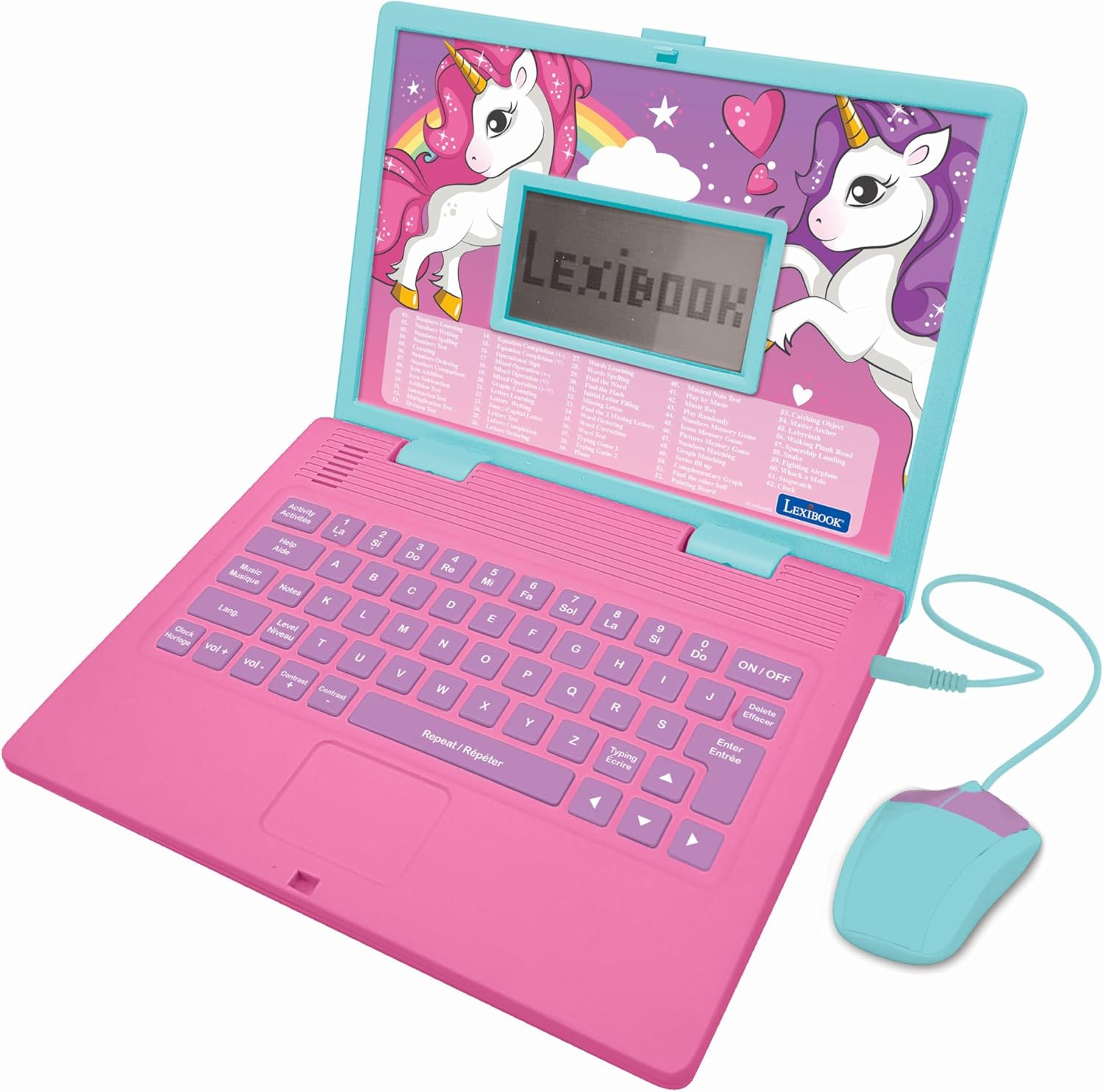
Image: The Lexibook Unicorn Bilingual Educational Computer, pink and blue, with its wired mouse connected, ready for use.
Operating Instructions
Powering On/Off
- To turn on the computer, press the ON/OFF button located on the keyboard.
- To turn off the computer, press the ON/OFF button again.
Navigating Activities
The computer features 124 activities across various categories. Use the keyboard and mouse to navigate.
- Activity Selection: Use the number keys (0-9) to select an activity number displayed on the screen.
- Language Selection: Press the Lang button to switch between French and English.
- Volume Control: Use the Vol + and Vol - buttons to adjust the sound level.
- Music Mode: Press the Music Mode button to access musical activities.
- Repeat/Répéter: Use this button to repeat instructions or sounds.
- Enter/Entrée: Confirm selections or answers.
- Delete/Effacer: Erase incorrect entries.

Image: A detailed view of the computer's keyboard and screen, illustrating the layout of keys for activity selection, language, volume, and other functions.
Activity Categories
The 124 activities are categorized to support various learning areas:
- Languages: Activities focused on letters, words, typing, and spelling in both French and English.
- Mathematics: Exercises covering numbers, basic calculations (addition, subtraction, multiplication, division), and problem-solving.
- Logic: Games and puzzles designed to develop logical thinking, memory, and speed.
- Music: Sections for learning notes, composing melodies, and exploring musical sounds.
- General Knowledge: Activities related to general culture and time reading.

Image: The computer's screen showing a vibrant unicorn graphic and the Lexibook logo, indicating the device is powered on and ready for activity selection.
Maintenance
- Cleaning: Wipe the surface of the computer with a soft, dry cloth. Do not use liquid cleaners or abrasive materials.
- Storage: Store the computer in a cool, dry place away from direct sunlight and extreme temperatures.
- Battery Care: Remove batteries if the device will not be used for an extended period to prevent leakage.
- Handling: Avoid dropping the computer or subjecting it to strong impacts.
Troubleshooting
| Problem | Possible Cause | Solution |
|---|---|---|
| Computer does not turn on. | Batteries are dead or incorrectly installed. | Replace batteries with new AA batteries, ensuring correct polarity. |
| No sound or low volume. | Volume is set too low. | Press the Vol + button to increase volume. |
| Screen is blank or flickering. | Low battery power or temporary software glitch. | Replace batteries. If problem persists, turn off and on again. |
| Mouse is not responding. | Mouse cable is loose or disconnected. | Ensure the mouse cable is securely plugged into the port. |
Specifications
- Model Number: JC598UNIi1
- Product Dimensions: 9.45 x 7.09 x 1.42 inches
- Item Weight: 1.15 pounds
- Power Source: 2 AA batteries (not included)
- Recommended Age: 3 years and up
- Languages: English, French
- Manufacturer: Lexibook
Warranty and Support
For warranty information or technical support, please refer to the contact details provided on the product packaging or visit the official Lexibook website. Keep your purchase receipt as proof of purchase.
Online support: www.lexibook.com/en/support


