
WEIZE SPA-0212
WEIZE 2000W Pure Sine Wave Power Inverter User Manual
Model: SPA-0212
1. Introduction
This user manual provides detailed instructions for the safe and efficient operation of your WEIZE 2000W Pure Sine Wave Power Inverter. This device converts 12V DC power from a battery into 110V AC power, suitable for a wide range of electronic devices and appliances. Please read this manual thoroughly before use and retain it for future reference.
1.1 Safety Precautions
Always observe the following safety guidelines to prevent injury or damage to the inverter and connected devices:
- Ensure proper ventilation around the inverter.
- Do not expose the inverter to water, rain, or excessive moisture.
- Avoid operating the inverter in direct sunlight or near heat sources.
- Connect the inverter only to a 12V DC power source.
- Do not overload the inverter beyond its rated capacity of 2000W.
- Keep out of reach of children.
- Disconnect the inverter from the power source before performing any maintenance or cleaning.
2. Product Features
The WEIZE 2000W Pure Sine Wave Power Inverter is designed with advanced features for reliable performance:
- Pure Sine Wave Output: Provides clean and stable power, ideal for sensitive electronics, reducing audible and electrical noise.
- Digital LCD Display: Clearly shows real-time working status, including input voltage, output wattage, and fault indicators.
- Advanced Protection System: Includes safeguards against low input voltage, high input voltage, overheating, overloading, and short circuits.
- Intelligent Cooling Fan: Automatically adjusts fan speed based on temperature to maintain optimal operating conditions.
- Multiple AC Outlets: Equipped with four 110V AC U.S. standard sockets.
- USB Charging Port: A 5V 2.4A USB output socket for charging mobile devices.
- Remote Control Port: Allows for connection of an external remote switch for convenient operation.

Image: Diagram showing the smooth waveform of pure sine wave power compared to modified sine wave, highlighting advantages such as low harmonic distortion and suitability for inductive loads.

Image: Top view showing intelligent cooling fans, positive and negative input terminals. Front view showing the switch button, digital display, power indicator, protection indicator, 5V 2.4A USB output socket, remote switch connection port, and four AC outlets.

Image: Icons illustrating the advanced protection system, including low input voltage protection, high input voltage protection, overheating protection, overloading protection, and short circuit protection.
3. Package Contents
Verify that all items are present in the package:
- WEIZE 2000W Pure Sine Wave Power Inverter
- Battery Cables (Red and Black, 8AWG, 2.3 Feet with Pure Copper Ring Terminals)
- Remote Control Panel
- Remote Control Cable
- Mounting Brackets (2)
- Mounting Screws and Wall Plugs
- User Manual (this document)
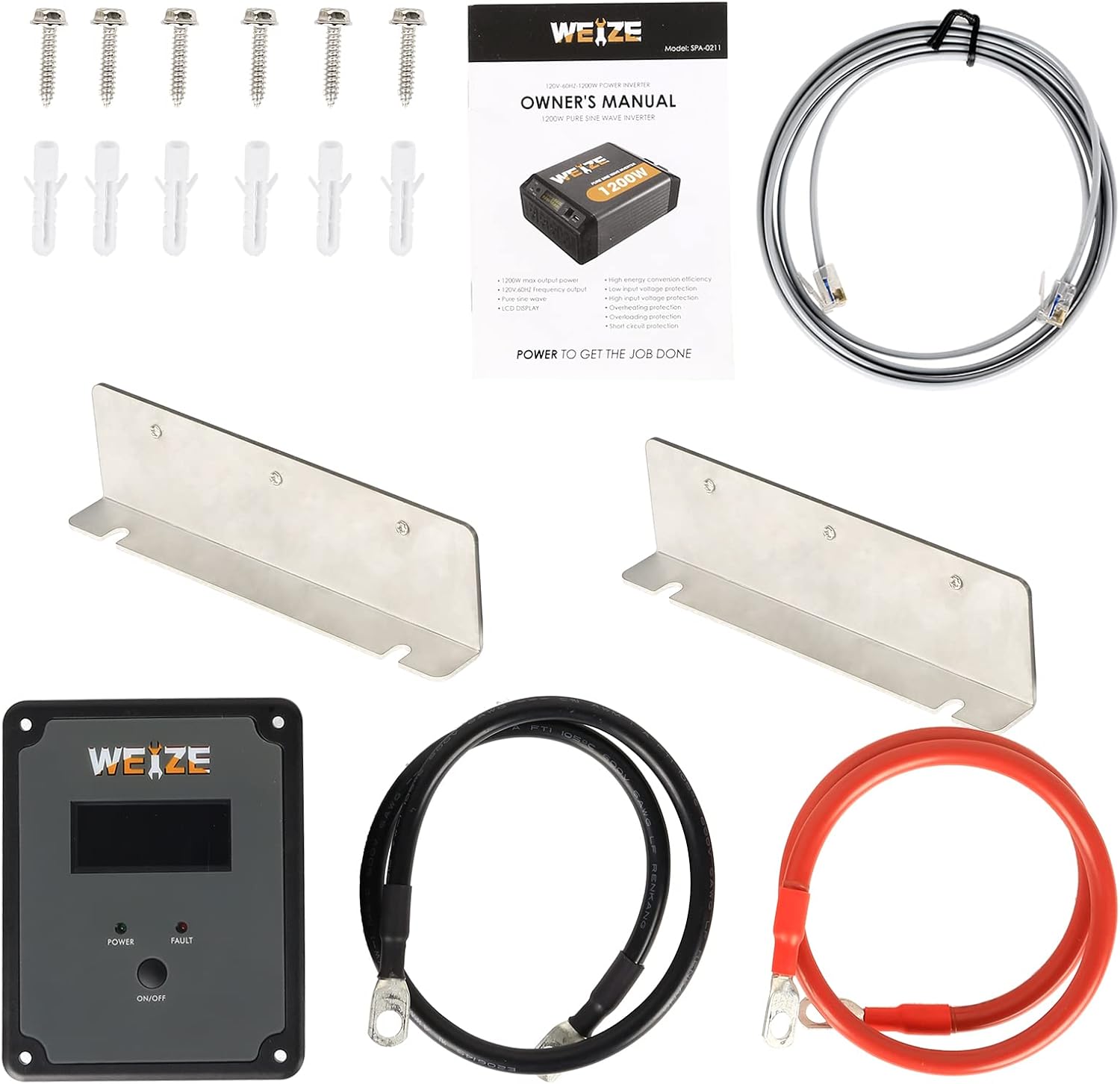
Image: A complete view of all items included in the package: the inverter unit, battery cables, remote control panel, remote control cable, mounting brackets, screws, and the printed owner's manual.

Image: The inverter with dimensions (11.7 inches length, 9.2 inches width) and a close-up of the red and black 8AWG battery cables with pure copper ring terminals.
4. Setup and Installation
4.1 Choosing a Location
Select a location that is:
- Dry and well-ventilated.
- Away from direct sunlight, heat, and flammable materials.
- Accessible for connections and operation.
- Securely mounted to prevent movement.
4.2 Connecting the Inverter
- Ensure the inverter's power switch is in the "OFF" position.
- Connect the red battery cable to the positive (+) terminal of the inverter and the positive (+) terminal of your 12V DC battery.
- Connect the black battery cable to the negative (-) terminal of the inverter and the negative (-) terminal of your 12V DC battery.
- Ensure all connections are tight and secure to prevent arcing and overheating.
- If using the remote control, connect the remote control cable to the "remote control" port on the inverter and the remote panel.

Image: The WEIZE 2000W Pure Sine Wave Power Inverter shown with its included remote control panel and the red and black battery cables, illustrating the complete setup.
5. Operating Instructions
5.1 Powering On
- After ensuring all connections are secure, switch the inverter's power button to the "ON" position.
- The digital LCD display will illuminate, showing the input voltage (DC 12V), output wattage, and output voltage (AC 110V).
- The "POWER" indicator light will turn green.
5.2 Connecting Appliances
- Plug your 110V AC appliances into the AC outlets on the inverter.
- For USB-powered devices, connect them to the 5V 2.4A USB port.
- Ensure the total wattage of all connected appliances does not exceed the inverter's rated output of 2000W.
5.3 Understanding the Display and Indicators
- Digital Display: Shows real-time input voltage (e.g., 12.7V), output wattage (e.g., 330W), and output voltage (e.g., 119V).
- POWER Indicator (Green): Indicates the inverter is powered on and operating normally.
- FAULT Indicator (Red): Illuminates when a fault condition is detected (e.g., overload, low voltage, high voltage, overheating, short circuit). The inverter will typically shut down automatically in such cases.
5.4 Powering Off
- Disconnect all appliances from the inverter.
- Switch the inverter's power button to the "OFF" position.
- If not in use for an extended period, disconnect the inverter from the battery.
6. Applications
The WEIZE 2000W Pure Sine Wave Power Inverter is versatile and suitable for various applications, providing reliable AC power on the go:
- Working: Powering tools like chainsaws for outdoor work.
- Camping: Running small appliances and lights at campsites.
- Outdoors: Operating grills or other outdoor equipment.
- Touring RV: Providing household power for RV appliances.
- Home Backup: Powering essential devices during outages.
- Common Appliances: Hair dryers, laptops, refrigerators, fans, electric drills, CPAP machines, audio systems, and smart HD TVs.
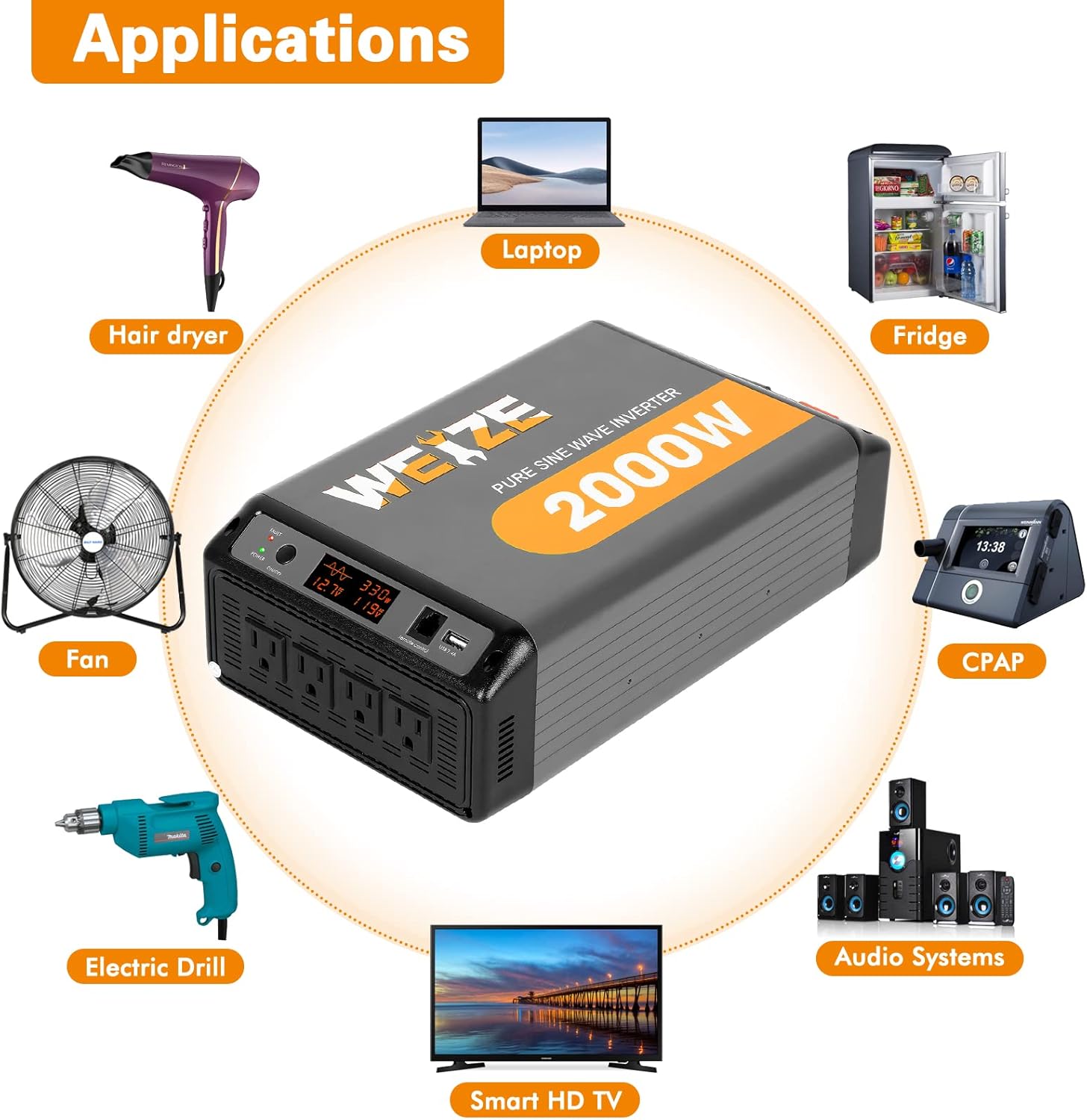
Image: A circular diagram showing various appliances that can be powered by the inverter, including hair dryer, laptop, fridge, CPAP, audio systems, smart HD TV, electric drill, and fan.

Image: Four panels showing the inverter in use: a person using a chainsaw (Working), a car and tent in a scenic landscape (Camping), a barbecue grill outdoors (Outdoors), and an RV (Touring RV). Below, a graphic illustrates a pure sine wave.
7. Maintenance
Regular maintenance ensures the longevity and optimal performance of your inverter:
- Cleaning: Periodically wipe the exterior of the inverter with a dry, soft cloth. Do not use harsh chemicals or abrasive cleaners.
- Ventilation: Ensure the cooling fans and vents are free from dust and obstructions. Clean them gently with compressed air if necessary.
- Connections: Regularly check battery cable connections for tightness and corrosion. Clean terminals if corrosion is present.
- Storage: When not in use for extended periods, store the inverter in a cool, dry place, disconnected from the battery.
8. Troubleshooting
If you encounter issues with your inverter, refer to the following common problems and solutions:
| Problem | Possible Cause | Solution |
|---|---|---|
| Inverter does not turn on. | Loose battery connections, low battery voltage, faulty fuse. | Check and tighten battery cables. Recharge or replace battery. Check inverter fuses. |
| FAULT indicator is red. | Overload, low/high input voltage, overheating, short circuit. | Reduce connected load. Check battery voltage. Allow inverter to cool down. Check for short circuits in wiring or appliances. |
| No AC output. | Inverter in protection mode, appliance drawing too much power, faulty appliance. | Check fault indicator and resolve cause. Ensure appliance wattage is within limits. Test appliance with another power source. |
| Fan runs constantly or loudly. | High internal temperature, heavy load, obstructed vents. | Ensure proper ventilation. Reduce load. Clean vents. |
If the problem persists after attempting these solutions, please contact customer support.
9. Specifications
| Feature | Detail |
|---|---|
| Model | SPA-0212 |
| Rated Power | 2000 Watts |
| Input Voltage | DC 12 Volts |
| Output Voltage | AC 110 Volts |
| Output Waveform | Pure Sine Wave |
| Frequency | 60 Hz |
| USB Output | 5V 2.4A |
| Product Dimensions | 32.89 x 19.1 x 9.8 cm (11.7 x 9.2 inches approx.) |
| Item Weight | 5.47 kg |
| Protection Features | Low/High Input Voltage, Overheating, Overload, Short Circuit |
10. Warranty and Support
WEIZE products are manufactured to high-quality standards. For warranty information or technical support, please refer to the contact details provided on the product packaging or the official WEIZE website. Please have your model number (SPA-0212) and purchase date ready when contacting support.
For further assistance, you may visit the WEIZE brand store on Amazon.
Ask a question about this manual
Ask about setup, troubleshooting, compatibility, parts, safety, or missing instructions. Manuals+ will review the question and use this page’s manual context to help answer it.