1. Introduction
This manual provides comprehensive instructions for the installation, operation, and maintenance of your SIXIN Tuya Smart Motorized Vertical Blinds Motor & Track system. This system allows for automated control of vertical blinds, offering convenience through app control, voice commands, and remote operation. The motorized track supports 180° rotation of blind louvers and can be integrated with smart home ecosystems like Google Assistant and Amazon Alexa.

Figure 1: SIXIN Tuya Smart Motorized Vertical Blinds Motor & Track System
2. Safety Information
Please read all safety instructions carefully before installation and operation. Failure to follow these instructions may result in electric shock, fire, or serious injury.
- Ensure the power supply is disconnected before performing any installation or maintenance.
- This product is designed for indoor use only. Do not expose to water or high humidity.
- Keep children and pets away from the motorized system during operation.
- Do not attempt to repair or modify the device yourself. Contact qualified service personnel for assistance.
- Verify that the mounting surface can support the weight of the motorized track and blinds.
3. Package Contents
Carefully unpack the box and ensure all items listed below are present and undamaged. If any items are missing or damaged, please contact customer service.
- 1 x Motor
- 1 x Motorized Rail (Track)
- 1 x Remote Control
- 1 x Instruction Manual
- Mounting Brackets (Ceiling Brackets)
- Drive Unit, Idler Unit, Loop Stop, Tackle, Runner, Belt, Dimming Rod, Rubber Strip (components of the motorized rail system)

Figure 2: Motorized Curtain System Accessories
4. Key Features
The SIXIN Tuya Smart Motorized Vertical Blinds system offers a range of features designed for convenience and control:
- App Control: Manage curtain opening/closing from your mobile phone using the Tuya Smart or Smart Life App. The WiFi version connects directly, while the Zigbee version requires a Zigbee hub (not included).
- Voice Control: Compatible with Google Assistant and Amazon Alexa for hands-free operation.
- Remote Control: Use the included RF remote for quick control of curtain movement and horizontal louver rotation.
- Manual Opening: Curtains can be manually pulled to initiate automatic opening or closing, useful during power outages.
- Timer Setting: Schedule automatic opening and closing times to suit your daily routine.
- 180° Rotation: Adjust the vertical blind louvers horizontally by 180° to control light and privacy.
- Durable Construction: Features a 2.5 N.m high-torque motor and an aluminum track, capable of supporting 60-120kg of curtain weight.
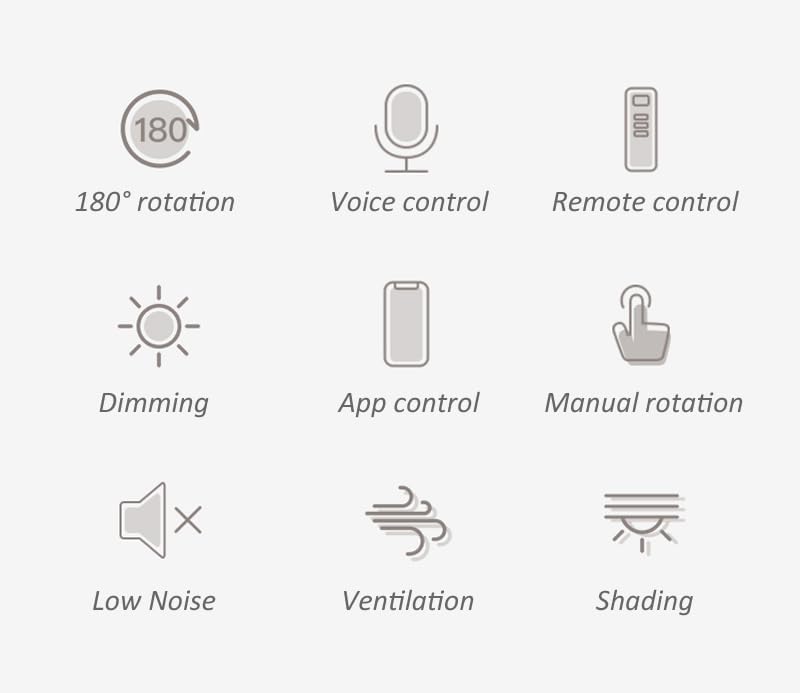
Figure 3: System Feature Icons
5. Setup and Installation
This section outlines the general steps for installing your motorized vertical blinds system. Professional installation is recommended for optimal performance and safety.
5.1 Pre-Installation Considerations
- Motor Orientation: Motors are differentiated between left and right. The default delivery style is motor on the left. If a right-side motor is required, please specify during purchase.
- Track Length: The track length can be customized. Ensure the purchased track length matches your window dimensions.
- Blade Spacing: Default blade spacing is 9cm. Options for 7.8cm or 10.5cm are available upon request.
- Opening Method: The standard opening method is middle to both sides. Single-side opening can be customized.
- Mounting: The system is designed for ceiling mounting. Ensure the ceiling structure is suitable for supporting the weight.
5.2 Installation Steps (General)
- Measure and Mark: Accurately measure the installation area and mark the positions for the ceiling brackets.
- Install Brackets: Securely attach the ceiling brackets to the ceiling using appropriate fasteners for your ceiling type.
- Mount Track: Carefully lift and attach the motorized track to the installed ceiling brackets. Ensure it is level and securely fastened.
- Install Motor: Insert the motor into the designated end of the track. Ensure it clicks into place.
- Connect Power: Connect the motor to a suitable power outlet (100~240V/AC 50/60Hz).
- Attach Blinds: Hang your vertical blind louvers onto the runners within the track system.
- Initial Calibration: Follow the instructions in the separate motor manual for initial calibration of the motor's travel limits and louver rotation.

Figure 4: Installed Motorized Track System
6. Operating Instructions
Your SIXIN motorized vertical blinds system offers multiple ways to control your blinds.
6.1 App Control (Tuya Smart / Smart Life App)
- Download App: Download the 'Tuya Smart' or 'Smart Life' app from your mobile device's app store.
- Register/Login: Create an account or log in to your existing account.
- Add Device: Follow the in-app instructions to add your motorized blinds system. For WiFi versions, direct connection is possible. For Zigbee versions, ensure a Zigbee hub is connected to the app first.
- Control: Once added, you can open, close, stop, and adjust the louver rotation directly from the app interface.
- Timer Setting: Use the app to set schedules for automatic opening and closing at specific times.

Figure 5: App Control Interface
6.2 Voice Control (Google Assistant / Amazon Alexa)
- Link Account: In your Google Home or Amazon Alexa app, link your Tuya Smart/Smart Life account.
- Discover Devices: Allow the voice assistant to discover your new blinds device.
- Voice Commands: Use commands such as:
- "Hey Google, open the blinds."
- "Alexa, close the curtains."
- "Hey Google, set blinds to 50%."
- "Alexa, rotate the blinds."

Figure 6: Voice Control Integration
6.3 Remote Control
Use the provided RF remote control to operate the blinds. Refer to the separate remote control manual for specific button functions. Typically, buttons include open, close, stop, and louver rotation.
6.4 Manual Operation
In case of a power outage or if you prefer manual interaction, gently pull the curtain fabric by hand. The motor will detect the manual input and automatically initiate opening or closing.

Figure 7: Manual Pull Operation
6.5 Timing Function
The timing function allows you to set specific schedules for your blinds to open and close automatically. This feature is configured through the Tuya Smart or Smart Life mobile application.
Figure 8: Timing Function Setup
7. Maintenance
Proper maintenance ensures the longevity and optimal performance of your motorized vertical blinds system.
- Cleaning: For the blinds fabric, follow the product care instructions: Spot Clean Only. For the motor and track, gently wipe with a dry, soft cloth. Do not use abrasive cleaners or solvents.
- Track Inspection: Periodically inspect the track for any obstructions or debris that might hinder smooth operation. Remove any foreign objects carefully.
- Lubrication: The track system is generally maintenance-free regarding lubrication. Do not apply lubricants unless specifically instructed by the manufacturer.
- Power Supply: Ensure the power cable is not pinched or damaged.
8. Troubleshooting
If you encounter issues with your motorized blinds, refer to the following common problems and solutions:
| Problem | Possible Cause | Solution |
|---|---|---|
| Blinds do not move | No power; Remote battery low; Motor not paired; Obstruction in track. | Check power connection; Replace remote batteries; Re-pair motor with remote/app; Clear track obstructions. |
| Blinds stop mid-way | Obstruction; Limit settings incorrect. | Remove obstruction; Re-calibrate motor travel limits. |
| App control not working | No internet connection; Device offline; Incorrect app settings; Zigbee hub issue (if applicable). | Check Wi-Fi/internet connection; Ensure device is online in app; Verify app settings; Check Zigbee hub status. |
| Voice control not responding | Account not linked; Device not discovered; Incorrect commands. | Ensure Tuya/Smart Life account is linked to voice assistant; Re-discover devices; Use correct voice commands. |
| Louver rotation not working | Motor issue; Calibration error. | Check motor connection; Re-calibrate louver rotation limits. |
If the problem persists after attempting these solutions, please contact SIXIN customer support for further assistance.
9. Specifications
| Parameter | Value |
|---|---|
| Model Number | SX-CZBYC-5818-32-US |
| Rated Voltage | 100~240V/AC 50/60Hz |
| Rated Power | 80W |
| Rated Current | 0.8 A |
| Operating Noise | <35 dB |
| Rated Torque | 2.5 N.m |
| Remote Control Frequency | 433.92 MHz |
| Movement Speed | 18 cm/s |
| Louver Rotation Angle | 180° horizontally |
| App Compatibility | Tuya Smart or Smart Life |
| Voice Control Support | Google Assistant and Amazon Alexa |
| Hub Requirement | Not required for WiFi version; Required for Zigbee version (not included) |
| Insulation Class | E |
| IP Rating | IP41 |
| Material | Aluminum |
| Product Dimensions | 2.76"L x 196.85"W (5M Track) |
| Item Weight | 8.8 Pounds (approx. 4 kg) |
| Mounting Type | Ceiling Mounted |
| Product Care Instructions | Spot Clean Only |
10. Warranty and Support
For warranty information, technical support, or to inquire about customized services (e.g., motor on the right side, single-side opening, specific blade spacing), please contact SIXIN customer service. Refer to the contact information provided with your purchase documentation or visit the official SIXIN website.
Manufacturer: SIXIN