
1. Introduction
Thank you for choosing the TRESKO TKVT 2000W Glass Convector Heater. This manual provides essential information for the safe and efficient operation of your new heater. Please read it thoroughly before installation and use, and retain it for future reference.
The TRESKO TKVT is a versatile electric heater designed for both freestanding and wall-mounted use, featuring a sleek glass panel, touch control, LCD display, WiFi connectivity via the Smart-Life App, and a remote control for convenient operation. It offers efficient heating with a 2000W aluminum heating element, a wide temperature range, and safety features like overheat protection and child lock.
2. Safety Instructions
Important: Always follow basic safety precautions when using electrical appliances to reduce the risk of fire, electric shock, and injury.
- Read all instructions before using this heater.
- Do not use this heater in bathrooms, laundry areas, or similar indoor locations where it may come into contact with water. The unit has an IP24 rating, meaning it is protected against splashing water, but it should not be submerged or exposed to direct water jets.
- Do not operate any heater with a damaged cord or plug, or after the heater malfunctions or has been dropped or damaged in any manner.
- Do not run power cord under carpeting. Do not cover cord with throw rugs, runners, or similar coverings. Arrange cord away from traffic area and where it will not be tripped over.
- To disconnect heater, turn controls to OFF, then remove plug from outlet.
- Do not insert or allow foreign objects to enter any ventilation or exhaust opening as this may cause an electric shock or fire, or damage the heater.
- To prevent a possible fire, do not block air intakes or exhaust in any manner. Do not use on soft surfaces, like a bed, where openings may become blocked.
- A heater has hot and arcing or sparking parts inside. Do not use it in areas where gasoline, paint, or flammable liquids are used or stored.
- Use this heater only as described in this manual. Any other use not recommended by the manufacturer may cause fire, electric shock, or injury to persons.
- Always plug heaters directly into a wall outlet/receptacle. Never use with an extension cord or relocatable power tap (outlet/power strip).
- Ensure the heater is placed on a stable, level surface if used freestanding.
- Maintain a safe distance from flammable materials (e.g., curtains, furniture).
- The heater features overheat protection; if it overheats, it will automatically shut off. Unplug the unit and allow it to cool before restarting.
- The unit includes a child safety lock function.
3. Package Contents
Please check the package contents upon unpacking:
- TRESKO TKVT Glass Convector Heater
- Remote Control
- Wall Mounting Kit (brackets, screws, anchors)
- Feet with castors for freestanding use
- User Manual
4. Product Overview
The TRESKO TKVT heater features a modern design with a glass front panel and an intuitive control interface.
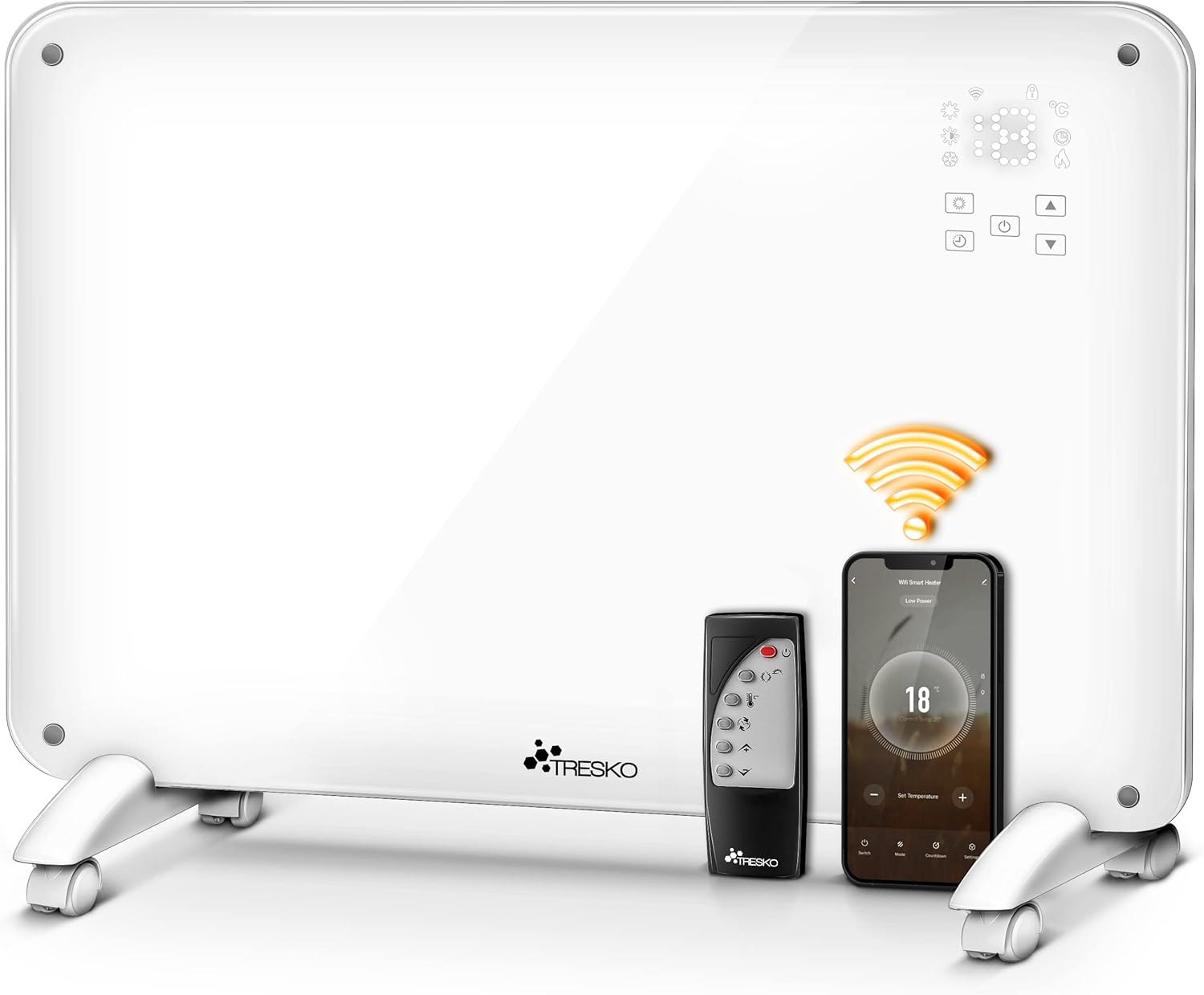
Image 4.1: Front view of the TRESKO TKVT Glass Convector Heater, showcasing its sleek design, integrated touch control panel, and the included remote control. A smartphone displaying the Smart-Life app interface is also visible, highlighting the heater's smart capabilities.
Key Features:
- Power: 2000W for rapid and efficient heating.
- Heating Element: Aluminum X-shaped heating element for uniform heat distribution.
- Control: Touch-sensitive LCD display, remote control, and WiFi via Smart-Life App.
- Temperature Range: Adjustable from 5°C to 50°C.
- Timer: 24-hour timer and weekly mode for programmable heating schedules.
- Safety: Overheat protection, child lock, and automatic shut-off upon tipping.
- Durability: High-quality safety glass front panel and IP24 splash water protection.
- Installation: Freestanding with castors or wall-mounted.
- Noise Level: Extremely quiet operation.

Image 4.2: Diagram illustrating the dimensions of the TRESKO TKVT Glass Convector Heater. The heater measures approximately 83 cm in length (A), 26 cm in width (B), and 52 cm in height (C). The image also highlights the included wall bracket and practical castors for mobility.
5. Setup and Installation
The TRESKO TKVT heater can be used as a freestanding unit or mounted on a wall.
5.1 Freestanding Installation
- Carefully remove the heater from its packaging.
- Attach the provided feet with castors to the bottom of the heater using the screws provided. Ensure they are securely fastened.
- Place the heater on a stable, level surface, ensuring adequate clearance from walls and flammable objects (at least 1 meter from furniture, curtains, etc.).
- Plug the power cord into a suitable 220-240V, 50Hz electrical outlet.

Image 5.1: The TRESKO TKVT heater shown in a freestanding configuration, highlighting its safety features such as automatic power-off upon tipping, energy-saving ECO mode, robust construction, IP24 splash water protection, and child lock. This image demonstrates the heater's suitability for various indoor environments.
5.2 Wall-Mounted Installation
For wall mounting, use the included wall mounting kit.
- Choose a suitable wall location, ensuring it is sturdy enough to support the heater's weight (approx. 7.7 kg). Maintain adequate clearance from ceilings, floors, and adjacent walls.
- Mark the drilling points for the wall brackets using the provided template or by measuring carefully.
- Drill holes and insert wall anchors.
- Secure the wall brackets to the wall using the provided screws.
- Carefully lift the heater and hook it onto the wall brackets. Ensure it is securely seated.
- Plug the power cord into a suitable 220-240V, 50Hz electrical outlet.

Image 5.2: The TRESKO TKVT heater elegantly mounted on a wall above a sofa, demonstrating its space-saving and aesthetic benefits. The image also highlights features like quiet operation, frost protection, and a 24-hour timer setting, emphasizing its suitability for various living spaces.
6. Operating Instructions
The TRESKO TKVT heater can be operated via its touch control panel, remote control, or the Smart-Life mobile application.
6.1 Control Panel Operation
The touch-sensitive LCD display on the front panel allows direct control of the heater's functions.

Image 6.1: A detailed view of the TRESKO TKVT heater's touch control panel, showing the digital temperature display and various function icons. A hand is shown interacting with the power button. Adjacent to it, a smartphone displays the Smart-Life app, illustrating the dual control options.
- Power Button (Ⓘ): Press to turn the heater ON or OFF.
- Temperature Adjustment (▲ / ▼): Use the up and down arrows to set the desired temperature between 5°C and 50°C.
- Mode Button: Cycle through different heating modes (e.g., Comfort, ECO, Frost Protection).
- Timer Button: Set the 24-hour timer or activate the weekly program.
- Child Lock Button: Press and hold to activate/deactivate the child lock.
6.2 Remote Control Operation
The included remote control provides convenient access to all heater functions from a distance.

Image 6.2: The TRESKO TKVT heater with its remote control positioned in front. The remote features buttons for power, mode selection, temperature adjustment, and timer settings. A smartphone displaying the Smart-Life app is also visible, emphasizing the multiple control options.
- Ensure batteries are correctly inserted into the remote control.
- Point the remote control towards the heater's display panel.
- Use the corresponding buttons on the remote to control power, temperature, mode, and timer settings.
6.3 WiFi and Smart-Life App Control
The heater can be controlled remotely via the Smart-Life application on your smartphone or tablet.
- Download the App: Download the "Smart-Life" app from your device's app store (iOS App Store or Google Play Store).
- Register/Log In: Create an account or log in to your existing Smart-Life account.
- Add Device: Follow the in-app instructions to add a new device. Select "Heater" or "Convector Heater" from the device list.
- Connect to WiFi: Ensure your heater is powered on and in pairing mode (refer to the app for specific pairing instructions, usually involving pressing a button on the heater for a few seconds). Connect your smartphone to a 2.4GHz WiFi network.
- Control: Once successfully paired, you can control the heater's power, temperature, modes, and timer settings directly from the Smart-Life app, even when you are away from home.

Image 6.3: A close-up of the TRESKO TKVT heater's control panel alongside a smartphone displaying the Smart-Life app interface. This image emphasizes the convenience of controlling the heater's temperature (5-50°C) and activating features like weekly mode via the app or remote control, thanks to its integrated WiFi functionality.
7. Maintenance
Regular maintenance ensures the longevity and efficient operation of your TRESKO TKVT heater.
- Cleaning: Always unplug the heater and allow it to cool completely before cleaning. Wipe the exterior surfaces with a soft, damp cloth. Do not use abrasive cleaners or solvents.
- Dust Removal: Periodically vacuum or wipe the air intake and exhaust vents to prevent dust buildup, which can affect performance and safety.
- Storage: If storing the heater for an extended period, unplug it, clean it thoroughly, and store it in a cool, dry place, preferably in its original packaging.
- No User Serviceable Parts: Do not attempt to open or repair the heater yourself. Refer all servicing to qualified service personnel.
8. Troubleshooting
If you encounter issues with your TRESKO TKVT heater, refer to the following table:
| Problem | Possible Cause | Solution |
|---|---|---|
| Heater does not turn on. | No power, power cord not plugged in, overheat protection activated, child lock active. | Check power outlet. Ensure cord is securely plugged in. Unplug and allow to cool for 30 minutes. Deactivate child lock. |
| Heater not heating effectively. | Temperature setting too low, room too large, air vents blocked. | Increase desired temperature. Ensure heater is appropriately sized for the room. Clear any obstructions from air vents. |
| Remote control not working. | Batteries depleted, remote not pointed at heater, obstruction. | Replace batteries. Ensure clear line of sight to the heater's display. |
| WiFi connection issues. | Incorrect WiFi password, 5GHz network used, heater not in pairing mode, router too far. | Verify WiFi password. Ensure you are connecting to a 2.4GHz network. Follow app instructions to put heater in pairing mode. Move heater closer to router. |
| Display shows incorrect temperature. | Internal sensor reading may differ slightly from ambient room temperature. | This is normal. Adjust the set temperature based on your comfort level rather than matching an external thermometer. |
9. Specifications
| Brand: | TRESKO |
| Model Number: | TKVT |
| Power: | 2000 Watt |
| Voltage: | AC 220-240V, 50 Hz |
| Temperature Range: | 5°C - 50°C |
| Protection Type: | IP24 (Splash water protected) |
| Dimensions (L x W x H): | 83 x 26 x 52 cm |
| Weight: | 7.7 Kilograms |
| Cable Length: | 2 meters |
| Special Features: | WiFi Compatible, Cool-touch Exterior, Programmable Thermostat, Remote Control, Child Lock, Overheat Protection, Frost Protection, 24-hour Timer, Weekly Mode. |
| Installation Type: | Freestanding (with castors) or Wall-mounted |
| Recommended Use: | Indoor, Bathroom (due to IP24 rating) |
10. Warranty and Support
TRESKO products are designed for quality and reliability. For warranty information and customer support, please refer to the documentation included with your purchase or contact your retailer.
Manufacturer: DWD-Company GmbH & Co. KG
For further assistance, please visit the TRESKO website or contact their customer service department.