
1. Introduction
This manual provides detailed instructions for the setup, operation, and maintenance of your Wings Phantom 850 Low Latency Wireless Earbuds. Please read this manual thoroughly before using the product to ensure optimal performance and longevity.

Image: The Wings Phantom 850 Wireless Earbuds shown inside their open charging case, highlighting their design and readiness for use.
2. Package Contents
Verify that all items are present in your product packaging:
- Wings Phantom 850 Earbuds
- Wireless Charging Case
- USB Charging Cable
- Ear Cushions (various sizes)
- User Manual (this document)
3. Setup
3.1. Charging the Earbuds and Case
Before first use, fully charge the earbuds and the charging case.
- Place the earbuds into the charging case. Ensure they are seated correctly.
- Connect the USB charging cable to the charging port on the case and to a power source (e.g., USB wall adapter, computer USB port).
- The LED indicators on the case will show the charging status. A full charge typically takes approximately 1-2 hours.

Image: The Wings Phantom 850 Earbuds in their charging case, illustrating the charging process with illuminated LED lights.
3.2. Bluetooth Pairing
To connect your earbuds to a device:
- Ensure the earbuds are charged and inside the charging case.
- Open the charging case. The earbuds will automatically enter pairing mode (indicated by flashing LED lights on the earbuds).
- On your device (smartphone, tablet, laptop), enable Bluetooth and search for available devices.
- Select "Wings Phantom 850" from the list of devices.
- Once connected, the earbud LEDs will stop flashing, and you will hear a confirmation tone.
The earbuds feature Open and On Tech™ for quick connection upon opening the case.
3.3. Wings Sync App Installation
Enhance your experience by installing the Wings Sync App. The app allows for custom controls, EQ modes, and locating misplaced earbuds.
- Download the "Wings Sync" app from your device's app store (App Store for iOS, Google Play Store for Android).
- Open the app and follow the on-screen instructions to connect your Phantom 850 earbuds.

Image: A visual representation of the Wings Sync App dashboard, showing options for touch controls, game mode, EQ modes, and locating earbuds.
Video: A demonstration of the Wings Sync App features, including custom touch controls, EQ modes, and the earbud locator function. This video illustrates how to personalize your earbud settings and find them if misplaced.
4. Operating Instructions
4.1. Touch Controls
The Wings Phantom 850 earbuds feature intuitive touch controls. These can be customized via the Wings Sync App.
| Action | Function (Default) |
|---|---|
| Single Tap (L/R) | Volume Up/Down (Customizable) |
| Double Tap (L/R) | Play/Pause (Customizable) |
| Triple Tap (L) | Previous Track (Customizable) |
| Triple Tap (R) | Next Track (Customizable) |
| Long Press (L) | Voice Assistant (Customizable) |
| Long Press (R) | Game Mode ON/OFF (Customizable) |
| Incoming Call (Single Tap) | Answer Call |
| Incoming Call (Long Press) | Reject Call |
Note: Default functions may vary. Refer to the Wings Sync App for current settings and customization options.
4.2. Gaming Mode
Activate Gaming Mode for ultra-low latency audio (40ms) during gameplay. This mode is designed to synchronize audio with on-screen action, providing a competitive edge.
- Activation: Long press the right earbud (default setting) or activate via the Wings Sync App.
- Deactivation: Repeat the activation step.

Image: An overview of key features including the dedicated Gaming Mode with 40ms ultra-low latency, Bluetooth 5.3, IPX5 water resistance, and ENC Quad Mic technology.
4.3. Environmental Noise Cancellation (ENC)
The Quad ENC Mics reduce environmental noise during calls, ensuring clear communication.
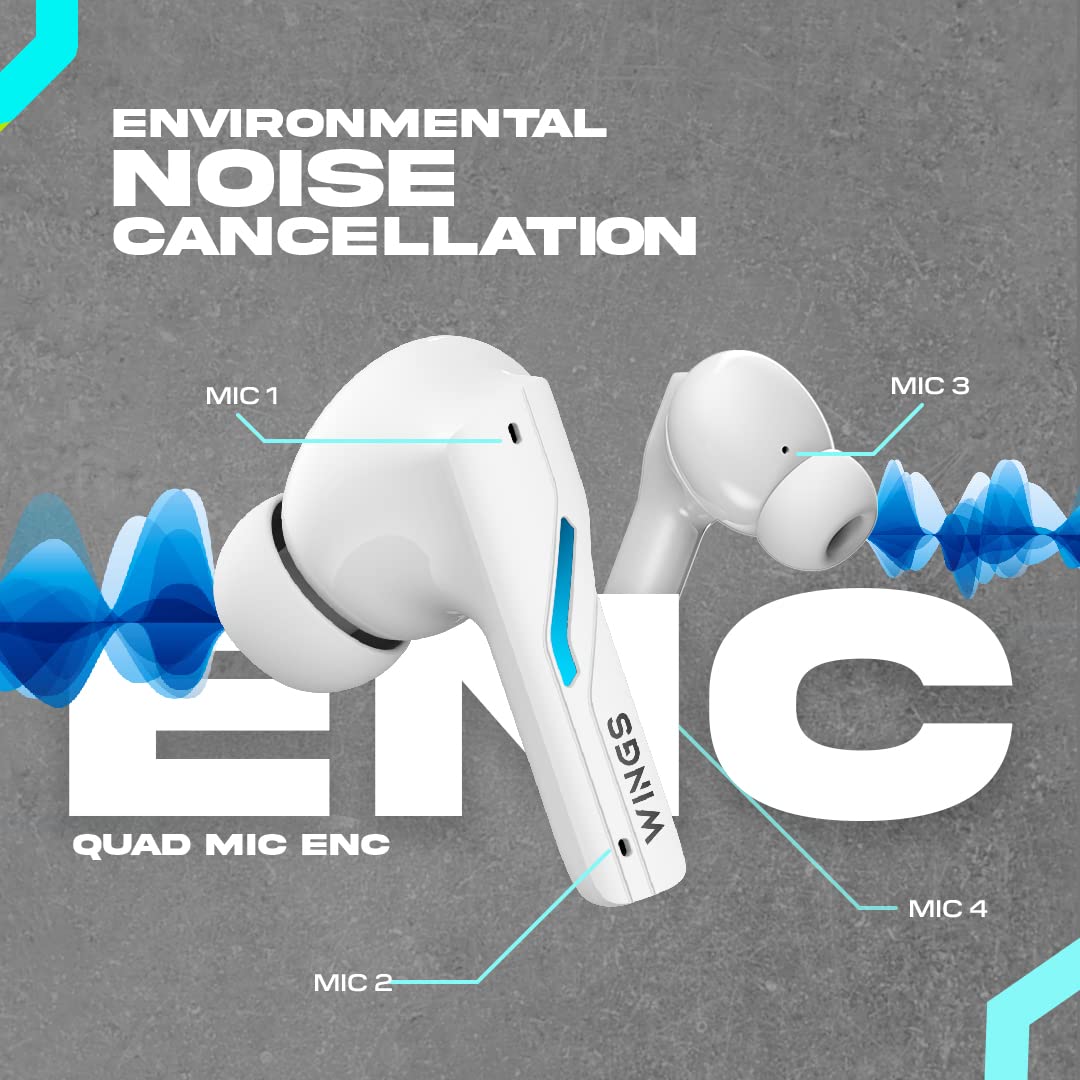
Image: A diagram illustrating the four Environmental Noise Cancellation (ENC) microphones on the Wings Phantom 850 earbuds, designed for clear call quality.
5. Maintenance
5.1. Cleaning
Regular cleaning helps maintain sound quality and hygiene:
- Gently wipe the earbuds and charging case with a soft, dry, lint-free cloth.
- Remove ear tips and clean them with mild soap and water, then dry thoroughly before reattaching.
- Use a dry cotton swab to clean the charging contacts on both the earbuds and the case.
5.2. Water Resistance
The Wings Phantom 850 earbuds are rated IPX5 water resistant, meaning they can withstand splashes and sweat. They are not designed for submersion in water.
- Do not expose the earbuds to running water or wear them while swimming or showering.
- Ensure earbuds are dry before placing them back in the charging case to prevent damage.
6. Troubleshooting
If you encounter issues with your Wings Phantom 850 earbuds, refer to the following common solutions:
- No Sound/Connectivity Issues:
- Ensure both earbuds are charged.
- Verify Bluetooth is enabled on your device and the earbuds are selected.
- Try unpairing and re-pairing the earbuds with your device.
- Restart your device.
- One Earbud Not Working:
- Place both earbuds back in the charging case, close the lid, wait a few seconds, then open and try again.
- Clean the charging contacts on the earbud and in the case.
- Charging Problems:
- Ensure the charging cable is securely connected.
- Try a different USB port or charging adapter.
- Clean the charging contacts.
- Low Volume/Poor Sound Quality:
- Adjust the volume on both your device and the earbuds.
- Ensure ear tips are properly sealed in your ear canal. Try different sized ear tips.
- Clean any debris from the earbud speaker mesh.
- Check EQ settings in the Wings Sync App.
For further assistance, please contact customer support.
7. Specifications
| Feature | Detail |
|---|---|
| Model Name | Phantom 850 |
| Connectivity Technology | Wireless (Bluetooth 5.3) |
| Bluetooth Range | 15 Metres |
| Audio Driver Type | Dynamic Driver (13mm Composite Drivers) |
| Battery Life (Earbuds) | Up to 10 Hours |
| Total Playtime (with Case) | Up to 50 Hours |
| Charging Technology | Bullet Charge™ (15 mins charge = 100 mins playtime) |
| Special Feature | ENC Quad Mic, Dedicated Gaming Mode (40ms Low Latency), App Support, Open and On Tech™ |
| Water Resistance Level | IPX5 (Sweat and Water Resistant) |
| Control Method | Touch, Voice |
| Compatible Devices | Cellphones, Desktops, Gaming Consoles, Laptops, Tablets |
| Item Weight | 150 Grams |
| Product Dimensions | 10 x 10 x 4 cm |

Image: An exploded view diagram illustrating the 13mm composite drivers responsible for high-fidelity audio output in the earbuds.

Image: Information detailing the battery life, showing 50 hours of total playtime with the charging case and 10 hours of playtime on the earbuds alone.
8. Warranty and Support
Your Wings Phantom 850 Wireless Earbuds come with a 1-Year Warranty from the date of purchase.
For warranty claims, technical support, or any other inquiries, please refer to the contact information provided on the official Wings website or your purchase documentation.


