
Introduction
This manual provides comprehensive instructions for the assembly, operation, maintenance, and troubleshooting of your new SUPERJARE 70 Inch Console Table with Outlet. Please read this manual thoroughly before assembly and use to ensure safe and efficient operation.
Safety Information
- Wipe with a damp cloth for cleaning.
- Ensure all connections for the power outlets are secure before use.
- Do not open the power outlet unit. Risk of electric shock.
- Attach the anti-tip device to the wall to prevent accidental tipping, especially in households with children or pets.
- Do not exceed the maximum weight recommendation of 100 pounds on the tabletop.
Setup and Assembly
Your console table is designed for straightforward assembly. All necessary tools and an assembly guide are included. Follow the numbered parts and clear instructions provided in the package.
Included Components:
- Assembly Guide
- Installation Tool
- Tabletop sections
- Metal frame components
- Power outlet unit with cord
- Adjustable feet
- Anti-tip device
Assembly Steps Overview:
- Unpack all components and verify against the parts list in the assembly guide.
- Assemble the metal frame according to the instructions.
- Attach the tabletop sections to the assembled frame. Note that the power outlet unit can be installed in the middle or on either side by adjusting the tabletop sections during assembly.
- Install the power outlet unit into the designated cutout on the tabletop.
- Attach the adjustable feet to the bottom of the table legs.
- Secure the anti-tip device to the table and the wall for enhanced stability.

Figure 1: Fully assembled SUPERJARE 70 Inch Console Table with Outlet, showcasing its rustic brown finish and integrated power strip.

Figure 2: The console table positioned behind a sofa, demonstrating its narrow profile and utility for holding decorative items and charging devices.

Figure 3: An illustration highlighting the dimensions of the console table: 7.9 inches deep, 70.8 inches wide, and 31.5 inches high.
Video 1: An official product video from SUPERJARE demonstrating the assembly process and various features of the console table, including its charging station.

Figure 4: This image illustrates the two assembly choices for the charging station: it can be positioned either on the side or in the middle of the tabletop to suit user preference.

Figure 5: A detailed view of the table's features, including adjustable feet for stability on uneven surfaces, the anti-tip device for safety, and the sturdy metal frame construction.
Operating Instructions
The integrated charging station provides convenient access to power for your electronic devices.
Using the Charging Station:
- Plug the table's power cord into a standard wall outlet.
- The charging station includes 2 AC outlets (125V/12A), 1 USB Port (5V-2A), and 1 Type-C port (5V-2A).
- Connect your devices to the appropriate ports for charging.
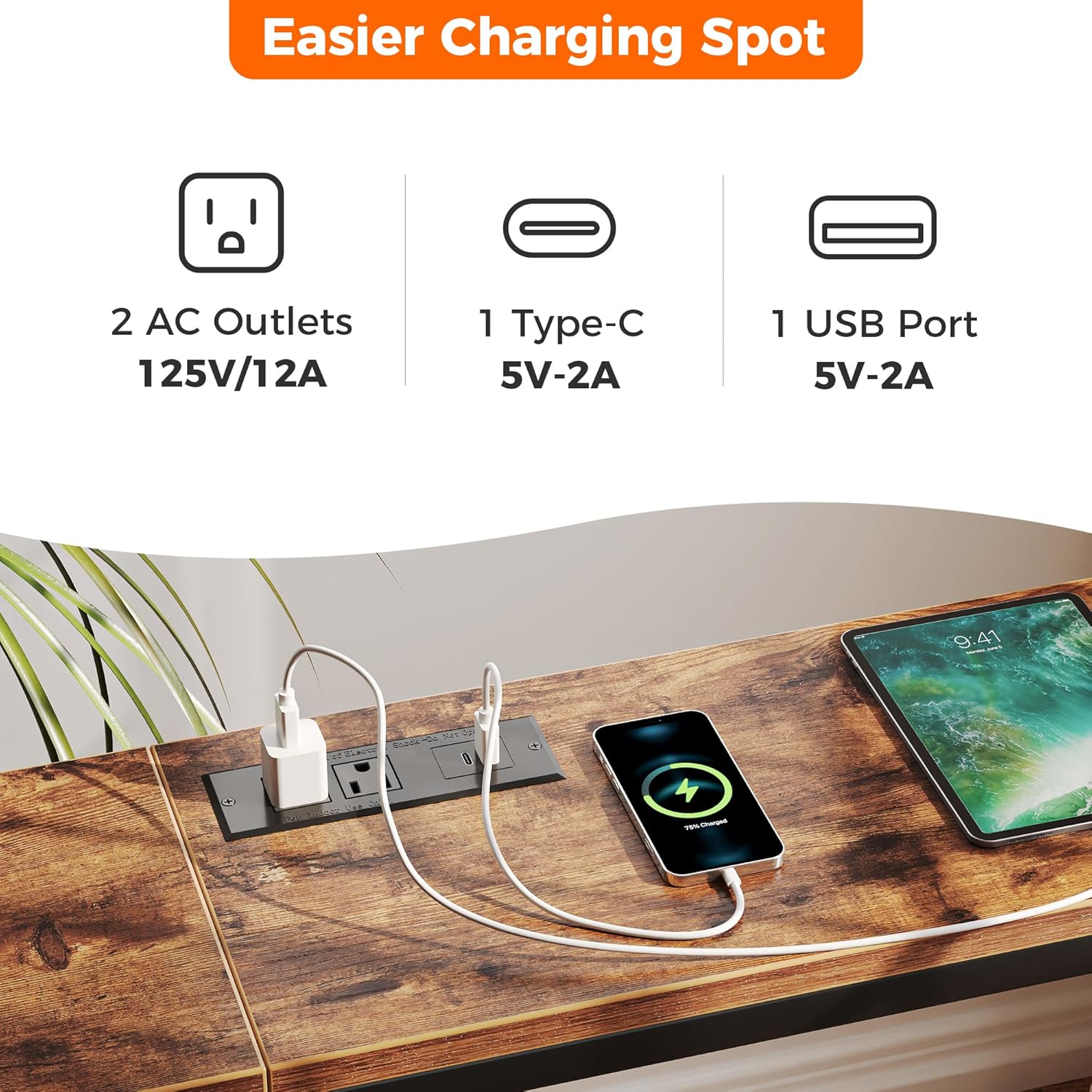
Figure 6: A close-up view of the integrated charging station, showing the two AC outlets, one USB-A port, and one USB-C port.

Figure 7: The charging station in active use, with a smartphone and tablet connected for power, highlighting its practical functionality.
Maintenance
To maintain the appearance and longevity of your console table, follow these simple care instructions:
- Regularly wipe the surface with a damp cloth to remove dust and spills.
- Avoid using harsh chemicals or abrasive cleaners, as these may damage the finish.
- Periodically check all screws and connections to ensure they remain tight.
Troubleshooting
If you encounter any issues with your console table, refer to the following common troubleshooting tips:
- Table Stability: If the table feels wobbly, ensure all screws are tightened. Adjust the leveling feet on the bottom of the legs to compensate for uneven floors. For freestanding use or in areas with potential for tipping, ensure the anti-tip device is properly installed and secured to the wall.
- Non-functional Power Outlet: Check that the table's main power cord is securely plugged into a working wall outlet. Verify that the power outlet unit itself is correctly installed and its internal connections are not loose. If the issue persists, discontinue use and contact customer support.
- Missing Parts: If any parts are missing upon unboxing, refer to the included parts list and contact customer support for replacements.
Specifications
| Brand | SUPERJARE |
| Model Number | EU7042ZC |
| Product Dimensions | 7.9"D x 70.8"W x 31.5"H |
| Maximum Weight Recommendation | 100 Pounds |
| Color | Rustic Brown |
| Frame Material Type | Metal |
| Top Material Type | Engineered Wood |
| Power Outlets | 2 AC Outlets (125V/12A), 1 USB Port (5V-2A), 1 Type-C Port (5V-2A) |
| Product Care Instructions | Wipe with Damp Cloth |
Warranty and Support
For warranty information or customer support, please refer to the contact details provided with your purchase documentation or visit the official SUPERJARE website. Keep your purchase receipt for any warranty claims.