
1. Introduction
The Elna eXcellence 710 is a computerized sewing and quilting machine designed for precision and ease of use. It features a large sewing area, an Advanced Dual Feed system, and a variety of built-in stitches and functions to support diverse sewing projects. This manual provides essential information for setting up, operating, maintaining, and troubleshooting your machine.

Figure 1: Front view of the Elna eXcellence 710 Sewing and Quilting Machine.
2. Key Features
- 170 Stitches: Includes alphabet and 10 automatic buttonholes, with a 9 mm stitch width.
- Convenience Functions: Button-operated automatic thread cutter, one-step needle plate conversion, and lock stitch.
- Touch Control Panel: For easy selection of stitches and settings.
- High Sewing Speed: Up to 1000 stitches per minute.
- Advanced Dual Feed System: Evenly moves fabric from top and bottom for precision, ideal for multiple layers and pattern matching. Includes a removable Dual Feed foot wide.
- 15 Presser Feet: For various sewing functions, including a Dual Feed wide and convertible free-motion quilting kit.
- Integrated Storage: Top compartment for presser feet and two compartments in the free arm.
- Knee Lifter: Allows lifting the presser foot with your leg, keeping hands on your project.
- LED Lighting: 5 built-in white LED lights in 3 areas for enhanced visibility.
3. Setup
3.1 Unpacking and Placement
Carefully remove the machine from its packaging. Place the machine on a stable, flat surface. Ensure adequate space around the machine for comfortable operation.

Figure 2: Side view of the Elna eXcellence 710, showing its compact design.
3.2 Power Connection
Connect the power cord to the machine and then to a suitable electrical outlet. Ensure the machine's power switch is in the 'Off' position before connecting.
3.3 Attaching the Extension Table
The extension table provides an expanded workspace, particularly useful for quilting and larger projects. Slide the extension table onto the free arm until it clicks securely into place.

Figure 3: Elna eXcellence 710 with the extension table providing an expanded work surface.
3.4 Bobbin Winding
Place a spool of thread on the spool pin. Guide the thread through the bobbin winding tension disc and then around the empty bobbin. Place the bobbin onto the bobbin winder shaft and push it to the right. Press the start/stop button to begin winding. The machine will automatically stop when the bobbin is full.
3.5 Upper Threading
Raise the presser foot and the needle to its highest position. Follow the numbered threading path indicated on the machine, ensuring the thread is securely seated in all guides and tension discs. Use the built-in needle threader for easy threading of the needle eye.

Figure 4: Top view illustrating the threading path and stitch selection chart.
3.6 Inserting the Bobbin
Open the bobbin cover. Insert the wound bobbin into the bobbin case, ensuring the thread unwinds in the correct direction (usually counter-clockwise). Guide the thread through the tension spring and cutter. Close the bobbin cover.
4. Operating Instructions
4.1 Stitch Selection
Use the touch control panel to select your desired stitch. The machine offers 170 built-in stitches, including utility, decorative, and buttonhole stitches. Refer to the stitch chart located on the machine's top cover for visual reference.

Figure 5: Front view with storage compartments open, revealing accessories and stitch chart.
4.2 Adjusting Stitch Settings
After selecting a stitch, the touch control panel will display recommended stitch length and width. These can be adjusted using the dedicated buttons on the panel to suit your fabric and project requirements.

Figure 6: Close-up of the touch control panel for stitch and setting adjustments.
4.3 Starting to Sew
Place your fabric under the presser foot. Lower the presser foot. Use the start/stop button or the foot controller to begin sewing. Adjust the sewing speed using the speed control slider.
5. Maintenance
5.1 Cleaning the Machine
Regularly clean the bobbin area and feed dogs to remove lint and dust. Use the provided lint brush. Disconnect the machine from power before cleaning. Do not use liquid cleaners or solvents.
5.2 Needle Replacement
Replace the needle frequently, especially when sewing different fabric types or if the needle becomes dull or bent. Always use the correct needle type and size for your fabric.
6. Troubleshooting
6.1 Common Issues
- Skipped Stitches: Check if the needle is inserted correctly, if it's bent or dull, or if the correct needle type is being used for the fabric.
- Thread Breakage: Ensure the machine is threaded correctly, the tension is appropriate, and the thread is not old or damaged.
- Fabric Jamming: Verify that the presser foot is lowered before sewing and that the correct presser foot is used for the task.
- Uneven Stitches: Check upper and bobbin thread tension. Ensure the machine is clean and free of lint.
7. Specifications
| Feature | Detail |
|---|---|
| Product Dimensions | 9 x 20.4 x 12.4 inches (9"D x 20.4"W x 12.4"H) |
| Item Weight | 26.9 pounds |
| Manufacturer | Elna |
| Item Model Number | EL710 |
| Power Source | Corded Electric |
| Material | Metal, Plastic |
| Color | White/Red |
| Assembly Required | No |
| Batteries Required | No |

Figure 7: Dimensions of the Elna eXcellence 710 Sewing Machine.
8. Included Accessories
The Elna eXcellence 710 comes with a comprehensive set of accessories to get you started immediately:
- Standard foot A
- Rolled hem foot D
- Zipper foot E
- Satin stitch foot F
- Open-toe satin stitch foot F2
- Blind hem foot G
- Overlock foot M
- ¼” seam foot O
- Darning foot PD-H
- Convertible free-motion quilting kit QB-S (including: closed-toe foot, open-toe foot, clear-view foot)
- Automatic buttonhole foot R with stabilizer plate
- Button sewing foot T
- Dual Feed foot AD wide system
- Straight stitch needle plate
- Knee lifter
- Quilting guide bar
- Bobbins
- Seam ripper
- Needle set
- Lint brush
- Spool holder small x2
- Spool holder large x2
- Spool holder special x2
- Spool rest
- Felt cushion
- Additional spool pin
- Screwdriver
- Touch panel stylus
- Foot controller
- Semi-hard cover
- eXcellence 710 Sewing Machine
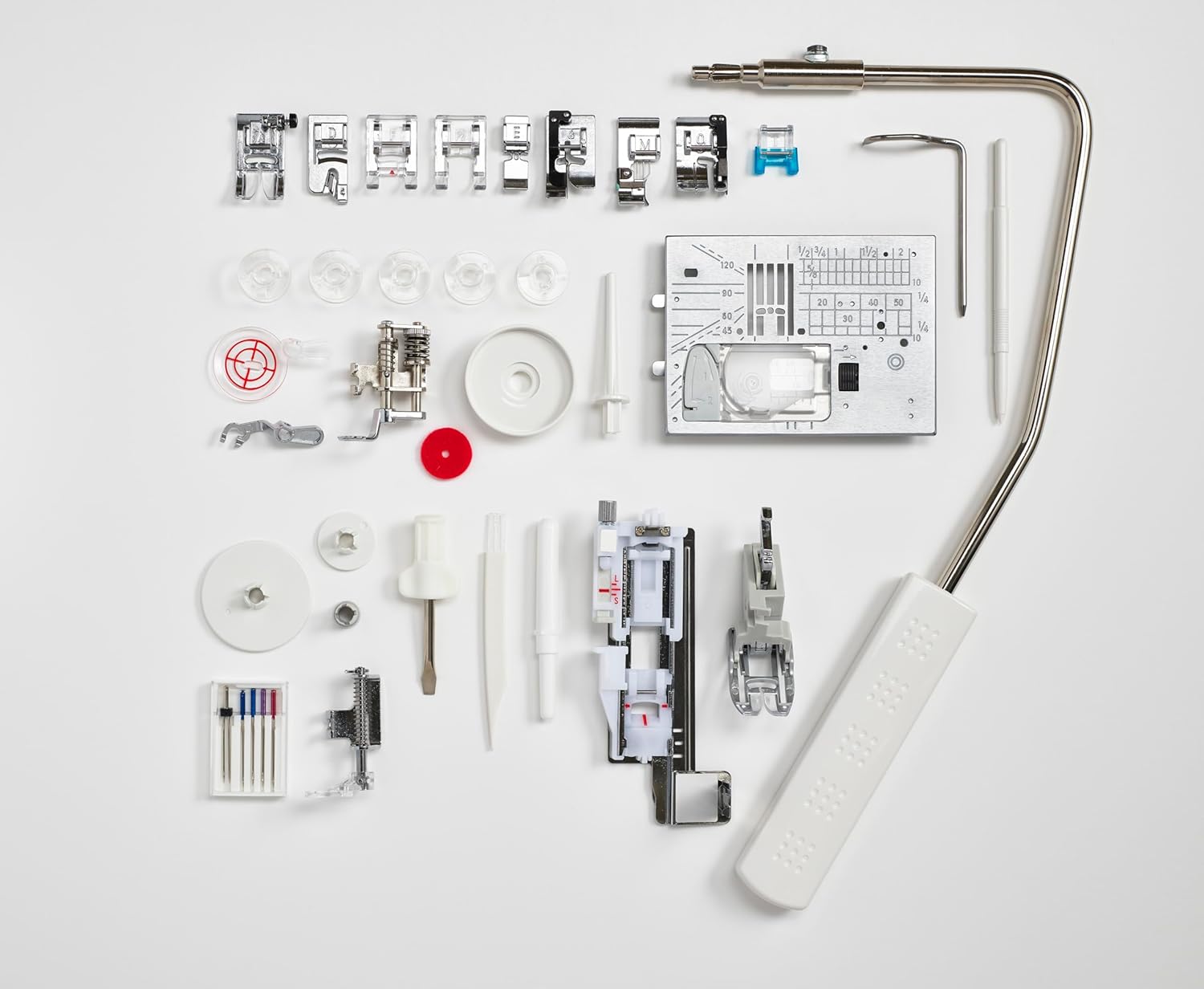
Figure 8: All included accessories, including various presser feet and tools.
9. Warranty and Support
For warranty information and customer support, please refer to the documentation included with your product or visit the official Elna website. Keep your proof of purchase for warranty claims.
10. Product Videos
No official product videos from the seller were found for this specific model in the provided data. Please refer to the written instructions or the manufacturer's website for visual guides.


