
1. Introduction
This manual provides detailed instructions for the safe and effective use of your BAOFENG BF-T3 Kids Walkie Talkies. Please read this manual thoroughly before operating the device and retain it for future reference. The BAOFENG BF-T3 is designed for clear communication, offering 22 channels and a range of up to 5 kilometers in open areas, making it ideal for outdoor activities and family communication.

Image 1.1: BAOFENG BF-T3 Walkie Talkies highlighting key features such as 22 channels, VOX function, built-in flashlight, 10 call tones, low battery alert, auto squelch, 5 KM range, and LCD backlit display.
2. Safety Information
- Battery Safety: Use only specified AAA batteries. Do not mix old and new batteries, or different types of batteries. Remove batteries if the device will not be used for extended periods.
- Choking Hazard: This product contains small parts and is not suitable for children under 3 years old.
- Water Exposure: The device is water-resistant, but not waterproof. Avoid submerging it in water.
- Hearing Protection: Do not hold the antenna close to your ear or touch it during transmission. Adjust volume to a comfortable level to prevent hearing damage.
- Interference: Turn off the walkie-talkie in areas where radio devices are prohibited, such as hospitals or aircraft.
3. Package Contents
Upon opening your BAOFENG BF-T3 package, you should find the following items:
- 4 x BAOFENG BF-T3 Transceivers (2 Pink, 2 Blue)
- 1 x English User Manual
Note: AAA batteries are not included and must be purchased separately.
4. Product Overview
Familiarize yourself with the components of your BAOFENG BF-T3 walkie-talkie:
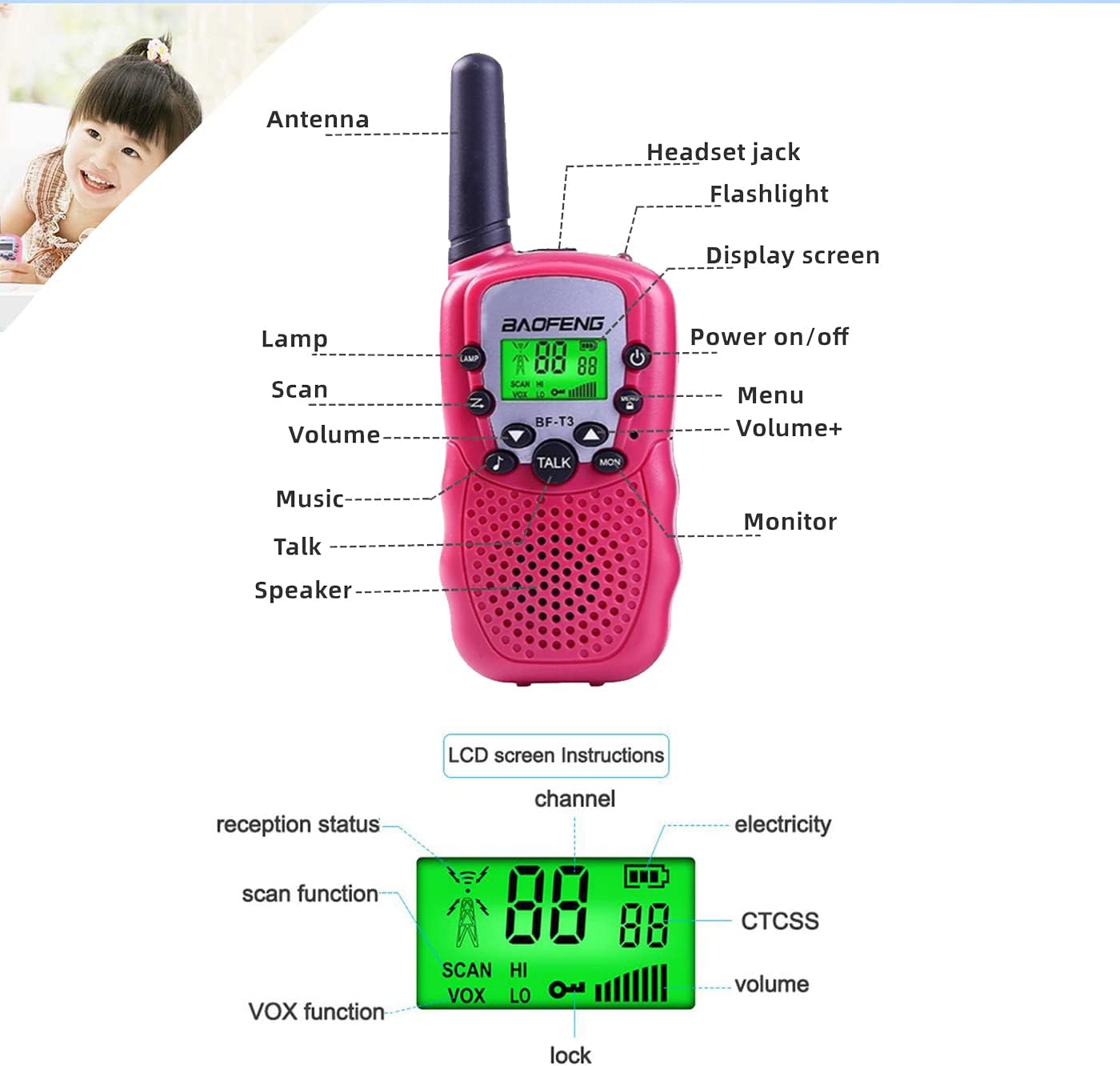
Image 4.1: Detailed diagram illustrating the external components of the BAOFENG BF-T3 walkie-talkie, including the antenna, headset jack, flashlight, display screen, power on/off button, menu button, volume controls, music button, talk button, speaker, monitor button, and lamp. Also shown are LCD screen indicators for reception status, scan function, channel, battery level, CTCSS, VOX function, lock, and volume.
- Antenna: For transmitting and receiving signals.
- Lamp/Flashlight: Built-in LED light.
- Power On/Off Button: Press and hold to turn the device on or off.
- Menu Button: Accesses settings and options.
- Volume +/- Buttons: Adjusts speaker volume.
- Talk Button (PTT): Press and hold to transmit your voice.
- Monitor Button (MON): Press to listen for weak signals on the current channel.
- Scan Button (SCAN): Initiates channel scanning.
- Display Screen: Shows channel, battery status, and other indicators.
- Speaker/Microphone: For audio output and input.
- Headset Jack: For connecting an external headset (not included).
5. Setup
5.1 Battery Installation
Each BAOFENG BF-T3 walkie-talkie requires 4 AAA batteries (not included).
- Locate the battery compartment cover on the back of the walkie-talkie.
- Gently slide or unclip the cover to open it.
- Insert 4 AAA batteries, ensuring correct polarity (+/-) as indicated inside the compartment.
- Replace the battery compartment cover, ensuring it clicks securely into place.

Image 5.1: Illustration of the BAOFENG BF-T3 walkie-talkie with its battery compartment open, demonstrating the correct placement of AAA batteries.
5.2 Powering On/Off
- To Power On: Press and hold the Power On/Off button until the LCD screen illuminates and you hear a tone.
- To Power Off: Press and hold the Power On/Off button until the LCD screen turns off.
6. Operating Instructions
6.1 Channel Selection
Your walkie-talkie has 22 available channels. To communicate with another walkie-talkie, both devices must be set to the same channel and privacy code.
- Press the Menu button once. The channel number on the LCD screen will flash.
- Use the Volume +/- buttons to select your desired channel (1-22).
- Press the Talk button or Menu button again to confirm your selection.
6.2 Privacy Codes (CTCSS)
The BF-T3 supports 38 privacy codes (CTCSS) per channel to minimize interference from other users. Both walkie-talkies must have the same channel and privacy code to communicate.
- Press the Menu button twice. The privacy code number will flash.
- Use the Volume +/- buttons to select your desired privacy code (0-38). Code 0 means no privacy code is active.
- Press the Talk button or Menu button again to confirm your selection.
6.3 Transmitting and Receiving
- To Transmit: Press and hold the Talk button. Speak clearly into the microphone, holding the walkie-talkie approximately 5-10 cm from your mouth. Release the Talk button when you finish speaking.
- To Receive: Ensure the Talk button is not pressed. The walkie-talkie will automatically receive signals on the selected channel and privacy code.

Image 6.1: Two children demonstrating communication using the BAOFENG BF-T3 walkie-talkies, illustrating the long talk distance capability.
6.4 Volume Adjustment
Use the Volume +/- buttons to increase or decrease the speaker volume to a comfortable listening level.
6.5 Monitor Function (MON)
Press and hold the MON button to temporarily disable the squelch and listen for weak signals on the current channel. This can be useful for checking if a channel is clear before transmitting or for hearing faint transmissions.
6.6 VOX Function (Voice Operated Exchange)
The VOX function allows hands-free communication. When activated, the walkie-talkie will automatically transmit when it detects your voice, without needing to press the Talk button.
- Press the Menu button three times. The VOX icon and sensitivity level will flash.
- Use the Volume +/- buttons to select the VOX sensitivity level (1-3, with 3 being the most sensitive). Select 'OF' to turn VOX off.
- Press the Talk button or Menu button again to confirm.
6.7 Call Tones
The BF-T3 offers 10 different call tones, including 5 animal sounds, to alert other users before speaking.
- Press the Menu button four times. The current call tone number will flash.
- Use the Volume +/- buttons to cycle through the 10 call tones.
- Press the Talk button or Menu button again to confirm.
- To send a call tone, quickly press the Talk button twice.
6.8 Built-in Flashlight
The walkie-talkie includes a small LED flashlight for convenience in low-light conditions.
- To turn the flashlight on or off, press the Lamp button located on the side of the device.

Image 6.2: A child utilizing the built-in flashlight feature of the BAOFENG BF-T3 walkie-talkie to illuminate a book in a dark setting.
6.9 Channel Scan
The scan function allows you to automatically search for active channels.
- Press the Scan button once to start scanning. The walkie-talkie will cycle through channels until it detects activity.
- To stop scanning, press the Scan button again or the Talk button.
7. Maintenance
- Cleaning: Use a soft, damp cloth to clean the exterior of the walkie-talkie. Do not use harsh chemicals or abrasive cleaners.
- Storage: Store the walkie-talkies in a cool, dry place when not in use. Remove batteries if storing for extended periods to prevent leakage.
- Battery Care: Replace all batteries at the same time. Do not attempt to recharge non-rechargeable batteries. Dispose of used batteries responsibly.
8. Troubleshooting
| Problem | Possible Cause | Solution |
|---|---|---|
| No power | Batteries are dead or incorrectly installed. | Check battery polarity; replace with fresh AAA batteries. |
| Cannot communicate with other walkie-talkies | Different channels or privacy codes. Out of range. | Ensure all walkie-talkies are on the same channel and privacy code. Move closer to the other unit. |
| Weak or distorted sound | Low battery. Out of range. Obstructions. | Replace batteries. Move closer. Avoid large obstructions like buildings or hills. |
| Walkie-talkie continuously transmits (VOX issue) | VOX sensitivity too high. | Adjust VOX sensitivity to a lower level or turn VOX off. |
| LCD screen is dim or flickering | Low battery. | Replace batteries. |
9. Specifications
| Feature | Specification |
|---|---|
| Model | BF-T3 |
| Channels | 22 UHF Channels |
| Privacy Codes | 38 CTCSS Codes per channel |
| Frequency Range | 300 MHz - 3 GHz |
| Talking Range (Max) | 5 Kilometers (in open field) |
| Power Output | 2W |
| Power Supply | 4 x AAA batteries (not included) |
| Voltage | 3.7V |
| Call Tones | 10 (including 5 animal call tones) |
| Special Features | Adjustable, Lightweight, Portable, UHF, Built-in Flashlight, VOX Function, Auto Squelch, Backlit Display, Keypad Tones, Audio Low Battery Alert |
| Material | ABS |
| Item Size (each) | 14.5 x 6 x 3.5 cm (5.7 x 2.4 x 1.4 inches) |
| Item Weight (each) | 79g (2.8 oz) |
| Water Resistance Level | Water Resistant |
10. Warranty Information
The BAOFENG BF-T3 Walkie Talkies come with a 6-month warranty from the date of purchase. This warranty covers manufacturing defects and malfunctions under normal use. It does not cover damage caused by misuse, accidents, unauthorized modifications, or improper battery installation.
Please retain your proof of purchase for warranty claims.
11. Support
For further assistance, technical support, or warranty inquiries, please contact BAOFENG customer service through the retailer where the product was purchased or visit the official BAOFENG website.
BAOFENG Official Store: Visit BAOFENG Store on Amazon