
1. Introduction
This manual provides essential information for the proper use and care of your ZdalaMit AH81-11699A Replacement Remote Control. This remote is designed as a direct replacement for specific Samsung Soundbar models, requiring no programming for immediate use.
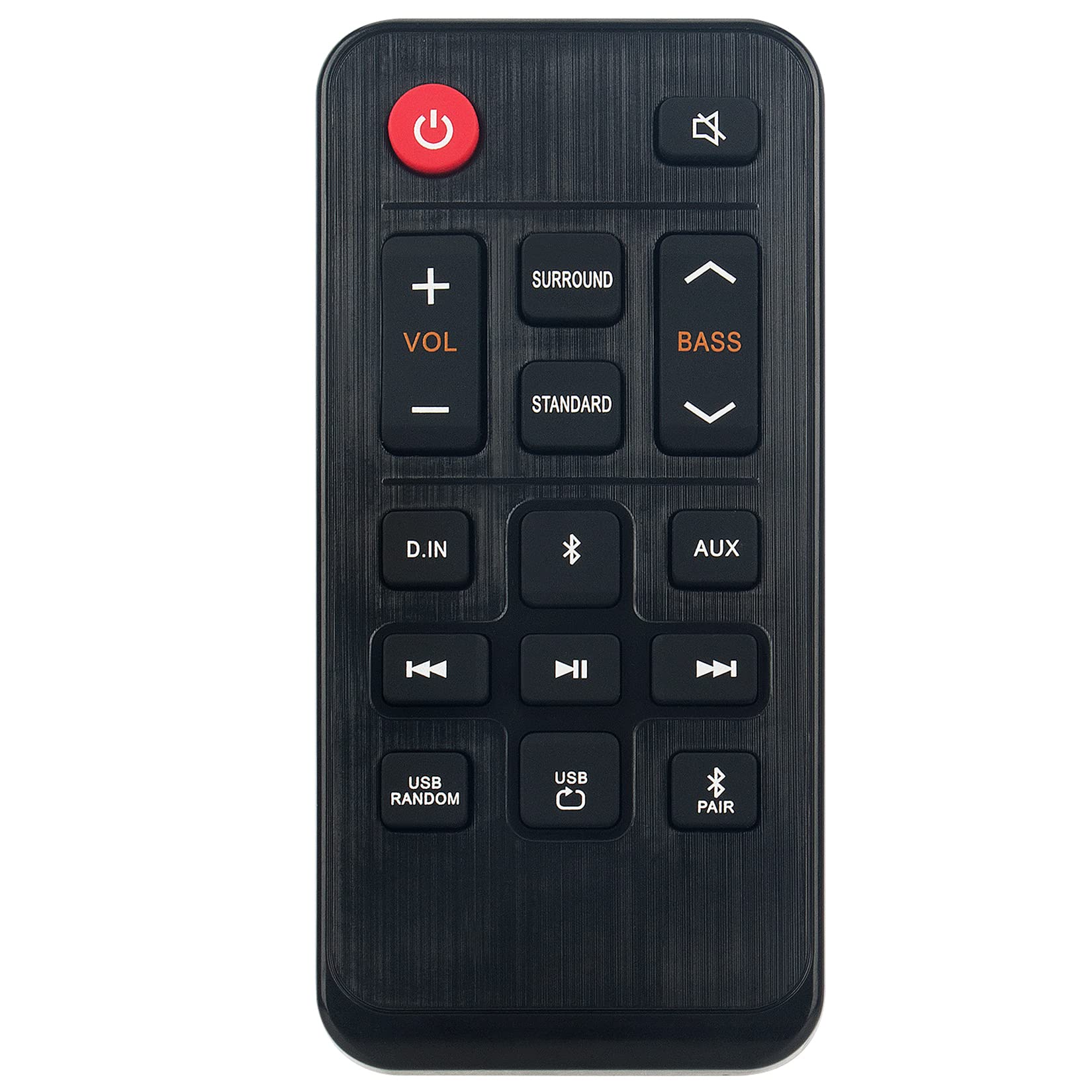
Image 1.1: The ZdalaMit AH81-11699A Replacement Remote Control. This image displays the front view of the black remote control, featuring various buttons for power, volume, mute, and other soundbar functions.
2. Compatibility
The AH81-11699A Replacement Remote Control is compatible with the following Samsung Soundbar models:
- HW-T400
- HW-T400/ZA
- HW-T400/XU
- HWT400
- HWT400/ZA
No programming is required for these models. Simply insert the battery, and the remote is ready for use.
3. Setup
To begin using your replacement remote control, follow these simple steps for battery installation:
- Locate the Battery Compartment: On the back of the remote control, identify the battery compartment cover.
- Open the Compartment: Gently slide or press the latch to open the battery compartment cover.
- Insert Battery: Insert one CR2032 coin cell battery into the compartment. Ensure the positive (+) side of the battery is facing upwards, as indicated by the diagram inside the compartment.
- Close the Compartment: Replace the battery compartment cover, ensuring it clicks securely into place.
The remote control is now ready for operation. No additional pairing or programming is necessary for compatible Samsung Soundbar models.
4. Operating Instructions
The AH81-11699A remote control features 18 buttons designed for intuitive control of your Samsung Soundbar. Point the remote directly at your soundbar for optimal performance.
- Power Button: Press to turn the soundbar on or off.
- Volume Up/Down: Use the '+' and '-' buttons to adjust the soundbar's volume level.
- Mute Button: Press to temporarily silence the soundbar's audio. Press again to restore sound.
- Source Button: Cycle through available input sources (e.g., Bluetooth, Optical, HDMI).
- Sound Mode Button: Change the sound effect mode (e.g., Standard, Surround, Game).
- Bass/Treble Control: Adjust bass and treble levels (if supported by your soundbar model).
- Other Function Buttons: Additional buttons may control specific soundbar features. Refer to your soundbar's original manual for detailed functionality.
Ensure there are no obstructions between the remote control and the soundbar's infrared receiver for proper signal transmission. The maximum effective range is approximately 33 feet (10 meters).
5. Maintenance
Proper maintenance ensures the longevity and optimal performance of your remote control.
- Cleaning: Wipe the remote control with a soft, dry cloth. Do not use liquid cleaners, solvents, or abrasive materials, as these can damage the surface or internal components.
- Battery Replacement: Replace the CR2032 battery when the remote's responsiveness decreases or it stops functioning. Always use a fresh, high-quality CR2032 alkaline battery.
- Storage: Store the remote control in a cool, dry place away from direct sunlight, extreme temperatures, and high humidity.
- Avoid Drops: Protect the remote from physical impact, as drops can damage internal circuitry.
6. Troubleshooting
If you experience issues with your remote control, refer to the following common solutions:
| Problem | Possible Cause | Solution |
|---|---|---|
| Remote not responding. | Dead or incorrectly installed battery. | Replace the CR2032 battery, ensuring correct polarity (+ side up). |
| Remote has short range or intermittent response. | Weak battery; Obstruction between remote and soundbar; Remote not pointed correctly. | Replace battery. Remove any objects blocking the signal path. Ensure the remote is pointed directly at the soundbar's IR receiver. |
| Specific buttons not working. | Button malfunction; Soundbar does not support the function. | Test other buttons. If only specific buttons fail, the remote may be faulty. Verify if your soundbar model supports the intended function. |
| Remote works but soundbar functions incorrectly. | Issue with the soundbar itself. | Refer to your Samsung Soundbar's original user manual for troubleshooting soundbar-specific issues. |
If these steps do not resolve the issue, please contact customer support.
7. Specifications
- Model Name: AH81-11699A
- Brand: ZdalaMit
- Connectivity Technology: Infrared
- Compatible Devices: Samsung Soundbar (HW-T400 series)
- Battery Type: 1 x CR2032 Coin Cell (Alkaline recommended)
- Maximum Range: Approximately 33 Feet (10 meters)
- Button Quantity: 18
- Controller Type: Button Control
- Dimensions (L x W x H): 4.76" x 2.18" x 0.55" (12.09 cm x 5.54 cm x 1.40 cm)
- Color: Black
- Special Feature: Ergonomic design
8. Warranty and Support
This ZdalaMit AH81-11699A Replacement Remote Control comes with a 1-year warranty from the date of purchase, covering manufacturing defects.
For warranty claims, technical assistance, or any other inquiries, please contact our customer support. We are available to assist you with any questions or concerns you may have regarding your product.
Contact information for support is typically provided at the point of purchase or on the product packaging.