
1. Introduction
The Elna eXperiance 570A is a versatile computerized sewing machine designed for a wide range of sewing applications. It incorporates smart features for enhanced efficiency and ease of use, including an automatic thread cutter, memory functions, and an alphabet for personalized projects.
This manual provides detailed instructions to help you set up, operate, and maintain your Elna eXperiance 570A, ensuring optimal performance and longevity.
Key Features:
- Stitch Variety: Offers 50, 100, or 380 stitches, including an alphabet for diverse sewing needs.
- LCD Screen: Provides clear display for stitch selection and settings.
- LED Lighting: Illuminates the sewing area for improved visibility.
- Automatic Thread Cutter: For convenient thread trimming (highest version).
- Memory Function: Stores custom stitch patterns (highest version).
2. Setup
Unpacking and Placement:
Carefully remove the sewing machine from its packaging. Place the machine on a stable, flat surface with adequate lighting. Ensure there is enough space around the machine for comfortable operation and fabric handling.

Figure 2.1: Front view of the Elna eXperiance 570A sewing machine, showing the main body, needle area, and control panel.
Power Connection:
- Connect the power cord to the machine's power input jack.
- Plug the other end of the power cord into a suitable electrical outlet.
- Turn on the machine using the power switch, typically located on the side or back.
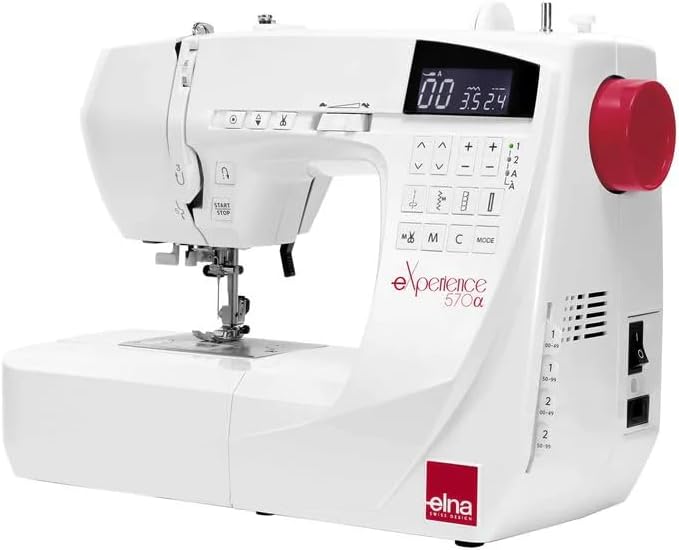
Figure 2.2: Side view of the Elna eXperiance 570A, illustrating the power switch and other side controls.
Attaching the Extension Table (if applicable):
For larger projects, attach the extension table by sliding it onto the free arm until it clicks into place. This provides a larger work surface.

Figure 2.3: The Elna eXperiance 570A with its extension table attached, providing an expanded work area.
3. Operating Instructions
Threading the Machine:
Proper threading is crucial for consistent stitch quality. Follow the numbered guides on the machine for both upper thread and bobbin winding/insertion.

Figure 3.1: Close-up view of the threading path and tension dial on the Elna eXperiance 570A.
Stitch Selection and Adjustment:
Use the control panel and LCD screen to select your desired stitch pattern. Adjust stitch length and width as needed using the dedicated buttons.

Figure 3.2: Detailed view of the control panel and LCD screen, showing stitch selection buttons and display.
Starting and Stopping Sewing:
The machine can be operated using the foot controller or the Start/Stop button. Press the Start/Stop button to begin sewing and press it again to stop. Use the speed slider to control sewing speed.

Figure 3.3: Close-up of the Start/Stop button and speed control slider on the Elna eXperiance 570A.
Using Accessories:
The Elna eXperiance 570A comes with various accessories to enhance your sewing experience. Refer to the accessory guide for proper attachment and use of different presser feet, bobbins, and tools.

Figure 3.4: A collection of accessories provided with the Elna eXperiance 570A, including various presser feet, bobbins, needles, and cleaning tools.
4. Maintenance
Regular maintenance ensures the smooth operation and extends the lifespan of your sewing machine.
Cleaning:
- Lint Removal: Regularly remove lint and dust from the bobbin case area and feed dogs using the brush provided.
- Needle Plate: Remove the needle plate to access and clean the area underneath.
- Exterior: Wipe the exterior of the machine with a soft, dry cloth. Avoid using harsh chemicals.
Oiling:
Consult your full user manual for specific oiling points and frequency. Use only high-quality sewing machine oil.
Needle Replacement:
Replace the needle frequently (e.g., after every 8-10 hours of sewing or when it becomes dull or bent) to prevent skipped stitches and fabric damage. Ensure the flat side of the needle faces the back of the machine when inserting.
5. Troubleshooting
This section addresses common issues you might encounter. For more complex problems, refer to the comprehensive troubleshooting guide in your full manual or contact customer support.
| Problem | Possible Cause | Solution |
|---|---|---|
| Skipped Stitches | Incorrect needle, bent needle, improper threading, wrong needle size for fabric. | Replace needle, re-thread machine, use correct needle type/size. |
| Thread Breaking | Incorrect tension, poor quality thread, burr on needle plate, improperly wound bobbin. | Adjust tension, use good quality thread, check for burrs, re-wind bobbin. |
| Machine Not Starting | Power cord not connected, power switch off, foot controller not plugged in. | Check power connections, ensure switch is on, plug in foot controller securely. |
6. Specifications
Detailed technical specifications for the Elna eXperiance 570A.
- Model Number: 570A
- Product Dimensions: 13 x 15 x 12 inches (13"D x 15"W x 12"H)
- Item Weight: 3.3 pounds
- Manufacturer: Elna
- ASIN: B0BM8FGML3
- Is Electric: Yes
- UPC: 732212321153
- Stitch Count: 50 / 100 / 380 (including alphabet)
- Display: LCD Screen
- Lighting: LED
7. Warranty and Support
For information regarding the product warranty, please refer to the warranty card included with your purchase or visit the official Elna website. For technical support or service inquiries, please contact Elna customer service directly.
Note: Specific warranty terms and support contact details may vary by region.


