
1. Introduction
This manual provides essential information for the proper installation, operation, and maintenance of the Idig IX30-00G4 LTE Router. The IX30-00G4 is a robust industrial-grade router designed for reliable cellular connectivity (CAT-4G/3G/2G) and includes Global Navigation Satellite System (GNSS) capabilities. It features one Ethernet port, RS-232, and RS-485 interfaces for versatile applications.
Please read this manual thoroughly before using the device to ensure safe and efficient operation.
2. Safety Information
- Ensure the power supply used is compatible with the router's voltage and current requirements.
- Do not expose the device to water, moisture, or extreme temperatures.
- Avoid placing the router near heat sources or in direct sunlight.
- Do not open the router casing. Servicing should only be performed by qualified personnel.
- Install the device in a well-ventilated area to prevent overheating.
- Use only approved antennas and accessories.
3. Package Contents
The Idig IX30-00G4 package typically includes:
- 1 x Idig IX30-00G4 LTE Router
Note: This model (IX30-00G4) is specified as "NO Accessories". Power supply, antennas, and mounting hardware are typically sold separately and are not included in this package.
4. Product Overview
The IX30-00G4 router is designed for industrial environments, offering robust connectivity and data transfer capabilities. It features a compact design with various ports for connectivity.
4.1 Device Layout
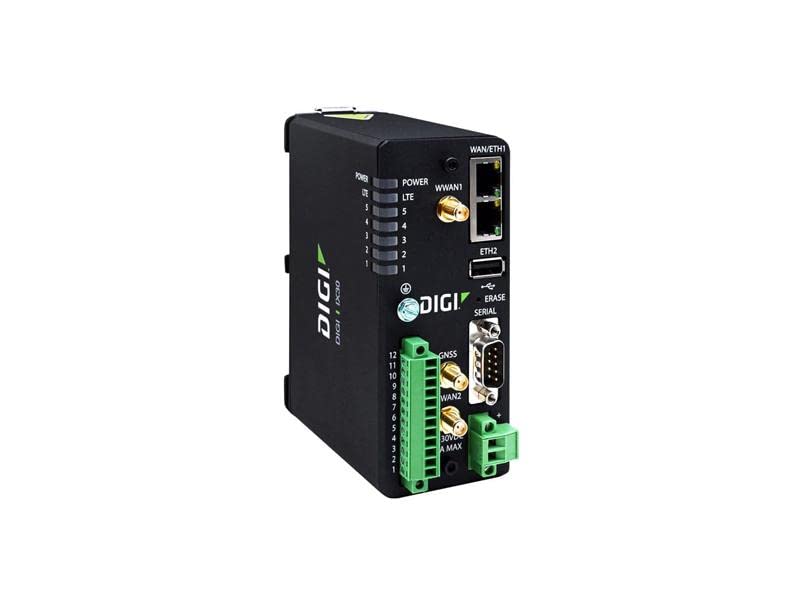
Figure 1: Front view of the Idig IX30-00G4 LTE Router. This image displays the device's compact form factor, highlighting the various ports and LED indicators on its front panel. Specific ports include one Ethernet port, RS-232, and RS-485 connectors, along with antenna connectors and power input.
4.2 Interfaces and Indicators
- Ethernet Port: One (1) 10/100 Mbps Ethernet port for local network connection.
- Serial Ports: RS-232 and RS-485 for connecting industrial devices.
- Antenna Connectors: For cellular (LTE) and GNSS antennas (antennas not included).
- Power Input: DC power input terminal.
- LED Indicators: Status LEDs for power, cellular signal strength, and network activity. (Refer to the full technical documentation for detailed LED behavior).
5. Setup
5.1 SIM Card Installation
- Ensure the router is powered off and disconnected from any power source.
- Locate the SIM card slot, typically on the side or bottom panel.
- Insert a standard-sized (2FF) or micro-sized (3FF) SIM card into the slot with the gold contacts facing down and the notched corner oriented correctly. Push until it clicks into place.
- If removing, gently push the SIM card to release it.
5.2 Antenna Connection
- Connect the cellular antennas (not included) to the designated cellular antenna ports (e.g., MAIN, AUX).
- Connect the GNSS antenna (not included) to the GNSS antenna port.
- Ensure all antenna connections are finger-tight.
5.3 Power Connection
- Connect a compatible DC power adapter (not included) to the router's power input terminal.
- Plug the power adapter into an appropriate power outlet. The Power LED should illuminate.
5.4 Initial Network Connection
- Connect an Ethernet cable from your computer to the router's Ethernet port.
- Configure your computer's network settings to obtain an IP address automatically (DHCP).
- Open a web browser and enter the router's default IP address (e.g.,
192.168.1.1or as specified in the full documentation) to access the web-based management interface. - Log in using the default username and password (refer to the full documentation or device label).
6. Operating Instructions
6.1 Basic Configuration
Once logged into the web interface, you can configure the following:
- Cellular Settings: Configure APN settings, enable/disable cellular data, and monitor signal strength.
- Network Settings: Adjust LAN IP address, DHCP server settings, and port forwarding rules.
- Security: Change administrator password, configure firewall rules, and VPN settings.
- GNSS: Monitor GNSS status and location data.
- Serial Port Settings: Configure RS-232/RS-485 parameters for connected devices.
Refer to the comprehensive user guide available from the manufacturer for detailed configuration options.
6.2 WPS Functionality
The router supports WPS (Wi-Fi Protected Setup) as a special feature. While primarily an LTE router, WPS might be available for specific Wi-Fi modules if present, or for simplified connection to certain devices. Consult the full documentation for WPS implementation details on this specific model.
7. Maintenance
- Cleaning: Use a soft, dry cloth to clean the exterior of the router. Do not use liquid cleaners or aerosols.
- Firmware Updates: Periodically check the manufacturer's website for firmware updates. Keeping the firmware updated ensures optimal performance and security. Follow the manufacturer's instructions carefully when performing updates.
- Environmental Conditions: Ensure the router operates within its specified temperature and humidity ranges.
8. Troubleshooting
8.1 No Power
- Check if the power adapter is securely connected to both the router and the power outlet.
- Verify that the power outlet is functional.
- Ensure the power adapter meets the router's specifications.
8.2 No Cellular Connection
- Confirm the SIM card is correctly inserted and activated with a data plan.
- Check cellular antenna connections.
- Verify APN settings in the router's web interface.
- Check the cellular signal strength LED indicators. If signal is weak, reposition antennas or the router.
8.3 Cannot Access Web Interface
- Ensure your computer is connected to the router via Ethernet.
- Verify your computer's IP settings are set to obtain an IP address automatically.
- Confirm you are using the correct default IP address for the router.
- Try clearing your browser's cache or using a different browser.
9. Specifications
| Feature | Detail |
|---|---|
| Model Name | IX30-00G4 |
| Brand | Idig |
| Manufacturer | DIGI International |
| Connectivity Technology | LTE (CAT-4G/3G/2G) |
| Special Feature | WPS, GNSS |
| Number of Ports | 1 (Ethernet), RS-232, RS-485 |
| Frequency Band Class | Single-Band |
| Security Protocol | WPS |
| Compatible Devices | Personal Computer (for management) |
| Recommended Uses | Home (Note: Typically industrial, 'Home' might be a general Amazon category tag) |
| Included Components | Router only (No accessories) |
| Item Weight | 6.99 pounds |
| ASIN | B0BM5B4Z5K |
| Date First Available | November 11, 2022 |
10. Warranty and Support
For specific warranty information, please refer to the warranty card included with your product or visit the official website of DIGI International (the manufacturer) or Idig (the brand). Warranty terms and conditions may vary by region and retailer.
For technical support, firmware downloads, and additional documentation, please visit the manufacturer's support portal or contact your authorized reseller. Ensure you have your product model number (IX30-00G4) and serial number ready when seeking support.