Product Overview
The Lufi XS OBD2 Gauge Display is a versatile 3-in-1 car meter designed to supplement your vehicle's dashboard by monitoring real-time ECU data. It integrates OBD2 gauge functionality, GPS speedometer, and a car inclinometer, providing comprehensive information about your vehicle's performance and status. This device offers extensive customization options for display data, colors, and even car logos, ensuring clear readability with its 3.5-inch polarized screen.

Image: Front view of the Lufi XS OBD2 Gauge Display, showing its digital interface with various readings.
Vehicle Compatibility
The Lufi XS OBD2 Gauge Display is compatible with most American car brands produced after 2008, and Japanese and European car brands produced after 2005. Please note that it is generally not compatible with pure electric vehicles.
It's important to understand that most cars do not support reading oil temperature and pressure data, nor MT/AT oil temperature and pressure data. A few car brands may display this data using custom PID (Parameter ID) upgrades. For specific vehicle compatibility or custom PID data, please contact Lufi's professional engineers.
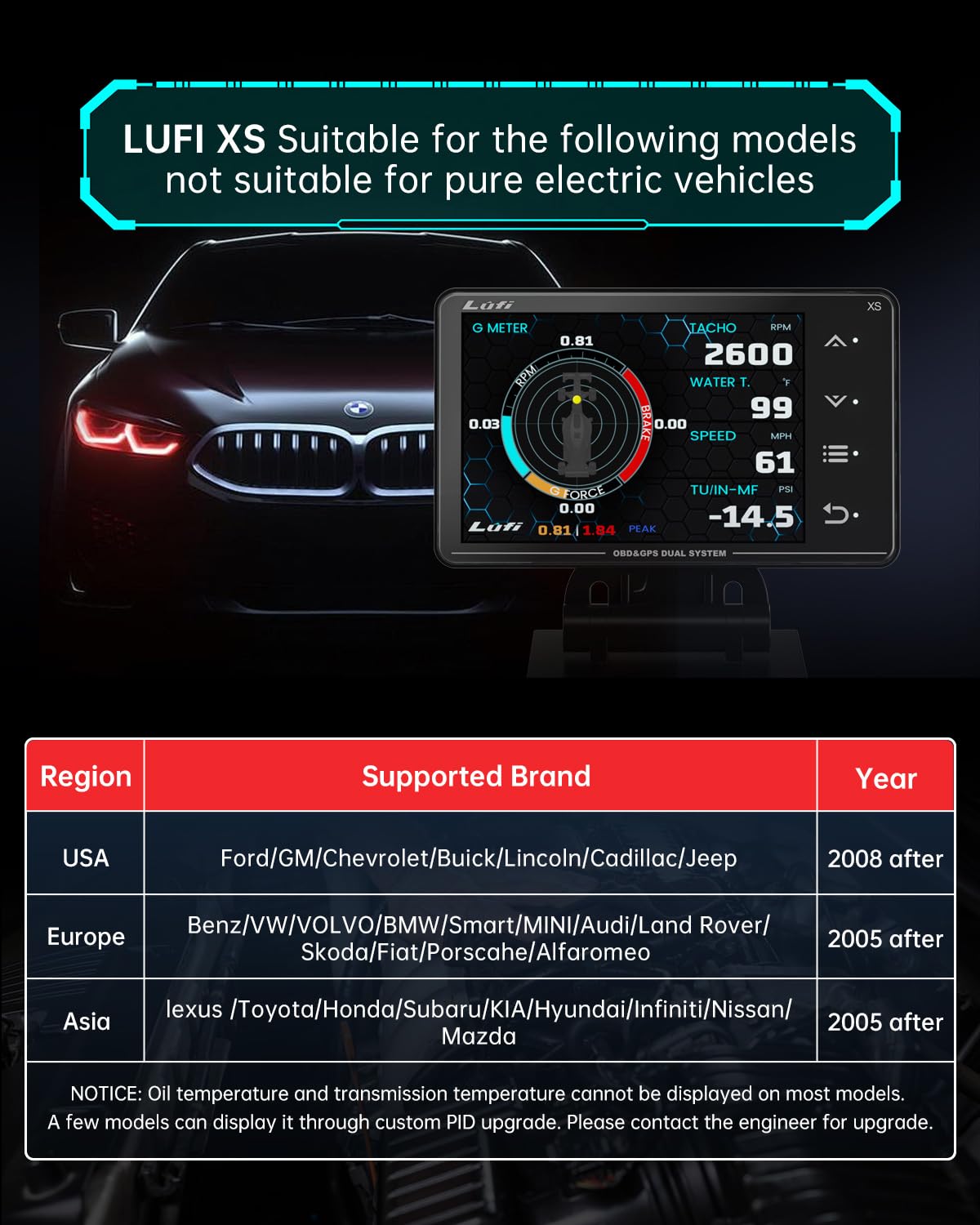
Image: A chart detailing vehicle compatibility by region, supported brands, and production year, along with a note about oil temperature and pressure data.
Key Features
ECU Data Monitoring
The Lufi XS supplements missing data from your original dashboard, monitoring essential car ECU data such as water temperature, speed, and turbine pressure in real-time. This allows you to stay informed about your car's running status at all times. It also includes a pop-up alert feature to protect your engine by preventing overload damage when critical ECU data reaches dangerous levels.

Image: Display showing various data points including fuel consumption, air/fuel ratio, altitude, GPS speed, and the ability to read/clear codes.
Ultimate Customization
This instrument display offers superior versatility. You can upgrade instrument programs, customize display data, change display colors, and even personalize your car's logo. The 3.5-inch polarized display screen features a built-in automatic light sensor, ensuring clear readings even when wearing polarized sunglasses.

Image: Lufi XS display highlighting custom car logo and customizable data display options.
3-in-1 Functionality
The Lufi XS combines three essential functions into one device: an OBD2 gauge, a GPS speedometer, and a car inclinometer. This comprehensive integration provides a wide range of data for various driving needs.

Image: Three different display modes of the Lufi XS, illustrating its functions as a GPS speedometer, OBD2 gauge, and car inclinometer.
Alerts and Warnings
The device features various alert functions to enhance driving safety, including temperature alarm, RPM alarm, voltage alarm, turbo alarm, speed alarm, exhaust temperature alarm, and inclinometer alarm. These alerts help prevent potential issues by notifying you when critical parameters reach dangerous levels.

Image: Lufi XS display showing a list of available alarm types, such as temperature, RPM, voltage, turbo, speed, EXT.T, and inclinometer alarms.
Setup and Installation
The Lufi XS OBD2 Gauge Display is designed for simple plug-and-play installation. Connect the device to your car's 16-pin OBD-II interface using the provided OBD-II plug. The instrument base can be fixed on the car's center console with double-sided tape (suction cups are not included).
Upon initial setup, it is recommended to clear any existing diagnostic trouble codes (DTCs) from your vehicle's ECU to ensure accurate readings and prevent false alarms. The device allows you to read and clear common fault codes directly.
Video: Official Lufi XS Car Meter demonstration, showing installation, clearing error codes, and various display modes in a vehicle. This video provides a visual guide to the initial setup and functionality.
System Upgrade
The device supports system upgrades. If you need custom PID data for a specific vehicle or encounter issues, please contact Lufi's professional engineers for potential system upgrades. This may involve connecting the device to a laptop or computer for software updates.

Image: Lufi XS device connected to a laptop, indicating the possibility of system upgrades.
Operating Instructions
Once installed, the Lufi XS will power on automatically when the vehicle's ignition is turned on. Navigate through the various display screens and settings using the buttons on the device. The intuitive interface allows you to select desired data points, customize layouts, and set alarms according to your preferences.
Understanding Displayed Data
The device reads ECU data in real-time. If your car does not have the corresponding sensors for certain data points (e.g., specific oil temperatures), those data points cannot be displayed. Refer to your vehicle's manual for available sensor data.
Clearing Fault Codes
The Lufi XS has the function to read and clear common fault codes. Access the DTCs DATA menu to view current codes or clear them. Always consult a qualified mechanic if a persistent fault code appears after clearing.
Maintenance
To ensure the longevity and optimal performance of your Lufi XS OBD2 Gauge Display, keep the screen clean using a soft, dry cloth. Avoid using abrasive cleaners or solvents. Ensure the OBD-II connection remains secure and free from debris. Periodically check for available software updates to benefit from new features and improved compatibility.
Troubleshooting
- Device Not Powering On: Ensure the OBD-II plug is securely connected to your vehicle's OBD-II port. Verify that your vehicle's ignition is turned on.
- No Data Displayed: Confirm vehicle compatibility (American cars post-2008, Japanese/European cars post-2005). Some data points may not be available if your car lacks the corresponding sensors. Try clearing DTCs.
- Screen Glitches or Lag: Ensure the device's software is up to date. Disconnect and reconnect the OBD-II plug.
- "Engine Power Reduced" Message (Chevy Cruze): Some users have reported this issue with specific vehicle models. Ensure the device's software is updated. If the issue persists, contact Lufi support or a qualified mechanic.
- Cable Disconnection: If the cable frequently disconnects, ensure it is properly seated. Contact Lufi support if the cable connection is loose or defective.
- Display Unreadable with Polarized Sunglasses: The device features a polarized display. While designed for clarity, some polarized sunglasses may still affect visibility. Adjust viewing angle or remove sunglasses if necessary.
Specifications
| Product Dimensions | 4.06 x 0.71 x 2.45 inches; 12.63 ounces |
| Item Model Number | lufi-XS-1 |
| Manufacturer | Wen zhou xu zhan Electrical apploances co.ltd |
| Material | PVC |
| Screen Size | 2.45 Inches |
| UPC | 648564086605 |
| Country of Origin | China |
What's in the Box
- Mainframe (Lufi XS OBD2 Gauge Display)
- OBD-II Connection Cable
- Double-sided Tape for Mounting
- User Manual (this document)
Warranty and Support
Lufi offers an 18-month warranty for the Lufi XS OBD2 Gauge Display for U.S. customers. For any product-related inquiries, technical support, or warranty claims, please contact Lufi customer service. Professional engineers are available to assist with system upgrades and specific vehicle data inquiries.

Image: Lufi XS product with a "540 days WARRANTY" badge, highlighting the 18-month warranty period.


