
Product Overview
The Arcade1UP Teenage Mutant Ninja Turtles Countercade offers a compact and engaging retro gaming experience. Designed for single-player use, this mini arcade cabinet is suitable for various spaces, including home bars, offices, or dorm rooms. It features authentic gameplay from two classic Teenage Mutant Ninja Turtles arcade titles: the original Teenage Mutant Ninja Turtles arcade game and Turtles in Time.
Key features include:
- Full-size, real-feel arcade controls for precise gameplay.
- A vibrant 8-inch screen for clear visual display.
- Integrated headphone jack for private audio.
- Adjustable variable volume control.

Figure 1: Front view of the Arcade1UP Teenage Mutant Ninja Turtles Countercade, showcasing the screen and control panel.
Setup Guide
Assembly of the Countercade typically takes approximately one hour. Ensure all components are present before beginning assembly. Follow the detailed instructions provided in the separate assembly manual for proper construction.
Placement and Power
- Place the Countercade on a stable, flat surface.
- Ensure adequate ventilation around the unit.
- Connect the provided power adapter to the DC input port on the back of the unit, then plug it into a standard electrical outlet.
Operating Instructions
Power On/Off
Locate the power switch on the control panel. Flip the switch to the "ON" position to power on the unit. To power off, flip the switch to the "OFF" position.
Game Selection
The Countercade includes two pre-installed games: Teenage Mutant Ninja Turtles and Turtles in Time. To switch between games, hold down the Player 1 button for approximately 5 to 6 seconds. This action will return you to the game selection menu, where you can choose your desired title.
Controls
The control panel features a joystick and multiple action buttons. Refer to the on-screen instructions within each game for specific control mappings and special moves.
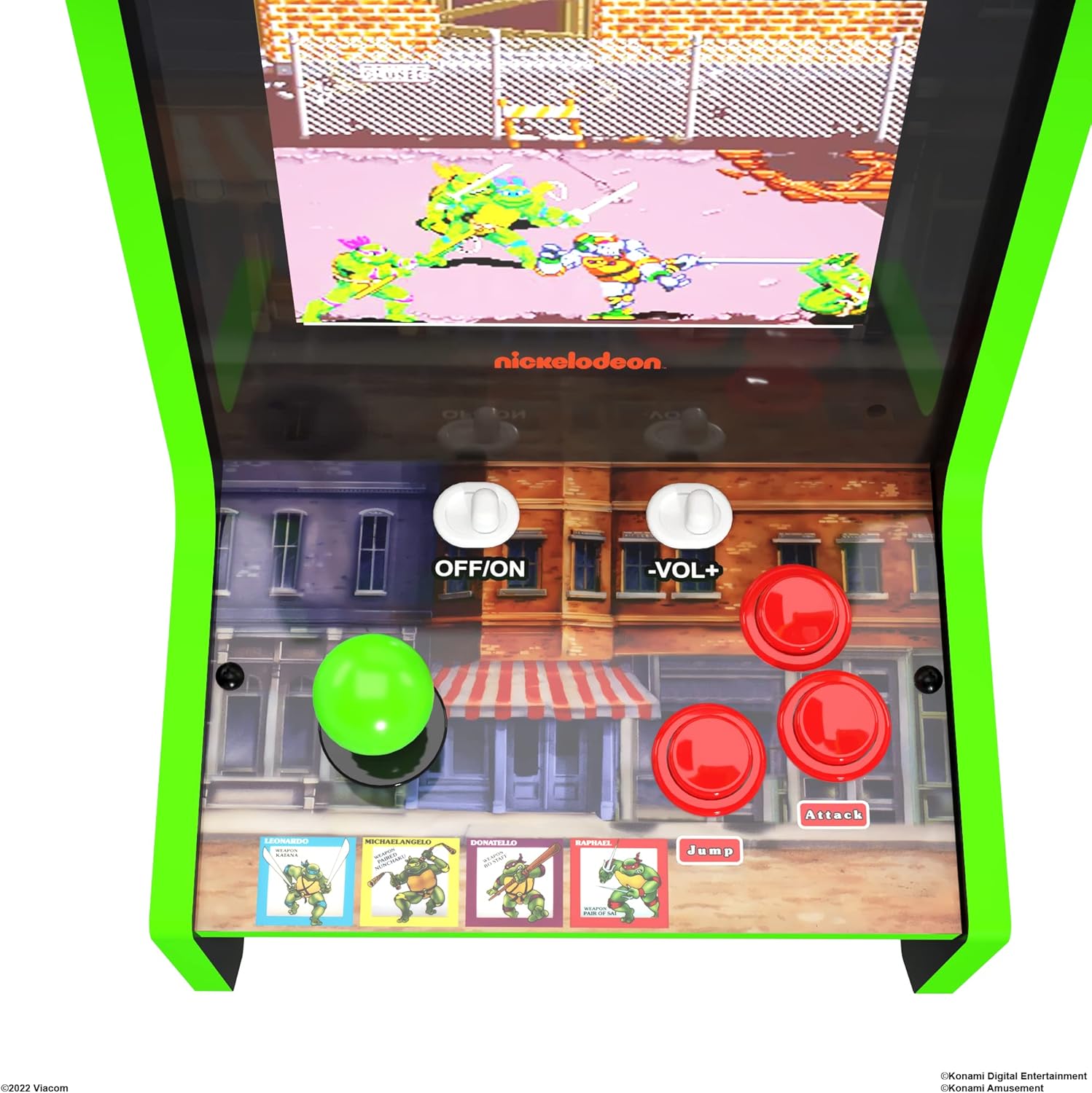
Figure 2: Close-up view of the control panel, showing the joystick, buttons, and power/volume controls.
Maintenance
To ensure the longevity and optimal performance of your Countercade, follow these maintenance guidelines:
- Cleaning: Use a soft, dry cloth to wipe down the cabinet and screen. Avoid abrasive cleaners or solvents that may damage the finish.
- Storage: When not in use for extended periods, store the unit in a cool, dry place away from direct sunlight and extreme temperatures.
- Handling: Always lift the unit from the base when moving it to prevent damage to the components.
Troubleshooting
| Problem | Possible Cause | Solution |
|---|---|---|
| Unit does not power on. | Power cable not properly connected; power outlet issue. | Ensure power cable is securely plugged into the unit and a working electrical outlet. Try a different outlet. |
| No sound or low volume. | Volume control set too low; headphone jack in use. | Adjust the volume control knob. Disconnect any headphones if connected. |
| Screen is blank or distorted. | Loose internal connection; display issue. | Power off the unit, wait 10 seconds, then power back on. If the issue persists, contact customer support. |
| Marquee does not light up. | This specific Countercade model (TMN-C-23860) does not feature a light-up marquee. | No action required. The product functions as designed. |
Product Specifications
| Feature | Detail |
|---|---|
| Brand | ARCADE1UP |
| Model Number | TMN-C-23860 |
| Screen Size | 8 Inches |
| Display Type | LED |
| Included Games | Teenage Mutant Ninja Turtles, Turtles in Time |
| Form Factor | Mini Countercade |
| Material | Plastic |
| Item Weight | 13 Pounds (5.9 kg) |
| Product Dimensions (L x W x H) | 9.57 x 11.93 x 15.75 inches (24.3 x 30.3 x 40 cm) |
| UPC | 195570019078 |
| Manufacturer Recommended Age | 14 years and up |
Warranty and Support
For information regarding product warranty, technical support, or replacement parts, please refer to the official Arcade1UP website or contact their customer service department. Keep your proof of purchase for warranty claims.
For further assistance, visit the ARCADE1UP Store on Amazon.