
1. Introduction
This manual provides essential instructions for the safe and efficient use of your CANYON Jondy KW-44 Kids Smart Watch. Please read this manual thoroughly before operating the device and retain it for future reference.
Safety Information
- Do not attempt to disassemble or modify the device.
- Keep the device away from extreme temperatures and direct sunlight.
- Ensure the charging cable is used correctly to prevent damage.
- This device is not a medical instrument. Do not use it for medical diagnosis or treatment.
- Supervise children during use, especially when handling the SIM card.
2. Package Contents
Verify that all items are present in the package:
- CANYON Jondy KW-44 Kids Smart Watch
- Charging Cable (Laddningskabel)
- User Manual (this document)
3. Product Overview
The CANYON Jondy KW-44 is a kids' smartwatch designed for communication and safety. It features a 1.44-inch IPS colorful screen, GPS tracking, and 4G cellular connectivity.
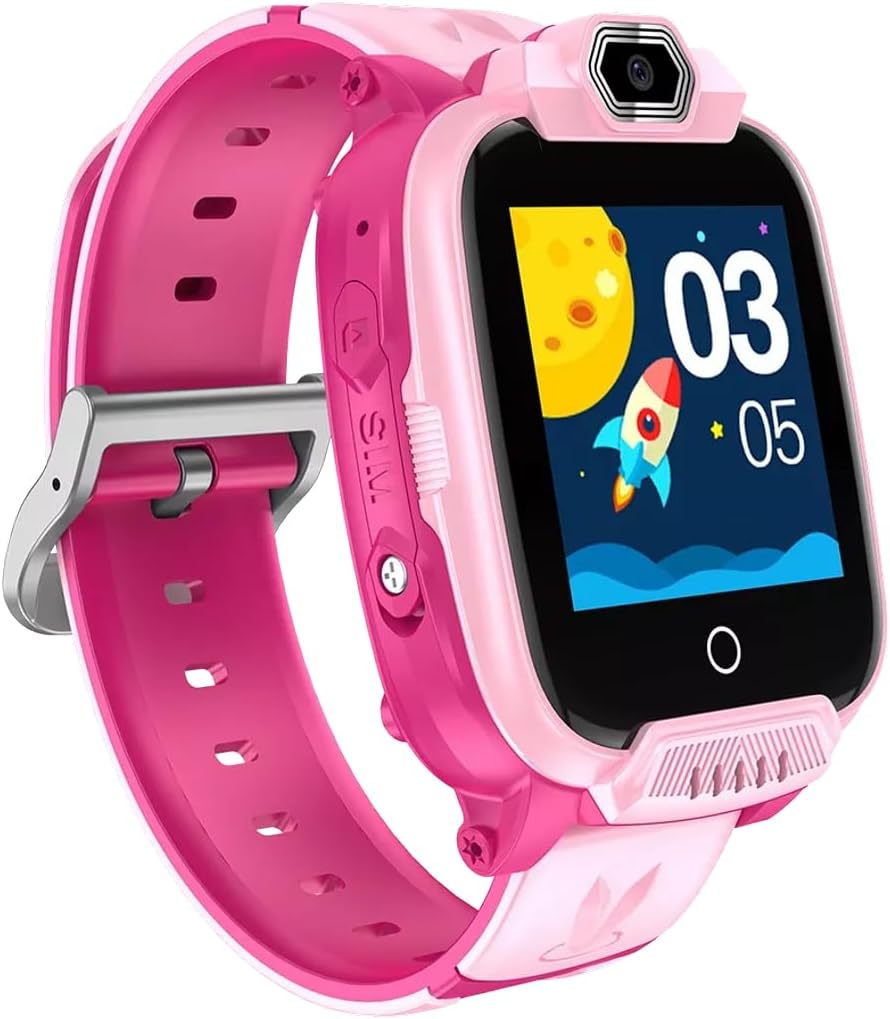
Figure 3.1: Front view of the CANYON Jondy KW-44 Kids Smart Watch, showing the screen, camera, and side buttons.
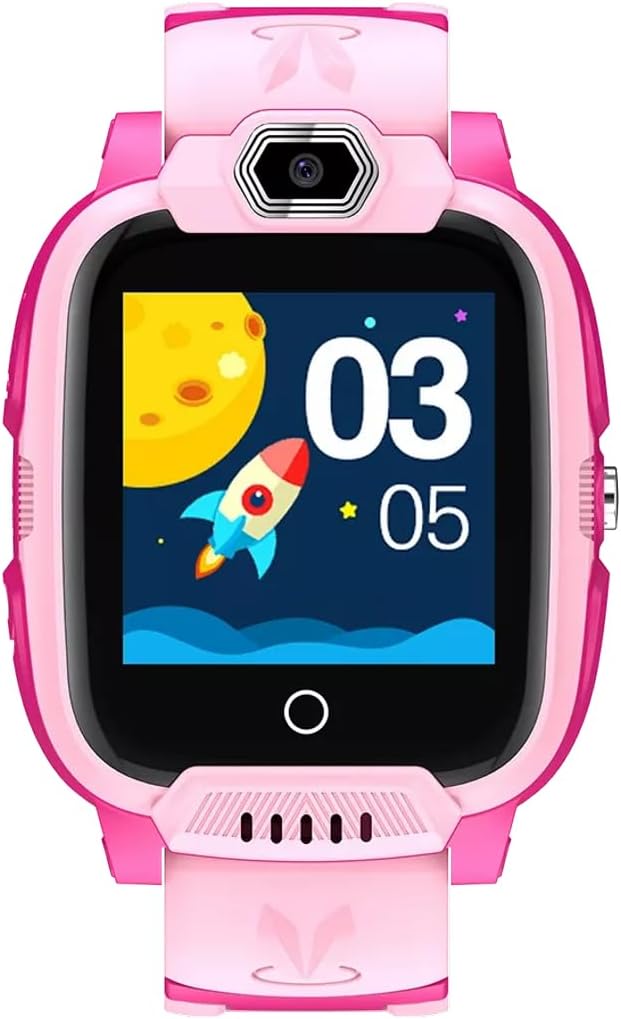
Figure 3.2: Angled view of the CANYON Jondy KW-44, highlighting the SIM card slot on the side.

Figure 3.3: Side view of the CANYON Jondy KW-44, illustrating the watch's profile and strap design.

Figure 3.4: Retail packaging for the CANYON Jondy KW-44 Kids Smart Watch.
4. Setup
4.1 Charging the Device
Before first use, fully charge the smartwatch. Connect the provided charging cable to the watch's charging port and plug the other end into a USB power adapter (not included) or a computer's USB port. A full charge takes approximately 3.5 hours. The battery average life is 2 days.
4.2 Inserting the Nano SIM Card
The CANYON Jondy KW-44 requires a Nano SIM card for cellular connectivity (calls, 4G network, GPS data transmission). Ensure the watch is powered off before inserting the SIM card.
- Locate the SIM card slot on the side of the watch (refer to Figure 3.2).
- Carefully open the SIM card slot cover.
- Insert the Nano SIM card with the gold contacts facing up and the notched corner aligned correctly.
- Gently push the SIM card until it clicks into place.
- Close the SIM card slot cover securely to ensure water resistance.
Note: The SIM card must have an active data plan and support 4G LTE (B1, B2, B3, B5, B7, B8, B20) and GSM (B3, B8) frequencies for full functionality.
4.3 Powering On/Off
- To Power On: Press and hold the power button (usually located on the side) until the screen lights up.
- To Power Off: Press and hold the power button until the power-off option appears on the screen. Select "Power Off" or continue holding until the device shuts down.
4.4 Pairing with a Smartphone
To manage the watch's features, such as contacts, GPS tracking, and settings, you need to pair it with a smartphone using the dedicated CANYON Life app (or similar app specified by CANYON). The watch is compatible with iOS and Android devices.
- Download and install the CANYON Life app from your smartphone's app store.
- Register an account and log in.
- Follow the in-app instructions to add a new device. This typically involves scanning a QR code displayed on the watch screen or entering a device ID.
- Once paired, you can configure watch settings and monitor its functions from your smartphone.
5. Operating Instructions
5.1 Basic Navigation
The watch features a touch-sensitive screen. Swipe left/right or up/down to navigate through menus and applications. Tap to select an option.
5.2 Making and Receiving Calls
Once a Nano SIM card is inserted and configured through the app, the watch can make and receive calls to pre-approved contacts.
- Making a Call: From the call menu, select a contact from the pre-set list and tap to dial.
- Receiving a Call: When a call comes in, tap the green answer icon on the screen. Tap the red hang-up icon to end a call.
5.3 GPS Tracking
The built-in GPS allows parents to track the child's location in real-time via the paired smartphone app. Location history and safe zones can also be configured through the app.
5.4 Video Calls
The watch supports video calls over its 4G network. Ensure a stable 4G connection for optimal video call quality. Video calls are initiated and received similarly to voice calls, with an additional video icon.
5.5 SOS Function
In an emergency, the child can press and hold the designated SOS button (refer to product overview for location). This will automatically dial pre-set emergency contacts and send location alerts.
6. Maintenance
6.1 Cleaning
Wipe the watch screen and body with a soft, dry, or slightly damp cloth. Do not use harsh chemicals or abrasive materials, as these can damage the screen and casing (ABS plastic).
6.2 Water Resistance (IP67)
The CANYON Jondy KW-44 is IP67 rated, meaning it is protected from dust and can withstand immersion in water up to 1 meter for up to 30 minutes. It is suitable for splashes and brief immersion but should not be used for swimming or showering with hot water. Ensure the SIM card slot cover is securely closed to maintain water resistance.
6.3 Battery Care
- Avoid fully discharging the battery frequently.
- Charge the watch regularly, even if not in use, to maintain battery health.
- Do not expose the watch to extreme temperatures during charging or storage.
7. Troubleshooting
| Problem | Possible Cause | Solution |
|---|---|---|
| Watch does not power on. | Low battery. | Charge the watch for at least 30 minutes. |
| Cannot make/receive calls. | No SIM card, inactive SIM, poor network signal, incorrect contact settings. | Ensure SIM is inserted correctly and active. Check network coverage. Verify contact numbers in the app. |
| GPS location is inaccurate. | Poor GPS signal (indoors/dense areas), watch not connected to network. | Move to an open area. Ensure SIM card has data and network connection. |
| Watch screen is unresponsive. | Software glitch, low battery. | Restart the watch. Charge the watch. If problem persists, contact support. |
8. Specifications
| Feature | Detail |
|---|---|
| Model Name | Jondy KW-44 |
| Model Number | CNE-KW44PP |
| Screen Size | 1.44 inches |
| Display Type | IPS Colorful Screen |
| Resolution | 240 x 240 pixels |
| Processor | ASR3603S |
| Memory (RAM+ROM) | 192MB + 128MB |
| Internal Storage (TF Card) | 512MB |
| SIM Card Type | Nano SIM |
| Cellular Technology | 4G LTE (B1, B2, B3, B5, B7, B8, B20), GSM (B3, B8) |
| GPS | Built-in GPS |
| Battery Capacity | 700mAh Lithium Polymer |
| Battery Average Life | Up to 2 days |
| Charging Time | Approximately 3.5 hours |
| Water Resistance | IP67 |
| Compatible OS | iOS, Android |
| Material | ABS Plastic |
| Included Components | Charging Cable |
9. Warranty and Support
CANYON products are designed and manufactured to the highest quality standards. For detailed warranty information and technical support, please refer to the official CANYON website or contact your local retailer. Keep your purchase receipt as proof of purchase.
For further assistance, please visit CANYON Support.


