
Introduction
This manual provides detailed instructions for the installation, operation, and maintenance of your Ohniyou 52 Inch Ceiling Fan with Light and Remote. Please read this manual thoroughly before installation and use to ensure safe and efficient operation. Keep this manual for future reference.
The Ohniyou 52-inch ceiling fan is designed for both indoor and outdoor use, featuring a reversible DC motor, integrated LED lighting with adjustable color temperature, and a convenient remote control. Its five double-finish blades offer versatile aesthetic options.
Safety Information
Always follow basic safety precautions when installing and operating electrical appliances to reduce the risk of fire, electric shock, and personal injury.
- Ensure the power is turned off at the circuit breaker before installation or maintenance.
- All wiring must be in accordance with national and local electrical codes. If you are unfamiliar with wiring, consult a qualified electrician.
- The mounting structure must be capable of supporting the weight of the fan (approximately 7.26 kg).
- Do not bend the blade holders during installation or cleaning.
- Maintain a minimum clearance of 7 feet from the floor to the bottom of the fan blades.
- This fan is designed for use with a remote control only; wall switches may not provide full functionality.
Package Contents
Before beginning installation, ensure all parts are present and accounted for:
- Ceiling Fan Motor Assembly
- Fan Blades (5)
- Blade Brackets (5)
- Downrods (5-inch and 10-inch options)
- Mounting Bracket
- Canopy and Canopy Cover
- LED Light Kit
- Remote Control with Wall Mount
- Hardware Pack (screws, washers, wire nuts, cotter pin)
- User Manual
Setup and Installation
Installation of this ceiling fan typically requires 1 to 2 people and takes approximately 0.5-1 hour. Refer to the following steps and videos for guidance.
Step 1: Prepare the Motor and Blade Brackets
Attach the blade brackets to the fan motor. Ensure they are securely fastened.

Image: Fan motor assembly with blade brackets attached, showing the internal wiring and mounting points.
Step 2: Attach Fan Blades
Secure each fan blade to its corresponding blade bracket using the provided screws and washers. The blades are reversible, allowing you to choose between a rough black wood grain or a smooth light wood grain finish.
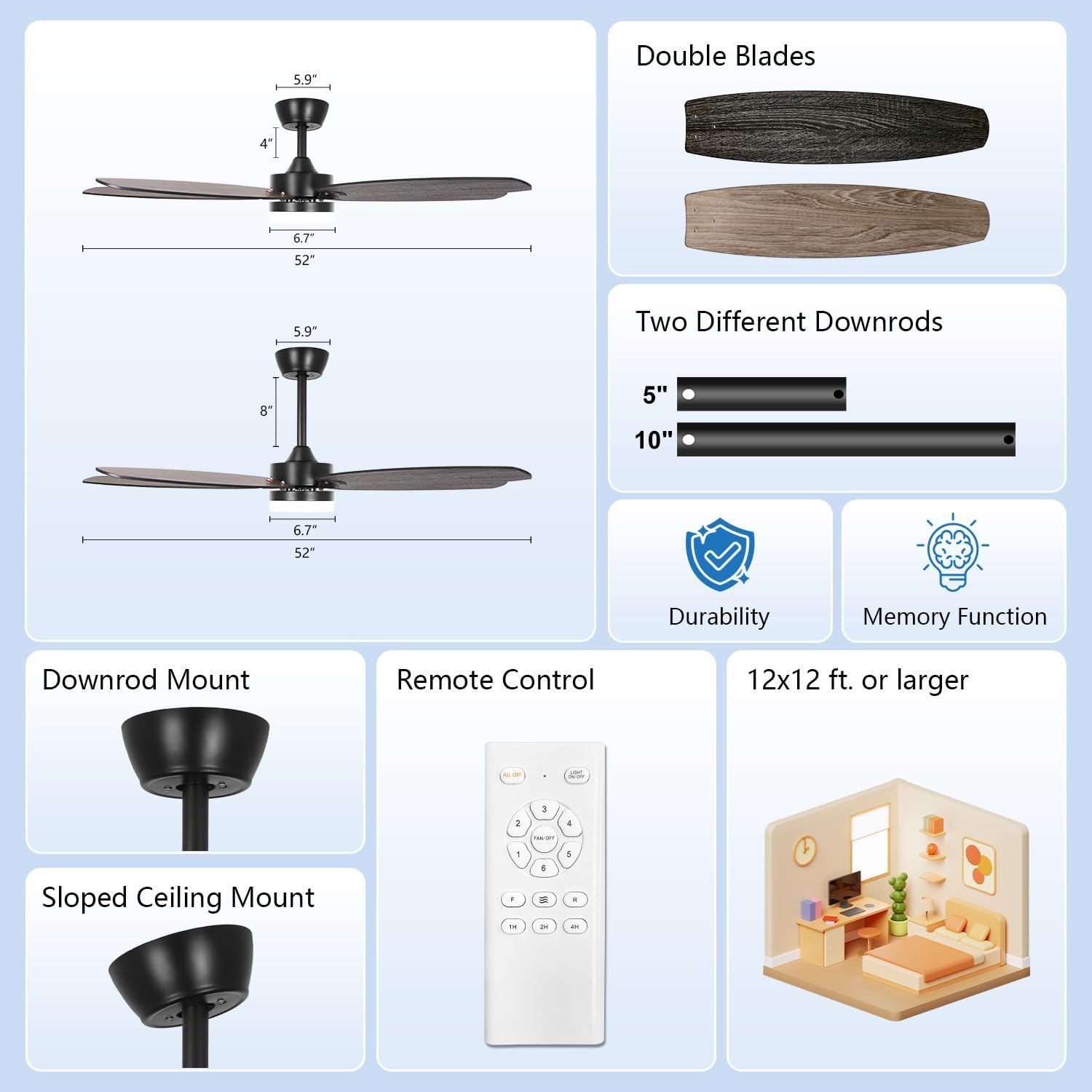
Image: A close-up view of a fan blade being attached to the motor housing with screws, highlighting the double-sided blade design.
Step 3: Connect LED Light Kit
Connect the LED light kit to the fan motor's wiring. Ensure all connections are secure before proceeding.

Image: The LED light kit is shown being connected to the fan's internal wiring, illustrating the 3-color temperature feature.
Step 4: Assemble Downrod and Canopy
Thread the electrical wires from the fan motor through the chosen downrod (5-inch or 10-inch). Secure the downrod to the motor assembly with the provided pin and screws. Slide the canopy and canopy cover onto the downrod.
Step 5: Mount the Fan to the Ceiling
Attach the mounting bracket to the ceiling junction box. Carefully lift the fan assembly and hang it on the mounting bracket. Connect the fan's electrical wires to the household wiring according to the wiring diagram in the full instruction manual. Secure the canopy to the mounting bracket.

Image: An Ohniyou 52-inch ceiling fan with light installed in a living room, demonstrating its aesthetic integration.
Installation Videos:
OHNIYOU 52'' Ceiling Fan Light Assembly Guide
This video provides a comprehensive guide to assembling the Ohniyou 52-inch ceiling fan light, detailing each step of the process.
OHNIYOU 52 inches ceiling fan light installation guide
Watch this video for a step-by-step guide on installing the Ohniyou 52-inch ceiling fan light onto your ceiling.
Operating Instructions
Your Ohniyou ceiling fan is operated using the included remote control. Ensure the remote has fresh batteries installed.
Fan Speed Control
The fan features 6 adjustable speeds. Use the remote control to select your desired airflow. Speeds 1-2 provide a comfortable low wind for sleeping or reading, speeds 3-4 offer natural medium wind for entertainment, and speeds 5-6 deliver a cool high wind for sports or fitness activities.

Image: Illustration of the 6 adjustable fan speeds and their recommended uses, controlled by the remote.
LED Light Control
The integrated 18W LED light offers 3 color temperature options: 3000K (warm light), 4500K (natural light), and 6000K (cool light). Use the remote to cycle through these settings to match your preference or room ambiance. The light also has a memory function, retaining the last used setting.
Image: The ceiling fan light displaying warm, natural, and cool light settings, indicating the 3 color temperature options.
Reversible DC Motor (Summer/Winter Mode)
The fan features a reversible DC motor for year-round comfort. In summer, the downdraft mode creates a cooling effect. In winter, the updraft mode circulates warm air trapped near the ceiling, promoting air circulation and energy saving.

Image: A visual representation of the fan's reversible motor function, showing airflow patterns for summer (downdraft) and winter (updraft) modes.
Timer Function
Set the fan to automatically turn off after 1, 2, or 4 hours using the timer function on the remote control. This is ideal for nighttime use or when you want to conserve energy.
Quiet Operation
The fan is equipped with a silent DC motor, operating at a low noise level of approximately 30 decibels, ensuring a peaceful environment.

Image: A graphic highlighting the fan's quiet operation at 30dB, comparing it to other noise levels.
52 inch ceiling fan with lights for indoor and outdoor use
This video demonstrates the various features and operational modes of the Ohniyou 52-inch ceiling fan, including light and speed adjustments.
Maintenance
Regular maintenance helps prolong the life and performance of your ceiling fan.
- Cleaning: Periodically clean the fan blades and motor housing with a soft, damp cloth. Do not use abrasive cleaners or solvents.
- Tightening Screws: Check all screws on the fan blades and mounting hardware annually to ensure they are secure.
- Lubrication: The DC motor is permanently lubricated and does not require additional oiling.
Troubleshooting
If you experience issues with your ceiling fan, refer to the following common problems and solutions:
| Problem | Possible Cause | Solution |
|---|---|---|
| Fan does not start | No power to the fan; loose wire connections; remote control battery dead. | Check circuit breaker; ensure all wire connections are secure; replace remote control battery. |
| Fan is noisy | Loose fan blades or mounting screws; motor housing rubbing. | Tighten all blade and mounting screws; ensure no parts are rubbing. |
| Light does not work | Loose wire connection to light kit; LED driver failure. | Check light kit wiring connections; contact customer support if LED driver is suspected. |
| Remote control not working | Dead battery; incorrect pairing. | Replace battery; refer to remote pairing instructions in the full manual. |
If problems persist after attempting these solutions, please contact Ohniyou customer support.
Specifications
| Feature | Specification |
|---|---|
| Brand | Ohniyou |
| Model Number | GLX032 |
| Blade Length | 52 Inches |
| Number of Blades | 5 |
| Blade Material | Wood |
| Motor Type | Silent DC Motor |
| Number of Speeds | 6 |
| Light Type | LED |
| Wattage (Light) | 18 watts |
| Color Temperature | 3000K-6000K (Warm, Natural, Cool) |
| Control Method | Remote Control |
| Special Features | LED Light, Remote Controlled, Silent DC Motor, Timer, Reversible Airflow |
| Noise Level | 30 Decibels |
| Mounting Type | Downrod Mount (suitable for sloped ceilings up to 15 degrees) |
| Indoor/Outdoor Usage | Indoor, Outdoor |
| Item Weight | 7.26 Kilograms |
Warranty and Support
For warranty information or technical support, please refer to the warranty card included with your product or contact Ohniyou customer service directly. Keep your purchase receipt as proof of purchase.
Contact Information: Please visit the official Ohniyou website or refer to the contact details provided in your product packaging for support.


