
Introduction
The Douk Audio P6-Mini is a compact HiFi Bluetooth tube preamplifier designed to enhance your audio system. It features multiple audio inputs including Bluetooth 5.0, USB (U-disk), and stereo RCA, offering versatility for various devices. The preamplifier utilizes a 6A2 tube to provide a warm and soft sound, with options for tube replacement to customize the audio experience. Independent bass and treble controls allow for fine-tuning of sound output, providing a rich and dynamic listening experience.
This manual provides essential information for the proper setup, operation, and maintenance of your P6-Mini preamplifier.

Image: The Douk Audio P6-Mini preamplifier showcasing its multiple input capabilities, including Bluetooth, USB, and RCA, connected to a home audio setup.
Setup Instructions
- Unpacking: Carefully remove all components from the packaging. Verify that all items listed in the packing list are present: 1x P6-MINI preamplifier, 2x 6A2 vacuum tubes, 1x DC 12V power adapter, 1x Bluetooth antenna, and 1x user manual.
- Tube Installation: Gently insert the two 6A2 vacuum tubes into their respective sockets on top of the preamplifier. Ensure they are seated firmly but do not force them.
- Bluetooth Antenna: Screw the provided Bluetooth antenna into the designated port on the rear panel of the preamplifier.
- Power Connection: Connect the DC 12V power adapter to the 'DC 12V IN' port on the rear of the preamplifier, then plug the adapter into a power outlet.
- Audio Input Connection:
- Bluetooth: Ensure the Bluetooth antenna is connected.
- USB (U-disk): Insert a FAT32 formatted U-disk into the USB port on the front panel.
- RCA: Connect your audio source (e.g., CD player, TV, computer) to the 'INPUT' RCA ports on the rear panel using RCA cables.
- Audio Output Connection: Connect the 'OUTPUT' RCA ports on the rear panel of the P6-Mini to your amplifier or active speakers using RCA cables.

Image: Detailed view of the Douk Audio P6-Mini packing list, including the preamplifier unit, two 6A2 vacuum tubes, a DC 12V power adapter, and a Bluetooth antenna.
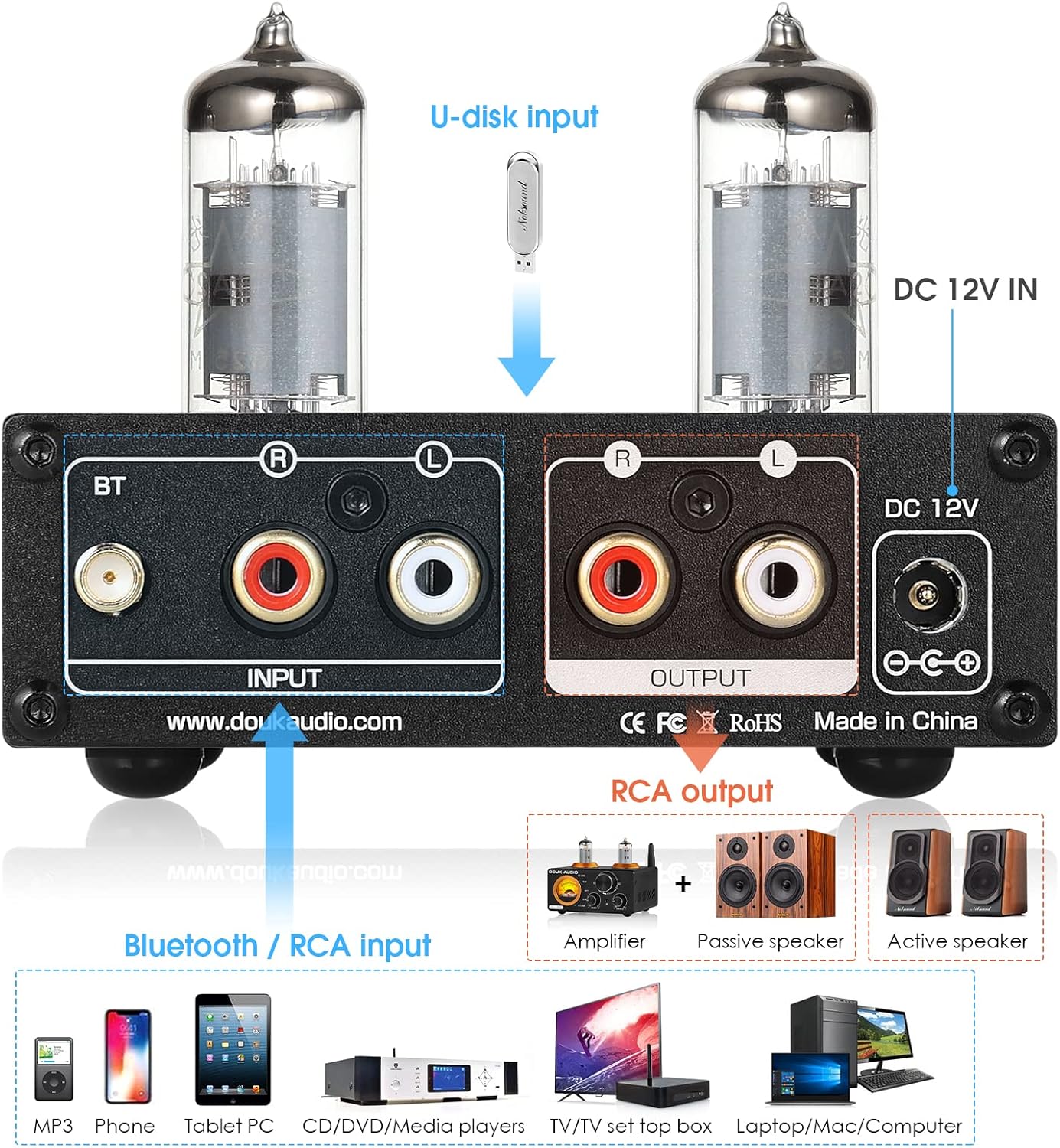
Image: The rear panel of the Douk Audio P6-Mini, illustrating the Bluetooth antenna connection, RCA input and output ports, and the DC 12V power input.
Operating Instructions
- Power On/Off: Use the input select switch on the front panel. Toggle it to BT/USB or RCA to power on, and to OFF to power off.
- Input Selection: Use the 'BT/USB / RCA / OFF' toggle switch on the front panel to select your desired audio input source. The LED indicator will show the active input (Blue for Bluetooth, Red for U-disk).
- Bluetooth Connection: If Bluetooth is selected, search for 'Douk Audio' on your device and pair.
- U-disk Operation: When a U-disk is inserted and selected, use the 'Previous song', 'Play/Pause', and 'Next song' buttons on the front panel to control playback. Note: U-disk input takes priority over Bluetooth. If a U-disk is inserted, Bluetooth will automatically disconnect.
- Volume Control: Adjust the 'VOL' knob on the front panel to set the overall output volume.
- Tone Control: Use the 'BASS' and 'TRE' (Treble) knobs to adjust the low and high frequencies of the audio output according to your preference.

Image: The front panel of the Douk Audio P6-Mini, detailing the input selector switch, U-disk control buttons, Bass, Treble, and Volume knobs, and input indicator LEDs.

Image: A close-up of the Douk Audio P6-Mini's front panel, highlighting the independent Bass, Treble, and Volume control knobs for precise sound adjustment.
Maintenance
Cleaning
To clean the unit, use a soft, dry cloth. Avoid using harsh chemicals or abrasive cleaners, as these can damage the finish. Ensure the unit is powered off and unplugged before cleaning.
Tube Replacement
The default 6A2 tubes can be replaced to alter the sound characteristics. Compatible tubes for upgrading include 6X1N, JAN5725W, 6AK5, and EF95. When replacing tubes, ensure the unit is powered off and unplugged. Allow the tubes to cool down before handling. Gently pull the old tubes straight up from their sockets and carefully insert the new tubes, aligning the pins correctly before pushing them down firmly.

Image: A detailed view of the Douk Audio P6-Mini, emphasizing its pluggable tube design, which allows users to replace the default 6A2 tubes with compatible alternatives for sound customization.
Troubleshooting
- No Sound Output:
- Ensure the power adapter is securely connected and the unit is powered on.
- Verify that the correct input source (Bluetooth, USB, or RCA) is selected.
- Check all audio cable connections between the source, preamplifier, and amplifier/speakers.
- Confirm that the volume knob is turned up and not at minimum.
- If using Bluetooth, ensure your device is paired and the volume on your device is also turned up.
- Bluetooth Disconnects Automatically:
- The U-disk input has priority over Bluetooth. If a U-disk is inserted into the USB port, Bluetooth will automatically disconnect. Remove the U-disk to re-enable Bluetooth connection.
- Distorted Sound:
- Check if the input signal level is too high, causing clipping. Reduce the volume on your audio source.
- Ensure all cables are properly connected and not damaged.
- Verify that the tubes are correctly seated in their sockets.
- Unit Not Powering On:
- Confirm the power adapter is plugged into a working outlet and securely connected to the preamplifier.
- Check the power switch position.
Specifications
| Feature | Specification |
|---|---|
| Audio Input | Bluetooth 5.0 / USB (U-disk) / Stereo RCA |
| Audio Output | Stereo RCA |
| U-disk Max Capacity | 64G |
| U-disk Supported Sampling Rate | 24Bit/192K (FAT32) |
| U-disk Supported Formats | MP3/APE/FLAC/WAV/WMA |
| Treble/Bass Range | ±6dB |
| Frequency Response | 20Hz - 20kHz (±1dB) |
| Distortion | ≤0.03% |
| RCA Input Sensitivity | 0dBFS/1V |
| SNR | ≥100dB |
| Working Voltage | DC 12V |
| Dimensions (W x D x H) | 97 x 118 x 33 mm |
| Net Weight | 337g |
Warranty Information
Douk Audio products are typically covered by a limited warranty against defects in materials and workmanship. The specific terms and duration of your warranty may vary depending on your region and point of purchase. Please retain your proof of purchase for warranty claims. For detailed warranty information, refer to the documentation provided with your product or visit the official Douk Audio website.
Customer Support
If you encounter any issues or have questions regarding your Douk Audio P6-Mini preamplifier that are not addressed in this manual, please contact Douk Audio customer support. You can usually find contact information, including email addresses or support portals, on the official Douk Audio website. Please have your product model and purchase details ready when contacting support.
For additional resources and product updates, visit the official Douk Audio website: www.doukaudio.com


