
1. Introduction
Thank you for choosing the MoKo 60-inch Camera Tripod. This lightweight aluminum tripod is designed to provide stable support for various devices, including DSLR cameras, smartphones, tablets, and action cameras. Its versatile features make it suitable for photography, live streaming, video recording, and more.

Image 1: MoKo 60-inch Camera Tripod with phone, tablet, DSLR, and action camera mounts.
2. Package Contents
- 1 x Foldable Tripod
- 1 x Phone/Tablet Holder
- 1 x GoPro Holder
- 1 x Wireless Remote Shutter
- 1 x Carrying Bag
- 1 x User Manual
3. Product Features
- Adjustable Height: Extends from 16 inches (41 cm) to 60 inches (140 cm) with 4-level height adjustment.
- 3-Way Pan Head: Allows 360-degree horizontal rotation and 180-degree tilt for versatile shooting angles.
- Wide Compatibility: Standard 1/4" screw mount for cameras. Includes detachable 2-in-1 phone/tablet holder and GoPro holder.
- Sturdy & Stable: Constructed from durable aluminum alloy with anti-slip feet and a built-in bubble level for precise horizontal alignment.
- Portable Design: Lightweight (28.57 oz / 810g) and comes with a carrying bag for easy transport.
- Wireless Remote: Bluetooth remote allows photo/video capture from up to 33ft (10m) away.

Image 2: Key components and features of the MoKo tripod.
4. Setup Instructions
4.1 Unfolding the Tripod
- Place the tripod on a flat, stable surface.
- Gently spread the three legs outwards until they are fully extended and stable.
- Use the flip-lever leg locks on each leg to extend the leg sections to your desired height. Ensure all locks are securely fastened.
- Adjust the center column by loosening the locking knob, extending the column, and then tightening the knob.

Image 3: Tripod height adjustment levels.
4.2 Attaching a Device
- Locate the quick-release plate on the tripod head. Press the release lever to detach the plate.
- For Cameras: Screw your camera onto the 1/4" screw on the quick-release plate. Ensure it is securely tightened.
- For Phones/Tablets: Attach the 2-in-1 phone/tablet holder to the 1/4" screw on the quick-release plate. Secure your phone or tablet within the holder, ensuring it is centered and stable. The phone holder adjusts from 2.17 to 3.3 inches, and the tablet holder from 4.33 to 7.2 inches.
- For GoPro/Action Cameras: Attach the provided GoPro holder to the 1/4" screw on the quick-release plate. Secure your GoPro into its mount.
- Once your device is attached to the quick-release plate, slide the plate back into the tripod head until it clicks securely into place.
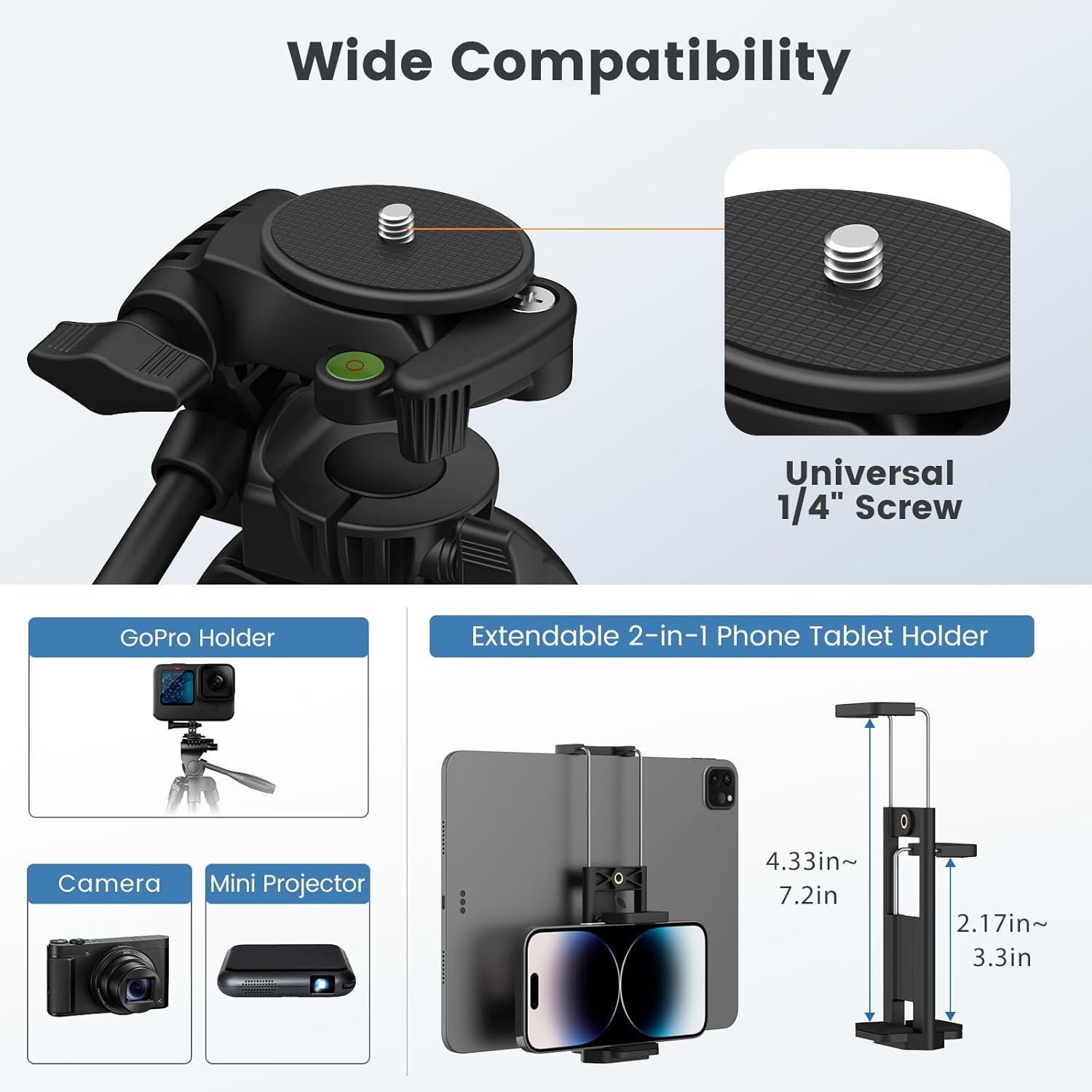
Image 4: Universal screw mount and device holders.
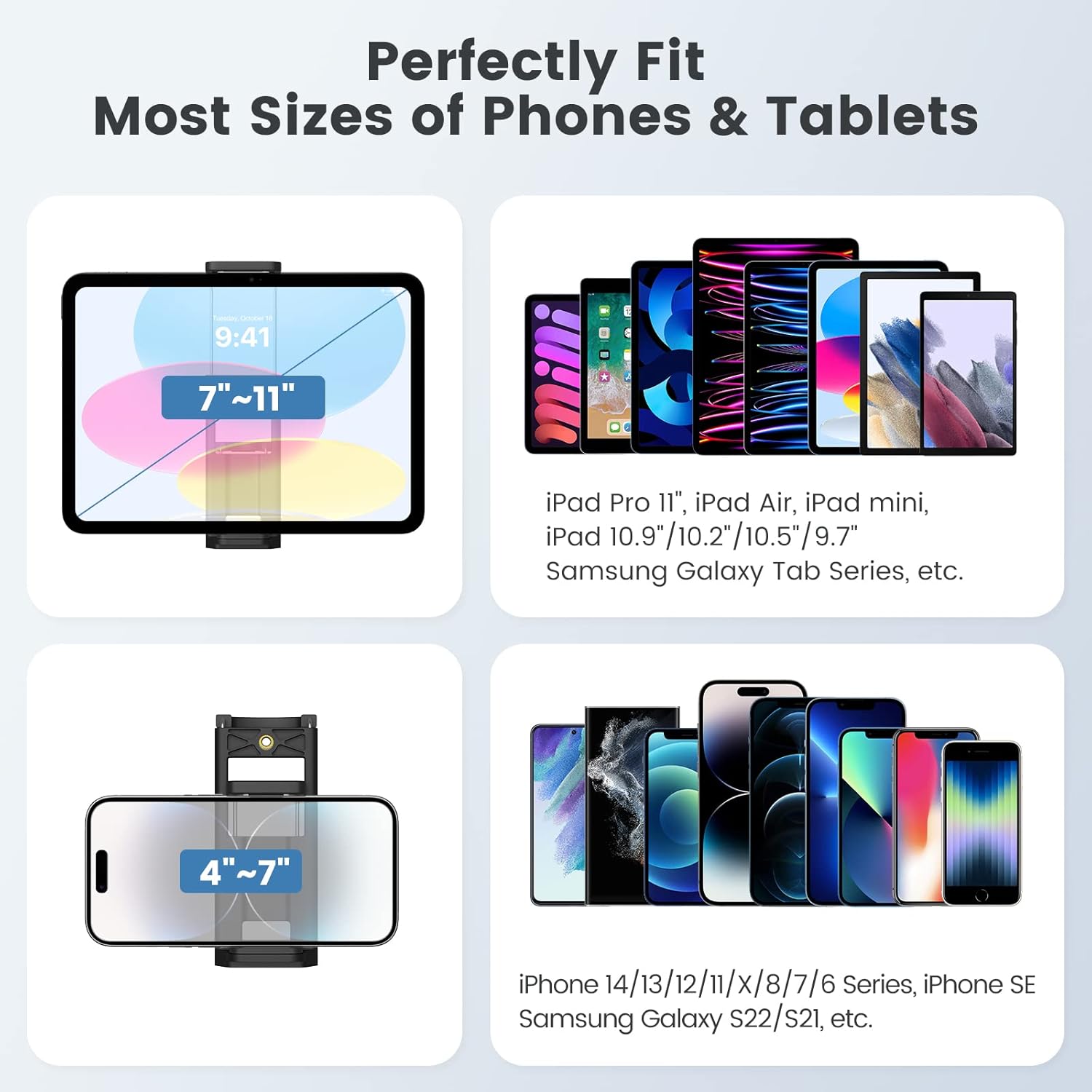
Image 5: Phone and tablet size compatibility.
4.3 Pairing the Wireless Remote
- Turn on the wireless remote shutter.
- Enable Bluetooth on your smartphone or tablet.
- Search for "BT1818" in the Bluetooth device list and pair with it.
- Once paired, you can use the remote to trigger your device's camera shutter.

Image 6: Wireless remote pairing guide.
5. Operating Instructions
5.1 Adjusting Shooting Angles
- Horizontal Rotation: Loosen the main locking knob below the pan head to rotate your device 360 degrees horizontally. Tighten the knob to secure the position.
- Vertical Tilt: Use the pan handle to tilt your device up to 180 degrees vertically. Loosen the handle's locking mechanism, adjust the angle, and then tighten to secure.
- Portrait/Landscape Mode: The top-plate allows adjustment from 0 to 90 degrees for switching between landscape and portrait shooting orientations.

Image 7: Demonstrating tilt and rotation capabilities.
5.2 Ensuring Stability
- Always ensure the tripod legs are fully extended and all leg locks are securely tightened before mounting your device.
- Utilize the built-in bubble level on the tripod head to achieve exact horizontal alignment, especially important for panoramic shots.
- The anti-slip rubber feet provide enhanced grip on various surfaces.
6. Maintenance
- Clean the tripod regularly with a soft, dry cloth. Avoid abrasive cleaners or solvents.
- Ensure all moving parts are free of dust and debris.
- Store the tripod in its carrying bag in a cool, dry place when not in use.
- Periodically check all screws and locking mechanisms for tightness.
7. Troubleshooting
- Tripod is unstable: Ensure all leg sections are fully extended and their flip-lever locks are securely closed. Check that the center column locking knob is tight.
- Device is wobbly: Verify that the quick-release plate is correctly seated and locked into the tripod head. Ensure your camera, phone, or tablet is tightly secured to its respective holder.
- Wireless remote not connecting: Make sure the remote is powered on and within 33ft (10m) of your device. Check your device's Bluetooth settings to ensure "BT1818" is paired. If issues persist, try unpairing and re-pairing the remote.
- Difficulty adjusting angles: Loosen the appropriate locking knobs or the pan handle mechanism before attempting to adjust the angle. Do not force adjustments.
8. Specifications
| Attribute | Value |
|---|---|
| Brand | MoKo |
| Model Number | P723314107851 |
| Material | Aluminum |
| Item Weight | 28.57 Ounces (1.79 pounds / 810g) |
| Maximum Load Capacity | 6.61 lbs (3 kg) |
| Maximum Height | 60 Inches (140 Centimeters) |
| Minimum Height | 16 Inches (41 Centimeters) |
| Folded Size | 17.5 inches |
| Tripod Head Type | Pan Heads |
| Compatible Devices | Cameras, Phones, Tablets, GoPro, Mini Projectors |
9. Official Product Videos
MoKo 60" Adjustable Tripod for Cameras, Tablets, Phones
Video 1: This video demonstrates the adjustable features of the MoKo 60-inch tripod, including leg extension, pan head movement, and compatibility with various devices like cameras, tablets, and phones. It also highlights the wireless remote shooting function.
MoKo 60" Tripod
Video 2: This video provides a concise overview of the MoKo 60-inch tripod, showcasing its ease of setup, device attachment options, and portability. It emphasizes the tripod's versatility for different shooting needs.
10. Warranty & Support
For warranty information and customer support, please refer to the official MoKo website or contact your retailer. Keep your purchase receipt for warranty claims.