
Introduction
This manual provides instructions for the installation, operation, and maintenance of the Robertshaw RS9110T Pro Series 5-1-1 Programmable Touchscreen Thermostat. This single-stage thermostat is designed for 1 Heat and 1 Cool systems, offering programmable control for your HVAC system.

Figure 1: Robertshaw RS9110T Thermostat with Display On
The RS9110T features a large 8.8-square-inch blue backlit touchscreen display for clear visibility and intuitive programming. It includes functions such as auto changeover, adjustable differential control, compressor delay, and a filter change reminder.
Setup and Installation
Safety Information
- Turn off power to the heating and cooling system at the main fuse or circuit breaker panel before installation.
- Ensure all wiring complies with local electrical codes and ordinances.
- This thermostat operates on 24 Volts AC. Do not use on systems exceeding this voltage.
Tools Required
- Screwdriver (Phillips and flathead)
- Drill with appropriate bit (if new mounting holes are needed)
- Wire strippers
Mounting the Thermostat
The RS9110T uses a universal sub-base for quick installation. Follow these steps:
- Separate the thermostat from its sub-base.
- Position the sub-base on the wall where the thermostat will be mounted.
- Mark the mounting holes.
- Drill pilot holes if necessary and insert wall anchors.
- Secure the sub-base to the wall using the provided screws.

Figure 2: Rear View of Thermostat and Mounting Plate
Wiring Instructions
Refer to the wiring diagram and labels provided with your thermostat. Connect the wires from your HVAC system to the corresponding terminals on the thermostat's sub-base. Ensure connections are secure.
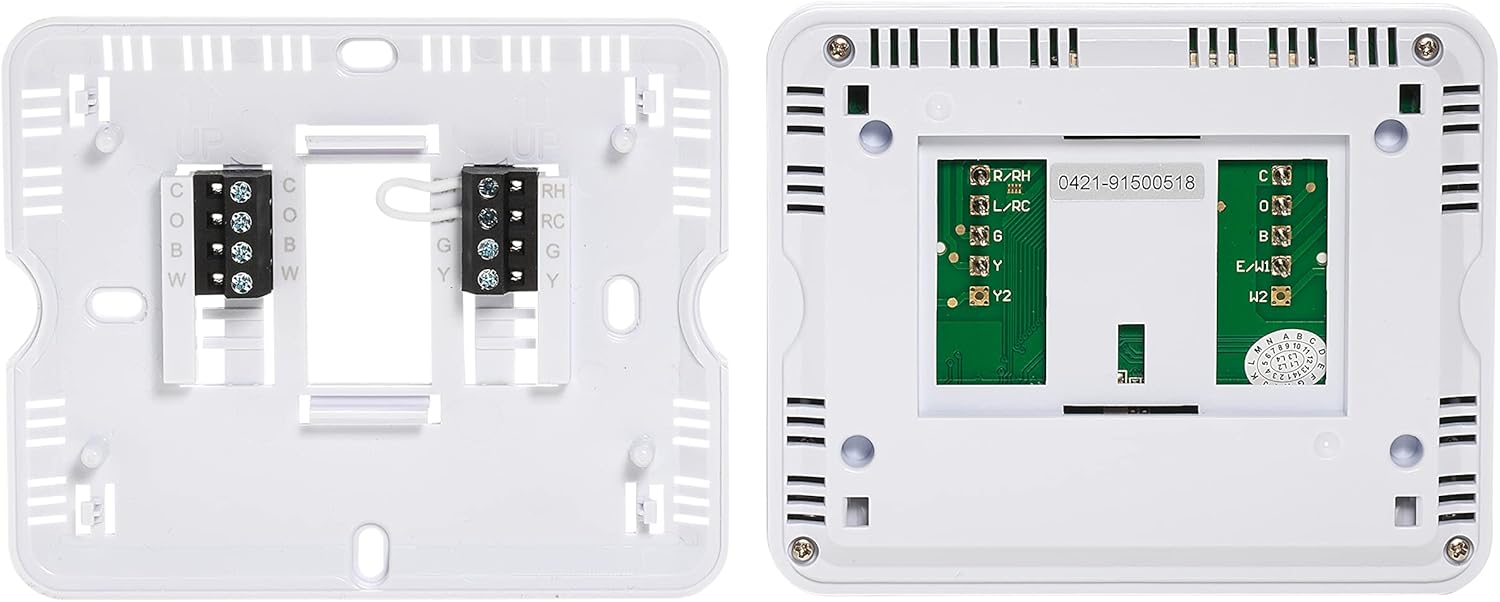
Figure 3: Thermostat Wiring Terminals
Typical wiring connections:
- R/RH: 24V AC Heating Power
- RC: 24V AC Cooling Power (Jumpered to RH for single transformer systems)
- C: Common wire (for continuous power to thermostat)
- W: Heat Call
- Y: Cool Call
- G: Fan Call
- B/O: Reversing Valve (Heat Pump applications)
After wiring, carefully attach the thermostat front panel to the sub-base.
Operating Instructions
Display Overview
The touchscreen display shows the current time, day, set temperature, actual room temperature, system mode, and fan mode. Use the touch-sensitive areas to adjust settings.

Figure 4: Robertshaw RS9110T Thermostat (Screen Off)
Setting System Mode
Touch the 'SYSTEM' button on the display to cycle through available modes: Heat, Cool, Off, and Auto (if enabled).
Setting Fan Mode
Touch the 'FAN' button to select between Auto (fan runs only when heating/cooling is active) or On (fan runs continuously).
Adjusting Temperature
Use the 'Up' and 'Down' arrow buttons on the touchscreen to increase or decrease the desired set temperature.
Programming Schedules (5-1-1 Day)
The RS9110T supports 5-1-1 day programming, allowing different schedules for weekdays, Saturday, and Sunday. Access the programming menu via the 'Menu' button on the display. You can set four periods per day: Wake, Leave, Return, and Sleep, each with its own temperature setting.
- Wake: Morning schedule when you wake up.
- Leave: Daytime schedule when you are away.
- Return: Evening schedule when you return home.
- Sleep: Nighttime schedule.
Advanced Control Features
- Auto Changeover: Automatically switches between heating and cooling modes to maintain the set temperature.
- Adjustable Differential (Swing): Controls the temperature difference between when the system turns on and off.
- Compressor Delay: Prevents short-cycling of the compressor, extending equipment life.
- Adjustable Setpoint Limits: Allows setting minimum and maximum temperature limits.
- Temperature Calibration: Adjusts the displayed temperature to match an external reference.
Maintenance
Filter Change Reminder
The thermostat includes an on/off filter change reminder. When activated, the display will indicate when it's time to replace your HVAC system's air filter. Refer to your HVAC system's manual for filter replacement instructions.
Battery Replacement
The thermostat requires 2 AAA 1.5V alkaline batteries (included). When the battery indicator appears on the display, replace the batteries promptly to ensure continuous operation and prevent loss of settings. To replace, carefully remove the thermostat from its sub-base and access the battery compartment on the back.
Troubleshooting
| Problem | Possible Cause | Solution |
|---|---|---|
| Display is blank or dim | Low or dead batteries; No 24V AC power | Replace AAA batteries; Check circuit breaker for HVAC system. |
| Heating/Cooling system not responding | Incorrect wiring; System mode set to 'Off'; Blown fuse in HVAC system | Verify wiring connections; Set system mode to 'Heat' or 'Cool'; Consult HVAC technician. |
| Temperature readings seem inaccurate | Thermostat location; Calibration needed | Ensure thermostat is not in direct sunlight or near heat sources; Perform temperature calibration. |
| Thermostat cycles too frequently or infrequently | Differential (swing) setting is too narrow or wide | Adjust the differential setting in the advanced menu. |
Specifications
- Model Number: RS9110T
- Brand: Robertshaw
- Controller Type: Touchscreen
- Special Feature: Programmable (5-1-1 Day)
- Color: White
- Specific Uses: HVAC Control (Heating and Cooling Systems)
- Temperature Control Type: Heating, Cooling
- Connectivity Technology: Wi-Fi (Note: Product specifications indicate Wi-Fi, but features list does not detail Wi-Fi control. Please refer to product packaging for confirmation.)
- Power Source: DC power supply (24V AC from HVAC system)
- Voltage: 24 Volts
- Display Type: Touchscreen, Blue Backlight
- Control Method: Touch
- Mounting Type: Wall Mount
- Batteries: 2 AAA batteries required (included)
- Item Weight: 8.64 ounces
- Material Type: Plastic
- Included Components: Thermostat, 2 AAA 1.5V alkaline batteries
- UPC: 662013228248
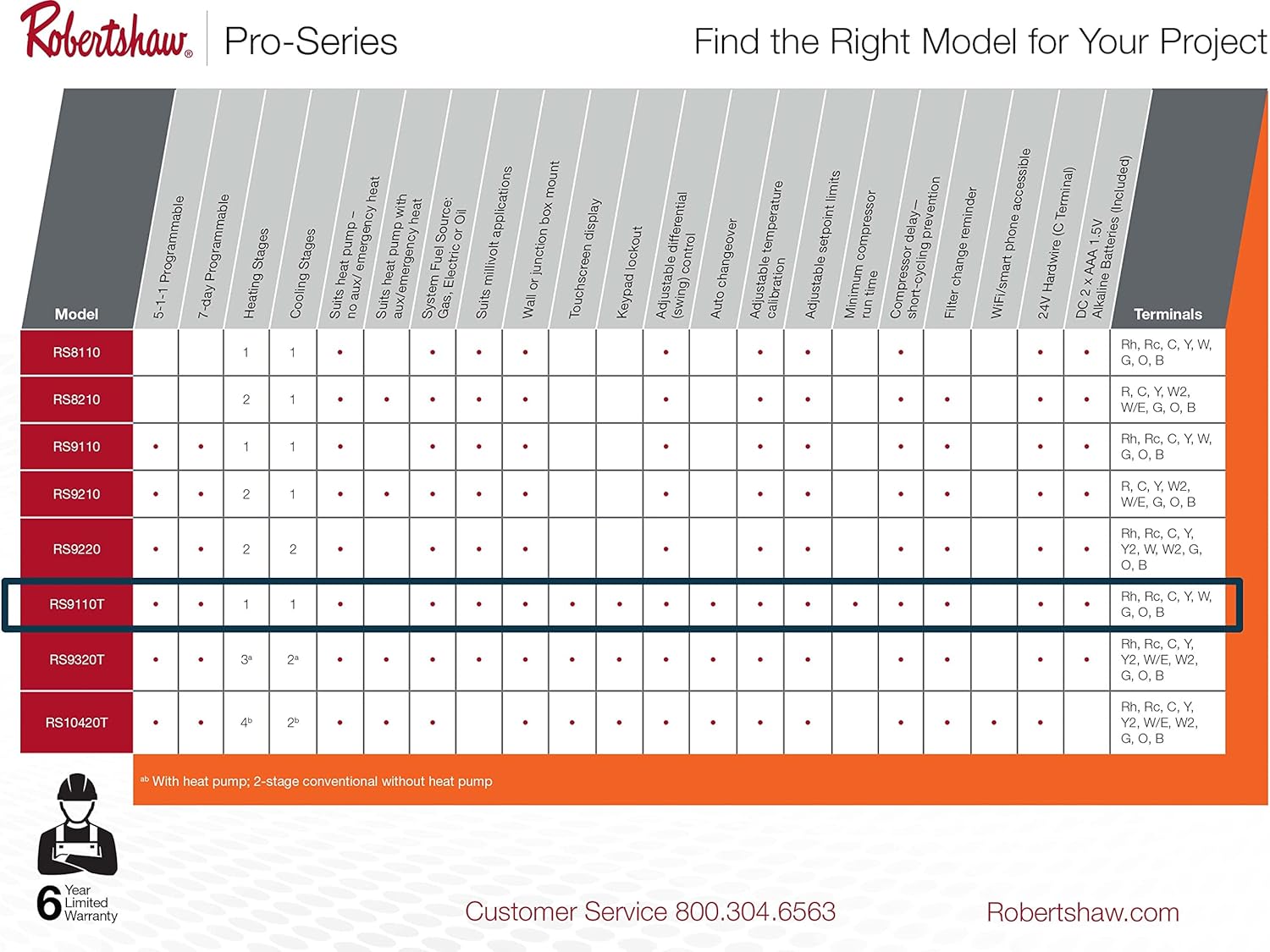
Figure 5: Robertshaw Pro Series Thermostat Feature Comparison (RS9110T highlighted)
Warranty Information
The Robertshaw RS9110T Pro Series Programmable Touchscreen Thermostat is backed by a 6-year limited warranty. This warranty covers defects in materials and workmanship under normal use and service. For specific terms and conditions, please refer to the warranty documentation included with your product or contact Robertshaw customer service.

Figure 6: Product Packaging Highlighting Features and Warranty
Customer Support
For technical assistance, troubleshooting, or warranty inquiries, please contact Robertshaw Customer Service:
Phone: 800.304.6563
You can also visit the official Robertshaw website for additional resources and support.


