
1. Introduction
This manual provides detailed instructions for the KOSPET Tank S2 Smart Watch. Please read this guide thoroughly to understand the watch's functions, setup procedures, and maintenance recommendations. Proper use ensures optimal performance and longevity of your device.

The KOSPET Tank S2 Smart Watch, showcasing its main display and rugged design.
2. Package Contents
Verify that all items are present in the package:
- 1x KOSPET Tank S2 Smart Watch
- 1x Charging Cable
- 1x User Manual
- 1x Tempered Film (Screen Protector)

Illustration of the KOSPET Tank S2 Smart Watch and its included accessories.
3. Key Features
- Military Standard Quality: Built to military standards, passed 15 military-grade tests for durability, wear resistance, and salt spray resistance. Features a third-generation Corning Gorilla screen.
- Built-in GPS & Navigation: Works with 6 Satellite Positioning Systems (L1 and L5 signals) for accurate activity tracking, planned route returns, and data sharing via the KOSPET FIT App.
- Altitude, Pressure & Compass: Includes an internal compass, altitude pressurization, and altimeter sensor to display current location altitude and barometric pressure.
- Ultra-light Body & AMOLED Display: Weighs 50 grams with a comfortable silicone strap. Features a 1.32-inch AMOLED display with 100% RGB color gamut, always-on mode, and high brightness for clear visibility.
- 5ATM & IP69K Waterproof: Seamless PC unibody design allows immersion up to 50m deep, suitable for swimming, diving, and surfing.
- 176 Sports Modes with Smart Recognition: Offers 176 sports modes, including smart recognition for walking, running, cycling, elliptical trainer, and others, automatically tracking your activity.
- Women's Health & Multifunctional: Provides 24H sleep tracking, heart rate, blood oxygen monitoring, and calorie tracking. Accurately tracks menstrual cycles. Includes Bluetooth calling, AI Voice control, remote photography, music control, alarm, sedentary reminder, weather forecast, and SOS.

The 1.32-inch AMOLED display offers vibrant colors and high resolution.

The watch is designed for water activities with 5ATM and IP69K waterproof ratings.
4. Setup Guide
4.1. Charging the Watch
Before first use, fully charge your KOSPET Tank S2 Smart Watch using the provided magnetic charging cable. Align the charging pins with the contacts on the back of the watch until it snaps into place.
4.2. App Installation
Download the 'KOSPET FIT' app from the Google Play Store (for Android devices) or the Apple App Store (for iOS devices).
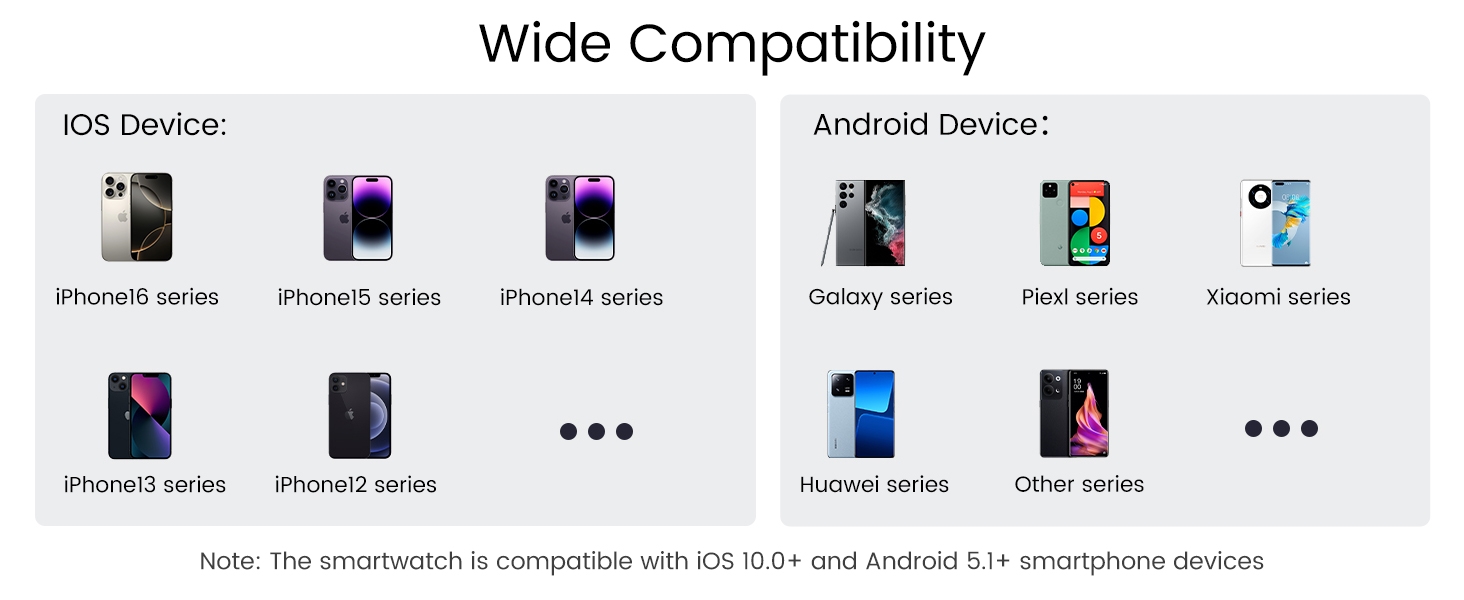
Visual guide for connecting the smartwatch to your phone.
4.3. Pairing with Your Phone
- Ensure your phone's Bluetooth is turned on.
- Open the 'KOSPET FIT' app.
- Go to 'Device' and tap 'Add a new device'.
- Select your KOSPET Tank S2 from the list of available devices and confirm pairing on both the app and the watch.
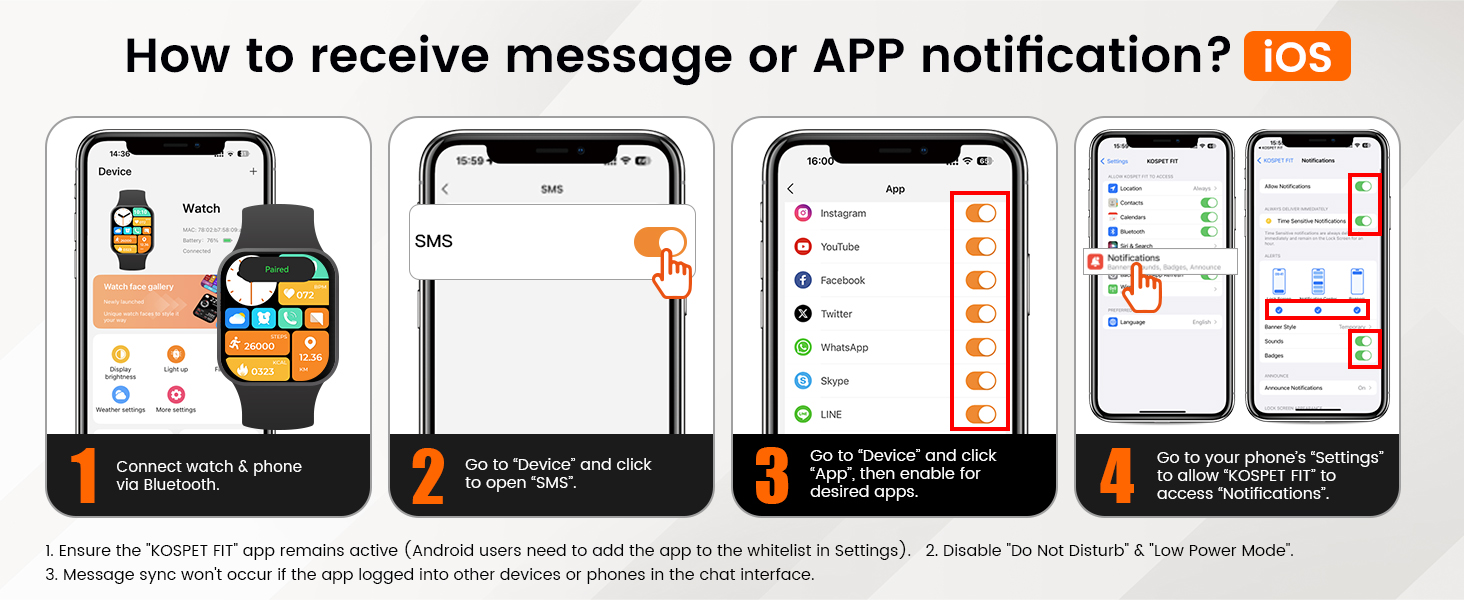
4.4. Receiving Notifications (iOS)
- Connect your watch and phone via Bluetooth.
- In the 'KOSPET FIT' app, go to 'Device' and tap 'SMS' to enable SMS notifications.
- In the app, go to 'Device' and tap 'App', then enable notifications for desired applications.
- Go to your phone's 'Settings' > 'Bluetooth' > 'KOSPET FIT' > 'Allow Notifications' to grant access.

Configuring notifications for iOS devices.
4.5. Receiving Notifications (Android)
- Connect your watch and phone via Bluetooth.
- In the 'KOSPET FIT' app, go to 'Device' and tap 'SMS Reminder' to enable SMS notifications.
- Allow 'KOSPET FIT' to access notifications when prompted.
- In the app, go to 'Device' and tap 'App Reminder', then enable notifications for desired applications.
Configuring notifications for Android devices.
5. Operating Instructions
5.1. Display and Watch Faces
The 1.32-inch AMOLED display supports an always-on mode. Swipe left/right or up/down to navigate through menus and features. Customize your watch face from over 200 styles available in the KOSPET FIT app or directly on the watch.
5.2. Sports Modes
The watch offers 176 sports modes. It features smart recognition for 6 common activities (walking, running, cycling, elliptical trainer, etc.), automatically starting tracking when detected. Access specific sports modes from the main menu to track your workouts.

The watch supports over 170 sports modes with smart recognition.
5.3. Health Monitoring
- Heart Rate: 24-hour continuous heart rate monitoring.
- Blood Oxygen: Monitor your blood oxygen levels.
- Sleep Tracking: Tracks sleep stages (deep, light, REM) and provides analysis via the app.
- Women's Health: Accurately tracks menstrual cycles and provides predictions.
- Stress & Emotion: Monitor stress levels and emotional state.

The watch includes a dedicated women's health monitor for menstrual cycle tracking.
5.4. GPS and Navigation
The built-in GPS tracks your activity routes. You can review and share your performance data through the KOSPET FIT App. The watch also supports route back functionality.

Track your outdoor activities with the built-in GPS.
5.5. Altitude, Barometric Pressure, and Compass
Utilize the integrated compass for navigation, and monitor real-time altitude and barometric pressure changes, especially useful for outdoor adventures.
5.6. Bluetooth Calling & AI Voice Assistant
Answer or make calls directly from your watch when connected to your phone via Bluetooth. Use the AI Voice Assistant for hands-free control and quick information access.

The watch supports Bluetooth calls, AI voice assistant, and instant message reminders.
5.7. Other Functions
The watch includes features such as music control, alarm, sedentary reminder, weather forecast, remote photography, and an SOS function for emergencies.
6. Care and Maintenance
- Cleaning: Regularly wipe the watch and strap with a soft, damp cloth. Avoid harsh chemicals.
- Water Exposure: While waterproof, avoid prolonged exposure to hot water, steam, or high-pressure water jets. Rinse with fresh water after exposure to saltwater.
- Charging: Use only the provided charging cable. Ensure the charging contacts are clean and dry before charging.
- Storage: Store the watch in a cool, dry place when not in use.
- Screen Protector: Apply the tempered film for added screen protection.
7. Troubleshooting
- Watch not turning on: Ensure the watch is fully charged.
- Cannot pair with phone: Make sure Bluetooth is enabled on your phone and the watch is within range. Restart both devices and try again.
- Notifications not received: Check app notification settings on both the watch app and your phone's system settings. Ensure the KOSPET FIT app is running in the background and not restricted by power-saving modes.
- Inaccurate health data: Ensure the watch is worn snugly on your wrist. Avoid excessive movement during measurements.
- GPS not connecting: Ensure you are in an open area with a clear view of the sky.
8. Technical Specifications
| Feature | Specification |
|---|---|
| Brand | KOSPET |
| Model Number | TANK S2 |
| Screen Size | 1.32 Inches |
| Display Type | AMOLED |
| Waterproof Rating | 5ATM & IP69K |
| GPS | Built-in GPS (6 Satellite Positioning Systems) |
| Battery Capacity | 380 Milliamp Hours |
| Connectivity Technology | Bluetooth |
| Operating System | Compatible for Android and iOS |
| Item Weight | 50 Grams (1.76 ounces) |
| Product Dimensions | 11 x 1.72 x 0.54 inches |
| Special Features | Activity Tracker, Always On Display, Cycle Tracking, GPS, Compass, Altimeter |
9. Warranty & Support
The KOSPET Tank S2 Smart Watch comes with a standard manufacturer's warranty. For specific warranty details, please refer to the warranty card included in your package or visit the official KOSPET website. For technical support, troubleshooting assistance, or any product-related inquiries, please contact KOSPET customer service through their official channels.
Online Support: Visit the KOSPET official website for FAQs, support articles, and contact information.
Customer Service: Refer to your warranty documentation for direct contact methods.
10. Product Video Overview
Official KOSPET TANK S2 Smart Watch overview video, demonstrating its features and design.


