
HOMCOM 713-097
Contents
HOMCOM Electric Lift Recliner Chair User Manual
Model: 713-097
1. Introduction
Thank you for choosing the HOMCOM Electric Lift Recliner Chair. This chair is designed to provide comfort and support with its electric lift, reclining, and massage functions. Please read this manual thoroughly before assembly and use to ensure proper operation and safety. Keep this manual for future reference.
2. Safety Warnings
- Maximum Recommended Load: The chair is designed for a maximum weight of 180 kg (396 lbs). Do not exceed this weight limit.
- This chair is intended for ergonomic and safe use. Any modifications or improper use may result in injury or damage.
- Keep children and pets away from the chair's moving parts during operation.
- Ensure all electrical connections are secure and the power cord is not pinched or damaged.
- Do not operate the chair if any part is damaged or malfunctioning. Contact customer support for assistance.
- Avoid placing liquids directly on the chair or near electrical components.
3. Package Contents
Please check that all components are present and undamaged before assembly:
- 1 x HOMCOM Electric Lift Recliner Chair
- 1 x Remote Control
- 1 x Assembly Instructions Manual
4. Setup and Assembly
Assembly is required for this product. Please follow the included assembly instructions manual for detailed steps. Ensure you have adequate space and any necessary tools before beginning.
4.1. General Assembly Overview
Typically, assembly involves attaching the backrest to the seat base, connecting the armrests, and plugging in the electrical components. Refer to the specific diagrams and instructions in your assembly manual.

Image 4.1: The HOMCOM Electric Lift Recliner Chair in a home environment, showcasing its design and size.
5. Operating Instructions
The chair is operated using the wired remote control. Ensure the chair is plugged into a suitable power outlet (100-240 V, 50-60 Hz).
5.1. Lift Function
To activate the lift function, press the appropriate button on the remote control. The chair will gently tilt forward and lift, assisting the user to a standing position. This feature is particularly beneficial for elderly individuals or those recovering from injuries.

Image 5.1: The chair's lift function assisting a user to stand, demonstrating its ergonomic design.
5.2. Reclining Function
Press the recline button on the remote control to adjust the backrest and footrest. The chair can recline up to 135 degrees, allowing you to find a comfortable position for reading, watching television, or napping. The integrated footrest extends automatically as the chair reclines.

Image 5.2: The chair in various reclining positions, illustrating the electric recline and retractable footrest.
5.3. Massage Function
The chair features 8 vibrating massage points targeting four zones: neck, lumbar, thighs, and legs. Use the remote control to select from 5 vibrating intensities. A timer can be set for 15 or 30 minutes, allowing for timed massage sessions.
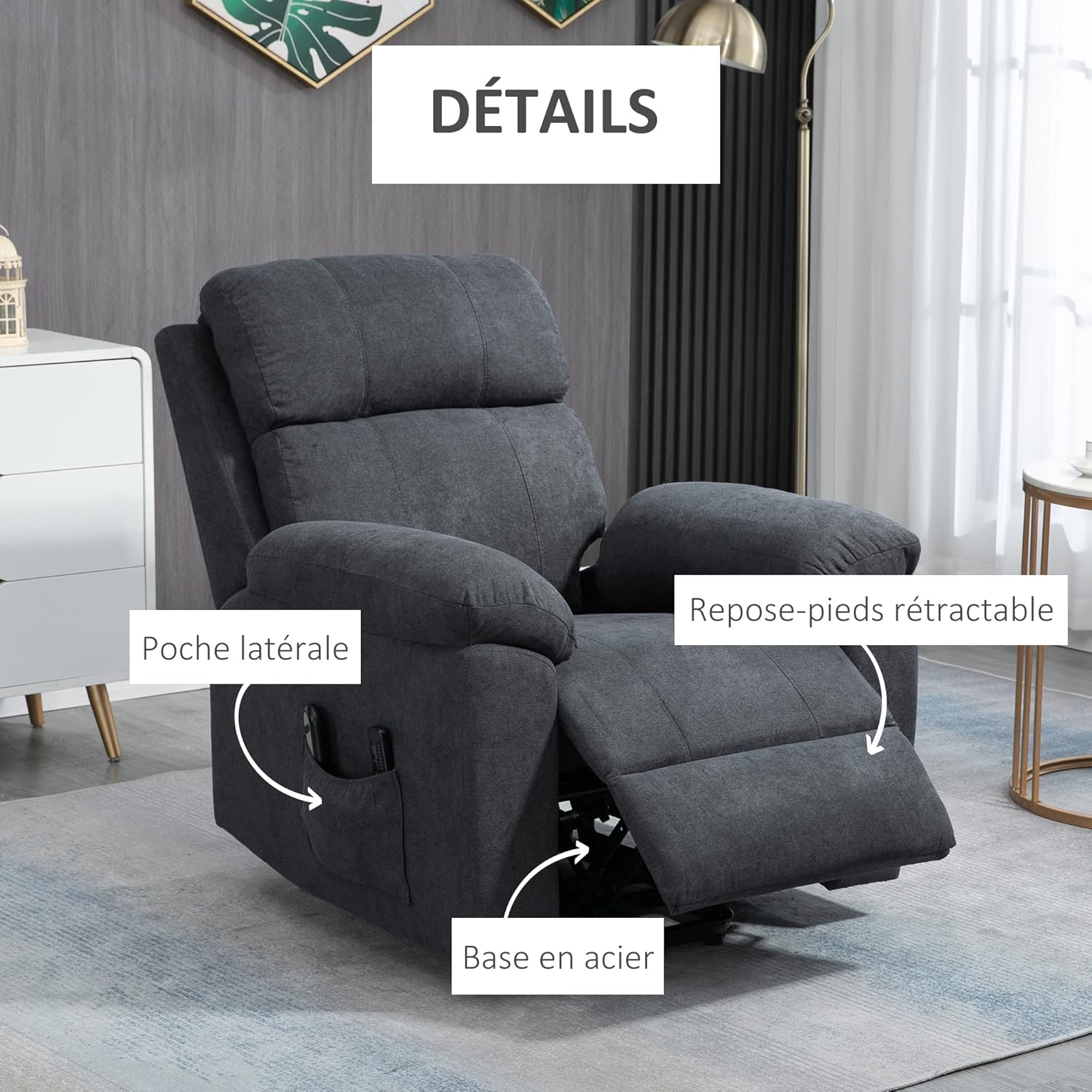
Image 5.3: Visual representation of the 8 massage points and the remote control interface for massage settings and timer.
5.4. Side Pocket
A convenient side pocket is included to store the remote control and other small essentials, keeping them within easy reach.
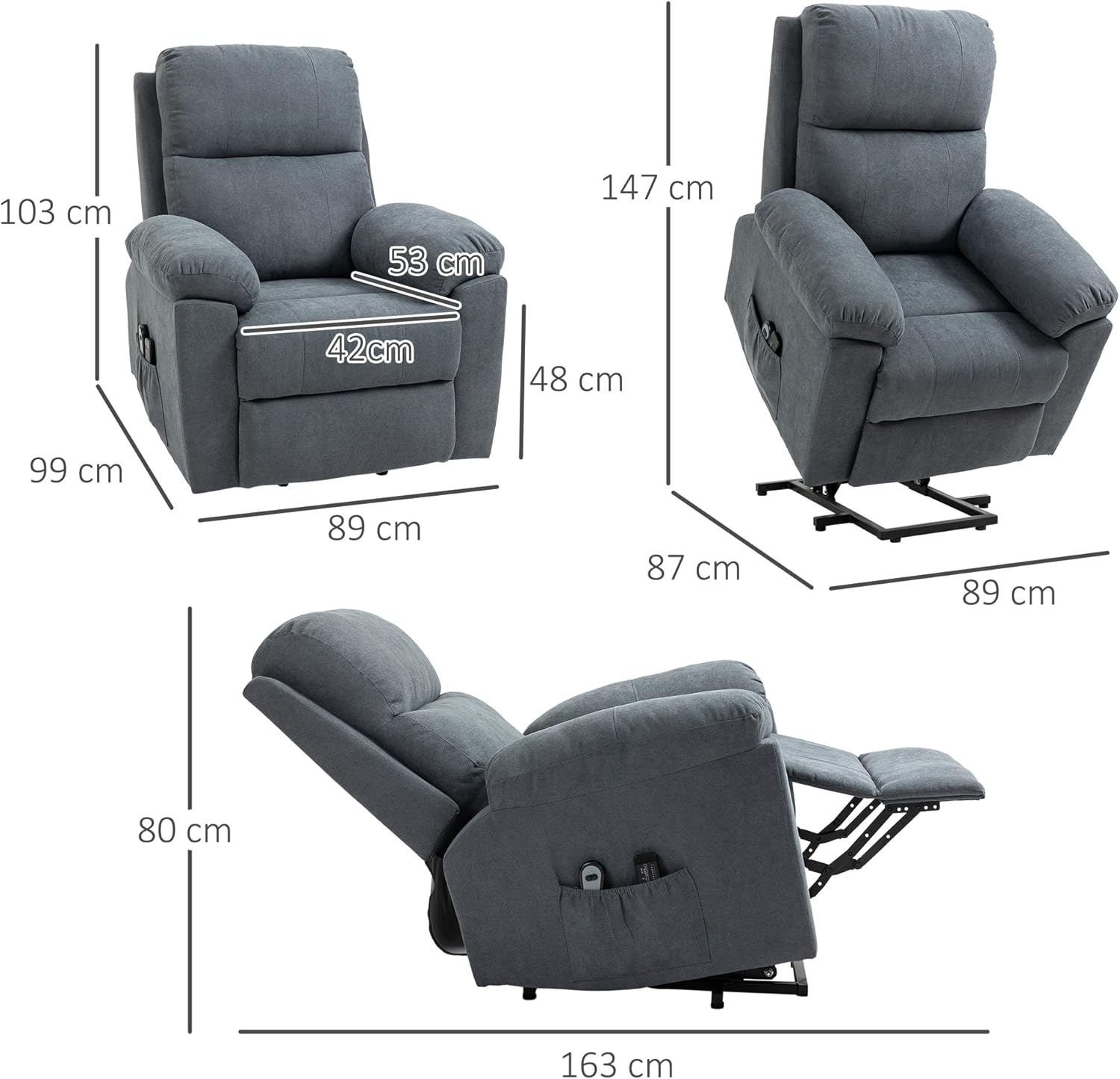
Image 5.4: Detailed view highlighting the side pocket, retractable footrest mechanism, and the sturdy steel base.
6. Maintenance and Care
Proper maintenance ensures the longevity and performance of your recliner chair.
- Cleaning: It is generally recommended to vacuum clean the fabric once a week to remove dust and debris. For spills, gently blot with a clean, damp cloth. Avoid harsh chemicals.
- Inspection: Periodically check all bolts and connections to ensure they are tight.
- Electrical Components: Keep electrical components dry and free from dust. Do not attempt to repair electrical parts yourself.
7. Troubleshooting
If you encounter any issues with your HOMCOM Electric Lift Recliner Chair, refer to the following common problems and solutions:
| Problem | Possible Cause | Solution |
|---|---|---|
| Chair does not operate (lift/recline/massage) | Not plugged in; Power outlet malfunction; Remote control issue; Loose connection. | Ensure power cord is securely plugged into a working outlet. Check remote control connection. |
| Chair movement is jerky or unstable | Loose assembly bolts; Obstruction in mechanism; Exceeded weight limit. | Check and tighten all assembly bolts. Ensure no objects are obstructing the chair's mechanism. Verify user weight is within limits. |
| Massage function is weak or noisy | Normal operation (vibration can be attenuated by padding); Motor issue. | The vibrating massage is designed for relaxation and may feel subtle through thick padding. If noise is excessive or function stops, contact support. |
If the problem persists after attempting these solutions, please contact HOMCOM customer support.
8. Specifications
| Feature | Detail |
|---|---|
| Brand | HOMCOM |
| Model Number | 713-097 |
| Color | Grey |
| Materials | Linen-look fabric (100% polyester), Foam padding, Steel frame |
| Overall Dimensions (Upright) | 89 cm (W) x 99 cm (D) x 103 cm (H) |
| Reclined Dimensions | 42 cm (W) x 163 cm (D) x 80 cm (H) |
| Seat Dimensions | 42 cm (W) x 53 cm (D) x 48 cm (H) |
| Seat Cushion Thickness | 15 cm |
| Backrest Cushion Thickness | 24 cm |
| Remote Control Cord Length | 2 m |
| Power Cord Length | 1.5 m |
| Maximum Recommended Load | 180 kg (396 lbs) |
| Input Voltage | 100-240 V, 50-60 Hz |
| Output Voltage | 12 V, 0.5 A |
| Item Weight | 43.3 kg |

Image 8.1: Dimensional overview of the chair, including height, width, and depth in various configurations.
9. Warranty and Support
For warranty information or technical support, please refer to the documentation provided with your purchase or visit the official HOMCOM website. If you have questions regarding spare parts, please note that information on spare parts availability is currently unavailable.
You can visit the HOMCOM Brand Store for more products and information.
Ask a question about this manual
Ask about setup, troubleshooting, compatibility, parts, safety, or missing instructions. Manuals+ will review the question and use this page’s manual context to help answer it.