1. Introduction
Thank you for purchasing the IRIS OHYAMA 2-Way Cordless Stick Cleaner SCD-160P-C. This manual provides important information for the safe and efficient use of your new appliance. Please read it thoroughly before use and keep it for future reference.
This versatile cleaner is designed for comprehensive home cleaning, functioning as both a stick vacuum for floors and a handheld vacuum for detailed cleaning. Its stylish, lightweight, and slim design ensures ease of use and blends seamlessly into any living space. The cordless operation provides maximum flexibility, allowing you to clean anywhere without being restricted by power outlets.

Image: The IRIS OHYAMA 2-Way Cordless Stick Cleaner, highlighting its dual functionality and available colors.
2. Safety Information
To ensure safe operation, always follow these basic precautions:
- Read all instructions before using the appliance.
- Keep the appliance away from water or other liquids.
- Do not use the appliance to pick up flammable or combustible liquids, or hot ashes.
- Do not operate the appliance with a damaged cord or plug.
- Keep hair, loose clothing, fingers, and all parts of the body away from openings and moving parts.
- Use only as described in this manual. Use only manufacturer’s recommended attachments.
- Unplug from outlet when not in use and before cleaning or servicing.
- This appliance is for household use only.
3. Package Contents
Please check that all items are present in the package:
- Main Cleaner Unit (Stick/Handheld)
- Charging Adapter
- Charging Stand
- Handle Fixing Screw (1 pc)
- Crevice Nozzle
- Brush Nozzle
4. Setup
4.1 Assembly
- Attach the main cleaner unit to the extension pipe.
- Connect the floor head to the bottom of the extension pipe.
- Secure the handle to the top of the main unit using the provided handle fixing screw.
- Place the assembled cleaner onto the charging stand.
4.2 Initial Charging
Before first use, fully charge the battery. Connect the charging adapter to the charging stand and plug it into a power outlet. The charging indicator lights will show the charging status. A full charge takes approximately 4 hours.
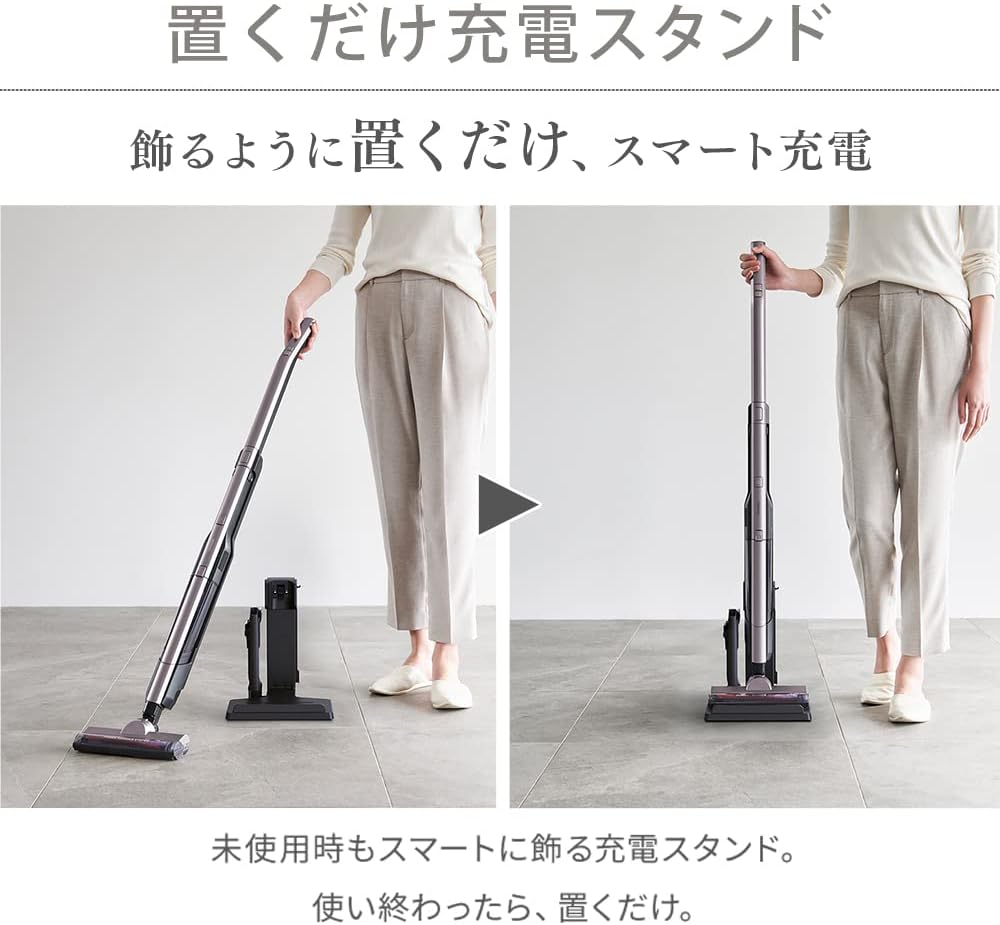
Image: Cleaner on charging stand.
5. Operating Instructions
5.1 Power On/Off
Press the power button located on the handle to turn the cleaner on or off.
5.2 Switching Between Stick and Handheld Modes
This cleaner offers 2-way functionality. To switch from stick to handheld mode, press the release button on the main unit and detach the handheld portion. To reattach, align the handheld unit with the extension pipe and click it into place.

Image: Smooth one-touch switching between modes.
5.3 Using the Self-Propelled Power Head
The self-propelled lightweight power head assists in moving the cleaner forward with minimal effort. It is effective on various floor types including flooring, carpets, and tatami mats. The head is designed to capture fine particles efficiently.

Image: Self-propelled power head for efficient suction of fine particles.
5.4 Using Attachments
Attach the crevice nozzle for narrow spaces like between sofa cushions or car seats. Use the brush nozzle for delicate surfaces or to dislodge stubborn dirt.

Image: Excellent maneuverability for cleaning under furniture.
6. Maintenance
6.1 Emptying the Dust Cup
The dust cup has a capacity of 0.2L. To maintain optimal suction, empty the dust cup regularly, especially when it reaches the MAX fill line. Detach the dust cup from the main unit and dispose of the collected debris.

Image: Detaching and emptying the large capacity dust cup.
6.2 Cleaning the Dust Cup and Filter
The dust cup and filter are washable. After emptying, rinse them under running water. Ensure they are completely dry before reassembling them into the cleaner. Do not use harsh detergents or abrasive materials.

Image: Washing the dust cup under running water.
6.3 Battery Care
The lithium-ion battery has a life of approximately 1000 charge cycles. To prolong battery life, avoid fully discharging it frequently. Store the cleaner in a cool, dry place when not in use for extended periods.

Image: Detachable battery for easy removal and extended use with a spare battery.
7. Troubleshooting
If you encounter any issues with your cleaner, please refer to the following common problems and solutions:
| Problem | Possible Cause | Solution |
|---|---|---|
| Cleaner does not turn on | Battery is not charged or not properly inserted. | Ensure the battery is fully charged and correctly inserted. |
| Reduced suction power | Dust cup is full, filter is clogged, or nozzle is blocked. | Empty the dust cup, clean the filter, and check for blockages in the nozzle or pipe. |
| Cleaner stops during operation | Battery is low or overheating. | Charge the battery. If overheating, turn off the cleaner and allow it to cool down before resuming use. |
If the problem persists after trying these solutions, please contact customer support.
8. Specifications
| Feature | Specification |
|---|---|
| Model Number | SCD-160P-C |
| Dust Collection Capacity | 0.2 L |
| Continuous Operating Time (Stick Mode) | Standard: Approx. 20 min / Turbo: Approx. 12 min |
| Continuous Operating Time (Handheld Mode) | Standard: Approx. 23 min / Turbo: Approx. 13 min |
| Battery Type | Lithium-ion Secondary Battery |
| Battery Capacity | 1900 mAh |
| Battery Life | Approx. 1000 charge cycles |
| Rated Voltage | DC 10.8 V |
| Charging Power Supply Input | AC100-240V, 50/60Hz |
| Charging Power Supply Output | DC 13.7V, 0.5A |
| Charging Time | Approx. 4 hours (may vary based on room temperature and usage) |
| Product Size (Stick Mode) | Approx. W22.4 × D16.7 × H104.5 cm |
| Product Size (Handheld Mode) | Approx. W6.3 × D6.8 × H48.1 cm |
| Product Size (with Charging Stand) | Approx. W23.4 × D21.0 × H107.0 cm |
| Product Weight (Stick Mode) | Approx. 1.6 kg |
| Product Weight (Handheld Mode, incl. battery) | Approx. 0.7 kg |
| Charging Stand Weight | Approx. 0.5 kg |
| Filter Type | Cartridge |
| Recommended Use | Hard Floor |
| Features | Lightweight |
Image: Dimensions of the cleaner in stick and handheld modes.

9. Warranty and Support
This product comes with a manufacturer's warranty. Please refer to the warranty card included in your package for details on coverage and duration. For technical support, spare parts, or service inquiries, please contact IRIS OHYAMA customer service. Contact information can typically be found on the product packaging or the official IRIS OHYAMA website.


