
1. Introduction
The Gens ace Imars Mini G-Tech Series 60W Lipo Battery Charger is designed for efficient and safe charging of various battery types. Its integrated G-Tech Smart Chip simplifies the charging process by automatically recognizing battery parameters and optimizing charging current. This compact and portable charger is an ideal companion for hobbyists requiring reliable power management on the go.

Figure 1.1: Gens ace Imars Mini Charger and included accessories.
2. Safety Information
WARNING: Failure to follow these safety instructions may result in fire, property damage, or injury.
- Always charge batteries in a fire-safe area, away from flammable materials.
- Never leave charging batteries unattended.
- Ensure proper ventilation during charging.
- Do not charge damaged or swollen batteries.
- Use only compatible power adapters and cables.
- Keep out of reach of children.
3. Package Contents
- Imars Mini 60W Smart Charger
- 65W Power Supply Adapter with USB-C Cable
- XT60 to EC3 Adapter (1 pc)
- XT60 to EC5 Adapter (1 pc)
- Product Manual
4. Product Features
- G-Tech Smart Lipo Charger: Automatic identification of G-Tech smart battery information, automatic charging, and automatic stop when fully charged. Manual setting is no longer required.
- Power Charging: Charge Power: 60W, Charge Current: 1-5A (adjustable), Max. 5A.
- Operating Modes: Includes charge, discharge, balance, storage, charge indicator, and storage indicator.
- Compact Design: Small, lightweight, and portable with a new interface design and increased balance connector durability. It is the smallest charger with automatic storage function.
- Supported Battery Types: LiPo/LiHV/LiFe 2-4S; NiMH 2-12S.
- Input Port: QC/PD/BC1.2/USB-C V1.4/SDP/CDP/DCP/Apple 5V/2.4A (Does not support 5V/1A adapter input).

Figure 4.1: Plug-and-play smart charging capability.

Figure 4.2: The built-in smart chip enables intelligent communication.
5. Setup and Initial Operation
- Connect Power: Connect the 65W power supply adapter to the USB-C input port on the Imars Mini charger. The charger will power on, and all LED lights will light up in sequence. The lighting time of each LED light is about 0.5 seconds. The default battery type is LiPo.
- Connect Battery: Connect your LiPo/LiHV/LiFe (2-4S) or NiMH (2-12S) battery to the appropriate balance port and XT60 output port on the charger. Ensure correct polarity.
- Select Battery Type (for non-G-Tech batteries): If connecting a non-smart battery, under the condition that the discharge connector and the balance connector are successfully connected, short press the CHARGE/STORAGE button to select the battery type. Then press and hold the CHARGE button for 2 seconds to start the charging mode.
- Start Charging: For G-Tech smart batteries, the charger will automatically identify the battery type and begin charging. For non-G-Tech batteries, after selecting the type, press and hold the CHARGE button for 2 seconds. The charging indicator light will flash at a frequency of 1Hz. The charger does not need to set the charging current; it will intelligently adjust the current according to battery voltage fluctuation.

Figure 5.1: Charger ports for battery connection.
6. Operating Modes
6.1 Charge Mode
In charge mode, the charger will automatically detect the battery type (for G-Tech batteries) or allow manual selection (for non-G-Tech batteries). The charging current is intelligently adjusted based on the battery's needs. The battery capacity indicator light will display the current real-time battery status. The charger will beep when the battery is fully charged, and the charging indicator light will remain on.
6.2 Storage Mode
To enter storage mode, short press the CHARGE/STORAGE button to select the storage mode. Then press and hold the CHARGE/STORAGE button for 2 seconds to start. The charger will bring your battery to a safe storage state (3.85V per cell for LiPo/LiHV/LiFe). The storage indicator light will remain on.

Figure 6.1: Automatic battery storage function.
6.3 Cancelling Operations
To cancel any ongoing operation (charge or storage), press and hold the CHARGE or STORAGE button for 2 seconds. If the cancellation is successful, the charger will beep, and the battery capacity indicator light, charging indicator light, and the storage indicator light will turn off.
7. Specifications
| Parameter | Value |
|---|---|
| Maximum Charging Power | 60W |
| Input Voltage | 5-20V |
| Max Input Current | DC 3A |
| Max Storage Power | 3W discharge, 60W charge |
| Charge Current | 1-5A |
| Balance Current | 0.4A/Cell |
| Supported Battery Types | LiPo/LiHV/LiFe 2-4S; NiMH 2-12S |
| Product Dimensions | 0.8 x 2.2 x 3.3 inches (85x55x21mm) |
| Item Weight | 2.26 ounces (64g) |
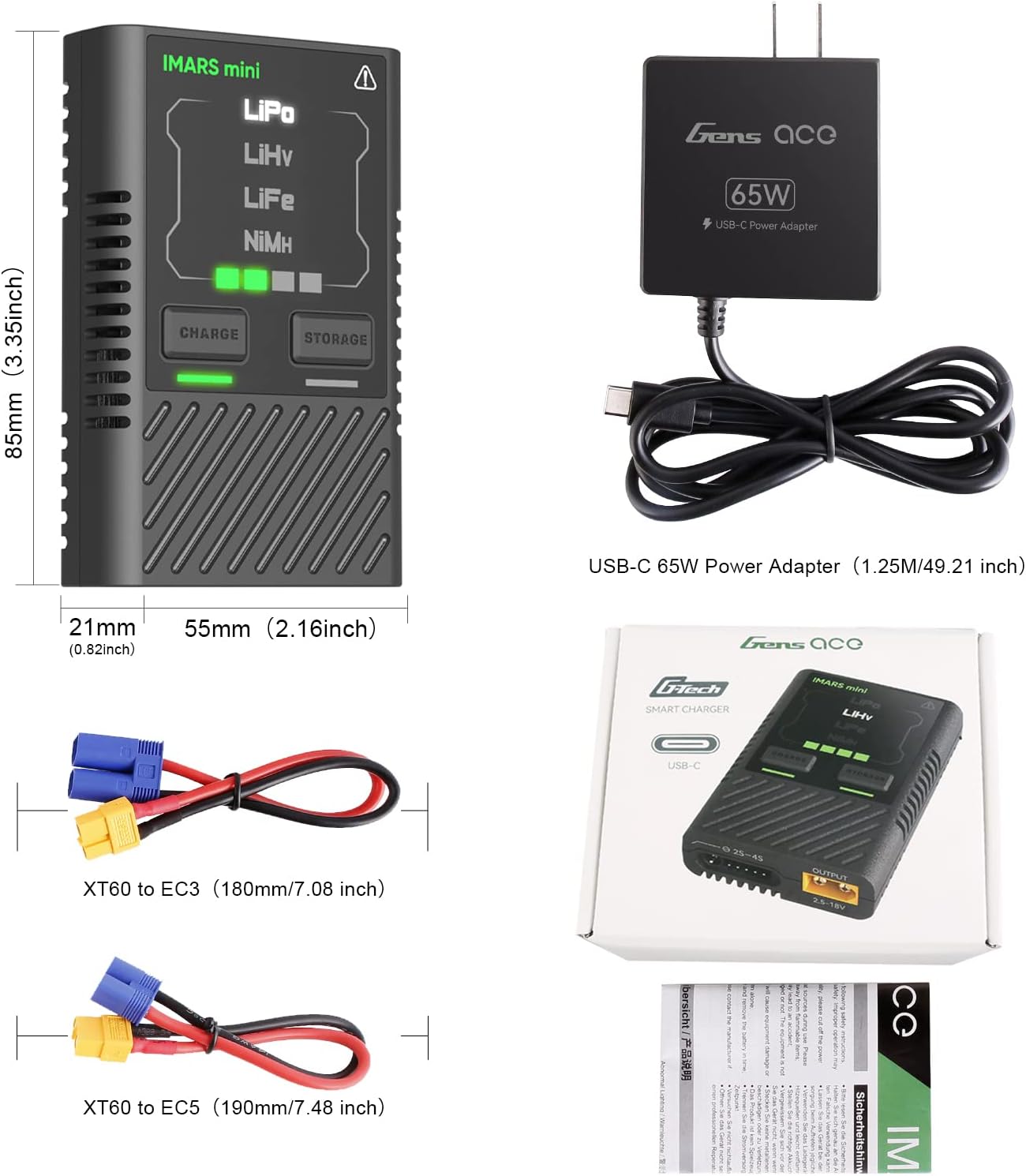
Figure 7.1: Physical dimensions of the charger.
8. Troubleshooting
- Charger not powering on: Ensure the USB-C power adapter is correctly connected and providing sufficient power (5-20V). Check the cable for damage.
- Battery not charging: Verify that the battery is correctly connected to both the balance port and the XT60 output. Ensure the battery type is correctly selected (for non-G-Tech batteries). Check if the battery is damaged or over-discharged.
- Error indicator flashing: Refer to the manual's specific error codes (if any) or disconnect and reconnect the battery and power to reset.
9. Maintenance
- Keep the charger clean and free from dust and debris. Use a soft, dry cloth for cleaning.
- Store the charger in a cool, dry place away from direct sunlight and extreme temperatures.
- Avoid dropping the charger or subjecting it to strong impacts.
10. Official Product Videos
What is G-Tech?
This video provides an overview of the G-Tech technology integrated into Gens ace products, explaining its benefits for battery management.
Gens ace Imars Mini Lipo Charger
This video demonstrates the features and operation of the Gens ace Imars Mini Lipo Charger, highlighting its compact size and smart charging capabilities.
11. Warranty and Support
Gens ace products come with a standard manufacturer's warranty. For detailed warranty information and support, please visit the official Gens ace website or contact their customer service. Keep your purchase receipt as proof of purchase.
For technical assistance or inquiries, please refer to the contact information provided in your product packaging or on the Gens ace official website.