1. Introduction
The YONGNUO YNLUX100 Pro is a versatile 120W COB LED video light designed for professional and enthusiast photographers and videographers. It features a bi-color temperature range of 2700-6500K, high CRI of 95+, and multiple power supply options, making it suitable for various shooting scenarios including portraits, weddings, outdoor shoots, and YouTube videos. This manual provides detailed instructions for safe and effective use of your YNLUX100 Pro.
2. Safety Information
Please read and understand all safety precautions before using the product. Improper use may result in damage to the product or personal injury.
- Do not look directly into the light source when it is on, as this may cause eye damage.
- Keep the device away from water, moisture, and flammable substances.
- Do not disassemble or modify the product. Repairs should only be performed by authorized personnel.
- Ensure proper ventilation to prevent overheating. Do not block the air vents.
- Use only the specified power adapter and batteries.
- Keep out of reach of children.
3. Package Contents
Verify that all items listed below are included in your package:
- 1x YNLUX100 Pro Video Light
- 1x Handheld Bracket
- 1x Standard Reflector
- 1x Adapter Cable
- 1x 19V5A Power Adapter
- 1x Portable Case
- 1x User Manual
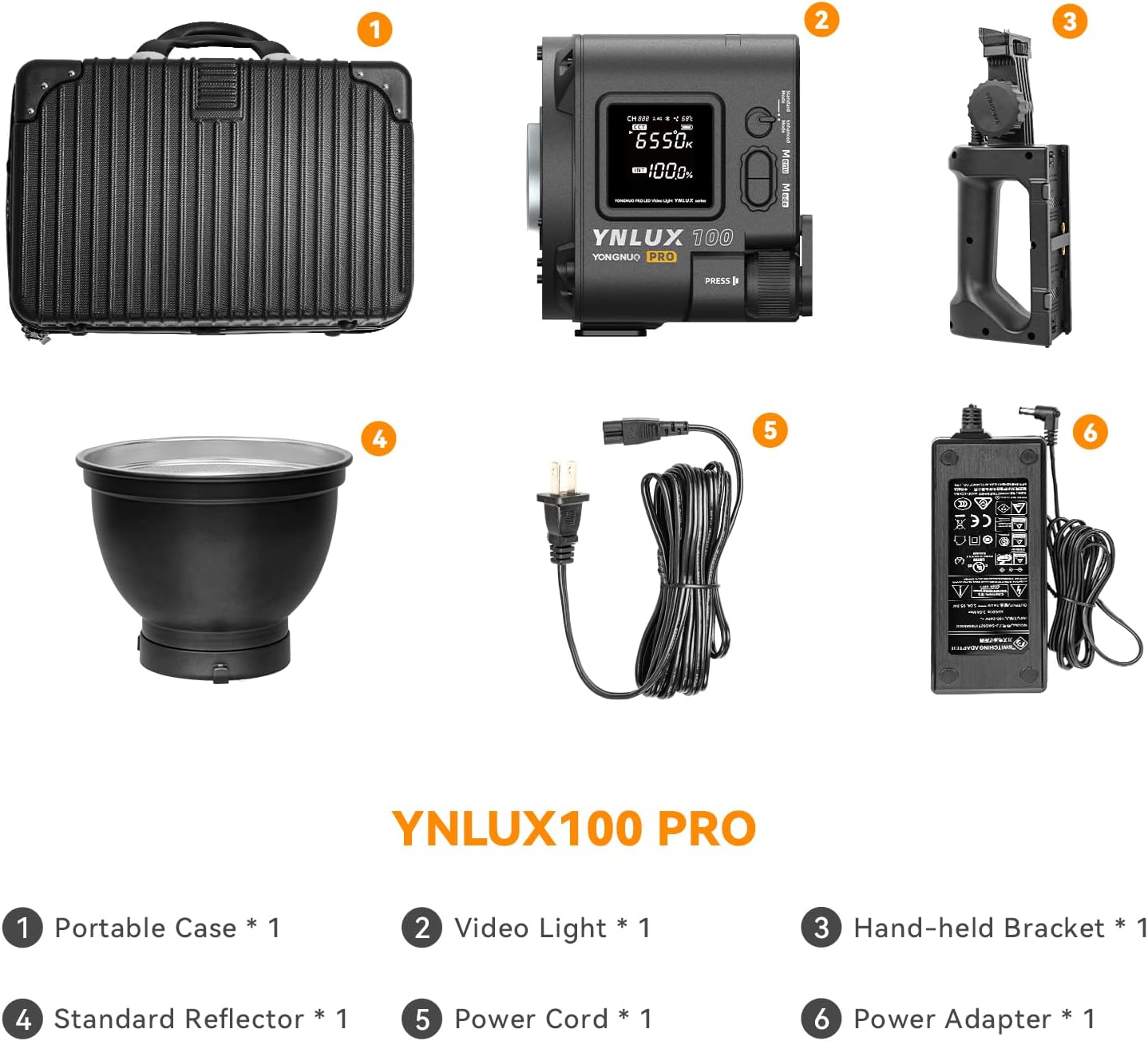
Figure 3.1: Contents of the YNLUX100 Pro package, including the light, handheld bracket, standard reflector, cables, power adapter, portable case, and manual.
4. Product Overview
The YNLUX100 Pro features a robust all-metal shell and an integrated design for durability and efficient heat dissipation. It provides powerful and consistent lighting with precise control.
4.1 Key Features
- Powerful Light Output: 120W COB LED with 2700-6500K bi-color temperature and CRI≥95. Illuminance value of 14316lux@1m (with standard reflector).
- Wireless Remote Control: Built-in YONGNUO LED wireless control system and YONGNUO APP support for remote adjustments (2.4G up to 100m, Bluetooth up to 15m).
- All-Metal Shell: Durable, shock-resistant, and shatter-resistant polymer engineering material framework.
- Multiple Power Supply Modes: Supports NP-F series batteries (via included handheld bracket), V-mount batteries (via optional bracket), and AC adapter.
- New Air Duct Heat Dissipation Design: Smart temperature control with automatic fan speed adjustment for quiet and strong cooling.
- Light Adjustment Curves: Four types of light adjustment curves (Exponential, Logarithmic, Sine, Linear) for various scenarios.

Figure 4.1: The YNLUX100 Pro handheld LED monolight with standard reflector and battery grip attached.

Figure 4.2: Display illustrating the four types of light adjustment curves available: Exponential, Logarithmic, Sine, and Linear functions.

Figure 4.3: An internal view of the YNLUX100 Pro's new air duct heat dissipation design and smart fan regulation system.
5. Setup
5.1 Attaching the Handheld Bracket
- Align the handheld bracket with the mounting point on the bottom of the YNLUX100 Pro.
- Securely fasten the bracket using the provided screw mechanism.
5.2 Attaching the Standard Reflector
- Align the Bowens mount of the standard reflector with the front of the YNLUX100 Pro.
- Twist the reflector clockwise until it clicks into place, ensuring it is securely locked.
5.3 Powering the Device
The YNLUX100 Pro offers multiple power options:
- AC Power: Connect the 19V5A Power Adapter to the light's DC input port and then to a power outlet.
- NP-F Batteries: Insert compatible NP-F series batteries into the slots on the handheld bracket. (Note: This bracket supports 30W in standard mode, 60W in performance mode).
- V-mount Batteries (Optional): If using an optional V-mount handheld bracket, attach it and insert a 24V V-mount battery. (Supports 60W in standard mode, 120W in performance mode).

Figure 5.1: Illustration of the YNLUX100 Pro with different power options, including NP-F batteries and an optional V-mount battery setup.
6. Operating Instructions
6.1 Basic Operation
- Power On/Off: Locate the power switch on the device and toggle it to turn the light on or off.
- Adjusting Brightness: Use the control dial or buttons to adjust the brightness from 0% to 100%.
- Adjusting Color Temperature: Use the dedicated controls to set the color temperature between 2700K and 6500K.

Figure 6.1: Close-up of the YNLUX100 Pro's control panel, showing the display for CCT and intensity settings, along with control buttons and dials.
6.2 Wireless Remote Control
The YNLUX100 Pro supports both 2.4G wireless remote control and Bluetooth APP control.
- 2.4G Remote: Refer to the separate 2.4G remote control manual for pairing and operation. The range is up to 100m.
- Bluetooth APP:
- Download the YONGNUO APP from your device's app store.
- Enable Bluetooth on your mobile device.
- Open the YONGNUO APP and search for the YNLUX100 Pro.
- Connect to the device and use the app interface to adjust brightness, color temperature, and access scene modes. The Bluetooth range is up to 15m.

Figure 6.2: A user controlling the YNLUX100 Pro via the YONGNUO mobile application, demonstrating wireless adjustment of light settings.
6.3 Light Adjustment Curves
The YNLUX100 Pro offers four light adjustment curves to suit different creative needs. Select the desired curve mode through the device's menu or the YONGNUO APP.
- Exponential Function
- Logarithmic Function
- Sine Function
- Linear Function
7. Maintenance
- Clean the device regularly with a soft, dry cloth. Do not use harsh chemicals or abrasive materials.
- Ensure the air vents are clear of dust and debris to maintain optimal cooling performance.
- When not in use, store the YNLUX100 Pro in its portable case in a dry, cool place.
- Avoid exposing the light to extreme temperatures or direct sunlight for prolonged periods.
8. Troubleshooting
| Problem | Possible Cause | Solution |
|---|---|---|
| Light does not turn on. | No power, low battery, or faulty connection. | Check power adapter connection or replace/charge batteries. Ensure power switch is ON. |
| Light flickers or is unstable. | Low battery, unstable power supply, or interference. | Ensure batteries are fully charged or use AC power. Check for nearby electronic interference. |
| Cannot connect via APP/remote. | Bluetooth/2.4G not enabled, device out of range, or pairing issue. | Ensure Bluetooth/2.4G is active on both devices. Move closer to the light. Re-pair the remote/APP. |
| Overheating warning. | Blocked air vents or prolonged use at high power in hot environment. | Clear air vents. Reduce power output or allow the device to cool down. Operate in a well-ventilated area. |
9. Specifications
| Feature | Detail |
|---|---|
| Model Number | YNLUX100 Pro |
| Output Power | 120W |
| Color Temperature | 2700K-6500K |
| CRI | ≥95 |
| Illuminance Value (with standard reflector) | 14316lux@1m |
| Wireless Control | 2.4G (up to 100m), Bluetooth (up to 15m) |
| Power Supply | AC Adapter (19V5A), NP-F batteries, V-mount batteries (optional) |
| Product Dimensions | 17.32 x 9.06 x 12.99 inches |
| Item Weight | 1.75 pounds |

Figure 9.1: Table detailing illuminance values at various color temperatures and distances for single light, standard reflector, and Dragon-scale Armor configurations.
10. Official Product Videos
10.1 Yongnuo LUX100 Pro LED Overview
This video provides a concise overview of the Yongnuo LUX100 Pro LED light, highlighting its key features and design. It demonstrates the light's compact size and ease of use.
10.2 Yongnuo YNLUX100 LED Video Light, Bowen Mount Reflector 2.4G
This video showcases the Yongnuo YNLUX100 LED video light, focusing on its Bowens mount compatibility and 2.4G wireless control capabilities. It illustrates how the light can be used in various shooting setups.
11. Warranty and Support
For warranty information and technical support, please refer to the official YONGNUO website or contact their customer service. Keep your purchase receipt as proof of purchase for warranty claims.
Manufacturer: HK YONGNUO LIMIT
Brand Store: YONGNUO Store on Amazon


