
iScooter iX3
iScooter iX3 Electric Scooter User Manual
Brand: iScooter | Model: iX3
1. Introduction
The iScooter iX3 Electric Scooter is designed for versatile use, offering a robust solution for commuting, errands, and off-road adventures. This manual provides essential information for the safe and efficient operation and maintenance of your iX3 scooter.
Key Features:
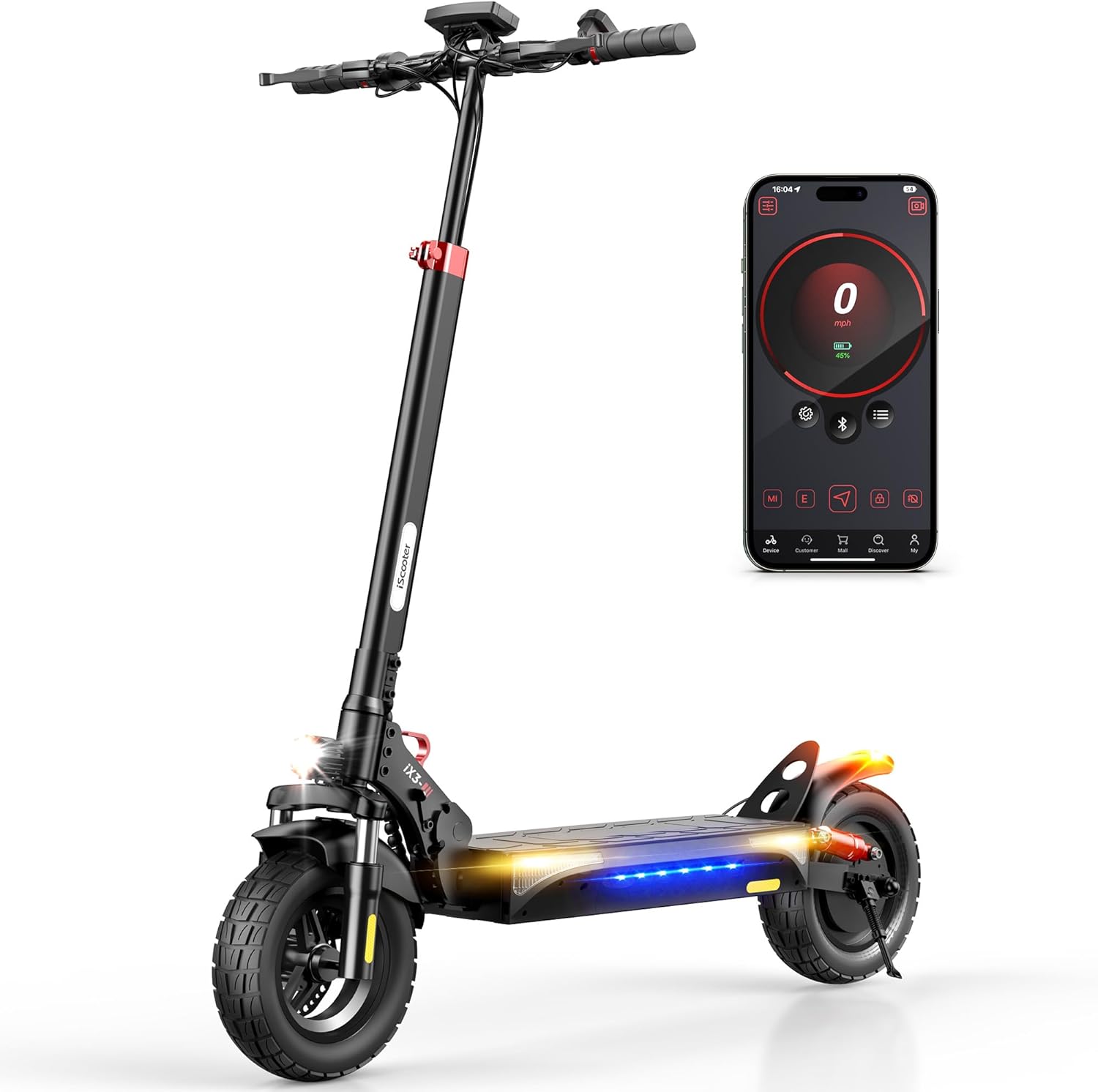
- Powerful Motor: Equipped with an 800W brushless motor for speeds up to 25 MPH and climbing inclines of 20-25°.
- Extended Range: A 480WH battery provides an impressive cruising range of up to 25 miles.
- All-Terrain Capability: Features 10-inch off-road pneumatic tires and dual front and rear shock absorbers for a smooth ride on various terrains.
- Enhanced Safety & Visibility: Includes directional signals, ambient lighting, powerful front headlights, and tail lights for improved nighttime visibility.
- Adjustable & Portable Design: Adjustable handlebar height (44.5-52.8 inches) and a foldable design for easy transport and storage.
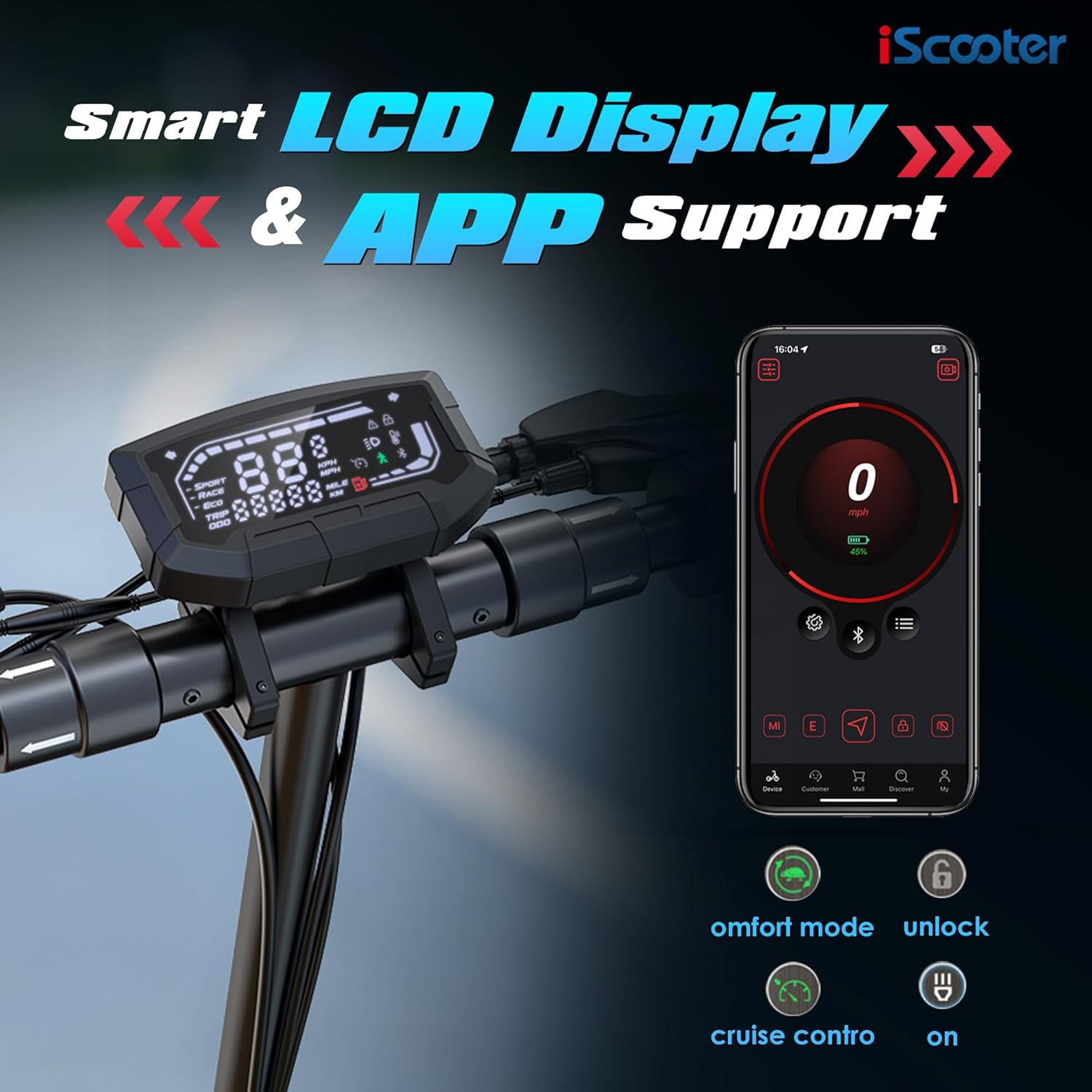
- Smart Control: Three riding speed modes (ECO, STD, TURBO) and full-color LCD display. Customize settings and lock the scooter via the 'iScooter Club' app.
2. Safety Information
Your safety is paramount. Always adhere to the following guidelines when operating the iScooter iX3:
- Always wear a certified helmet and appropriate protective gear (e.g., knee pads, elbow pads) while riding.
- Familiarize yourself with local laws and regulations regarding electric scooter usage.
- Do not ride under the influence of alcohol or drugs.
- Maintain a safe speed and distance from other vehicles and pedestrians.
- Avoid riding in heavy traffic, on slippery surfaces, or in adverse weather conditions.
- Regularly inspect your scooter for any damage, loose parts, or tire pressure issues before each ride.
- Ensure the battery is adequately charged before use.
3. Setup & Assembly
3.1. What's in the Box
Upon unboxing your iScooter iX3, verify that all components are present:
- iX3 Electric Scooter (partially folded)
- Charger
- Instruction Manual
- Tool Kit (including Allen wrench)
3.2. Assembly Instructions
The iX3 features a one-piece pre-installation design, minimizing assembly. Follow these steps to prepare your scooter for its first ride:
- Unfold the Scooter:
- Place the scooter on a flat surface.
- Unfold the kickstand to ensure stability.
- Push the stem away from the base until it clicks into place.
- Close the quick-release lever firmly to secure the stem.
- Attach the Handlebar:
- Carefully organize the cables to prevent pinching.
- Slide the handlebar and cables into the stem.
- Ensure the headlight is facing forward.
- Use the provided Allen wrench to insert and tighten the four screws in the suggested order (refer to the diagram in the physical manual for specific order).

4. Charging Instructions
To charge your iScooter iX3:
- Locate the charging port and open the rubber plug.
- Insert the charger plug into the port.
- Plug the charger into a power source.
- The LED indicator on the charger will turn from red to green when fully charged.
- Once charging is complete, remove the charger and reinsert the rubber plug to protect the port.
Battery Activation: For the first use, plug the scooter into the charger for at least 3 seconds to activate the battery.
Battery Sleep Mode: If the battery power is 30% or less and the scooter has not been powered on for about 7 consecutive days, the battery will enter sleep mode. To reactivate, charge the battery to 30% or higher.

5. Activation
To activate your iScooter iX3 and unlock its full potential, you need to use the 'iScooter Club' app:
- Download and install the 'iScooter Club' app on your smartphone.
- Create an account or log in.
- Power on your iX3 Electric Scooter.
- In the app, search for your vehicle and pair it via Bluetooth.
- Follow the on-screen instructions and watch any required riding safety videos within the app.
- Tap to activate your iX3.
Note: Upon initial activation, the scooter's speed mode may be set to a limited "Demo Mode" (e.g., 20 km/h). You can adjust this in the app after activation.
6. Operating Instructions
6.1. How to Ride
- Power on the scooter.
- Fold up the kickstand.
- Place one foot firmly on the footboard.
- Push off with your other foot to gain initial momentum.
- Once moving, gently press the throttle to accelerate.
- To slow down, release the throttle and squeeze the brake levers.
- For safety, the motor will not engage until the scooter reaches approximately 1.9 MPH (3 km/h). This start speed can be adjusted via the app.
6.2. Speed Modes
The iX3 offers three riding modes, selectable via the control panel:
- ECO Mode: Max speed approximately 10 MPH (16 km/h). Ideal for energy saving and beginners.
- STD Mode (Standard): Max speed approximately 18 MPH (29 km/h). A balanced mode for daily commuting.
- TURBO Mode: Max speed approximately 25 MPH (40 km/h). For maximum performance and speed.
- Walk Mode: Max speed approximately 3.1 MPH (5 km/h). Assists when pushing the scooter manually.

6.3. Turning
To turn left or right, gently pivot the handlebar in the desired direction.
6.4. Lights and Bell
- Headlight: Press the dedicated button on the handlebar to turn the headlight on or off.
- Tail Light & Ambient Lights: The tail light and ambient mood lights activate automatically for enhanced visibility.
- Turn Signals: Use the directional indicator buttons on the handlebar to signal turns. Press again to turn them off.
- Bell: Press the bell button to alert pedestrians or other riders.

6.5. Custom Button
The iX3 features a customizable button. Through the 'iScooter Club' app, you can assign various quick features to this button, such as Automatic Hill Hold Assist. Refer to the app settings for customization options.
7. Apple Find My Integration
The iScooter iX3 is compatible with Apple Find My, allowing you to track your scooter's whereabouts using the global Find My network of iOS devices.
- Open the 'iScooter Club' app.
- Navigate to "More Functions" and then "Segway-Ninebot Lab".
- Select "Locating vehicle" (Beta version).
- Agree to use the function and start pairing with your scooter.
- The app will automatically redirect you to the Apple Find My app.
- In the Find My app, add a new item and give your scooter a name.
Once set up, you can quickly and conveniently locate your iX3 via the Find My app on your iPhone.
8. Maintenance
8.1. Tire Inflation
Proper tire pressure is crucial for ride quality and safety. The iX3 uses 10-inch off-road pneumatic tires.
- Unscrew the valve cap on the tire.
- Connect a pump to the tire valve.
- Inflate the tire to the recommended pressure of 45 PSI.
- Remove the pump and replace the valve cap.

8.2. Phone Holder Installation (Optional)
If you wish to install a phone holder (not included), follow these general steps:
- Use an Allen wrench to loosen the screws on the handlebar where the removable part is located.
- Remove the existing removable part.
- Install your phone holder in its place.
- Tighten the screws to secure the phone holder.
Refer to your specific phone holder's manual for detailed installation instructions.
9. Troubleshooting
If you encounter issues with your iScooter iX3, consider the following common solutions:
- Scooter Not Powering On:
- Ensure the battery is charged above 30% and not in sleep mode.
- Check all cable connections for security.
- Motor Not Engaging:
- Confirm the scooter is activated via the 'iScooter Club' app.
- Ensure you are pushing off to reach the minimum start speed (1.9 MPH) before applying throttle.
- App Connectivity Issues:
- Ensure Bluetooth is enabled on your phone and the scooter is powered on.
- Try restarting both the app and the scooter.
- Reduced Performance/Range:
- Check tire pressure; under-inflated tires can reduce range and speed.
- Rider weight, terrain, wind conditions, and speed mode can all affect performance.
For persistent issues or error codes, please refer to the 'iScooter Club' app's help section or contact customer support.
10. Specifications
| Feature | Detail |
|---|---|
| Brand | iScooter |
| Model Name | iX3 |
| Motor Power | 800W |
| Top Speed | 25 MPH |
| Maximum Distance Range | 25 Miles |
| Battery | 480WH |
| Tire Size | 10 Inches |
| Tire Type | Off-Road Pneumatic |
| Suspension Type | Dual Suspension (Front and Rear) |
| Brake Style | Front and Rear Double Braking Systems |
| Adjustable Handlebar Height | 44.5-52.8 Inches |
| Item Weight | 22 Kilograms (approx. 48.5 lbs) |
| Weight Limit | 264 Pounds |
| Charging Time | 7 Hours |
| Frame Material | Aluminum |
| Product Dimensions (LxWxH) | 47"L x 23"W x 50"H |
| UPC | 699838690608 |
11. Warranty & Support
iScooter is committed to providing quality products and service. Your iX3 Electric Scooter comes with a limited warranty:
- Electric Scooter: One-year warranty.
- Specific Parts (e.g., Motor, Battery): 180-day warranty.
This warranty is non-transferable after the product's initial sale. iScooter also offers a 7-day no-reason return policy, provided there is no human damage or stains.
Customer Support: For any questions, warranty claims, or assistance, please contact iScooter customer service:
- Email: vip.support@iscooterglobal.com
- Phone: +1 (855) 696-2888
If shipping damage occurs, please provide photo or video proof when contacting support.
12. Official Product Videos
iX3 Video from iScooter Center
This video provides a general overview of the iX3 Electric Scooter, highlighting its features and usage. It is provided by iScooter Center.
Related documentsiX3


Ask a question about this manual
Ask about setup, troubleshooting, compatibility, parts, safety, or missing instructions. Manuals+ will review the question and use this page’s manual context to help answer it.