
Introduction
This manual provides detailed instructions for the safe and efficient use of your BigBlue 150W Portable Solar Panel. Please read this manual thoroughly before operating the device and retain it for future reference.
Safety Information
- Do not attempt to disassemble, repair, or modify the solar panel.
- Keep the solar panel away from fire, water, and corrosive substances.
- Avoid dropping or subjecting the solar panel to strong impacts.
- Ensure all connections are secure before use.
- Do not touch the electrical contacts with bare hands or conductive materials.
- Always handle the solar panel with care, especially when unfolding or folding.
Package Contents
Verify that all items are present in your package:
- 1 x BigBlue 150W Portable Solar Panel
- 1 x MC4 to DC551/8020/7909/XT60 Cable
- User Manual (this document)
Product Features
- N-Type Solar Technology: Advanced materials for higher solar energy generation and improved performance in extreme heat.
- High Efficiency: Premium ETFE solar arrays achieve up to 25% conversion rate.
- Built-in Bypass Diodes: Ensures reliable performance by providing an alternative current path, bypassing faulty panels to maintain consistent power production and reducing the risk of hotspots.
- High Compatibility: Equipped with MC-4 connector (17.4V/8.62A) and versatile adapters (DC551, 8020, 7909, XT60) for most power stations.
- IP68 Waterproof Rating: Provides reliable protection against harsh outdoor environments and potential damage.
- Integrated Kickstands: Allows for easy setup and optimal angling towards the sun for maximum efficiency.
- Compact and Portable: Weighs 8.8 lbs and folds for easy transport and storage.
- Parallel-Series Connection Support: Allows optimization of power efficiency (connection cables not included).
Setup Instructions
- Unfold the Solar Panel: Carefully unfold the BigBlue 150W Portable Solar Panel on a flat surface.

Image: The solar panel unfolded with its kickstands extended, positioned to capture sunlight, and connected to a portable power station.
- Extend the Kickstands: Locate the integrated kickstands on the back of the panel and extend them to support the panel.
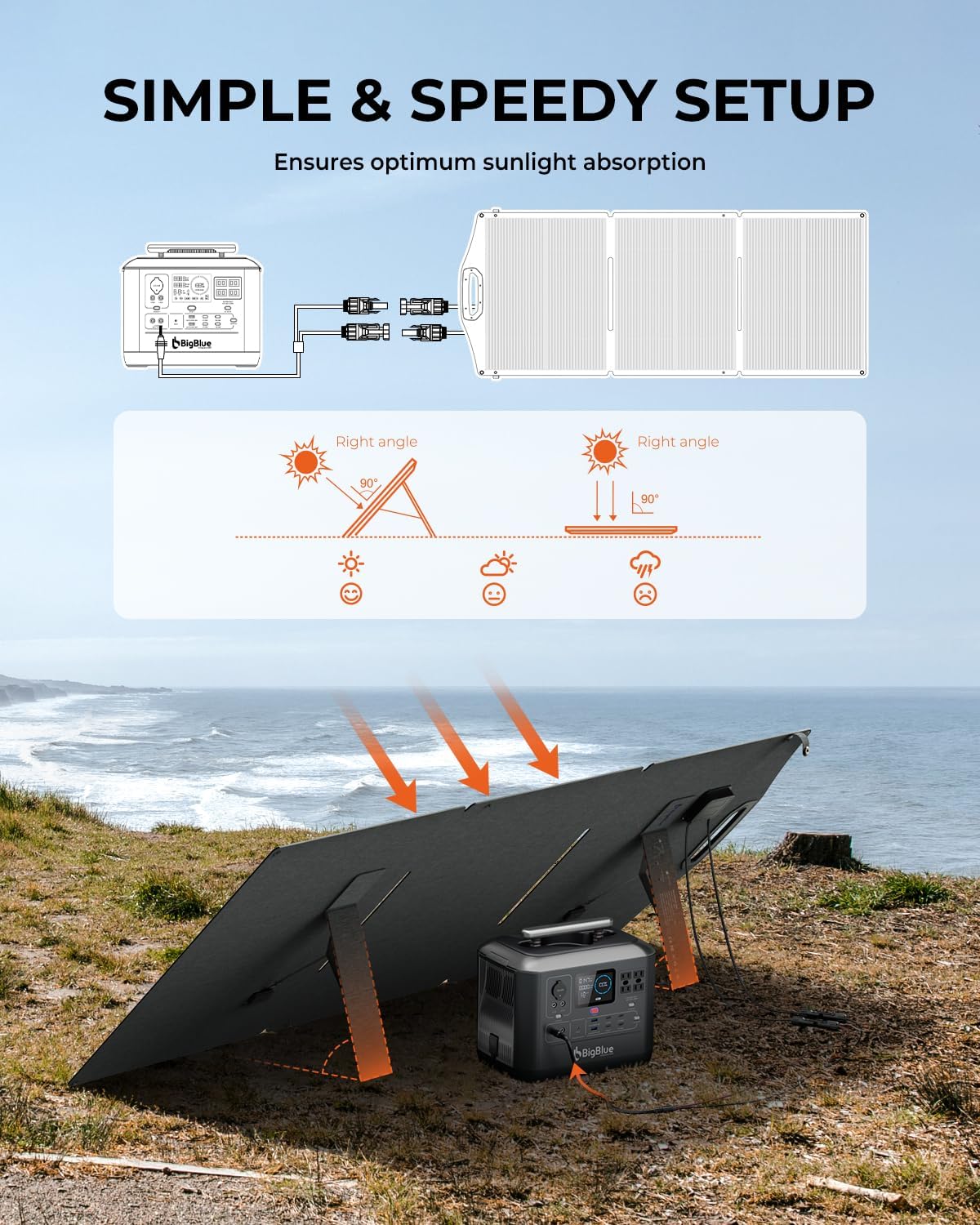
Image: The solar panel is shown with its kickstands deployed, allowing it to be angled for optimal sun exposure.
- Position for Optimal Sunlight: Angle the solar panel directly towards the sun. For best results, adjust the angle periodically as the sun moves across the sky.

Image: A diagram illustrating how to adjust the solar panel's angle to maintain a right angle to the sun for maximum efficiency, regardless of sun position.
- Connect to Your Device: Use the provided MC4 to DC551/8020/7909/XT60 cable to connect the solar panel to your compatible power station or battery. Ensure the connection is firm.
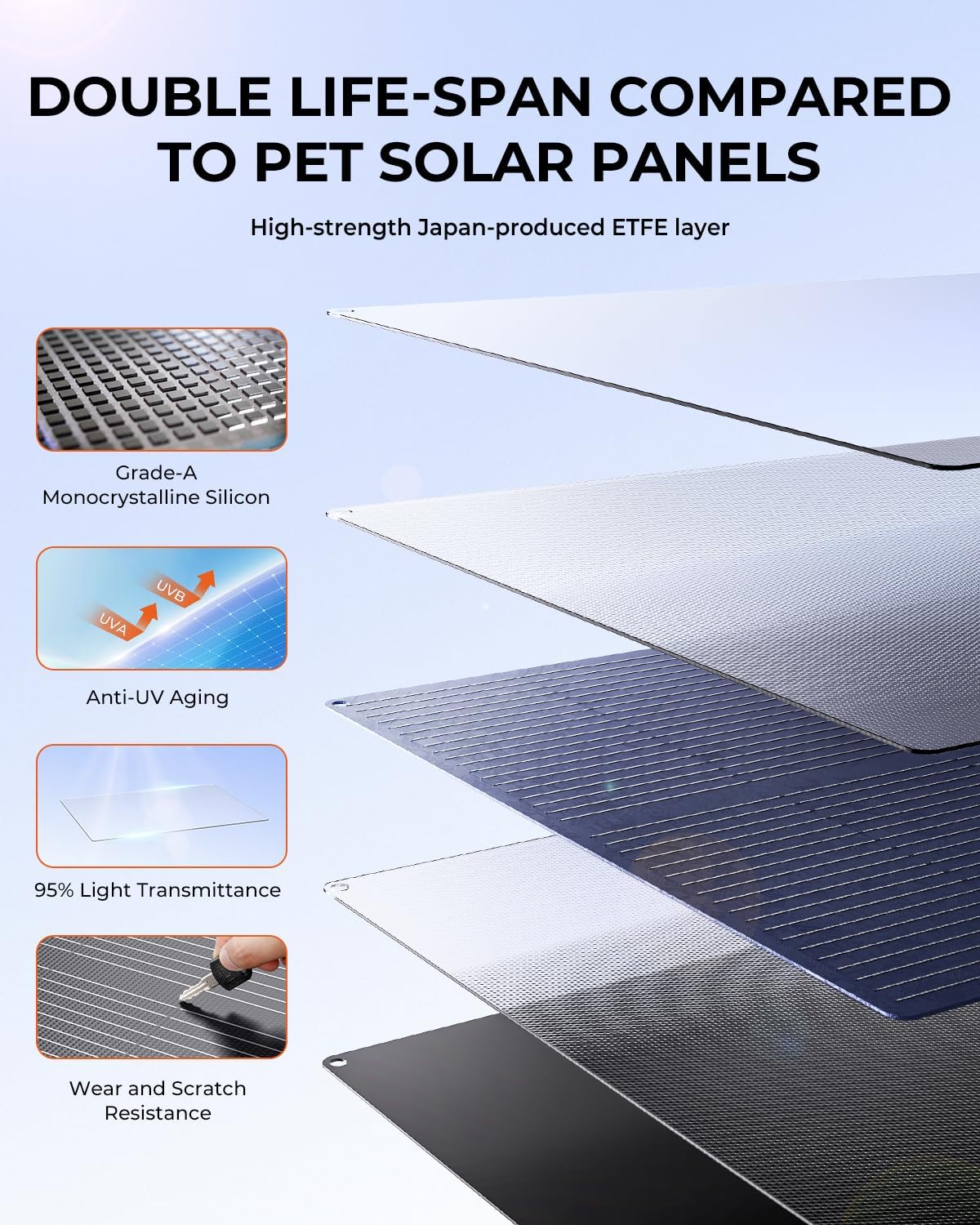
Image: A detailed view of the solar panel's output ports and the various adapter cables (MC4, DC551, 8020, 7909, XT60) for connecting to different devices.
- Parallel or Series Connection (Optional): If connecting multiple panels, use appropriate cables (not included) for parallel or series configurations as required by your power system. Refer to your power station's manual for specific connection requirements.

Image: An illustration demonstrating how to connect the solar panel to various battery types (GAR/RV, LA, GEL, AGM, LITHIUM) via a charge controller, and directly to different solar generators.
Operating Instructions
Once the solar panel is set up and connected, it will begin converting sunlight into electrical energy. The charging indicator on your connected device (power station, battery) will typically show the charging status.
- Optimal Performance: For maximum power output, ensure the solar panel is positioned in direct sunlight and adjusted to face the sun at a 90-degree angle.
- Environmental Factors: Actual power output can vary significantly based on factors such as season, temperature, cloud cover, placement angle, and the type of connected device.
- Monitoring: Regularly check your connected device's display to monitor charging progress and input wattage.
Maintenance
- Cleaning: Wipe the solar panel surface with a soft, damp cloth to remove dust, dirt, or debris. Avoid abrasive cleaners or harsh chemicals that could damage the ETFE coating.
- Inspection: Periodically inspect the panel and cables for any signs of damage, wear, or loose connections.
- Storage: When not in use, fold the solar panel and store it in a dry, cool place away from direct sunlight and extreme temperatures.

Image: The solar panel in its folded, compact state, highlighting its portability and integrated handle for easy carrying.
- Water Resistance: The IP68 rating provides protection against water ingress. However, avoid submerging the panel and ensure connectors are dry before use.
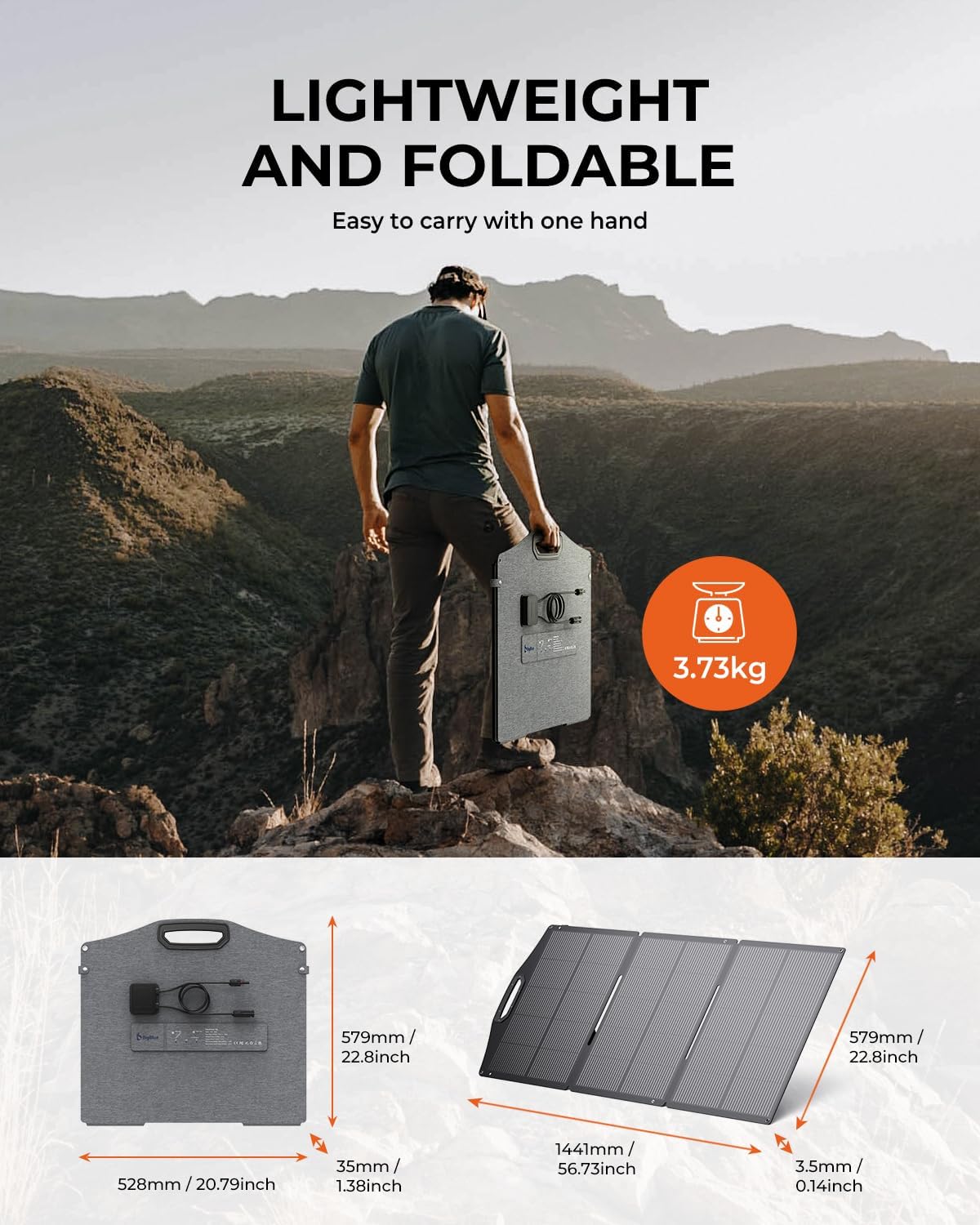
Image: A close-up shot of water droplets on the solar panel's surface, illustrating its IP68 waterproof design.
Troubleshooting
- Low Power Output:
- Check Sunlight: Ensure the panel is in direct, unobstructed sunlight. Shadows, even partial ones, can significantly reduce output.
- Adjust Angle: Re-angle the panel to face the sun directly.
- Clean Surface: Dust or dirt on the panel surface can reduce efficiency. Clean the panel as described in the Maintenance section.
- Temperature: High ambient temperatures can slightly reduce solar panel efficiency.
- Cable Connections: Verify all cables are securely connected and undamaged.
- Cloud Cover: Overcast conditions will naturally reduce power output.
- Device Not Charging:
- Verify Connections: Ensure the solar panel is correctly connected to your power station or battery using the appropriate adapter.
- Check Device Input: Confirm your power station or battery is capable of receiving input from a 150W solar panel and that its input specifications match the panel's output.
- Sufficient Sunlight: Ensure there is enough sunlight for the panel to generate power.
- Panel Damage: Inspect the solar panel for any visible damage.
Specifications
| Specification | Value |
|---|---|
| Brand | BigBlue |
| Model Number | B752 |
| Maximum Power | 150 Watts |
| Efficiency | 25% Solar Efficiency |
| Material | ETFE, EVA |
| Product Dimensions (Unfolded) | 56.73"L x 22.8"W x 0.14"H (1441mm x 579mm x 3.5mm) |
| Product Dimensions (Folded) | 20.79"L x 22.8"W x 1.38"H (528mm x 579mm x 35mm) |
| Item Weight | 8.8 Pounds (3.73kg) |
| Maximum Voltage (Vmp) | 17.4 Volts |
| AC Adapter Current (Imp) | 8.62 Amps |
| Upper Temperature Rating | 70 Degrees Celsius |
| Included Components | 1* MC4 TO DC551/8020/7909/ XT60 cable |
| Waterproof Rating | IP68 |
Warranty & Support
BigBlue stands behind the quality of its products.
- Quality Guarantee: This product comes with a 2-Year Quality Guarantee.
- Customer Support: For any questions, technical assistance, or warranty claims, please contact BigBlue customer support. Refer to the official BigBlue website for contact information.


