
1. Product Overview
The Cyrusher XF650 is a robust electric fat tire bike designed for versatile terrain, including snow, sand, and mountain trails. It features a powerful 750W motor, a removable 48V/16Ah battery, and a Shimano 7-speed gear system, providing both electric assistance and traditional pedaling capabilities. This manual provides essential information for the safe assembly, operation, and maintenance of your e-bike.

Figure 1: Front-side view of the Cyrusher XF650 Electric Fat Tire Bike, showcasing its robust frame, fat tires, and the included comfort saddle.
2. Safety Information
Your safety is paramount. Please read and understand all safety warnings and instructions before operating the Cyrusher XF650. Failure to do so may result in serious injury or property damage.
- Wear a Helmet: Always wear an approved bicycle helmet that fits properly.
- Obey Traffic Laws: Follow all local traffic laws, regulations, and signage.
- Pre-Ride Check: Before each ride, inspect brakes, tires (pressure and condition), battery charge, and ensure all quick releases and fasteners are secure.
- Weather Conditions: Exercise caution in wet or slippery conditions. Braking distance increases significantly.
- Visibility: Use lights at night or in low-light conditions. Consider reflective clothing.
- Weight Limit: Do not exceed the maximum weight capacity specified in the specifications section.
3. Package Contents
Upon unpacking, verify that all components are present and undamaged. If any items are missing or damaged, contact Cyrusher customer support immediately.
- Cyrusher XF650 Electric Bike Frame
- Front Wheel
- Handlebar Assembly
- Seat Post and Saddle
- Pedals (Left and Right)
- 48V/16Ah Removable Lithium Battery
- Battery Charger
- Front and Rear Fenders
- Rear Rack
- Tool Kit
- User Manual
4. Setup and Assembly
Follow these steps to assemble your Cyrusher XF650 e-bike. It is recommended to have a second person assist with some steps.
- Unpack and Inspect: Carefully remove all packaging materials. Inspect the bike for any visible damage.
- Install Handlebar: Attach the handlebar to the stem, ensuring it is centered and the bolts are tightened securely. Adjust the angle for comfortable riding.
- Install Front Wheel: Mount the front wheel into the fork dropouts. Ensure the disc brake rotor is correctly seated in the caliper. Secure with the quick release or axle nuts.
- Attach Pedals: Identify the Left (L) and Right (R) pedals. The left pedal threads counter-clockwise, and the right pedal threads clockwise. Tighten firmly with a wrench.
- Install Seat Post and Saddle: Insert the seat post into the frame's seat tube. Adjust the height for comfortable leg extension while pedaling. Secure with the quick release lever.
- Install Fenders and Rear Rack: Attach the front and rear fenders, and the rear rack, using the provided hardware.
- Insert Battery: Slide the fully charged battery into its compartment on the frame. Ensure it clicks securely into place and lock it with the key.
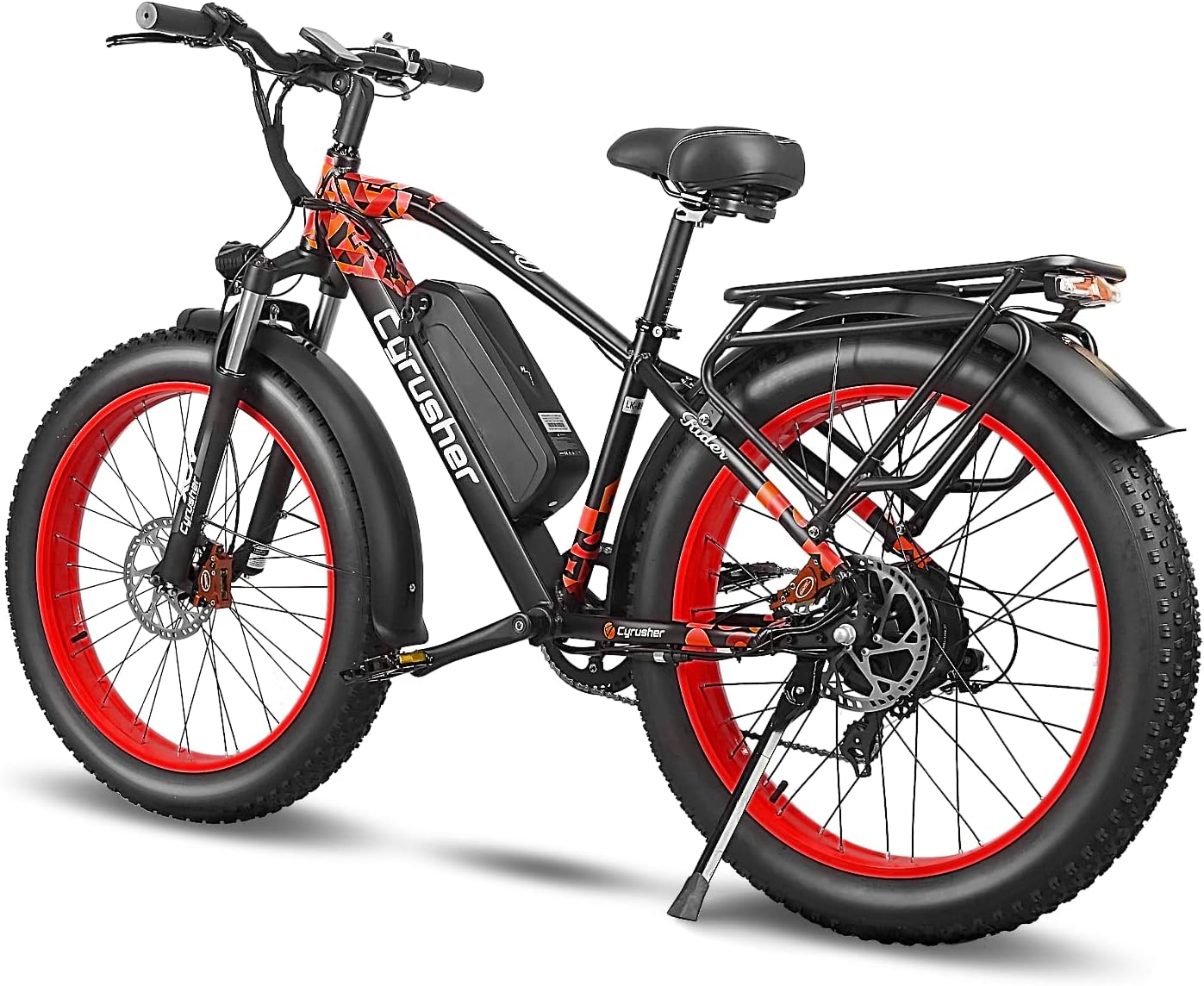
Figure 2: Rear-side view of the Cyrusher XF650, highlighting the sturdy rear rack and fender, suitable for carrying cargo.
5. Operating Instructions
5.1 Powering On/Off
- To Power On: Ensure the battery is locked in place. Press and hold the power button on the display unit for a few seconds until the screen illuminates.
- To Power Off: Press and hold the power button on the display unit until the screen turns off.
5.2 Display Functions
The Cyrusher XF650 features a 3.7-inch extra-large center-mounted display that provides key riding information.

Figure 3: The Cyrusher XF650's 3.7-inch extra-large display is centrally positioned for improved visibility and riding safety compared to smaller, side-mounted alternatives.
- Speed: Current riding speed.
- Battery Level: Indicates remaining battery charge.
- Pedal Assist Level (PAS): Shows the current level of motor assistance (0-5).
- Odometer/Trip Distance: Tracks total distance or current trip distance.
- Error Codes: Displays diagnostic codes if an issue arises.
5.3 Pedal Assist System (PAS) and Throttle
- Pedal Assist: The motor provides assistance as you pedal. Use the '+' and '-' buttons on the control panel to adjust the PAS level (0 for no assist, 5 for maximum assist).
- Throttle: The thumb throttle provides power on demand without pedaling. Use it cautiously, especially when starting.
5.4 Shifting Gears
The Shimano 7-speed derailleur allows you to adjust your pedaling effort to different terrains and speeds.
- Use the shifter on the right handlebar to change gears.
- Shift to a lower gear (larger cog) for easier pedaling on inclines.
- Shift to a higher gear (smaller cog) for faster speeds on flat terrain.
5.5 Braking
The XF650 is equipped with disc brakes for reliable stopping power.
- The right lever controls the rear brake, and the left lever controls the front brake.
- Apply both brakes simultaneously for optimal stopping power and control. Avoid sudden front braking, especially at high speeds.
6. Maintenance
Regular maintenance ensures the longevity and safe operation of your e-bike.
6.1 Battery Care

Figure 4: Detailed view of the removable 48V/16Ah lithium battery, designed for easy charging and secure integration into the bike frame.
- Charging: Charge the battery fully before first use. Use only the provided charger. Do not overcharge.
- Storage: Store the battery in a cool, dry place. If storing for extended periods, charge it to 50-70% every 2-3 months.
- Cleaning: Keep battery contacts clean and dry.
6.2 Tires
- Tire Pressure: Maintain recommended tire pressure (PSI) as indicated on the tire sidewall. Fat tires typically require lower pressure for off-road use.
- Inspection: Regularly check tires for wear, cuts, or embedded objects.
6.3 Drivetrain
- Chain Lubrication: Keep the chain clean and lubricated to ensure smooth shifting and prevent rust.
- Gear Adjustment: If shifting becomes rough or inaccurate, the derailleur may need adjustment. Consult a bike mechanic if unsure.
6.4 Brakes
- Brake Pad Wear: Regularly inspect brake pads for wear. Replace them when they are thin.
- Brake Lever Feel: If brake levers feel spongy, the hydraulic system may need bleeding or cable tension adjustment.
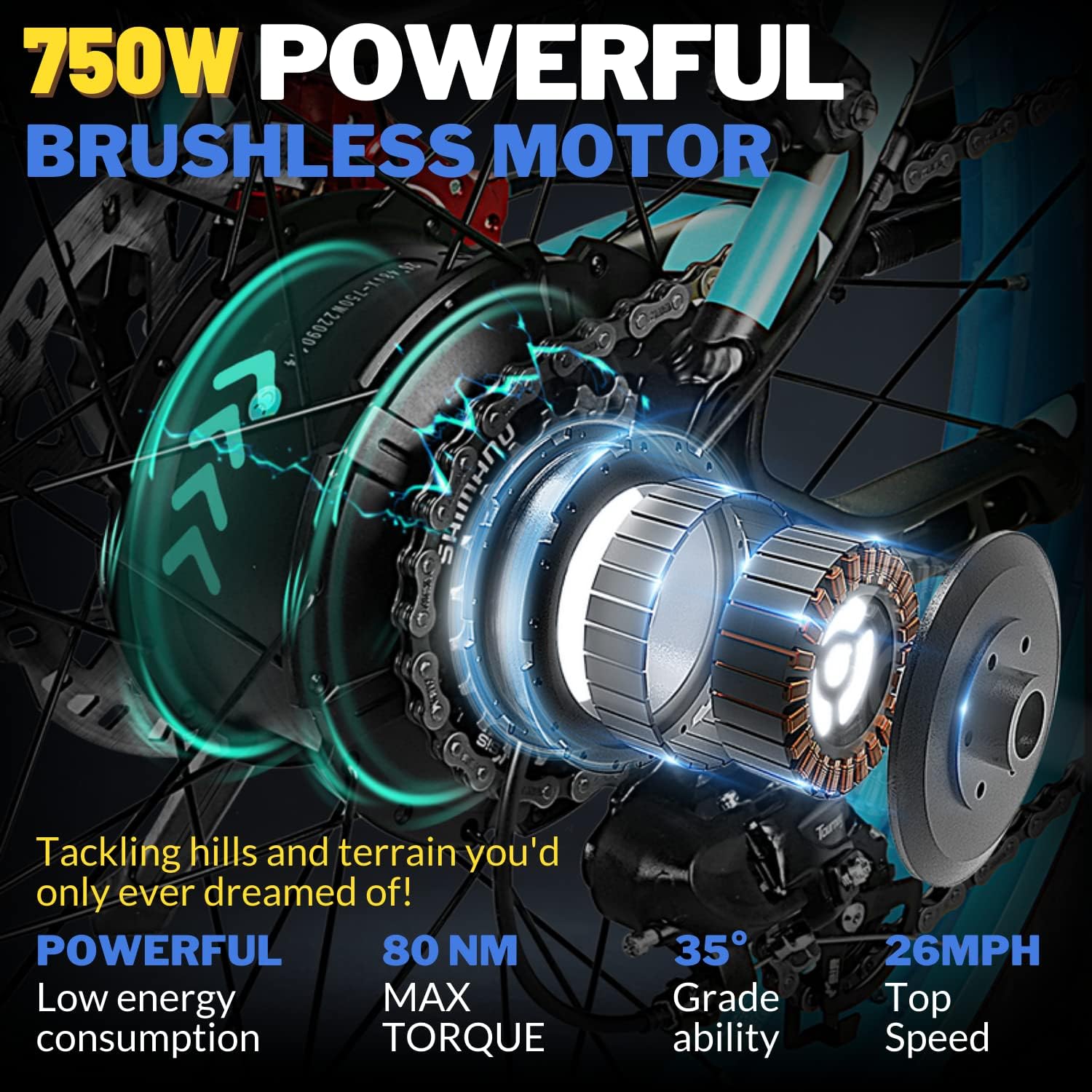
Figure 5: A detailed view of the powerful 750W brushless motor integrated into the rear wheel hub, alongside the responsive disc brake system.
6.5 Cleaning
Clean your e-bike regularly with a damp cloth and mild soap. Avoid high-pressure washers directly on electrical components.
7. Troubleshooting
This section addresses common issues you might encounter. For problems not listed here, contact customer support.
| Problem | Possible Cause | Solution |
|---|---|---|
| Bike does not power on | Battery not charged or not properly seated/locked. Loose electrical connection. | Ensure battery is fully charged and securely locked. Check all visible cable connections. |
| Motor not assisting | PAS level is 0. Brake levers engaged. Motor cable disconnected. | Increase PAS level. Release brake levers. Check motor cable connection. |
| Brakes feel weak or noisy | Worn brake pads. Contaminated rotors/pads. Air in hydraulic lines. | Inspect and replace brake pads. Clean rotors/pads with disc brake cleaner. Consult a mechanic for hydraulic issues. |
| Gears are skipping or not shifting smoothly | Derailleur out of adjustment. Dirty or dry chain. Bent hanger. | Clean and lubricate chain. Adjust derailleur. Inspect derailleur hanger for bends. |
8. Specifications
Key technical specifications for the Cyrusher XF650 Electric Fat Tire Bike:
- Motor: 750W Brushless Motor
- Battery: 48V/16Ah Removable Lithium Battery (16 Kilowatt Hours)
- Tires: 26'' x 4'' Fat Tires
- Gears: Shimano 7-Speed
- Max Speed: Up to 26 MPH (42 km/h)
- Range: 35-55 Miles per charge (depending on assist level, terrain, rider weight)
- Charging Time: 4-7 Hours
- Item Package Dimensions: 58 x 32 x 12 inches
- Package Weight: 72 Pounds
9. Official Product Video
Watch this video for a detailed overview of the Cyrusher XF650's configuration and features.
Video: "Extrbici XF650 Configuration, details show" - This video provides a visual guide to the key components and operational aspects of the Cyrusher XF650 electric bike.
10. Warranty and Support
Cyrusher provides a limited warranty for its electric bikes. Please refer to the warranty card included with your purchase for specific terms and conditions, including coverage period and exclusions.
For technical support, warranty claims, or to order replacement parts, please contact Cyrusher customer service through their official website or the retailer where you purchased the product. Keep your purchase receipt and serial number handy for faster service.
For the most up-to-date support information, please visit the official Cyrusher website.


