
1. Introduction
This manual provides essential information for the safe operation, maintenance, and troubleshooting of your MEGAWHEELS A6 Electric Kick Scooter. Please read this manual thoroughly before your first ride to ensure proper use and to maximize the lifespan of your scooter.

Figure 1.1: The MEGAWHEELS A6 Electric Kick Scooter shown alongside its companion mobile application interface.
Product Features
- Powerful Motor: Equipped with a 250W motor, providing a top speed of 15.5 mph.
- Extended Range: Capable of traveling up to 15.5 miles on a single charge.
- Durable Tires: Features 9-inch pneumatic tubeless tires for enhanced shock absorption and a smooth ride.
- Portable Design: Foldable frame for easy storage and transport.
- Advanced Braking: Dual braking system including a disc brake and regenerative e-brake.
- Multiple Riding Modes: Three distinct speed modes (L, M, H) for various riding preferences and safety.
- Smart Connectivity: APP support for cruise mode, driving record, APP lock, and speed adjustment.
2. Safety Guidelines
Your safety is paramount. Always adhere to local laws and regulations regarding electric scooter use. Wear appropriate safety gear, including a helmet, knee pads, and elbow pads, during operation.
Pre-Ride Checks
- Ensure the battery is sufficiently charged.
- Check tire pressure and condition.
- Verify that the brakes are functioning correctly.
- Confirm all folding mechanisms are securely locked.
- Inspect the handlebar and stem for any looseness.

Figure 2.1: Key safety features of the A6 scooter, including its dual braking system, comprehensive lighting, and shock-absorbing pneumatic tires.
Riding Safety Tips
- Do not ride in heavy rain or through puddles.
- Avoid riding on slippery surfaces, loose gravel, or uneven terrain.
- Maintain a safe distance from other vehicles and pedestrians.
- Do not perform stunts or sudden maneuvers.
- The maximum weight limit for the rider is 220 lbs. Do not exceed this limit.
3. Setup
Your MEGAWHEELS A6 scooter comes partially assembled. Follow these steps to prepare it for its first use.
Unfolding the Scooter
- Carefully remove the scooter from its packaging.
- Place the scooter on a flat, stable surface.
- Locate the folding mechanism near the base of the handlebar stem.
- Release the locking latch and gently lift the handlebar stem until it clicks into its upright, locked position. Ensure the latch is fully engaged.
- Adjust the handlebar height if applicable and secure it.

Figure 3.1: The A6 scooter's folding system allows for easy portability and storage.

Figure 3.2: The compact folded size makes it convenient to store the scooter in a vehicle.
Initial Charging
Before first use, fully charge the scooter's battery. The charging time is approximately 4 hours.
- Locate the charging port on the scooter.
- Connect the charger to the scooter's charging port.
- Plug the charger into a standard power outlet.
- The charging indicator light on the charger will change (e.g., from red to green) when charging is complete.
- Disconnect the charger from the outlet first, then from the scooter.
4. Operating Instructions
Familiarize yourself with the controls and riding modes before operating the scooter.
Powering On/Off
- To power on: Press and hold the power button on the display for a few seconds.
- To power off: Press and hold the power button again until the display turns off.
LED Display Functions
The integrated LED display provides real-time information about your ride.
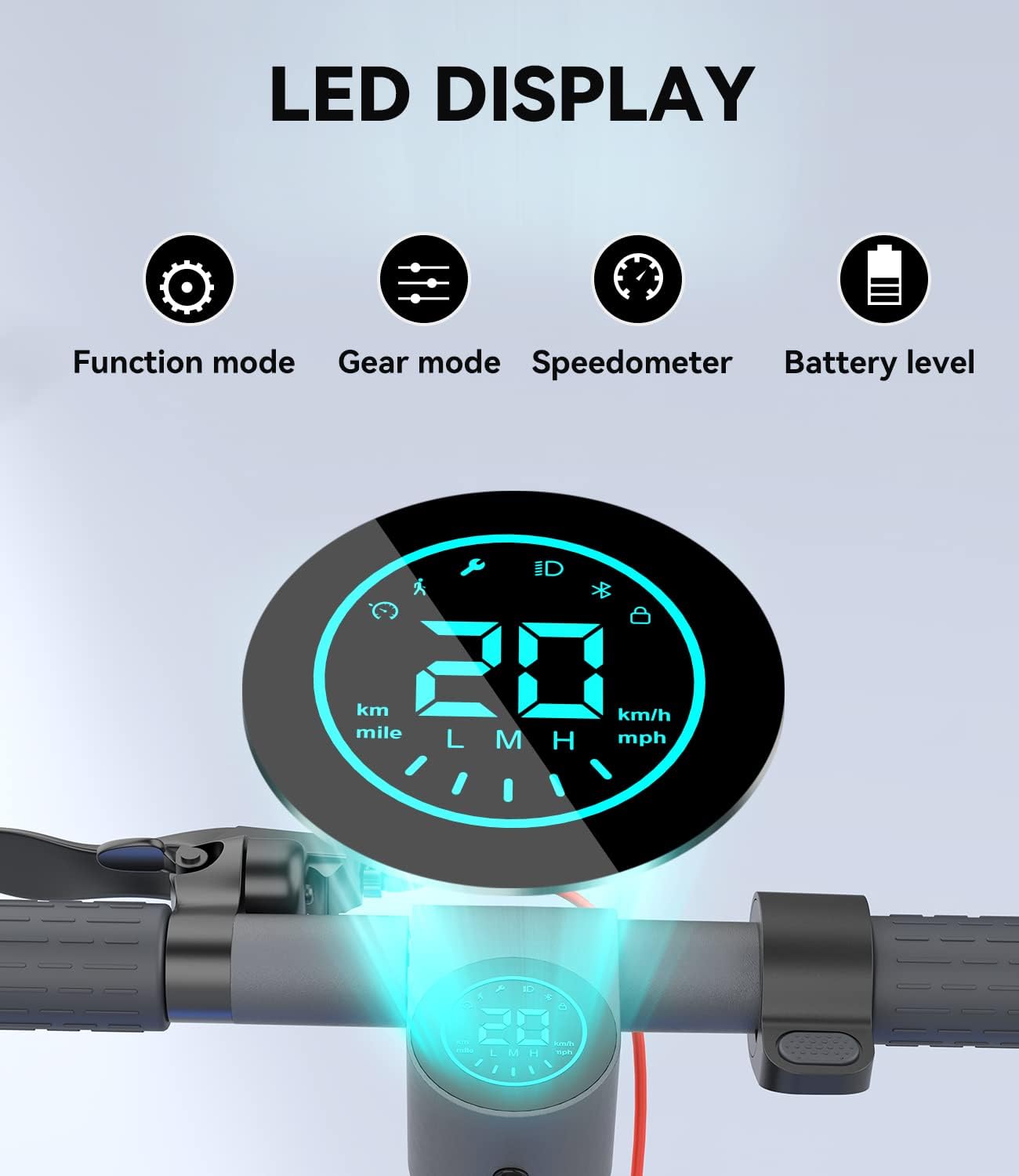
Figure 4.1: The LED display provides essential riding information at a glance.
- Function Mode: Indicates current operational status.
- Gear Mode: Shows the selected speed mode (L, M, H).
- Speedometer: Displays current speed.
- Battery Level: Shows remaining battery charge.
Riding Modes
The scooter offers three riding modes to suit different speeds and rider experience levels.
- L Mode (Low Speed): Maximum speed of 3.7 mph. Ideal for beginners or crowded areas.
- M Mode (Medium Speed): Maximum speed of 9.3 mph. Suitable for intermediate riders.
- H Mode (High Speed): Maximum speed of 15.5 mph. For experienced riders on open paths.
To switch between modes, short press the power button while the scooter is on.
Braking System
The A6 scooter features a dual braking system for reliable stopping power.
- Disc Brake: Activated by the brake lever on the handlebar. Provides strong mechanical braking.
- Regenerative E-Brake: Recovers energy during braking, extending battery life.

Figure 4.2: Detail of the rear disc brake, part of the scooter's dual braking system.
Using the Companion App
Download the LEQISMART app to unlock additional features and customize your riding experience.

Figure 4.3: The LEQISMART app provides advanced control and monitoring features for your scooter.
- Cruise Mode: Maintain a constant speed without holding the throttle.
- Driving Record: Track your ride statistics.
- APP Lock: Electronically lock your scooter for added security.
- Speed Adjustment: Fine-tune speed settings within each mode.
5. Maintenance
Regular maintenance ensures the longevity and optimal performance of your scooter.
Battery Care
- Charge the battery fully before long-term storage.
- Avoid completely draining the battery.
- Store the scooter in a cool, dry place away from direct sunlight and extreme temperatures.
- Charge the battery at least once every three months if not in use.

Figure 5.1: The scooter's battery is integrated into the deck for efficient power delivery.
Tire Maintenance
- Regularly check tire pressure to ensure it matches the recommended PSI (refer to tire sidewall or specifications).
- Inspect tires for any signs of wear, punctures, or damage.
- Keep tires clean from debris.
Cleaning and Storage
- Wipe the scooter with a damp cloth. Do not use high-pressure water jets or corrosive cleaners.
- Ensure the charging port cover is securely closed when not charging.
- Store the scooter indoors in a dry environment.
6. Troubleshooting
This section addresses common issues you might encounter with your MEGAWHEELS A6 Electric Kick Scooter.
| Problem | Possible Cause | Solution |
|---|---|---|
| Scooter does not power on | Low battery; Loose connections; Power button malfunction | Charge the battery; Check all cable connections; Contact support if issue persists. |
| Reduced range or speed | Low tire pressure; Overload; Battery degradation; Riding uphill frequently | Inflate tires to recommended pressure; Ensure rider weight is within limits; Charge battery fully; Adjust riding habits. |
| Brakes not responsive | Brake cable loose; Worn brake pads; System error | Inspect and tighten brake cable; Replace brake pads if worn; Restart scooter; Contact support. |
| Unusual noises during operation | Loose components; Debris in wheels; Motor issue | Check for loose screws; Inspect wheels for foreign objects; Contact support for motor issues. |
If you encounter an issue not listed here or if the suggested solutions do not resolve the problem, please contact MEGAWHEELS customer support.
7. Specifications
Detailed technical specifications for the MEGAWHEELS A6 Electric Kick Scooter.
| Feature | Specification |
|---|---|
| Brand | MEGAWHEELS |
| Model Name | A6 Electric Scooter Black |
| Color | Black |
| Motor Power | 250W |
| Max Speed | 15.5 MPH |
| Max Distance Range | 15.5 Miles |
| Charging Time | 4 Hours |
| Weight Limit | 220 Pounds |
| Item Weight | 18.42 Kilograms |
| Wheel Size | 9 Inches |
| Wheel Type | Pneumatic Tubeless |
| Brake Style | Drum brake + Electronic brake |
| Frame Material | Aluminum Alloy Steel |
| Age Range (Description) | Adult |
| Special Features | 9" Pneumatic Tires, APP Support, Ambient side lights, Foldable & Portable, Lights |
8. Warranty and Support
Warranty Information
The MEGAWHEELS A6 Electric Kick Scooter comes with a Limited Warranty. Please refer to the warranty card included in your product packaging for specific terms, conditions, and duration of coverage.
Customer Support
For technical assistance, warranty claims, or general inquiries, please contact MEGAWHEELS customer support through the following channels:
- Visit the official MEGAWHEELS store on Amazon: MEGAWHEELS Store
- Refer to the contact information provided in your product packaging.

