
BAOFENG TP8Pro 8
Mirkit TP8Pro Baofeng Two Way Radio User Manual
Model: TP8Pro 8 | Brand: BAOFENG
Introduction
The Mirkit TP8Pro Baofeng Two Way Radio is a powerful and versatile communication device designed for long-range use. Featuring an 8W output, a large LCD screen, and a 1800mAh battery with convenient USB Type-C charging, it offers reliable performance for various applications. This manual provides essential information for the proper setup, operation, and maintenance of your radio.
What's in the Box

Image: All components included in the Mirkit TP8Pro Baofeng Two Way Radio package, laid out neatly.
- 1 x Baofeng radio TP8Pro MK5
- 1 x Baofeng Battery Model: BL-13UV/7.4V/1800 mAh/13.32Wh
- 1 x Baofeng Antenna
- 1 x Earphone Mic / Headset
- 1 x Belt Clip
- 1 x Lanyard
- 1 x English Manual
- 1 x AC Adaptor to USB Type-C for Charging
Product Overview

Image: A detailed diagram of the Mirkit TP8Pro radio, highlighting key components such as the antenna, PTT key, LCD display, alphanumeric keypad, volume control, speaker, microphone, and Type-C charging port.
Key Components:
- Antenna: For transmitting and receiving radio signals.
- Power Switch/Volume Control: Rotates to turn the radio on/off and adjust volume.
- Speaker: Outputs received audio.
- Microphone: For voice input during transmission.
- PTT (Push-to-Talk) Key: Press and hold to transmit, release to receive.
- LCD Display: Shows channel information, battery status, and menu options.
- Alphanumeric Keypad: For direct frequency input, channel selection, and menu navigation.
- MENU Key: Accesses the radio's settings menu.
- EXIT Key: Exits menu or cancels current operation.
- Type-C Charging Port: For convenient battery charging.
- LED Indicator: Red for transmission, Green for reception.
- FM/SOS Key: Activates FM radio or SOS function.
- LAMP/Monitor Key: Activates flashlight or monitor function.
Setup
1. Battery Installation:
Align the 1800mAh Lithium Ion battery with the battery compartment on the back of the radio. Slide the battery into place until it clicks securely. Ensure the battery is fully seated to prevent accidental disconnection.

Image: The back of the radio showing the battery compartment and the separate 1800mAh Li-ion battery pack.
2. Antenna Attachment:
Screw the antenna clockwise onto the connector at the top of the radio until it is finger-tight. Do not overtighten.
3. Initial Charging:
Before first use, fully charge the radio's battery. Connect the provided USB Type-C cable to the radio's Type-C port and the other end to the AC adaptor. Plug the AC adaptor into a wall outlet. The charging indicator will show the charging status. A full charge typically takes several hours.
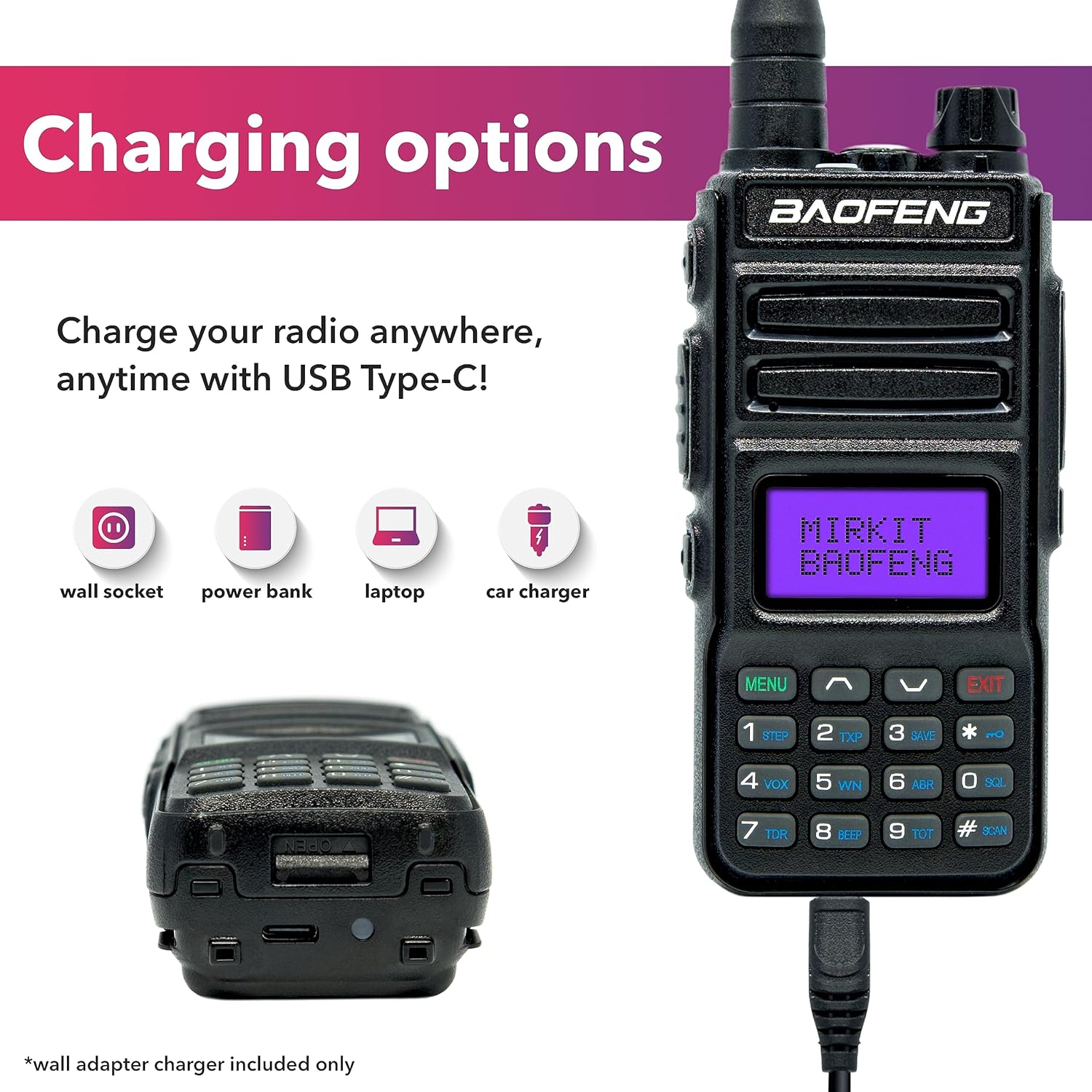
Image: The radio connected via USB Type-C, illustrating various charging options including wall socket, power bank, laptop, and car charger.
Operating Instructions
Power On/Off and Volume:
Rotate the Power Switch/Volume Control knob clockwise to turn the radio on. Continue rotating to increase the volume. Rotate counter-clockwise to decrease volume and turn off the radio.
Basic Communication:
- Selecting a Channel: Use the up/down arrow keys or the numeric keypad to select one of the 999 available channels.
- Transmitting: Press and hold the PTT (Push-to-Talk) key on the side of the radio. Speak clearly into the microphone. The LED indicator will turn red.
- Receiving: Release the PTT key to listen. The LED indicator will turn green when receiving a signal.
Advanced Functions:
- SYNC: Synchronizes settings.
- VOX (Voice Operated Transmit): Allows hands-free transmission when voice is detected.
- Scan: Scans through channels to find active transmissions.
- Dual Watch: Monitors two different frequencies simultaneously.
- BCL (Busy Channel Lockout): Prevents transmission on an already busy channel.
- SOS: Activates an emergency alarm signal.
- Squelch: Adjustable in 9 levels to filter out background noise.
- VOICE: Provides vocal indication of selected functions.
- Frequency Range: Operates on VHF 144-148 MHz and UHF 420-450 MHz.
Charging
The Mirkit TP8Pro features a convenient USB Type-C charging port, allowing you to charge the 1800mAh battery from various power sources. This flexibility ensures your radio is always ready for use.
Charging Methods:
- Wall Outlet: Use the included AC adaptor and USB Type-C cable.
- Computer/Laptop: Connect the USB Type-C cable to a USB port on your computer.
- Power Bank: Ideal for charging on the go.
- Car Charger: Use a compatible car charger with a USB Type-C output.
Ensure the radio is turned off during charging for optimal battery performance. The charging indicator light will provide feedback on the charging status.
Maintenance
- Cleaning: Wipe the radio with a soft, damp cloth. Do not use harsh chemicals or abrasive cleaners.
- Battery Care: To prolong battery life, avoid fully discharging the battery frequently. Store the radio and battery in a cool, dry place when not in use for extended periods.
- Antenna: Ensure the antenna is securely attached but do not overtighten. Avoid bending or stressing the antenna.
- Storage: Store the radio in a clean, dry environment away from extreme temperatures and direct sunlight.
Troubleshooting
| Problem | Possible Cause | Solution |
|---|---|---|
| Radio does not turn on. | Battery is low or not installed correctly. | Charge the battery. Ensure the battery is securely installed. |
| Cannot transmit or receive. | Incorrect channel/frequency, antenna loose, or out of range. | Verify channel/frequency settings. Check antenna connection. Move closer to other radios. |
| Poor audio quality or static. | Weak signal, squelch level too low, or interference. | Adjust squelch level. Move to an area with better signal. Check for sources of interference. |
| Battery drains quickly. | Frequent transmission, high power setting, or aging battery. | Reduce transmission time. Use low power setting when possible. Consider replacing battery if old. |
Specifications
- Model Number: TP8Pro 8
- Brand: BAOFENG
- Item Weight: 3.07 ounces
- Package Dimensions: 7.99 x 4.8 x 4.09 inches
- Country of Origin: China
- Batteries: 1 Lithium Ion battery required (included)
- Battery Capacity: 1800mAh
- Power Output: 8 Watt (High/Low selectable)
- Number of Channels: 999
- Frequency Range: VHF 144-148 MHz / UHF 420-450 MHz
- Talking Range Maximum: 15 Mile (approximate, depends on terrain)
- Tuner Technology: UHF, VHF
- Voltage: 7.4 Volts
- Water Resistance Level: Not Water Resistant
- Special Features: Long Range, Portable, Keypad Lock, Type-C Charging
- Certifications: FCC Part 15 Part 97 Certified (FCC ID: 2AJGM-TP8)
Safety Information
This device complies with part 15 of the FCC Rules. Operation is subject to the condition that this device does not cause harmful interference. FCC ID: 2AJGM-TP8.
Important: Restricted to occupational use to satisfy FCC RF exposure limits. Modification of this device to receive cellular radiotelephone service signals is prohibited under FCC rules and federal law.
Warranty and Support
Mirkit provides a 1-year 100% USA Warranty for this product. Additionally, a 60-day refund policy is in place. For any issues or inquiries, please contact Mirkit's friendly customer support. This ensures you receive the best local support for any concerns that may arise.
Bonus: A lanyard for your ham radio and a Channel list are available upon request.
Ask a question about this manual
Ask about setup, troubleshooting, compatibility, parts, safety, or missing instructions. Manuals+ will review the question and use this page’s manual context to help answer it.