
1. Introduction
Thank you for purchasing the XDUOO TA-22 DAC & Tube Balance Headphone Amplifier. This manual provides essential information for the proper setup, operation, and maintenance of your device. Please read this manual thoroughly before using the product to ensure optimal performance and safety.
Keep this manual for future reference.
2. Product Overview
2.1 Key Features
- Equipped with a 3.12-inch OLED screen for displaying music information.
- Supports USB audio decoding with asynchronous transfer mode, supporting PCM up to 32Bit/384KHz, DSD256, and MQA render.
- Coaxial/optical audio decoding support for PCM up to 24bit/384Khz and DSD128 signals.
- Bluetooth 5.1 audio decoding, supporting SBC, AAC, aptX, aptX_LL, aptX_HD, and LDAC formats.
- Features two ESS ES9038Q2M DAC chips for enhanced decoding performance and native DSD, DXD, and PCM signal support.
- Hybrid amplifier structure (Tube + Transistor) for exquisite sound and powerful output.
- Balanced output with up to 3000mW (32Ω) power for 4.4mm and XLR headphones.
- Utilizes enthusiast-grade capacitors for superior audio quality.
2.2 Package Contents
The XDUOO TA-22 package typically includes:
- XDUOO TA-22 Unit
- Power Cable
- USB Cable
- User Manual (this document)
- (Other accessories may vary)
2.3 Component Identification

Figure 1: Front Panel Overview. Shows the OLED display, 6.5mm and 4.4mm headphone outputs, XLR output, and volume knob with menu button.

Figure 2: Rear Panel Overview. Displays AUX OUT (RCA), AUX IN (RCA), XLR Balance IN, Optical, Coaxial, USB inputs, and power switch with AC inlet.

Figure 3: Detailed view of the front panel, highlighting the OLED screen and headphone output ports.
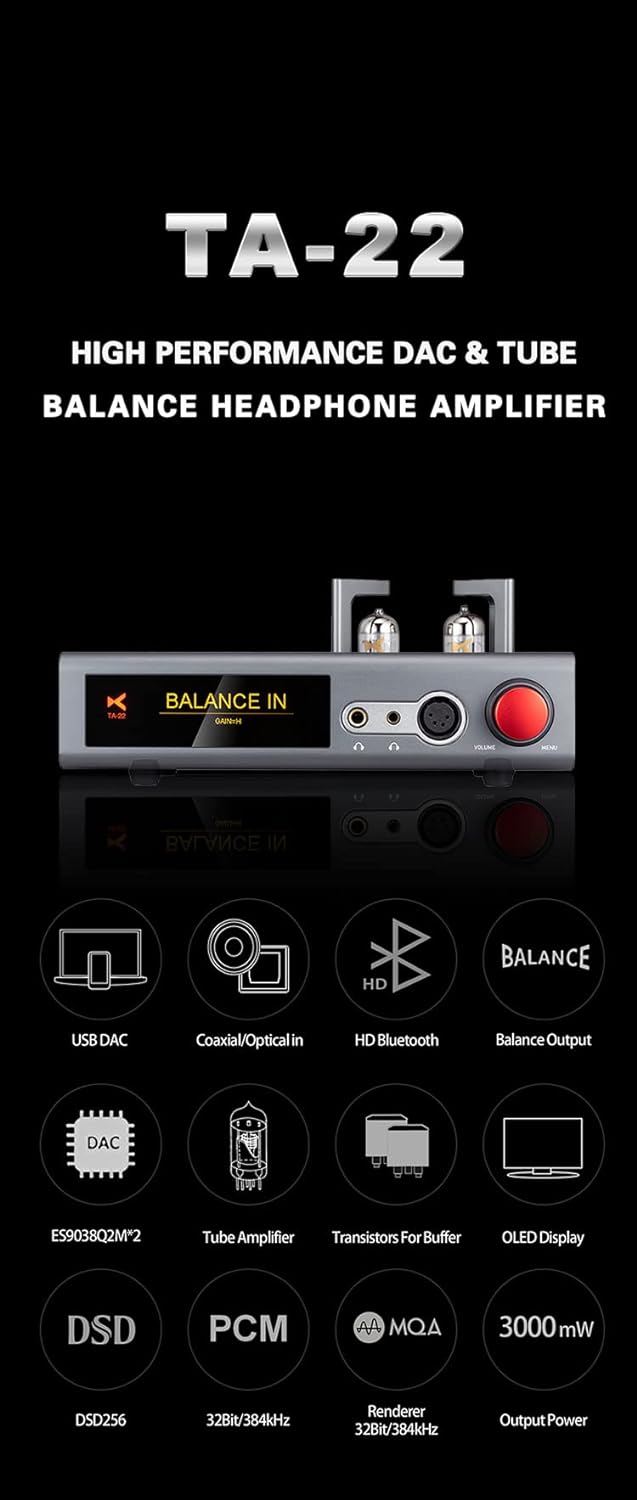
Figure 4: Visual summary of the TA-22's high-performance features.
3. Setup
3.1 Power Connection
Connect the provided power cable to the AC inlet on the rear panel of the TA-22 and then to a suitable power outlet. The device supports AC100-120V or 220-240V power input. Ensure the voltage selector switch on the rear panel is set correctly for your region before connecting to power.
3.2 Driver Installation (for USB Audio)
For optimal performance when connecting via USB to a computer (Windows, Linux, MacOS), it may be necessary to install specific drivers. Please refer to the XDUOO official website for the latest driver downloads and installation instructions. No special drivers are typically required for iOS or Android devices.
3.3 Connecting Audio Sources
The TA-22 offers multiple input options:
- USB Input: Connect your computer, smartphone (iOS/Android), tablet, or HIFI player to the USB-B port on the rear panel using a USB cable.
- Optical Input: Connect a digital audio source (e.g., TV, CD player) to the OPTICAL port using an optical fiber cable.
- Coaxial Input: Connect a digital audio source to the COAXIAL port using a coaxial cable.
- AUX IN (RCA): Connect analog audio sources (e.g., turntable pre-amp, dedicated DAC) to the AUX IN RCA ports.
- XLR Balance IN: Connect balanced analog audio sources to the XLR input ports.

Figure 5: Illustration of balanced output and USB DAC connectivity with various devices.

Figure 6: Illustration of Coaxial/Optical and Bluetooth decoding capabilities.
3.4 Connecting Headphones
The TA-22 provides three headphone output options on the front panel:
- 6.5mm Single-Ended: For standard headphones.
- 4.4mm Balanced: For headphones with a 4.4mm balanced connector.
- XLR Balanced: For headphones with an XLR balanced connector.
Ensure your headphones are compatible with the selected output. The TA-22 is suitable for headphones with an impedance range of 16-600Ω.
3.5 Connecting to External Amplifiers (AUX OUT)
The AUX OUT (RCA) ports on the rear panel allow you to connect the TA-22 to an external power amplifier or active speakers, using the TA-22 as a DAC/pre-amplifier.
4. Operating Instructions
4.1 Power On/Off
Locate the power switch on the rear panel. Flip the switch to the "ON" position to power on the device. The OLED screen will illuminate. Flip to "OFF" to power down.
4.2 Input Selection
The TA-22 allows you to switch between different audio inputs. Use the menu button (often integrated with the volume knob, press to select/enter menu) to navigate and select your desired input source (USB, Optical, Coaxial, Bluetooth, AUX IN, XLR IN). The selected input will be displayed on the OLED screen.
4.3 Volume Control
Rotate the large red knob on the front panel clockwise to increase volume and counter-clockwise to decrease volume. Always start with a low volume level and gradually increase it to a comfortable listening level to prevent hearing damage.
4.4 Bluetooth Pairing
- Select "Bluetooth" as the input source on the TA-22. The OLED screen will indicate "Bluetooth Pairing" or similar.
- On your Bluetooth device (smartphone, tablet, etc.), enable Bluetooth and search for available devices.
- Select "XDUOO TA-22" from the list of found devices.
- Once paired, the TA-22's screen will confirm the connection. You can now play audio from your Bluetooth device through the TA-22.
The TA-22 supports Bluetooth 5.1 and various high-quality codecs including SBC, AAC, aptX, aptX LL, aptX HD, and LDAC.
4.5 Supported Audio Formats
The TA-22 supports a wide range of audio formats and sampling rates:
- USB IN: PCM: 16-32Bit/44.1-384kHz; DSD: DSD64~DSD256; MQA(Renderer): 44.1-384kHz
- OPT/COA IN: PCM: 16-24Bit/44.1-384kHz; DSD: DSD64-DSD128 (DOP)
5. Maintenance
To ensure the longevity and optimal performance of your XDUOO TA-22, follow these maintenance guidelines:
- Cleaning: Use a soft, dry cloth to wipe the exterior of the unit. Avoid using abrasive cleaners, solvents, or chemical sprays, as they may damage the finish.
- Ventilation: Ensure the ventilation holes on the unit are not obstructed to prevent overheating. Do not place the unit in an enclosed space without adequate airflow.
- Tube Care: The vacuum tubes are delicate. Avoid touching them directly when hot. If tube replacement is necessary, ensure the unit is powered off and unplugged, and allow the tubes to cool completely before handling. Refer to XDUOO's official resources for recommended replacement tubes and procedures.
- Environment: Keep the unit away from direct sunlight, heat sources, excessive dust, moisture, and strong electromagnetic fields.

Figure 7: Internal architecture highlighting the dual DAC chips and hybrid amplifier design.

Figure 8: View of the specialized capacitors used in the TA-22 for audio performance.
6. Troubleshooting
If you encounter issues with your XDUOO TA-22, please refer to the following common troubleshooting steps:
6.1 No Power
- Ensure the power cable is securely connected to both the unit and the power outlet.
- Check if the power switch on the rear panel is in the "ON" position.
- Verify that the power outlet is functional.
- Confirm the voltage selector switch on the rear panel matches your local power supply.
6.2 No Sound Output
- Check if the correct input source is selected on the TA-22's OLED screen.
- Ensure the volume knob is turned up to an audible level.
- Verify that your headphones are properly connected to the correct output jack (6.5mm, 4.4mm, or XLR).
- If using USB input, confirm that the necessary drivers are installed on your computer and the TA-22 is selected as the audio output device.
- If using Bluetooth, ensure the device is properly paired and connected.
- Check all audio cables for secure connections and damage.
- If using AUX OUT, ensure your external amplifier or active speakers are powered on and correctly configured.
6.3 Distorted or Poor Sound Quality
- Ensure the audio source is providing a clean signal.
- Check if the headphone impedance is within the recommended range (16-600Ω).
- Verify that the audio files or streaming quality are high resolution.
- If using tubes, note that tubes have a lifespan and may degrade over time, potentially affecting sound quality. Consider tube replacement if distortion persists.
6.4 Bluetooth Connection Issues
- Ensure the TA-22 is in Bluetooth pairing mode.
- Move your Bluetooth device closer to the TA-22 to reduce interference.
- Try unpairing and re-pairing the device.
- Ensure no other devices are actively connected to the TA-22 via Bluetooth.
If problems persist after trying these steps, please contact XDUOO customer support or your retailer for further assistance.
7. Specifications

Figure 9: Comprehensive technical specifications and dimensions of the TA-22.
| Parameter | Value |
|---|---|
| Screen | 3.12 inch OLED |
| Power Supply | AC100-120V/220-240V |
| Compliant OS | Linux, Windows, MacOS, iOS, Android |
| Sampling Rate Support (USB IN) | |
| PCM | 16-32Bit/44.1-384kHz |
| DSD | DSD64~DSD256 |
| MQA (Renderer) | 44.1-384kHz |
| Sampling Rate Support (OPT/COA IN) | |
| PCM | 16-24Bit/44.1-384kHz |
| DSD | DSD64-DSD128 (DOP) |
| Support Format (Bluetooth) | SBC, AAC, aptX, aptX LL, aptX HD, LDAC |
| Parameters of 6.5mm Headphone | |
| Output Power | 1500mW (32Ω) |
| Frequency Response | 20Hz-60kHz (±0.5dB) |
| THD+N | ≤0.02% |
| SNR | 113 dB |
| Crosstalk | ≥70dB |
| Parameters of 4.4mm and XLR Headphone | |
| Output Power | 3000mW (32Ω) |
| Frequency Response | 20Hz~60kHz (±0.5dB) |
| THD+N | ≤1% |
| SNR | 118dB |
| Crosstalk | ≥96dB |
| Parameters of AUX OUT | |
| Output Level | 2.0 Vrms |
| Frequency Response | 20Hz-20kHz (±0.5dB) |
| SNR | 113dB |
| Crosstalk | ≥113dB |
| THD+N | 0.001% |
| Suitable Headphone Impedance | 16-600Ω |
| Size | 26*19*7cm |
| Weight | 3.0kg |
8. Warranty and Support
XDUOO products are designed and manufactured to the highest quality standards. For information regarding warranty coverage, terms, and conditions, please refer to the warranty card included with your product or visit the official XDUOO website.
For technical support, service, or inquiries, please contact XDUOO customer service or your authorized dealer. Keep your purchase receipt as proof of purchase for warranty claims.
Manufacturer: XDUOO
Model Number: TA-22
Date First Available: November 7, 2022