
Parkside PGK 1400 B2
Parkside Garden Cultivator PGK 1400 B2 Instruction Manual
Model: PGK 1400 B2
1. Introduction
This instruction manual provides important information for the safe and efficient operation, maintenance, and troubleshooting of your Parkside Garden Cultivator PGK 1400 B2. Please read this manual thoroughly before using the device and keep it for future reference.
2. General Safety Instructions
WARNINGS:
- Beware of moving parts. Always ensure the device is switched off and unplugged before performing any adjustments, cleaning, or maintenance.
- Always wear protective gloves when handling the cultivator, especially when dealing with the tines.
- Wear appropriate personal protective equipment (PPE) including safety glasses, sturdy footwear, and hearing protection during operation.
- Keep children and bystanders away from the operating area.
- Do not operate the cultivator in wet conditions or on excessively steep slopes.
- Inspect the work area for hidden obstacles such as rocks, roots, or wires before starting.
3. Product Overview
The Parkside Garden Cultivator PGK 1400 B2 is an automatic, corded electric cultivator designed for loosening soil in gardens and preparing seedbeds. It features durable alloy steel tines and a robust plastic housing.

Figure 3.1: Overall view of the Parkside Garden Cultivator PGK 1400 B2, showcasing its green and black design with handles and tines.

Figure 3.2: Detail of the robust alloy steel tines, designed for efficient soil cultivation.

Figure 3.3: Ergonomic handles with integrated controls and the power cord connection point.
4. Specifications
| Feature | Detail |
|---|---|
| Model Number | PGK 1400 B2 |
| Product Dimensions | 41.8 x 85.6 x 41.8 cm (16.46 x 33.70 x 16.46 inches) |
| Weight | 13 Kilograms (28.66 lbs) |
| Material | Alloy Steel, Plastic |
| Power Source | Corded Electric |
| Color | Green |
5. Setup and Assembly
The Parkside Garden Cultivator PGK 1400 B2 requires minimal assembly. Follow these steps to prepare your cultivator for use:
- Unpacking: Carefully remove all components from the packaging. Check for any damage or missing parts.
- Handle Assembly: Attach the upper handle section to the lower handle section using the provided fasteners. Ensure all connections are secure. Refer to Figure 3.3 for handle orientation.
- Cable Management: Secure the power cable along the handle using the cable clips to prevent it from getting tangled during operation.
- Tine Inspection: Verify that the tines are securely attached and free from any obstructions.

Figure 5.1: The cultivator components laid out, ready for handle assembly.
6. Operating Instructions
Before operating, ensure you have read and understood all safety instructions.
6.1 Pre-Operation Checklist
- Ensure the work area is clear of debris, large rocks, and hidden obstacles.
- Check that all fasteners are tight and the tines are in good condition.
- Wear appropriate PPE: safety glasses, gloves, sturdy shoes, and hearing protection.
- Use an outdoor-rated extension cord if necessary, ensuring it is suitable for the power requirements of the cultivator.
6.2 Starting and Stopping
- Connect the cultivator to a suitable power outlet.
- Grip both handles firmly.
- To start, press and hold the safety switch (if present) and then squeeze the operating lever. The tines will begin to rotate.
- To stop, release the operating lever. The tines will cease rotation.
6.3 Cultivating Technique
- Begin cultivating at one end of the area, working in straight lines.
- Allow the tines to penetrate the soil naturally. Do not force the machine.
- Overlap each pass slightly to ensure thorough cultivation.
- For deeper cultivation, make multiple passes over the same area, gradually increasing depth.
- Be mindful of the power cord's position to avoid cutting it.
7. Maintenance
Regular maintenance ensures the longevity and optimal performance of your cultivator.
7.1 Cleaning
- Always disconnect the power supply before cleaning.
- Remove soil, debris, and plant matter from the tines and housing after each use. A stiff brush or scraper can be used.
- Do not use water jets or high-pressure cleaners directly on the motor housing. Wipe with a damp cloth.
7.2 Tine Care
- Inspect tines regularly for wear, damage, or bending. Replace worn or damaged tines immediately.
- Sharpen tines if necessary, following proper safety procedures.
7.3 Storage
When not in use, store the cultivator in a dry, secure location, out of reach of children.
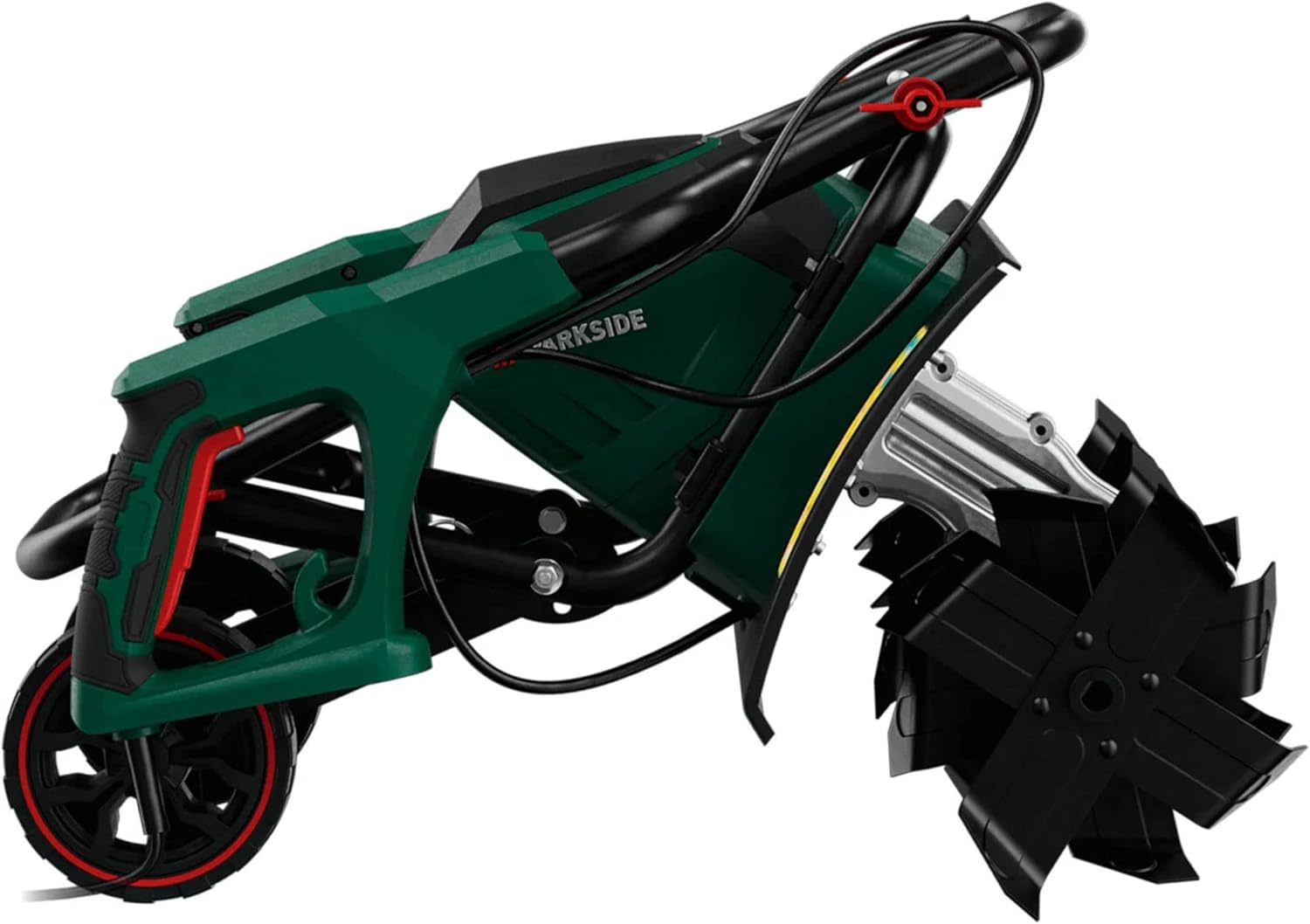
Figure 7.1: The cultivator folded for compact storage, side view.

Figure 7.2: The cultivator folded for compact storage, top view, showing how handles collapse.
The handles can be folded down for compact storage. Refer to Figures 7.1 and 7.2 for examples of the folded state.
8. Troubleshooting
This section addresses common issues you might encounter with your cultivator.
| Problem | Possible Cause | Solution |
|---|---|---|
| Cultivator does not start. | No power supply; Safety switch not engaged; Operating lever not squeezed. | Check power connection and outlet; Ensure safety switch is pressed and operating lever is fully squeezed. |
| Tines are not rotating or rotating slowly. | Tines are clogged with debris; Overload protection activated; Damaged tines. | Disconnect power and clear debris from tines; Allow motor to cool down; Inspect and replace damaged tines. |
| Excessive vibration during operation. | Bent or damaged tines; Loose fasteners. | Inspect tines for damage and replace if necessary; Check and tighten all fasteners. |
If the problem persists after attempting these solutions, please contact customer support.
9. Warranty and Support
Your Parkside Garden Cultivator PGK 1400 B2 comes with a manufacturer's warranty, details of which are typically provided with your purchase documentation. Please refer to the warranty card or contact the retailer for specific terms and conditions.
For technical support, spare parts, or service inquiries, please contact the customer service department of your retailer or the manufacturer. Keep your proof of purchase and model number (PGK 1400 B2) ready when contacting support.
Related Documents - PGK 1400 B2
 |
PARKSIDE PEBH 1500 B2 Electric Tiller: Operation & Safety Guide User guide for the PARKSIDE PEBH 1500 B2 Electric Tiller. Learn about safe operation, assembly, intended use, and maintenance for your garden tiller. Visit parkside-diy.com for full manual. |
 |
PARKSIDE PBGK 1400 F5 - Käyttöohje Bensiinikäyttöiselle Puutarhakultivaattorille Käyttöohje PARKSIDE PBGK 1400 F5 -bensiinikäyttöiselle puutarhakultivaattorille. Opi käyttämään, huoltamaan ja säilyttämään puutarhakultivaattoriasi turvallisesti ja tehokkaasti. |
 |
PARKSIDE Petrol Garden Tiller PBGK 1400 F5 User Manual This user manual provides comprehensive instructions for the PARKSIDE Petrol Garden Tiller PBGK 1400 F5, covering safety, operation, assembly, maintenance, and troubleshooting for efficient garden cultivation. |
 |
Parkside PBGK 1400 E5 Benzin-Gartenkultivator Bedienungsanleitung Entdecken Sie die Bedienungsanleitung für den Parkside Benzin-Gartenkultivator PBGK 1400 E5. Erfahren Sie mehr über sichere Handhabung, Wartung und optimale Nutzung für Ihren Garten. |
 |
PARKSIDE PGK 1500 A1 Elektrische Gartenkultivator Bedienungsanleitung Erfahren Sie, wie Sie den PARKSIDE PGK 1500 A1 Elektrischen Gartenkultivator sicher und effektiv für die Bodenbearbeitung in Ihrem Garten verwenden. Diese Anleitung enthält wichtige Informationen zur Montage, Bedienung, Wartung und Sicherheit. |
 |
PARKSIDE PGK 1500 A1 Gartenkultivator Bedienungsanleitung Umfassende Bedienungsanleitung für den PARKSIDE PGK 1500 A1 Gartenkultivator. Enthält Informationen zu Sicherheit, Montage, Bedienung, Wartung und Fehlerbehebung. |