
HW HAOWORKS M801
HW HAOWORKS M801 Voice Amplifier User Manual
Model: M801
1. Introduction
Thank you for choosing the HW HAOWORKS M801 Voice Amplifier. This portable PA system is designed to provide clear, powerful sound amplification for various settings, including classrooms, conference halls, outdoor events, and more. Its robust design and advanced features ensure reliable performance and ease of use.

Figure 1: HW HAOWORKS M801 Voice Amplifier and Headset Microphone
2. Package Contents
Please check the box for the following items:
- 1 x Voice Amplifier Speaker
- 1 x Wireless Microphone Headset
- 1 x Adjustable Waistband
- 1 x 3.5mm Audio Cable
- 1 x Charger
- 1 x USB Charging Cable
- 1 x User Manual

Figure 2: All items included in the M801 package
3. Setup Guide
3.1 Automatic Connection
- Turn on the Voice Amplifier speaker.
- Turn on the Wireless Microphone Headset.
- The microphone and speaker will automatically connect within a few seconds. The 'MIC' indicator on the speaker's display will light up when connected successfully.
3.2 Manual Connection (if automatic fails)
- Ensure both the speaker and microphone are powered on.
- Double-click the power button on the Wireless Microphone Headset. The indicator light will start blinking continuously.
- Click the power button on the microphone again. The indicator light will stop blinking, signifying a successful connection. The 'MIC' indicator on the speaker's display will also light up.
Video 1: How to connect the M801 wireless microphone. This video demonstrates the automatic and manual connection process between the amplifier and headset.

Figure 3: Visual guide for connection troubleshooting.
4. Operating Instructions
4.1 Basic Controls
The M801 features intuitive controls located on the top and sides of the unit.
- Power On/Off: Use the main power switch/button to turn the unit on or off.
- Volume Adjustment: Use the volume buttons/dial to increase or decrease the amplification level. The display shows the current volume level.
- Mute: Press the mute button to temporarily silence the microphone output.
- Mode Button (M): Double-click to switch between Acoustic, Professional, and Karaoke modes for different sound effects.
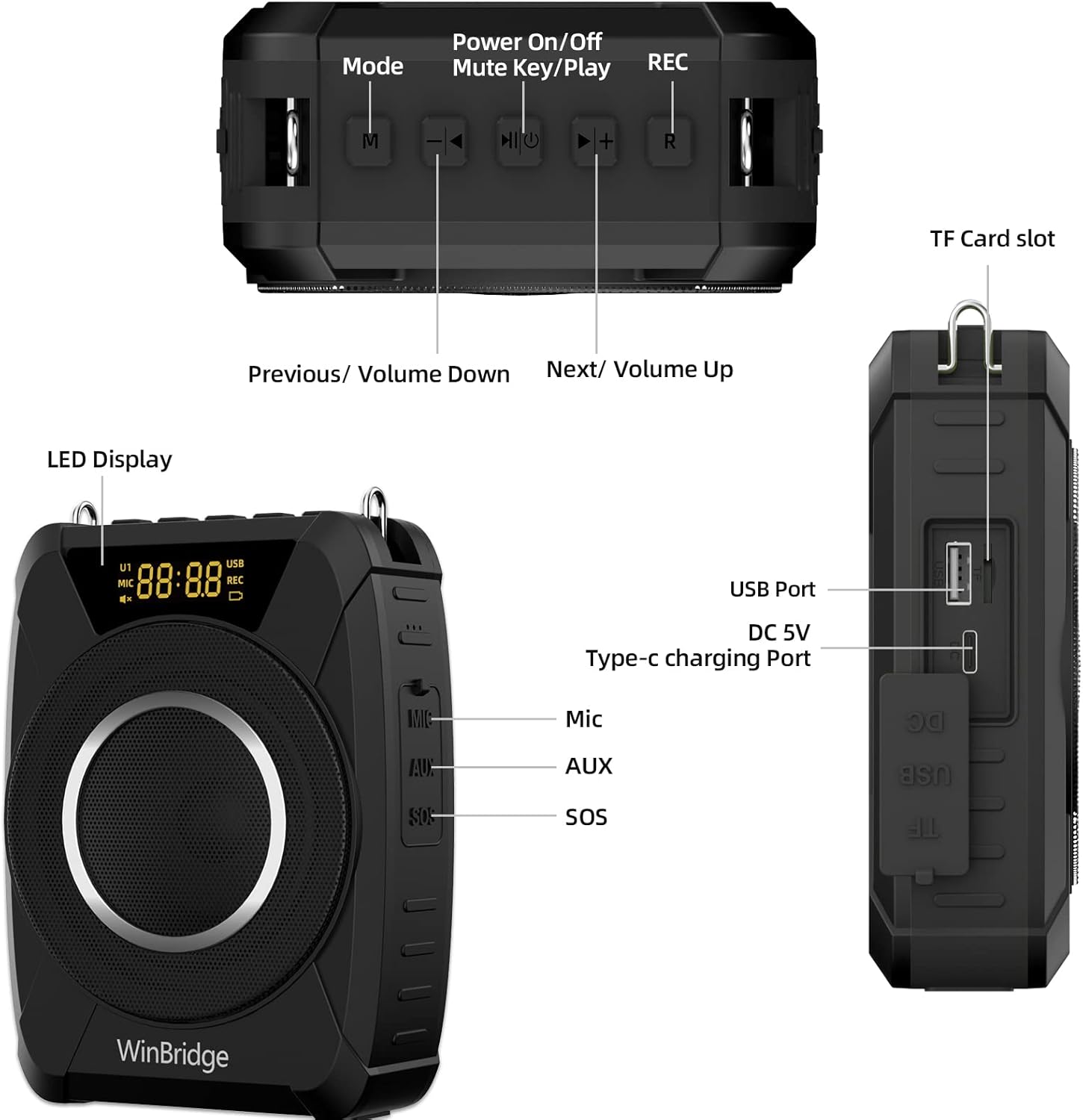
Figure 4: Overview of the M801 controls and input/output ports.
4.2 Audio Playback & Recording
- TF Card/USB Playback: Insert a TF card or USB drive into the respective ports to play audio files. Use the previous/next track buttons to navigate.
- AUX Input: Connect external audio devices (e.g., smartphone, laptop) via the 3.5mm AUX cable.
- Recording: Press the 'R' button to start/stop recording. Recordings are saved to the inserted TF card or USB drive.
4.3 SOS Siren
The M801 includes an SOS siren function for emergency situations. Locate the SOS button on the side of the unit and press it to activate the alarm.
5. Key Features
- Powerful 20W Sound: Delivers crystal-clear audio covering up to 13,000 sq ft, suitable for rooms up to 100 people.
- UHF Wireless Connectivity: Ensures a stable and reliable connection between the microphone and amplifier.
- Compact & Lightweight: Weighs just 0.88 lbs (0.4 kg) with dimensions of 3.94" x 1.77" x 5.51", making it highly portable.
- IPX5 Waterproof & Durable: Built with a durable silicone casing, offering protection against water splashes, dust, and drops, ideal for outdoor use.
- Long-Lasting Battery: Wireless microphone headset provides up to 7 hours of continuous use (1-hour charge). The amplifier offers up to 15 hours of runtime (3-hour charge).
- Bluetooth 5.0: For fast and stable wireless pairing with devices.
- TWS Function: Pair two M801 units for 40W stereo sound, perfect for larger events.
Video 2: M801 20W Multifunction Waterproof Wireless Voice Amplifier. This video highlights the key features and capabilities of the M801.

Figure 5: M801's durable and outdoor-ready design.
6. Specifications
| Attribute | Detail |
|---|---|
| Brand | HW HAOWORKS |
| Model Number | M801 |
| Output Wattage | 20 Watts |
| Item Weight | 1.48 pounds (0.67 kg) |
| Product Dimensions | 3.94 x 1.77 x 5.51 inches |
| Material | Silicone, Plastic |
| Power Source | Battery Powered |
| Connectivity Technology | Wireless (UHF, Bluetooth 5.0) |
| Frequency Response | 20 KHz |
| Impedance | 4 Ohm |
| Noise Level | 20 dB |
| Batteries | 2 Lithium Polymer batteries (included) |
7. Maintenance
- Cleaning: Use a soft, dry cloth to clean the surface of the amplifier and microphone. Do not use harsh chemicals or abrasive materials.
- Storage: Store the unit in a cool, dry place away from direct sunlight and extreme temperatures.
- Battery Care: For optimal battery life, fully charge the unit before first use and recharge it regularly, even if not in frequent use. Avoid completely draining the battery.
- Port Protection: Ensure all port covers are securely closed when not in use to protect against dust and water.
8. Troubleshooting
- No Sound:
- Ensure both the amplifier and microphone are powered on and fully charged.
- Check if the microphone is correctly connected to the amplifier (MIC indicator on display). Refer to Section 3.
- Increase the volume on both the amplifier and the connected device (if using AUX/Bluetooth).
- Ensure the microphone is not muted.
- Static/Noise:
- Move away from other electronic devices that might cause interference.
- Ensure the microphone is not too close to the speaker, which can cause feedback.
- Check for loose connections.
- Connection Issues:
- If automatic connection fails, try the manual connection steps (Section 3.2).
- Ensure both devices are within the effective wireless range (up to 50 feet).
- Short Battery Life:
- Ensure the unit is fully charged before use.
- Reduce volume levels, as higher volumes consume more power.
9. Warranty & Support
The HW HAOWORKS M801 Voice Amplifier comes with a one-year warranty, ensuring your purchase is protected. HW HAOWORKS is a technology-based enterprise integrating product development, production, and sales, committed to providing quality products and services.
For any issues, questions, or support needs, please feel free to contact our dedicated customer support team. Your satisfaction is our consistent aim.
Protection Plans: Additional protection plans are available for purchase to extend coverage beyond the standard warranty period:
- 2-Year Protection Plan
- 3-Year Protection Plan
- Complete Protect: One plan covers all eligible past and future purchases.
Related documentsM801

Ask a question about this manual
Ask about setup, troubleshooting, compatibility, parts, safety, or missing instructions. Manuals+ will review the question and use this page’s manual context to help answer it.