
1. Introduction
The AeroGarden Trio Grow Light is designed to provide full-spectrum LED light, supporting the growth and health of your indoor plants throughout the year. This versatile grow light features three adjustable arms, allowing you to illuminate multiple houseplants up to 12 inches tall. Its modern design seamlessly integrates into any home environment, serving as both a functional light source for plants and an ambient light for your space.
The Trio Grow Light offers smart control capabilities through the AeroGarden app, enabling custom light schedules, dimming, and selection from four distinct light modes. This manual provides detailed instructions for setup, operation, maintenance, and troubleshooting to ensure optimal performance and plant vitality.

Image 1: The AeroGarden Trio Grow Light providing light to various indoor plants.

Image 2: The Trio Grow Light's design blends with home decor.
2. Setup
2.1 Unboxing and Initial Placement
- Carefully remove all components from the packaging.
- Place the AeroGarden Trio Grow Light base on a stable, flat surface in your desired location. Ensure the location allows for adequate space around the plants and access to a power outlet.
- Position your houseplants under the grow light. The adjustable arms allow for flexible placement to accommodate plants up to 12 inches in height.

Image 3: The Trio Grow Light is suitable for plants up to 12 inches tall.
2.2 Power Connection
- Connect the power cord to the grow light base.
- Plug the power adapter into a standard electrical outlet.
2.3 App Download and Connection
For enhanced control and customization, download the official AeroGarden app from your device's app store. Follow the in-app instructions to connect your Trio Grow Light via Bluetooth. This will unlock features such as custom light schedules, dimming, and light mode selection.
3. Operating Instructions
3.1 Manual Control
- On/Off: Each light head features a touch-sensitive surface. Tap the surface to turn the individual light on or off.
- Dimming: Tap and hold the touch-sensitive surface to adjust the brightness of the light. Release when the desired brightness is reached.

Image 4: One-touch control for turning lights on/off.
3.2 Adjusting Light Arms
The three arms of the grow light are flexible and can be bent to direct light precisely where needed. Adjust the height and angle of each light head to ensure optimal coverage for your plants. Maintain a distance of at least 6 inches between the light source and the plant foliage to prevent burning.

Image 5: Adjustable height and flexible arms for optimal plant coverage.
4. Light Modes and App Control
4.1 AeroGarden App Features
The AeroGarden app provides comprehensive control over your Trio Grow Light:
- Custom Light Schedule: Set specific on/off times for your grow light to match your plants' needs.
- Dimming Capabilities: Adjust light intensity from 0-100% for precise control.
- Sunrise/Sunset Simulation: Program the light to gradually brighten and dim, mimicking natural light cycles.
- Four Adjustable Light Modes: Select the ideal spectrum for different plant growth stages.
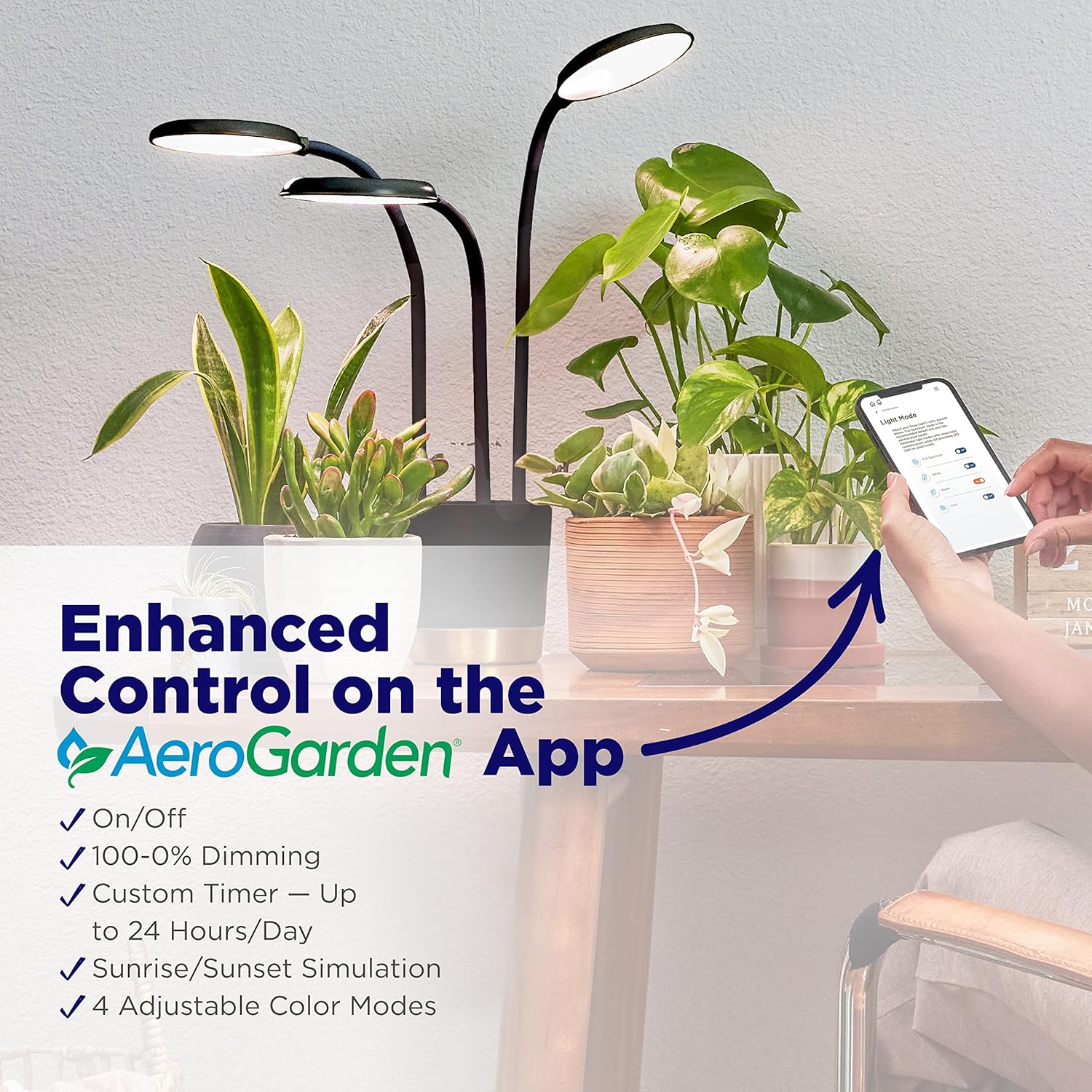
Image 6: AeroGarden app interface for light mode and schedule control.
4.2 Light Modes Explained
The Trio Grow Light offers four distinct light modes to cater to various plant requirements:
- Full-Spectrum: High intensity light to promote overall growth and vibrant color.
- White: Provides visible warmth similar to standard indoor lighting, suitable for general plant health.
- Warm: Features a warm red spectrum that aids in flower setting and fruiting.
- Cool: Encourages slower, more compact growth, ideal for leafy greens or maintaining plant size.

Image 7: Visual representation of the four available light modes.
4.3 Official Product Video
Video 1: An official overview of the AeroGarden Trio Grow Light, demonstrating its features and benefits for indoor plant care.
5. Maintenance
5.1 Cleaning the Grow Light
To ensure optimal light output, periodically wipe the LED light heads with a soft, dry cloth. Avoid using abrasive cleaners or excessive moisture, as this may damage the electrical components.
5.2 Plant Care
Regularly monitor your plants for signs of stress or overexposure to light. Adjust the height and intensity of the grow light as needed to match your plants' growth and light requirements. Ensure proper watering and nutrient supply according to your plant species' needs.
6. Troubleshooting
- Light not turning on:
- Check if the power cord is securely plugged into both the grow light base and the electrical outlet.
- Ensure the outlet is functional by plugging in another device.
- If using the app, verify that the light schedule is correctly set and the light is not scheduled to be off.
- App connectivity issues:
- Ensure your device's Bluetooth is enabled and within range of the grow light.
- Try restarting the AeroGarden app.
- Unplug the grow light for a few seconds and then plug it back in to reset its connection.
- Plants not thriving:
- Adjust the light intensity or duration using the app or manual controls. Different plants have varying light requirements.
- Ensure the light heads are at least 6 inches away from the plant foliage to prevent heat stress or burning.
- Review your plant's specific watering and nutrient needs.
7. Specifications
| Feature | Detail |
|---|---|
| Model Number | 980204-0100 |
| Brand | AeroGarden |
| Color | Black |
| Material | Plastic |
| Light Source Type | LED |
| Light Source Wattage | 15 Watts (3 x 5W LED bulbs) |
| Number of Light Sources | 3 |
| Product Dimensions | 6.4"L x 14.8"W x 6.4"H |
| Item Weight | 4.39 pounds |
| Power Source | Corded Electric |
| Special Features | Dimmable, Full Spectrum, App Control |
| UPC | 810705130458 |
8. Warranty and Support
8.1 Warranty Information
The AeroGarden Trio Grow Light is covered by a manufacturer's warranty. For specific details regarding warranty coverage, duration, and terms, please refer to the documentation included with your product or visit the official AeroGarden website.
8.2 Customer Support
If you encounter any issues or have questions not addressed in this manual, please contact AeroGarden customer support. Contact information can typically be found on the product packaging or the official AeroGarden website.

